Mailgun vs SendGrid: Which One Should You Choose in 2026?
Capterra, G2, Trustpilot, and Reddit to create an objective evaluation. Learn more about our review methodology
If you’ve been going back and forth between SendGrid and Mailgun for your transactional email service, trust me—you’re in good company.
Both platforms have been around the block and built solid reputations as email APIs, but they’ve evolved in different directions. Mailgun doubled down on being the developer’s choice, while SendGrid expanded to serve marketing teams, too.
If you’re exploring a SendGrid alternative or a Mailgun alternative, this guide breaks down exactly what each platform offers.
I’ve dug deep into both of these email marketing software platforms, looked at the features, the pricing plans, and what actual people are saying about them online.
Whether you’re a developer who needs bulletproof email deliverability tools or a marketer trying to run email marketing campaigns without pulling your hair out, this detailed comparison should help you figure out which one’s actually worth your money.
Mailgun vs. SendGrid: The 30-Second Verdict
If you need a rapid answer, here’s our expert-recommended choice for 2026:
- Best for Developers & Transactional Email: Mailgun—Purpose-built API, superior email parsing, and a forever-free plan make it the go-to for tech teams sending high-volume notifications.
- Best for Marketing + Transactional Hybrid: SendGrid—Visual campaign builder, built-in automation, and 120+ integrations serve mixed teams without sacrificing API flexibility.
- Best for Multi-Channel (Email + SMS): SendGrid—Twilio integration enables unified email and SMS campaigns under one ecosystem.
Scroll down for a side-by-side price and feature breakdown.
Mailgun vs. SendGrid — Comparison Table
Feature
Mailgun
SendGrid
Best For
Developers, transactional emails
Marketers & developers, hybrid needs
Starting Price
$15/month (10K emails)
$15/month (Marketing) / $19.95 (API)
Free Plan
100 emails/day (no expiration)
100 emails/day (60-day trial)
Dedicated IPs
Foundation plan ($75/month, +$59/IP/month)
Pro plan ($89.95/month, 1 IP included, +$30/month per IP)
Email Validation
Available on Foundation (add-on)
Available on Pro+
Ease of Use
⭐⭐
⭐⭐⭐
SMS Marketing
Not available
Twilio SMS
Log Retention
5 days (Foundation) / 30 days (Scale)
3 days (Free/Essentials) / 30 days (paid add-on)
Inbound Email Parsing
Routes feature
Inbound Parse Webhook
IP Warmup
Automatic + manual options
Automated warmup
Subuser Management
Available on Scale+
Available on Pro+
SMS Capability
Not available
Twilio integration
Mailgun vs. SendGrid — Feature Comparison
Mailgun takes a developer-first approach, campaign tools exist, but they still feel like a layer on top of an API-first product. You can create email marketing campaigns using a WYSIWYG editor and templates, segment lists, and track engagement with robust analytics, but the workflows assume you’re comfortable wiring things via API or external tools.
Even for a basic newsletter, I found myself thinking in endpoints and webhooks rather than ‘lists and campaigns’. It’s excellent for high volume senders who already run their own app logic, but beginners might find it overwhelming. When comparing SendGrid vs. Mailgun, this developer-centric focus is one of the clearest differentiators.
SendGrid, on the other hand, goes bigger on the email marketing campaigns front with their Marketing Campaigns product. It’s basically a complete campaign management suite that lives separately from their Email API—you get visual campaign builders, scheduling tools, audience management, the whole nine yards.
The nice thing about SendGrid’s approach is that marketers get their own set of tools while developers still have access to flexible APIs. If your team needs to juggle promotional campaigns and transactional emails at the same time, SendGrid makes more sense here. Many Twilio SendGrid customers appreciate this flexibility to scale their email program without switching platforms.
Feature
Mailgun
SendGrid
Visual Campaign Builder
Yes
Yes
Campaign Scheduling
Yes
Yes
Dedicated Marketing Suite
No
Yes
Email A/B Testing
Not built in, you can use tags to A/B test in emails
Yes
Winner: SendGrid—its dedicated Marketing Campaigns product offers more comprehensive campaign management.
Mailgun’s editor has improved over the years. The HTML editor lets developers build custom email templates using Handlebars variables for personalization—pretty standard stuff, but it works well. You can store up to 100 templates per domain and there’s version control, which is handy when you’re iterating.
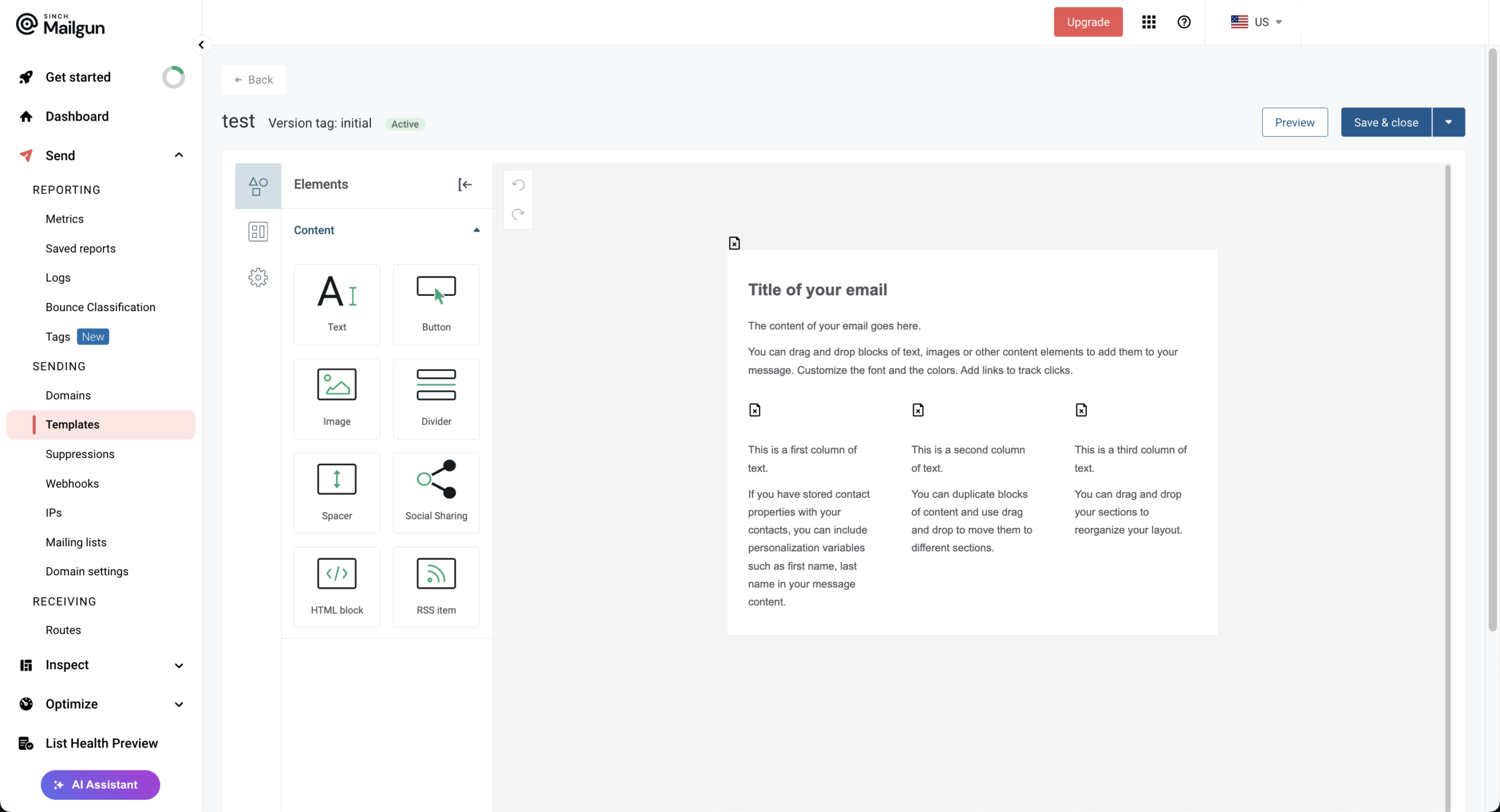
The template library isn’t huge compared to marketing-focused platforms, but it’s solid enough. And the preview feature? Actually useful—you can see how your emails will render on different devices before hitting send.
SendGrid gives you a modern drag-and-drop design editor and a code editor for custom needs. You can store up to 300 dynamic transactional templates on your account, available to be increased to 1,000 by SendGrid support. The design editor handles text, images, buttons, social icons—all with real-time preview.
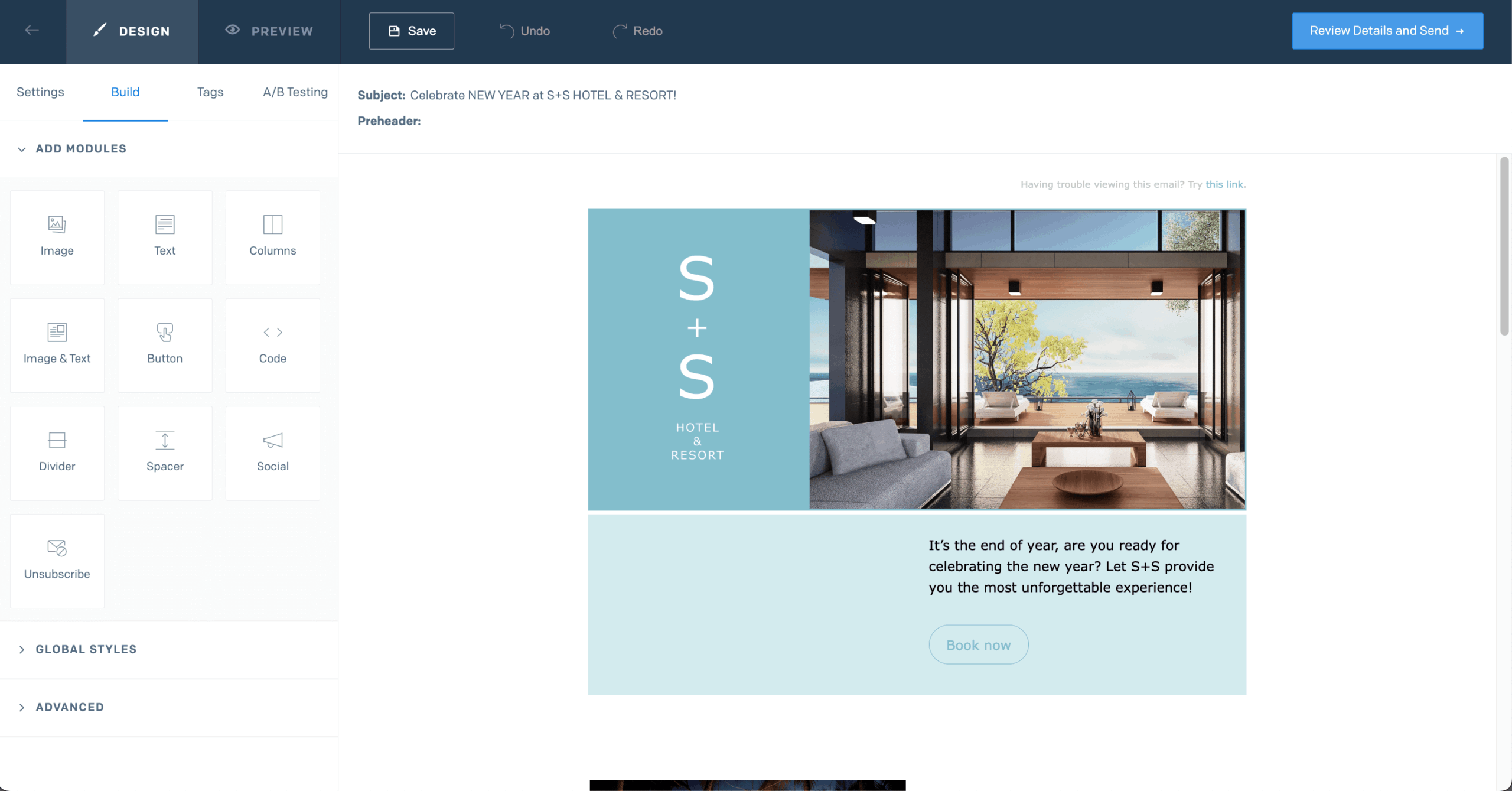
Developers can use their dynamic template system with Handlebars syntax for more sophisticated personalization. Where SendGrid really shines is email testing: you can preview how your emails render across dozens of popular inbox providers and devices. No more “it looked fine on my screen” excuses.
Feature
Mailgun
SendGrid
Drag-and-Drop Editor
Yes
Yes
HTML Editor
Yes
Yes
Event-triggered via AP
Yes
Yes
Email Preview Testing
100+ devices (Mailgun Optimize)
Wide range
Winner: SendGrid—more developed setup for needs beyond transactional email.
Mailgun’s automation is really geared toward API-triggered workflows—don’t expect visual automation builders here. The platform handles sending transactional emails based on application events just fine, and they’ve got send time optimization powered by machine learning to figure out the best delivery windows (Scale plans).
Webhooks for real-time event notifications? Check. Rules for inbound email routing? Also check. But if you want to build complex drip campaigns or multi-step nurture sequences, you’re going to need to either code it yourself or bring in external marketing automation tools. If you’re comfortable writing a bit of glue code, it feels great; if you’re not, it feels pretty bare. Technical teams tend to thrive with this level of control.
SendGrid has dedicated automation features baked into their Marketing Campaigns product. You can create automated welcome series, drip campaigns, and triggered emails based on what subscribers do.
The automation builder handles simple triggers like list joins and time-based delays. Is it as sophisticated as something like ActiveCampaign? No, but it covers the common use cases without making you write a single line of code. For anything more complex, you can always hook it up to Zapier or use their webhooks to capture webhook events in real time.
Feature
Mailgun
SendGrid
Visual Automation Builder
No
Yes
Drip Campaigns
Via API only
Built-in
Send Time Optimization
Yes
Yes
Webhook Support
Yes
Yes
Journey templates
Depends on external tools
Welcome and drip flow patterns
Winner: SendGrid—built-in automation builder makes it accessible without coding.
This is where Mailgun really comes alive. The platform was literally built from the ground up for sending transactional emails, and you can tell. Password resets, order confirmations, shipping notifications, all those triggered messages—Mailgun handles them like a champ.
They’ve got message queuing, automatic retries, sender reputation management—basically everything you need to make sure your critical transactional messages actually reach people. Their transactional email API is robust and well-documented. And if you’re a high-volume sender or enterprise, their Rapid Fire Delivery SLA guarantees 99% attempted delivery for up to 15 million messages within five minutes. That’s serious.
SendGrid’s Email API plan is built for transactional email delivery, too. You get reliable delivery with automatic bounce handling, suppression management, and real-time event tracking. SendGrid’s infrastructure backs a 99.99% uptime SLA, and emails typically hit recipient servers in under 2 seconds.
In my tests, both password reset and order-style emails landed in inboxes quickly and consistently. SendGrid is definitely capable when it comes to transactional use cases, but because they’ve spread their focus across marketing too, some advanced transactional features like email parsing are more bare-bones compared to Mailgun’s more feature-rich implementation.
Feature
Mailgun
SendGrid
Email Parsing
Built-in Email Parsing & Routes (extracts data, posts to webhooks)
Inbound Parse Webhook for processing incoming messages
Template engine
Drag-and-drop + HTML templates, API-driven transactional templates
Dynamic transactional templates via Email API
Logs & event webhooks
Detailed logs + events (opens, clicks, bounces, etc.) via webhook
Event Webhook for message lifecycle + analytics
Message queuing & retries
Automatic queuing and retry logic for temporary failures
Automatic queuing and retry logic for temporary failures
Winner: Mailgun—purpose-built for transactional emails with superior parsing and routing.
Mailgun doesn’t have landing pages or forms. The platform is laser-focused on email delivery infrastructure, so if you need lead capture tools, you’ll have to bring in third-party builders and connect them through API or webhooks.
Bulk imports and exports are straightforward, and Mailgun’s email validation tools help clean out invalid or risky addresses before you send. Segmentation exists, but it’s driven mostly by tags, variables, and the API rather than a visual segment builder. For high-volume senders who want granular control and don’t mind getting a bit technical, Mailgun delivers what you need. These features help brands improve email health over time.
Now, these aren’t full-blown landing page builders—for anything more sophisticated, you’d still need external tools. But SendGrid’s native forms give you a decent starting point for building your list without adding another tool to your stack.
Feature
Mailgun
SendGrid
Landing Page Builder
No
No
Signup Forms
No
Yes
Hosted Form Links
No
Yes
reCAPTCHA Support
No
Yes
Winner: SendGrid—native signup forms provide lead capture without third-party tools.
Mailgun offers mailing lists, basic attributes, and list-level targeting so you can focus sends on smaller groups, including segments based on traits like company size, demographics, or engagement. You can create multiple lists per domain and keep data separated for different products or clients.
Bulk imports and exports are straightforward, and Mailgun’s email validation tools help clean out invalid or risky addresses before you send. Segmentation exists, but it’s driven mostly by tags, variables, and the API rather than a visual segment builder. For high volume senders who want granular control and don’t mind getting a bit technical, Mailgun delivers what you need.
SendGrid’s Marketing Campaigns interface makes list management pretty straightforward. You can upload contacts via CSV, segment by custom fields and engagement data like opens or clicks, and layer multiple conditions without writing code. Just note that traits like location or lifecycle stage need to be stored as custom fields first—it won’t pull that data automatically.
Pro plan supports up to 200,000 contacts and the Contacts API lets you keep audiences in sync with your app or CRM systems. It’s a solid setup for marketers who want to manage audiences on their own, with enough API flexibility for developers when they need it.
Feature
Mailgun
SendGrid
Visual Segmentation
No (API only)
Yes
Engagement targeting
Mostly via your own app logic
Built-in (“opened in X days”, etc.)
Custom Fields
Yes
Yes
Domain Isolation
Yes
Yes
Winner: SendGrid—visual segmentation tools make audience targeting accessible to non-developers.
Mailgun doesn’t really play in the ecommerce space out of the box. It’s commonly paired with ecommerce stacks via integrations (WooCommerce, Shopify, Sharetribe, etc.) to send order confirmations, shipping updates, cart recovery flows, and other transactional messages.
Big names like Lyft, Microsoft, and Etsy use Mailgun to send hundreds of billions of emails every year, so it’s definitely possible—the platform just stays focused on email delivery infrastructure rather than commerce-specific workflows.
SendGrid can work with ecommerce platforms like Shopify, WooCommerce, and Magento, though Zapier or similar apps—it’s not the deep native integration you’d get with something like Sender.
Marketing Campaigns support dynamic content through Handlebars, so you can personalize emails based on data you pass in, but don’t expect built-in product recommendation engines or other ecommerce features. It’s not an ecommerce marketing suite, but it can handle the transactional side, plus basic email campaigns.
Feature
Mailgun
SendGrid
Order & receipt emails
Yes (API/SMTP)
Yes (API/SMTP)
Product Recommendations
No
No
Cart recovery/win-back
Via external logic & workflows
Via Marketing Campaigns + automation
Ecommerce integrations
WooCommerce, Shopify, Sharatribe
Third-party
Winner: Both platforms offer excellent transactional email services, but SendGrid wins for the ability to build ecommerce automations.
Mailgun doesn’t mess around with email deliverability. They’ve got dedicated IP addresses available on higher plans, automatic IP warm-up, real-time blocklist monitoring—the works. Their email validation service (add-on) catches invalid addresses before you send, which keeps bounces down and protects your domain reputation.
Inbox placement testing shows you exactly where your emails are landing across major providers. Mailgun claims a 97.4% average delivery rate, and their reputation monitoring will ping you about potential issues before they actually hurt your delivery. Proper SPF/DKIM/DMARC configuration is essential, and Mailgun provides clear guidance on setting these up.
SendGrid has built solid relationships with major mailbox providers—we’re talking direct peering with Google, Yahoo, Apple, and Microsoft. They provide domain authentication via SPF, DKIM, and DMARC with step by step instructions for getting everything set up. Strong inbox placement rates are a direct result of these authentication practices.
Dedicated IP options are available on higher plans with automated warmup. SendGrid’s deliverability insights dashboard gives you granular color into how you’re performing across different mailbox providers. The Twilio inbox tools help you monitor and optimize delivery performance.
Mailgun provides a free sandbox domain for testing without affecting your real domain’s reputation, plus Mailgun Inspect for previewing emails across 100+ devices, running spam analysis, and checking link validity. Inbox placement testing is available on higher tiers.
SendGrid’s API sandbox mode validates requests without delivering emails—useful for integration testing. Their Email Testing suite includes inbox rendering previews, spam filter checks, and link validation, though it runs on a credit system (3–60 credits/month depending on plan).
Feature
Mailgun
SendGrid
Dedicated IPs
Yes
Yes
Authentication guidance
SPF, DKIM, DMARC, BIMI setup & monitoring
SPF/DKIM setup, reverse DNS, link & image branding, TLS best practices
Inbox placement & testing
Inbox testing & reputation tools (Optimize)
Deliverability Insights & testing
Email validation
Add-on
Add-on
Winner: Tie—both offer reliable deliverability features.
Mailgun doesn’t do SMS. If you need SMS alongside email, you’re going to have to integrate a separate provider. That means managing multiple platforms, separate billing, additional integration work—not ideal. For businesses that really need unified email and SMS communications, this could be a dealbreaker.
SendGrid also doesn’t natively do SMS; that’s handled by Twilio’s (parent company) SMS/WhatsApp APIs. The integration lets you keep customer data unified and coordinate multi-channel campaigns. If you’re already in the Twilio ecosystem, adding SMS to complement your email campaigns is pretty seamless.
Feature
Mailgun
SendGrid
Native SMS
No
Via Twilio
Unified email + SMS UI
No
Not in SendGrid alone
No
Via Twilio
Unified Platform
No
Twilio
Winner: SendGrid—Twilio integration enables SMS/WhatsApp when needed.
Mailgun brings robust analytics to the table with detailed tracking of deliveries, opens, clicks, bounces, and complaints. The dashboard lets you filter engagement data by date range, campaigns, and recipient domains.
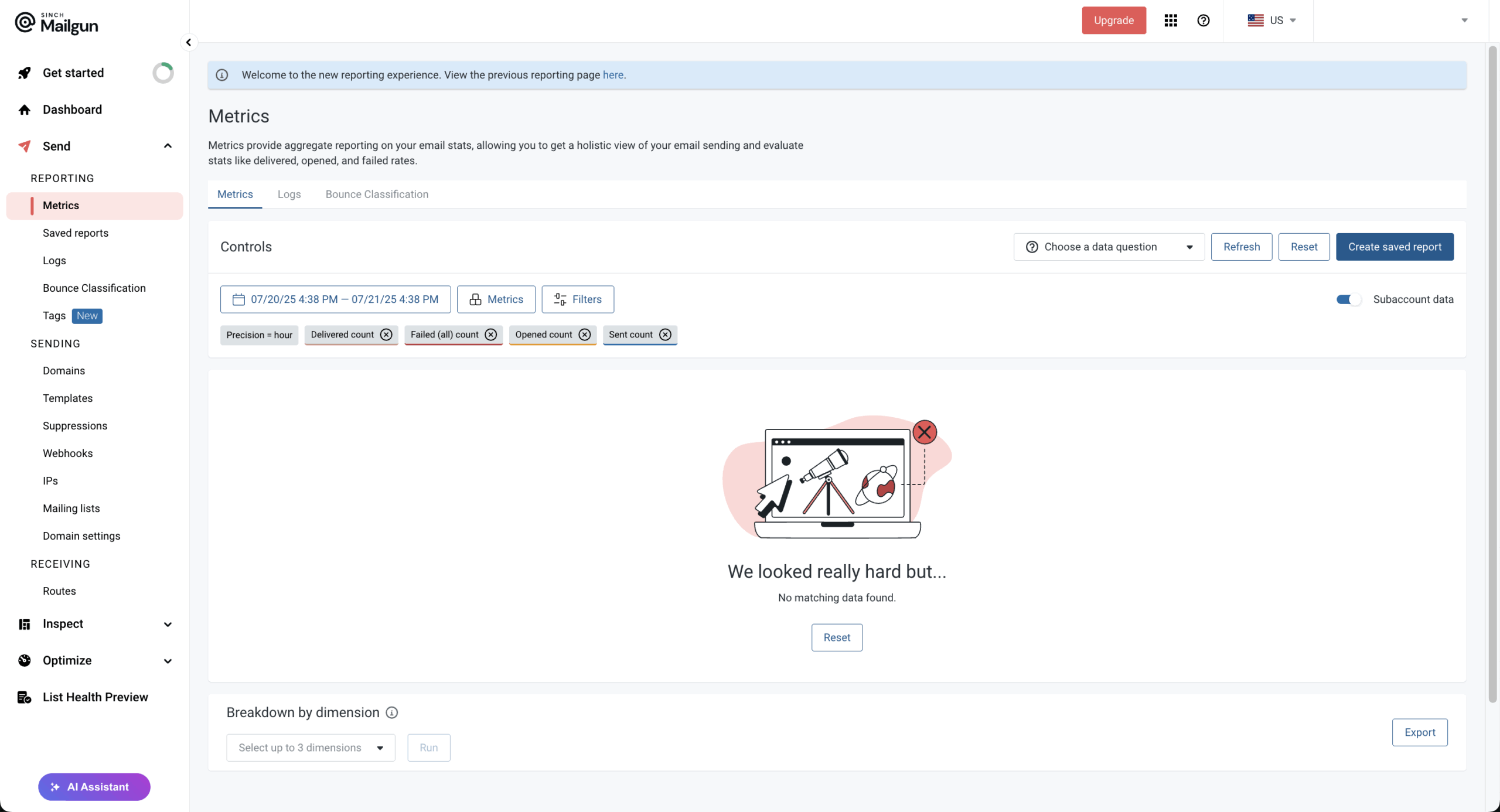
Log retention depends on your plan—5 days on Foundation and up to 30 days on Scale. Webhook integrations let you pipe email events into your own analytics systems for custom reporting. The platform tracks over 40 email signals, giving you plenty of data to optimize your sending strategy.
SendGrid delivers comprehensive reporting through both their Email API and Marketing Campaigns interfaces. You get near-real-time stats on opens, clicks, bounces, blocks, and spam reports, with the ability to view trends over different time ranges.
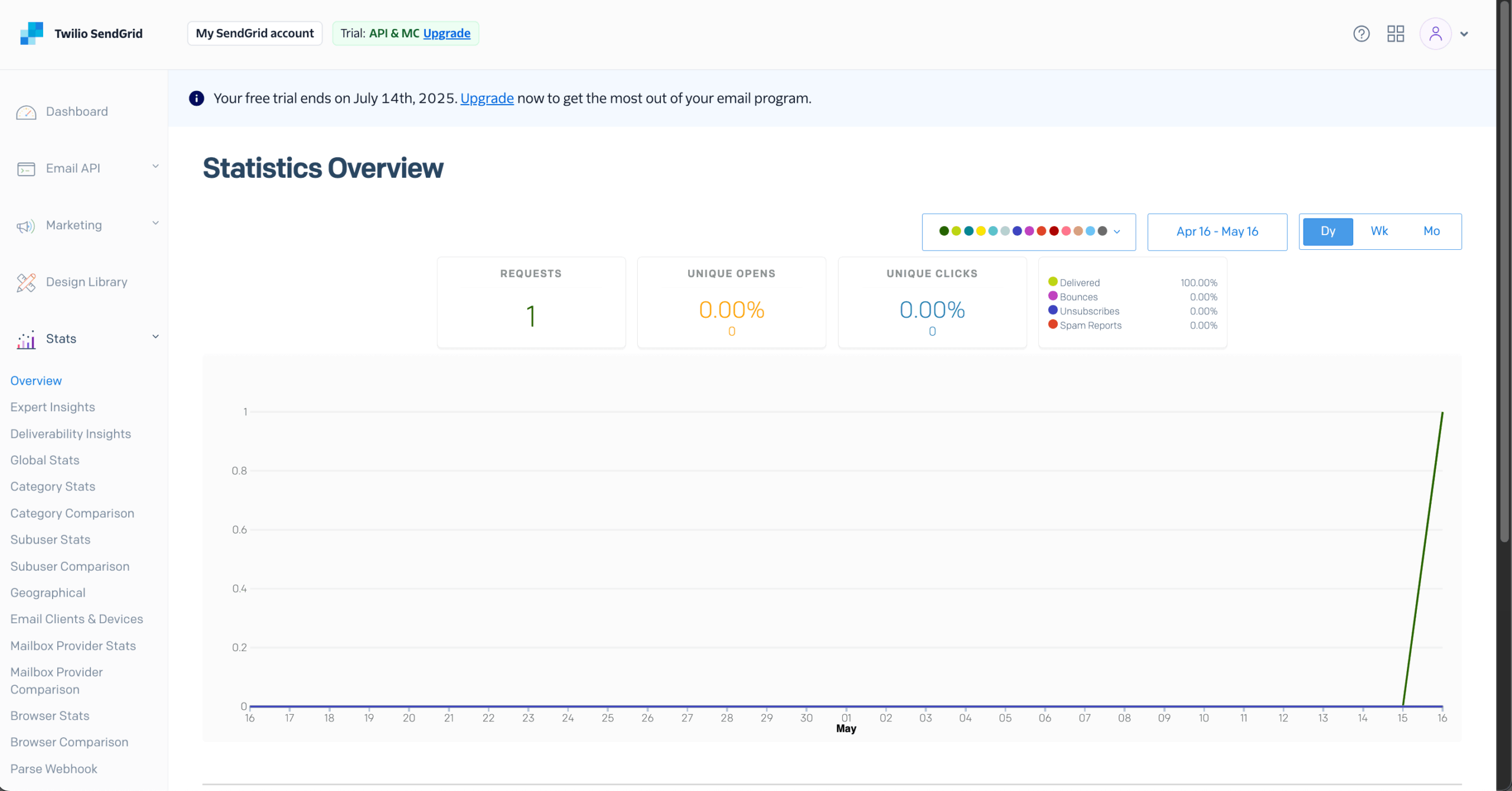
The deliverability insights dashboard breaks things down by mailbox provider and geography. Marketing Campaigns adds engagement metrics like unique opens, click maps, and device breakdowns.
Feature
Mailgun
SendGrid
Real-time Tracking
Yes
Yes
Log Retention
1-30 days (depends on plan)
3-7 days (30 day add-on available)
Webhook Events
Yes
Yes
Provider Breakdown
Yes
Yes
Winner: Tie—both offer detailed analytics; SendGrid has better marketing reports, Mailgun better API events.
Mailgun’s web API was designed by developers, for developers—and it shows. The RESTful API supports Python, PHP, Java, Ruby, C#, Node.js, and Go with solid documentation and code samples. SMTP relay is there for systems that prefer the traditional route.
With 60+ native integrations covering popular CMS platforms and automation tools, Mailgun goes for quality over quantity. The API gives you fine-grained control over email delivery, parsing, routing, and detailed analytics, which makes it ideal for custom implementations.
SendGrid offers both RESTful APIs and SMTP relay with official helper libraries in seven programming languages (C#, Go, Java, Node.js, PHP, Python, and Ruby). Its ecosystem includes 120+ integrations and partner connectors spanning CRM, marketing automation, ecommerce, and developer tools—their WordPress integration is especially popular.
SendGrid’s API documentation is thorough with interactive references and sandbox testing. For teams using multiple tools in their stack, SendGrid’s broader integration ecosystem usually means less custom development to get everything connected.
Both platforms offer official SDKs in seven languages (Python, Node.js, PHP, Ruby, Java, C#, and Go) with solid documentation. On rate limits, Mailgun varies by endpoint and plan, returning status via response headers, while SendGrid allows up to 10,000 requests/second on mail/send with no limit—other endpoints cap at 600/minute.
For real-time event tracking, both support webhooks for delivery, opens, clicks, bounces, and complaints. Mailgun allows up to 3 URLs per event type and stores data 3–30 days; SendGrid offers multiple webhook configs with OAuth 2.0 and signature verification, retrying failed deliveries for 24 hours.
For inbound email parsing, Mailgun’s Inbound Routes convert incoming messages to UTF-8 JSON with regex and JSONPath filtering, automatic attachment handling, and flexible forwarding—great for support ticketing, two-way messaging, and email-to-app workflows.
SendGrid’s Inbound Parse Webhook POSTs parsed data (headers, body, attachments up to 30MB) to your endpoint with optional spam scoring. Mailgun’s parsing is more feature-rich with advanced routing rules; SendGrid’s approach is simpler but covers the basics.
Feature
Mailgun
SendGrid
API Languages
7
7
Webhooks
Message, events, and routing
Event webhook + multiple analytics webhooks
SMTP Relay
Yes
Yes
Third-party integrations
Very broad via iPaaS tools
Very broad; often first-class connectors
Winner: Tie—both have mature APIs and extensive integration ecosystems.
Mailgun ties support to your pricing plan. Free and Basic plans get 24/7 ticket-based support, while live chat and phone ticket support are reserved for higher tiers like Scale and Enterprise. Enterprise customers also get dedicated Technical Account Managers and SLA-backed guaranteed response times through Mailgun’s deliverability services.
Their help center has comprehensive documentation, and the deliverability team apparently has over 320 years of combined experience (which, honestly, is a wild stat). Support quality is generally well-regarded, though I’ve seen some users mention inconsistent experiences on the lower tiers.
SendGrid offers 24/7 ticket support on all plans, including the free tier. Live chat and phone support is reserved for paid customers, while Advanced plan guarantees you a fast response time. Their knowledge center is packed with guides and tutorials. Starting with the Essentials plan, you get access to more features and better support response times.
Here’s the thing though—customer support has become a pretty common complaint since Twilio bought them. From my own tests, tickets sometimes took days to reply. Higher-tier customers seem to fare better with dedicated support, but smaller users? They might find the experience frustrating when something critical goes wrong.
Feature
Mailgun
SendGrid
Ticket Support
All plans
All plans
Live Chat
Scale+
Basic+
Phone Support
Enterprise
Basic+
Docs & knowledge base
Strong dev docs, guides, help center
Strong docs, guides, knowledge center
Winner: SendGrid for accessibility on lower tiers.
Mailgun doesn’t have a mobile app. Account management, analytics, email operations—all of it happens through the web dashboard or API. If your team needs mobile access, you’re stuck with the responsive web design or building custom mobile integrations.
The web interface technically works on mobile browsers, but it’s not optimized for smaller screens, so anything complex gets pretty clunky on a phone or tablet.
SendGrid is in the same boat—no dedicated iOS or Android app. Everything runs through the web interface, which has reasonable mobile browser compatibility but wasn’t designed with mobile workflows in mind.
Both platforms clearly prioritize API-first approaches, assuming most users are interacting programmatically rather than through mobile interfaces. If mobile app access is a must-have for your workflow, neither platform is going to make you happy right now.
Feature
Mailgun
SendGrid
iOS App
No
No
Android App
No
No
Mobile Web Access
Yes (Responsive)
Yes (Responsive)
Winner: Tie—neither platform offers dedicated mobile apps.
Mailgun vs. SendGrid — Pricing & Plans
Pricing Comparison
Plan
Mailgun
SendGrid (API)
SendGrid Marketing Campaigns
Entry
$15/mo—Basic (10k emails)
$19.95/mo—Essentials (50k emails)
$15/mo — Basic (5k contacts, 15k emails)
Mid-tier
$75/mo—Foundation (100k emails)
$34.95/mo—Essentials (100k emails)
$60/mo — Advanced (10k contacts, 50,000 emails)
Pro plan
$215/mo—Scale (250k)
$249/mo—Pro (300k + Dedicated IP)
$450—Advanced (100k contacts, 500,000 emails)
High Volume
Custom pricing
Custom pricing
Custom (Custom pricing)
For transactional emails, both platforms use tiered pricing structure based on email volume, with competitive pricing for high volume senders. For Marketing Campaigns, SendGrid factors in both email volume and contact storage. Paid plans start around $15-20/month for both services. Pricing scales based on how your sending volume grows over time.
Hidden Fees to Watch: Mailgun pricing charges extra for email validation once you exceed the free quota on your plan, with tiered pricing starting around $1.20 per 100 validations and dropping as volume increases, plus optional Optimize add-ons at $49–99/month depending on how many validations and tests you need. Additional IPs run for $59/IP/month.
SendGrid pricing charges $30/month for each additional dedicated IP and bills extra Email Validation API usage once you burn through the included credits. Both platforms apply overage fees if you exceed your sending limits
Free Plan Comparison
Feature
Mailgun Free
SendGrid Free Trial
Daily Limit
100 emails/day
100 emails/day
Duration
No expiration
60 days
Contacts
Unlimited
100 contacts (Marketing Campaigns)
API Access
Yes
Yes
Mailgun’s free plan never expires, which is great for ongoing testing or super low-volume needs. SendGrid’s 60-day trial gives you full feature access but then you have to upgrade to keep going.
Mailgun vs. SendGrid — Pros & Cons
Mailgun
- Developer-first API design
- No-expiration free plan
- Excellent deliverability
- Strong email parsing/routing
- No SMS capabilities
- Limited marketing features
- No landing pages/forms
- Steeper learning curve
SendGrid
- Marketing + transactional in one
- User-friendly interface
- More integrations (120+)
- Built-in signup forms
- Trial expires (60 days)
- Less advanced automation than dedicated marketing platforms
- No true landing page builder
- Separate pricing for API/Marketing
At the end of the day, the SendGrid Mailgun debate comes down to your team’s technical chops and whether you need marketing features alongside transactional email. Mailgun is the clear winner for developers who want that granular control, while SendGrid makes more sense for mixed technical/marketing teams who need a bit of everything.
Which Platform Should You Choose?
Mailgun is Best For
SaaS Companies and Tech Startups: If you’re building apps that need rock-solid transactional email delivery, Mailgun’s API-first approach slots right into development workflows. The email parsing, inbound routing, and detailed logs help tech teams troubleshoot delivery issues fast when things go sideways.
Development Agencies: Agencies building email functionality for clients get a lot out of Mailgun’s clean API documentation and multi-language support. Mailgun lets you isolate reputation by using separate sending domains (and IPs) for each client, so one client’s deliverability issues are less likely to affect another.
Competitive pricing on high email volume makes it cost-effective when you’re juggling multiple client accounts.
High-Volume Transactional Senders: If you’re pushing millions of order confirmations, password resets, or notifications, you need infrastructure that scales without breaking a sweat.
Mailgun’s Rapid Fire Delivery SLA and dedicated IP options make sure your critical messages actually get delivered. And because they focus on deliverability rather than marketing features, you’re not paying for tools you’ll never touch.
SendGrid is Best For
Small Businesses and Startups: When you need both transactional and marketing email but don’t want to manage two separate platforms, SendGrid is an all-in-one solution that can save you a lot of headaches. The visual campaign builder and pre-made templates let non-technical users create professional emails without bugging your developers.
SaaS & Product Platforms: Apps that live on high-volume transactional email—password resets, sign-in links, alerts, invoices—get a lot of mileage out of SendGrid’s Email API. The SDKs, webhooks, and logging make it easier for developers to wire everything into the product, while Marketing Campaigns can still handle occasional announcements or product update emails.
Marketing Teams with Developer Support: For organizations where marketers build the campaigns but developers handle the integrations, SendGrid hits a nice sweet spot. The platform keeps both groups happy without forcing everyone to learn to code or limiting what the technical folks can do.
Enterprise features like sub-user management help larger teams stay organized and work together effectively.
What If Neither Fits?
If you can’t seem to decide between SendGrid and Mailgun, you should check out Mailtrap, an email-sending solution built for developer and product teams, focused on fast delivery and strong inbox placement for transactional and promotional emails.
It supports both SMTP and Email API, offers simple setup, and provides high deliverability by default, without requiring an expensive higher-tier plan.
If you’re looking for an all-in-one solution that combines email and SMS marketing without the developer-heavy setup, Sender is worth a look. It offers a generous free plan (2,500 subscribers, 15,000 emails/month), drag-and-drop design, automation workflows, and high deliverability—all at a fraction of what most platforms charge.
It’s well-suited for small businesses, ecommerce stores, and startups that want powerful marketing features without the technical overhead.
Mailgun vs. SendGrid — What Real Users Are Saying


On G2, Mailgun is frequently praised for reliability, straightforward API integration, and strong deliverability—especially for dev-heavy teams that need predictable transactional email performance. Some reviewers mention frustration when accounts are suddenly blocked for compliance reasons, calling out the need for clearer communication.
SendGrid G2 feedback highlights its scale (huge email volumes), good inbox placement, and ease of setup via SDKs and integrations.
However, there are repeated complaints about sudden account suspensions when traffic patterns change and slow responses to those suspensions on lower tiers. Users also note that automation is functional but not as flexible as full-blown marketing automation tools.
On Capterra, Mailgun scores highly for reliability and developer friendliness. Users like that the basic plans already include tracking and analytics that others charge more for, but some mention rough edges during migrations (e.g., the Sinch login transition) and a learning curve for non-technical staff.
SendGrid Capterra reviews often describe it as an “honestly great app for email marketing” with solid deliverability and good value once you’re on the right tier. Negative comments tend to focus on UI quirks, domain verification complexity, and the feeling that support becomes noticeably better as you move into higher-priced plans.
Reddit threads tend to position Mailgun as the go-to for developers who want precise control over their email infrastructure. People share positive experiences with API integration and deliverability.
That said, some threads mention account suspension issues hitting legitimate businesses, and there are concerns about shared IP reputation on lower plans. The dev community generally recommends Mailgun for transactional use cases over marketing.
Reddit users often describe SendGrid setup as quick—API integration takes minutes, according to many posts. Long-term users report reliability for both transactional and marketing emails.
But there are multiple threads venting about frustrating support experiences, unexpected account suspensions, and delivery issues to specific providers like Outlook. Some developers flat-out recommend alternatives for mission-critical applications because of support concerns.
FAQs
Yes. Mailgun has a big focus on email deliverability, with built-in email validation, blocklist monitoring, domain authentication helpers (SPF, DKIM, DMARC, BIMI), and tools to monitor domain reputation and IP reputation.
Higher-tier plans add inbox placement tests, send-time optimization, and dedicated IPs, all of which help maximize inbox placement for both transactional messages and campaigns.
Yes. Mailgun is used by many high-volume senders for both transactional and bulk email sending. Its infrastructure is designed to send at large scale; the main responsibility on your side is to follow best practices (validated lists, compliant content, sane rates) so you don’t damage your sender reputation.
Plans scale up via volume-based pricing, with options for custom pricing at enterprise scale.
SendGrid Mailgun migration is pretty straightforward, especially if you’ve got developers on your team. Both platforms work with similar concepts—RESTful APIs, SMTP relay, webhooks, template systems. Mailgun has migration documentation and their deliverability team offers hands-on support to smooth out the transition.
You’ll need to update DNS records for domain authentication, modify API calls to hit Mailgun endpoints, and move over any templates you want to keep. The main adjustments are Mailgun’s slightly different webhook schema and template syntax. Most teams wrap up migration within a few days to a week.
Yes, both SendGrid and Mailgun have email validation to help you maintain list quality and deliverability. Mailgun includes email validation starting at the Scale plan ($90/month), with 5,000 validations included and more available if you need them. Their validation API checks syntax, domain validity, and whether the mailbox actually exists in real-time.
SendGrid offers email validation as an add-on through their Pro plan, with the first 5,000 credits included and pay-as-you-go pricing after that. Both services help keep bounce rates low and protect sender reputation by flagging invalid addresses before you hit send.
Both platforms automatically manage bounces to protect your sender reputation. Mailgun adds hard-bounced addresses to a suppression list, preventing future sends, and provides webhook notifications plus detailed bounce logs with reason codes.
SendGrid similarly maintains a bounce suppression list, categorizes bounces by type (block, bounce, invalid), and offers automatic retry logic for soft bounces. Both let you manage suppression lists via API or dashboard and provide real-time bounce event webhooks for custom handling.
- Hands-on testing across multiple email marketing tools
- Fair comparisons using a unified evaluation process
- Insights verified with real user reviews from trusted sources
- No sponsorships or affiliate ties
- Clear, unbiased scoring and methodology