

Choosing a marketing automation platform often comes down to how much complexity your team can realistically manage alongside cost and scalability. This page is an email marketing software comparison guide for those looking for Active Campaign alternatives, focusing on automation depth, usability, pricing structure, and real-world flexibility.
We hope this guide will help teams evaluate comparable tools side by side, understand key trade-offs, and identify platforms that better match their workflows, budgets, or growth stage. Each option is assessed using consistent criteria relevant to modern email marketing and automation needs.
Best ActiveCampaign Alternatives: A Snapshot
- Top choice for email marketing for small businesses: Sender – full automation builder, segmentation, and transactional email included on a generous free plan, making it the most accessible starting point;
- Great for all-in-one marketing workflows: GetResponse – combines automated email campaigns, webinars, funnels, and monetization tools in a single platform without relying on integrations;
- Go-to option for multichannel messaging: Brevo – manages email, SMS, and transactional emails from one system, reducing the need for separate tools;
- Best for ecommerce omnichannel marketing: Omnisend – unifies email, SMS, and push notifications with prebuilt ecommerce workflows and behavioral targeting;
- Top pick for ecommerce lifecycle marketing: Drip – connects onsite forms, automation, and revenue dashboards for tracking performance across customer journeys;
- Solid choice for data-driven ecommerce targeting: Klaviyo – uses predictive analytics, purchase behavior, and real-time data to power highly personalized campaigns;
- Most beginner-friendly platform: Mailchimp – simple campaign setup, strong deliverability, and built-in tools for website creation and integrations;
- Best for event-driven email marketing: Constant Contact – includes event management, resend-to-non-openers, and built-in surveys for audience engagement;
- Top-tier CRM-based marketing automation: HubSpot – connects email campaigns with CRM, sales, and lifecycle data for full-funnel visibility and coordination.
Why Search for ActiveCampaign Alternatives?
ActiveCampaign is a decent marketing solution, but like all tools, great or not – it’s simply not for everyone.
That said, here are the most common reasons for exploring the best ActiveCampaign competitors:
- Complexity. ActiveCampaign’s interface is often considered difficult to learn and navigate, even for experienced marketers. (Gartner)
- Price hikes. Users report sudden price increases and broken pricing agreements, leaving them feeling frustrated and misled. (Reddit user)
- Poor support. Once praised for excellent customer service, users now complain of slow response times and unhelpful support staff. (G2)
- Cumbersome automation. Editing email sequences within automations is time-consuming and inefficient, driving users towards platforms with more streamlined workflows. (FluentCRM)
Capterra, G2, Trustpilot, and Reddit to create an objective evaluation. Learn more about our review methodology
ActiveCampaign Alternatives: Comparison Table
If you’re comparing the best ActiveCampaign alternatives and newsletter platforms—from creator-focused options to enterprise-grade platforms—the following table gives you a quick overview of pricing, limits, and standout features to help you choose the right marketing automation solution.
| Tool | Best For | Key Features | Starting Price | Free Plan |
| Sender | SMBs looking for scalable email and transactional email marketing tool | 24/7 Human support; Landing page builder; drag-and-drop builder | $7/month (1,000 contacts) | Up to 2,500 contacts |
| GetResponse | Good automation, webinar tools, and landing pages | Website & course builder; Conversion funnels | $16/month (1,000 contacts) | Up to 500 contacts |
| Brevo | Affordable price, multi-channel marketing with intuitive interface | Transactional email management; built-in CRM | $8/month (20,000 emails) | Up to 300 emails/day |
| Omnisend | Ecommerce-focused automation and omnichannel marketing | Behavioral signup forms; Omnichannel marketing tools | $16/month (500 contacts) | Up to 250 contacts |
| Drip | Ecommerce personalization, customer lifecycle automation | Ecommerce revenue dashboards; Pre-built playbook library | $39/month (2,500 contacts) | Free trial only |
| Klaviyo | Powerful segmentation, great for ecommerce, deep integrations | Ecommerce-native personalization; predictive analytics | $20/month (500 contacts) | Up to 250 contacts |
| Mailchimp | Easy to use, great templates, all-in-one marketing platform | 100+ third-party tools; website builder; AI-based suggestions | $13/month (500 contacts) | Up to 250 contacts |
| Constant Contact | Mid-sized businesses needing strong support and event tools | Event management toolkit; SMS marketing | $12/month (500 contacts) | Free trial only |
| HubSpot | Comprehensive CRM, powerful automation, and analytics | Automated prospecting; landing page builder | $20/month (1,000 contacts, Marketing Starter) | Up to 1,000 contacts |
9 ActiveCampaign Alternatives Compared
Need a new email marketing platform but feeling overwhelmed by all the comparable choices?
From budget-friendly email automation software options to those brimming with advanced features, I’ll break down the best CRM email marketing tools to help you find the perfect alternatives to ActiveCampaign CRM.
Sender — Best Alternative for Automation & Email Campaigns
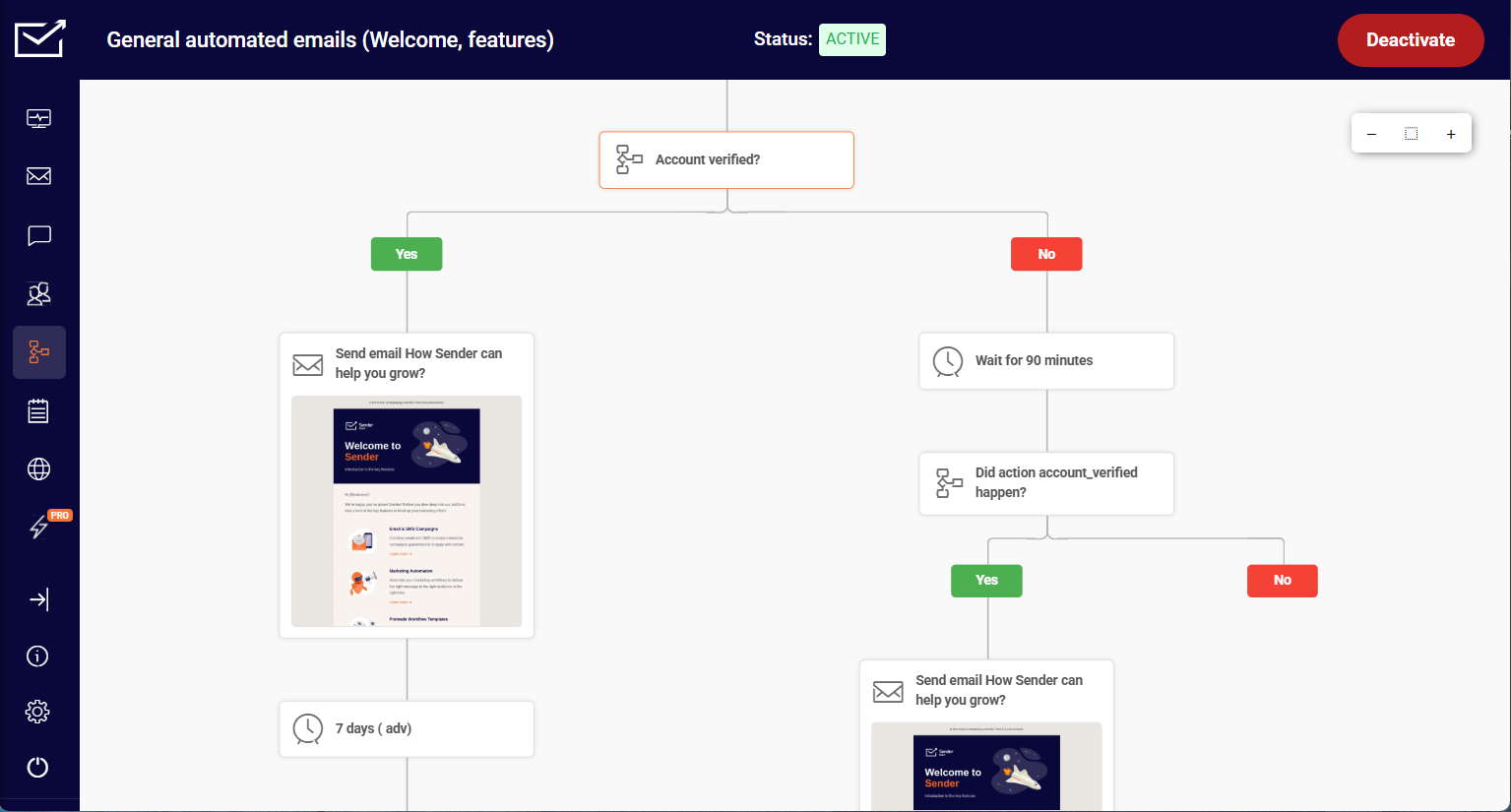
When it comes to Sender, its automation feels more practical than most tools in its price range. I was able to build a full onboarding journey – welcome email, two-day delay, link-click condition, two different follow-up paths – from blank canvas to activated flow in around 35 minutes. That same structure took me significantly longer in tools where branching logic requires workarounds or separate integrations.

The visual builder makes the full customer journey visible in one place, which helped me catch gaps I’d otherwise miss – like a missing fallback path for users who never opened the first email.
I also tested multi-step scenarios like splitting users based on engagement and sending different follow-ups depending on previous actions. The available triggers and conditions covered the typical lifecycle scenarios I needed – welcome flows, lead nurturing, and re-engagement, drip campaigns – without hitting feature restrictions.
Where I noticed the ceiling: Sender isn’t the right choice if you need CRM-style lead scoring or workflows built around deeper multi-channel behavior. The segmentation is solid for most use cases, but complex sales-driven automation will reach the edges of what’s available.
On the free plan – 2,500 subscribers and 15,000 emails per month – the full automation builder was included throughout. I ran the same workflows I tested on paid tools without being prompted to upgrade, which isn’t standard at this price point. Which is to say: a Free Forever plan of this level is hard to come by today, and there’s little wonder why a lot of marketers see it as one of the better Mailchimp alternatives.
Sender works best for small to mid-sized businesses that need reliable email automation without paying for CRM features they won’t use.
Pros & Cons
- Generous free plan
- Easy-to-use interface
- Advanced automation tools
- Native transactional email support (API/SMTP)
- High email deliverability
- 24/7 human support
- Landing page builder
- Free plan includes Sender branding
- Fewer third-party app integrations
- Lacks built-in CRM features
Key Features
- Free Forever plan. Campaigns, automations, landing pages, forms, and transactional emails are available without a time limit;
- Transactional emails (even on the free plan). Order confirmations, password resets, and other triggered emails can be sent without upgrading;
- Email A/B testing experiments. 8 different variations of subject lines, sender names, send times, or content can be tested at once;
- 24/7 human support. Live chat and email support are available at any time, including on lower-tier or free plans.
ActiveCampaign vs. Sender Pricing
| Plan tier | ActiveCampaign | Sender |
| Free Plan | 14-day free trial | $0 (2,500 contacts + 15,000 monthly emails) |
| Entry plan | $15/month (1,000 contacts, basic automation) | $7/month (1,000 subscribers + 12,000 monthly emails) |
| Mid-tier plan | $37/month (1,000 contacts + CRM + advanced automation) | $14/month (1,000 subscribers + 24,000 monthly emails) |
| High-tier plan | $79/month (1,000 contacts + advanced features, scales with contacts) | Custom price |
| Enterprise | $145/month (1,000 contacts + advanced features, scales with contacts) | N/A |
Limitations
- Weaker CRM support. Sales pipelines, deal stages, and task automation are less developed than ActiveCampaign’s CRM-first setup;
- Simpler lead scoring. Lead scoring exists, but is not as granular or sales-oriented;
- CRM ecosystem feels limited. Fewer third-party CRM extensions compared to ActiveCampaign’s mature integrations.
GetResponse — All-in-One Marketing Automation Suite
The GetResponse feature that genuinely separates it from general email platforms is how tightly webinars connect to the rest of the marketing workflow.
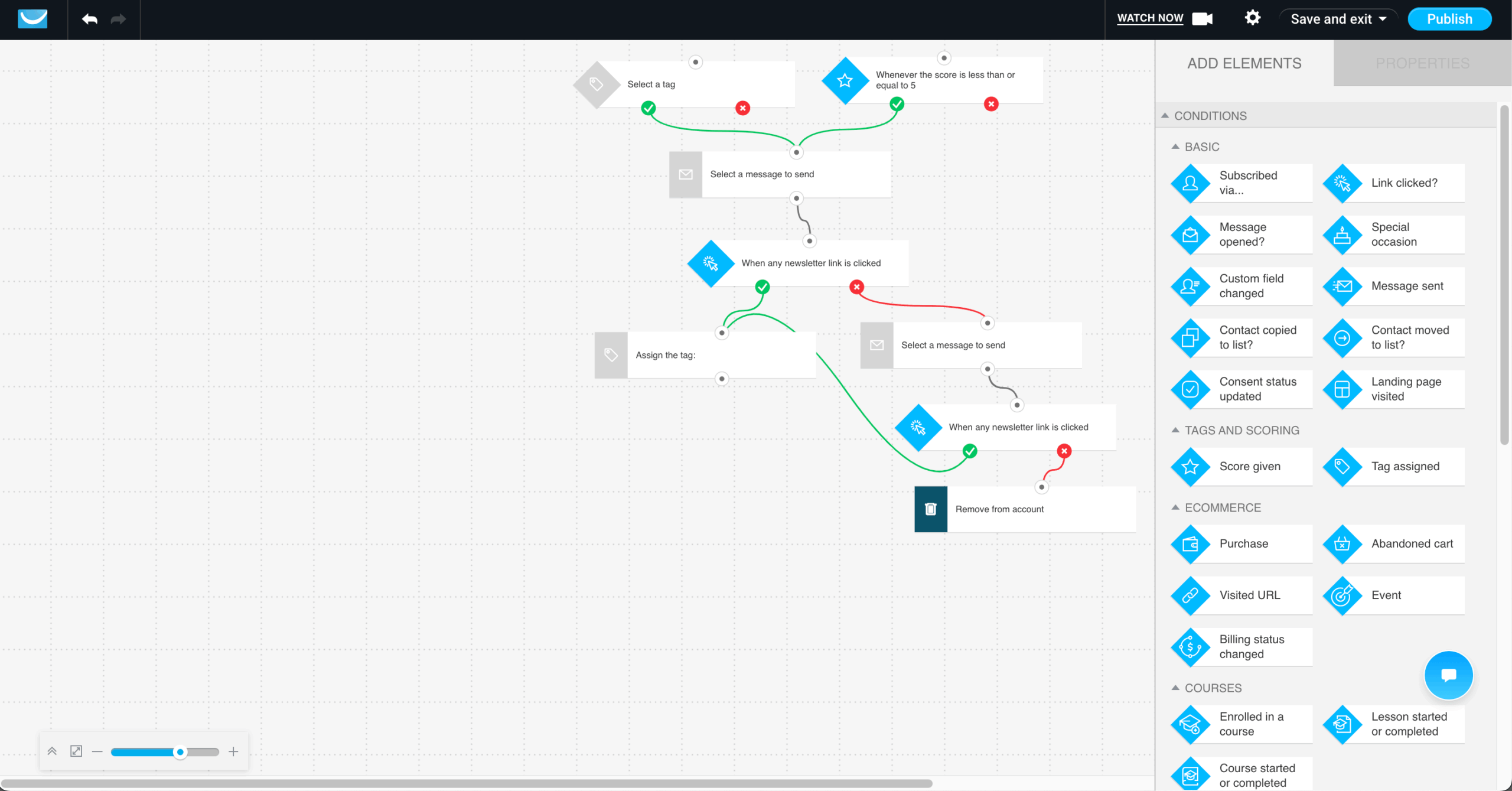
I built a full campaign where users registered through a landing page, received automated reminder emails, attended the webinar, and then got different follow-up sequences depending on whether they showed up or not. The whole flow took around 55 minutes to configure end-to-end.

Where I hit friction was in the landing page editor. It’s functional but less flexible than dedicated page builders. Getting a form to display correctly on mobile required manual adjustments that a tool like Unbounce handles automatically.
The content monetization flow is the other area worth testing. I set up a sequence where users signed up via a landing page, received a nurture email, and were routed toward a paid digital product. The checkout and email steps are connected inside one system without a third-party integration, which reduces setup time significantly for teams running simple digital product campaigns.
For teams running webinar-led marketing or digital product campaigns, the all-in-one setup removes real integration overhead. The ceiling shows up when landing page flexibility or checkout depth becomes a requirement.
All in all, this ActiveCampaign alternative is great for marketers, creators, and small businesses that want to run campaigns, webinars, and funnels from one platform without relying on multiple tools.
Pros & Cons
- All-in-one platform (email, funnels, webinars)
- Strong deliverability
- Smart send-time optimization
- Advanced segmentation & dynamic content
- 24/7 multilingual support
- Interface can feel dated
- Pricing scales quickly
- Complex workflows take time
- Fewer native integrations
- Templates lack flexibility
Key Features
- Webinar hosting. Webinars can be run directly inside the platform without using separate tools;
- Conversion funnels. Funnels combine landing pages, emails, and follow-ups into one flow to guide users toward a purchase;
- Website & course builder. Websites, courses, and paid newsletters can be created and managed within the same system;
- Content monetization tools. Digital products, subscriptions, and courses can be sold without relying on external platforms or integrations.
ActiveCampaign vs. GetResponse Pricing
| Plan tier | ActiveCampaign | GetResponse |
| Free Plan | 14-day free trial | 14-day free trial |
| Entry plan | $15/month (1,000 contacts, basic automation) | $15/month (1,000 subscribers + unlimited emails) |
| Mid-tier plan | $37/month (1,000 contacts + CRM + advanced automation) | $52/month (1,000 subscribers + unlimited emails) |
| High-tier plan | $79/month (1,000 contacts + advanced features, scales with contacts) | $59/month (1,000 subscribers + unlimited emails) |
| Enterprise | $145/month (1,000 contacts + advanced features, scales with contacts) | Custom price |
Limitations
- Less sales automation depth. Deal-driven workflows and pipeline automation are more limited;
- Simpler branching logic. Advanced conditional paths can feel less flexible in complex journeys;
- Basic lead scoring. Lead qualification features are lighter for sales-heavy teams;
- Broad, not specialized. All-in-one scope can trade depth for convenience.
Brevo — Email, SMS, and Transactional Messaging Platform
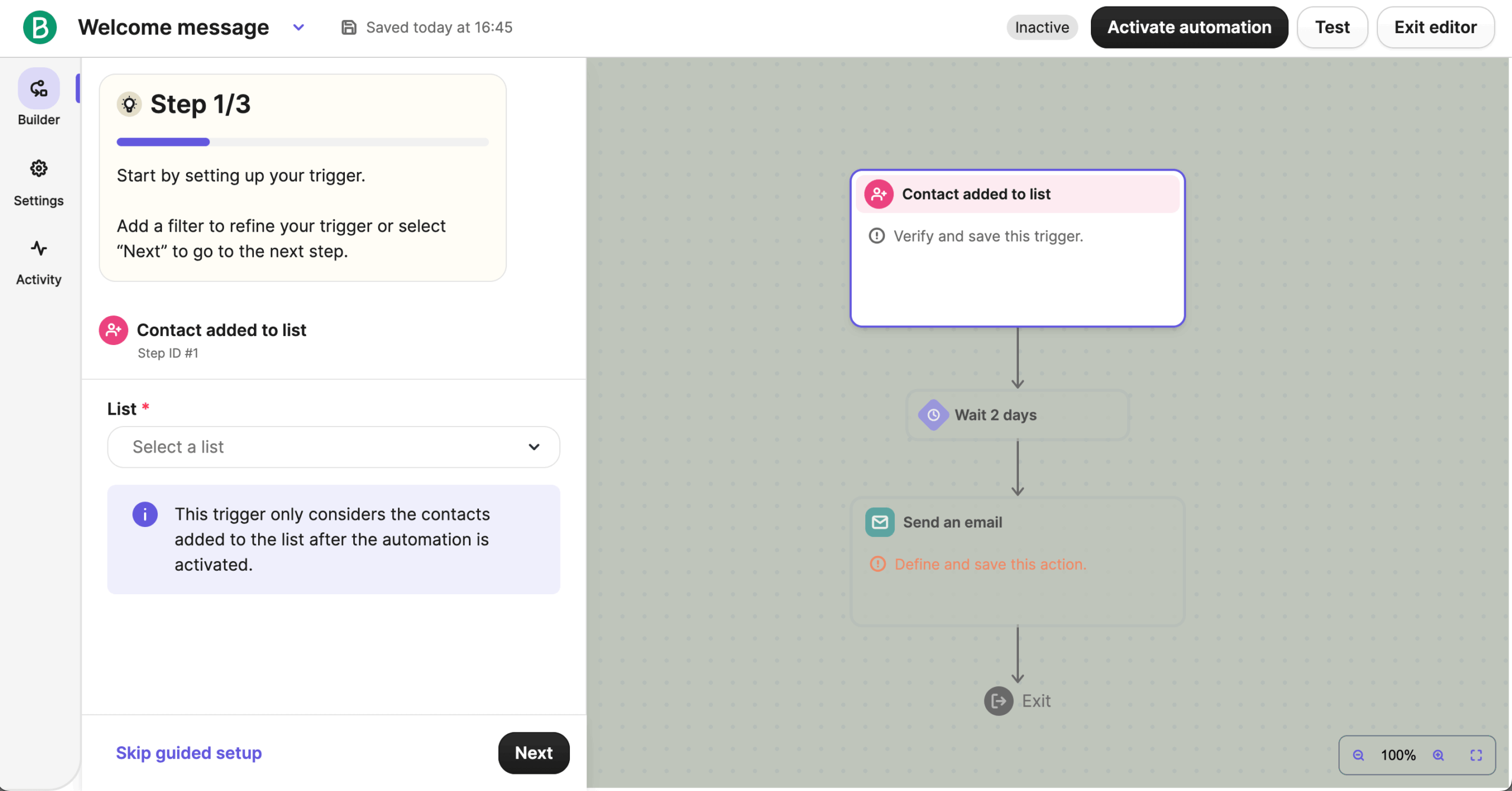
During my hands-on with Brevo, I started with a multichannel flow – signup trigger, welcome email, SMS reminder, and a conditional follow-up based on engagement – and was able to set it up in around 30 minutes.

All channels live in the same builder, including transactional flows like order confirmations and password resets, so I didn’t need a separate system or API to handle triggered messages. Compared to setups where email and SMS live in different tools, the coordination overhead was noticeably lower.
The limitation showed up in branching logic. I wanted to route contacts based on which specific link they clicked in the welcome email. Brevo doesn’t support link-level click conditions natively – you can branch on clicked or not clicked, but not on which link. For a sequence with multiple CTAs pointing to different product pages, that meant manual routing, which the builder should have handled automatically.
For teams coordinating email, SMS, and transactional messages without managing separate platforms, Brevo removes a real integration problem. The ceiling shows up when automation logic needs to get more granular than channel coordination.
Brevo is an excellent choice if you need to run email, SMS, and transactional messages from one platform without managing separate tools or integrations.
Pros & Cons
- Generous free plan (300 emails/day, 100k contacts)
- Built-in CRM + email & SMS
- Easy drag-and-drop editor
- AI tools for content & subject lines
- Strong integrations (Shopify, WordPress, CRMs)
- Limited templates & customization
- Basic reporting (no funnel/revenue tracking)
- Limited automation logic
- Key features locked to higher plans
Key Features
- Multi-channel marketing. Email, SMS, and in-app chat can be managed from one platform instead of separate tools;
- Transactional email management. Order confirmations, shipping updates, and password resets can be sent from the same system;
- Built-in CRM & multichannel tools. Contacts, deals, and campaigns are handled in one dashboard without switching between platforms;
- AI campaign assistant. Subject lines and email content can be generated and optimized using built-in AI tools.
ActiveCampaign vs. Brevo Pricing
| Plan tier | ActiveCampaign | Brevo |
| Free Plan | 14-day free trial | $0/month (2,000 subscribers + 300 daily emails) |
| Entry plan | $15/month (1,000 contacts, basic automation) | $8/month (500 subscribers + 5,000 monthly emails) |
| Mid-tier plan | $37/month (1,000 contacts + CRM + advanced automation) | $16/month (500 subscribers + 5,000 monthly emails) |
| High-tier plan | $79/month (1,000 contacts + advanced features, scales with contacts) | $449/month (2,000,000 subscribers + 150,000 monthly emails) |
| Enterprise | $145/month (1,000 contacts + advanced features, scales with contacts) | Custom price |
Limitations
- Shallower automation logic. Complex multi-branch workflows are harder to replicate;
- Basic CRM automation. Pipeline movement and sales task automation are minimal;
- Lighter email segmentation rules. Behavioral targeting is less granular for advanced lifecycle programs;
- Simpler reporting. Attribution and performance analysis are less detailed.
Omnisend — Ecommerce-Focused Email Marketing Platform
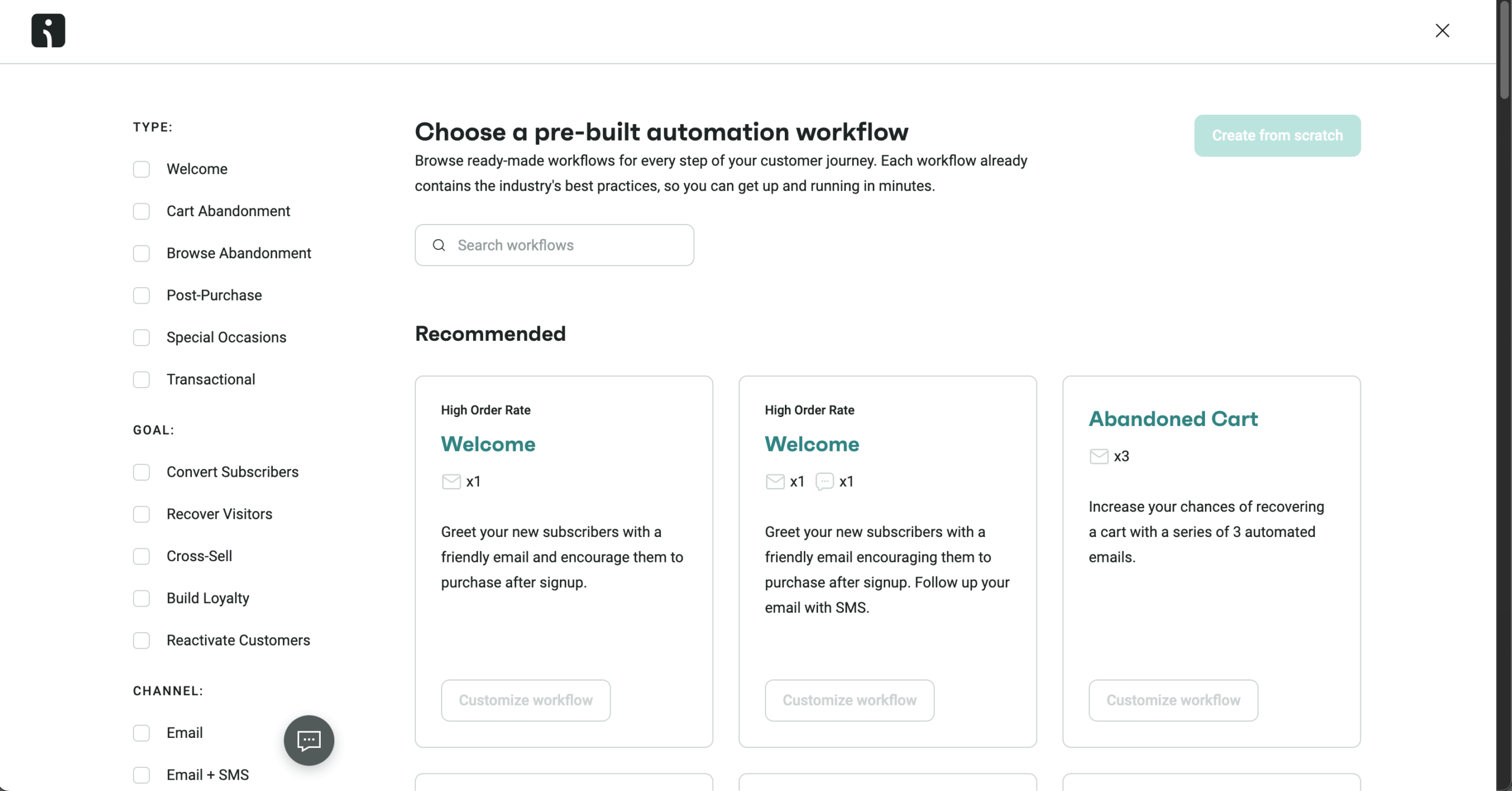
I started my testing of Omnisend by connecting it to a Shopify store. Within minutes, I had access to purchase history, browsing activity, and product-level data. I used that data to set up a basic abandoned cart flow with product recommendations and a follow-up SMS. Getting this live took around 25–30 minutes, since the triggers and templates were already aligned with ecommerce use cases.

The same setup extended into omnichannel campaigns. I built a flow where users received an email first, then an SMS reminder, and a web push notification if they didn’t return. All of this was managed inside a single workflow, so I didn’t need to coordinate separate tools or duplicate segments across channels.
I also tested signup forms and popups connected to the store. I set up an exit-intent popup offering a discount and another form triggered by scroll depth on product pages. These fed directly into automation flows, so new subscribers entered the same sequences without additional setup. The targeting rules–like exit intent and visitor behavior–were built in, which removed the need for external tools.
Where the difference shows is how tightly these features are tied to ecommerce actions. Product views, cart activity, and purchase behavior are already part of the workflow logic, so campaigns can react to what shoppers are doing in real time. Compared to platforms that require more setup to reach the same point, this reduces the time needed to launch store-specific campaigns.
You should go with Omnisend if you run an ecommerce store and want ready-made workflows, built-in popups, and email, SMS, and push campaigns managed in one system with minimal setup.
Pros & Cons
- Seamless Shopify/Woo/BigCommerce integration
- Email, SMS & push in one platform
- Prebuilt automation workflows
- Tracks revenue from emails
- Personalized product-based content
- 24/7 knowledgeable chat support
- Built mainly for ecommerce
- Editor can feel restrictive
- Analytics are fairly basic
- Fewer CRM integrations
- SMS costs add up
- No phone support
Key Features
- Ecommerce-specific automation. Pre-built workflows support cart recovery, product recommendations, and winback campaigns;
- Popups and forms. Signup forms and pop-ups can be used to capture leads and grow the email list;
- Omnichannel marketing. Email, SMS, and push notifications can be managed from one platform;
- Behavioral signup forms. Pop-ups and forms include targeting options like exit intent, scroll depth, and visitor rules without extra tools.
ActiveCampaign vs. Omnisend Pricing
| Plan tier | ActiveCampaign | Omnisend |
| Free Plan | 14-day free trial | $0/month (2,500 subscribers + 500 monthly emails) |
| Entry plan | $15/month (1,000 contacts, basic automation) | $14/month (2,500 subscribers + Unlimited monthly emails) |
| Mid-tier plan | $37/month (1,000 contacts + CRM + advanced automation) | $41/month (2,500 subscribers + Unlimited monthly emails) |
| High-tier plan | $79/month (1,000 contacts + advanced features, scales with contacts) | Custom price |
| Enterprise | $145/month (1,000 contacts + advanced features, scales with contacts) | – |
Limitations
- Ecommerce-first focus. Less suitable for B2B or sales pipeline–driven automation;
- Limited CRM features. No deep deal management or lead scoring comparable to AC;
- Narrow automation scope. Strong for retail flows, weaker for custom journeys;
- Platform-dependent value. Benefits decrease outside Shopify or WooCommerce ecosystems.
Drip — Ecommerce Lifecycle Marketing Automation
I started with Drip’s on-site marketing toolkit, setting up a pop-up and a slide-in form triggered by user behavior, plus a multi-step form connected to an email sequence. Everything was built inside the platform without needing an external tool like Privy or Justuno. The setup took around 20–25 minutes, and the forms were fed directly into automation workflows without additional configuration.
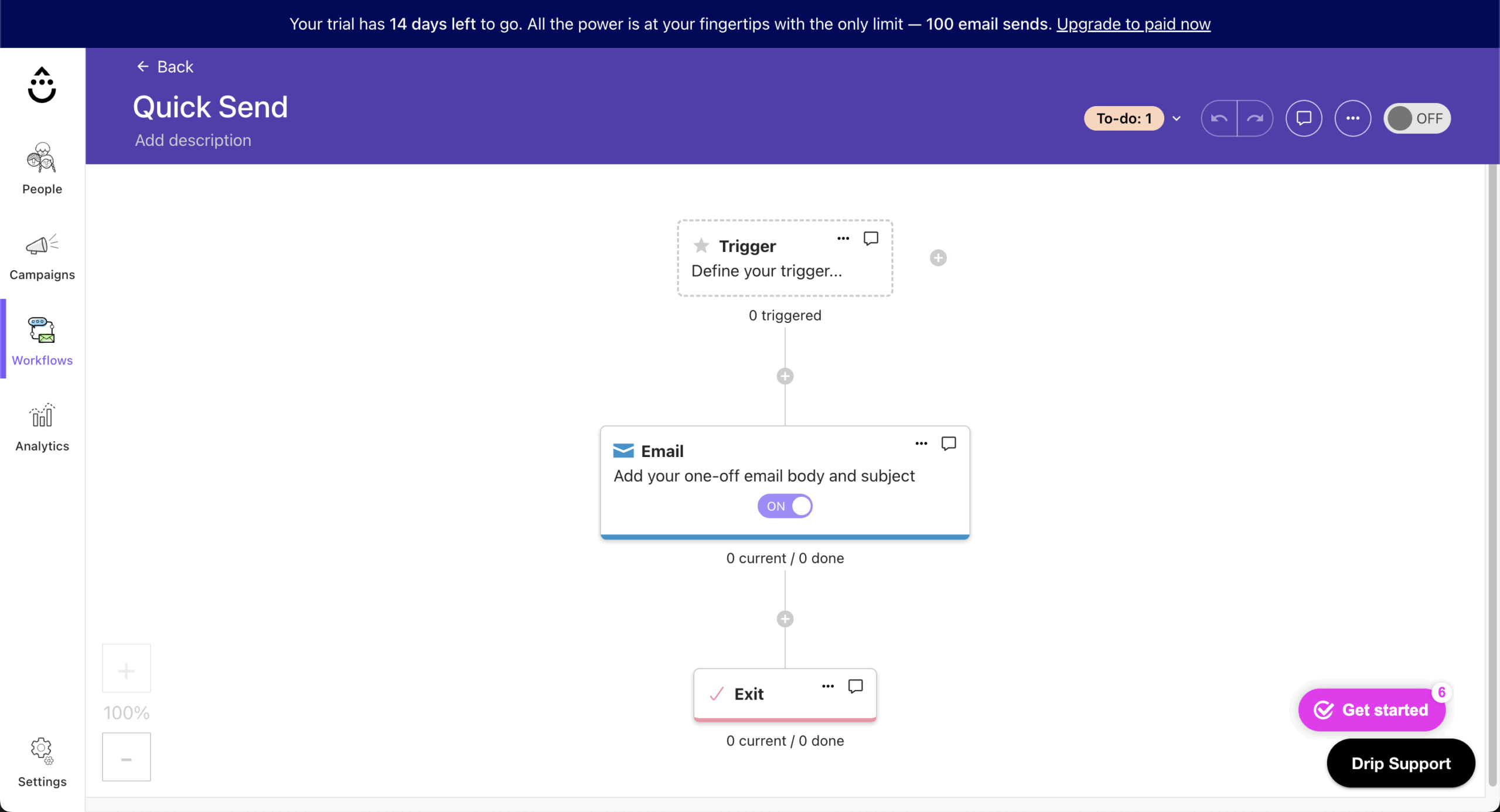
The prebuilt ecommerce playbooks were the fastest path to a running campaign. I launched an abandoned cart flow and a welcome sequence using the ready-made templates, then adjusted timing and messaging based on store activity.
The behavioral email triggers – cart abandonment, product views, purchase events – were already mapped to ecommerce actions, which removed the manual trigger configuration that tools like Klaviyo still require for custom setups.
The revenue dashboards are where Drip separates itself most clearly from general email platforms. I could see which specific workflows generated revenue, not just which emails were opened.
Where I hit a limitation was attribution depth – the dashboard showed revenue per workflow, but didn’t break down performance by individual email within a multi-step sequence. To get that granularity, I had to export data and cross-reference it manually, which partially defeats the purpose of built-in revenue tracking.
For ecommerce teams that want on-site forms, automation, and revenue reporting connected in one system, Drip removes meaningful setup overhead. The ceiling shows up when attribution needs to get more granular than workflow-level reporting.
Drip is a great choice if you run an ecommerce store and want on-site forms, automation, and revenue tracking in one system without complex setup.
Pros & Cons
- Ecommerce-focused features & integrations
- Advanced email workflow builder
- Revenue tracking & detailed analytics
- Unlimited email sending
- Strong deliverability
- Higher pricing than basic tools
- No free plan (trial only)
- Limited template library
- No landing page builder
- Ecommerce focus is not for all
Key Features
- On-site marketing toolkit. Pop-ups, slide-ins, quizzes, and multi-step forms can be created without additional tools;
- Ecommerce revenue dashboards. Revenue, top-performing campaigns, and workflow performance can be tracked from a single dashboard;
- Prebuilt ecommerce playbooks. Ready-made flows like welcome sequences and abandoned cart emails are available with minimal setup.
ActiveCampaign vs. Drip Pricing
| Plan tier | ActiveCampaign | Drip |
| Free Plan | 14-day free trial | 14-day free trial |
| Entry plan | $15/month (1,000 contacts, basic automation) | $39/month* (2,500 subscribers + Unlimited monthly emails) |
| Mid-tier plan | $37/month (1,000 contacts + CRM + advanced automation) | – |
| High-tier plan | $79/month (1,000 contacts + advanced features, scales with contacts) | – |
| Enterprise | $145/month (1,000 contacts + advanced features, scales with contacts) | – |
Limitations
- Minimal CRM functionality. No native deal pipelines or sales task automation;
- Ecommerce-biased workflows. Non-retail automation use cases feel secondary;
- Simpler journey logic. Advanced branching and multi-path automation are more constrained;
- Smaller feature surface. Broader marketing tools beyond lifecycle automation are limited.
Klaviyo — Data-Driven Ecommerce Marketing Automation
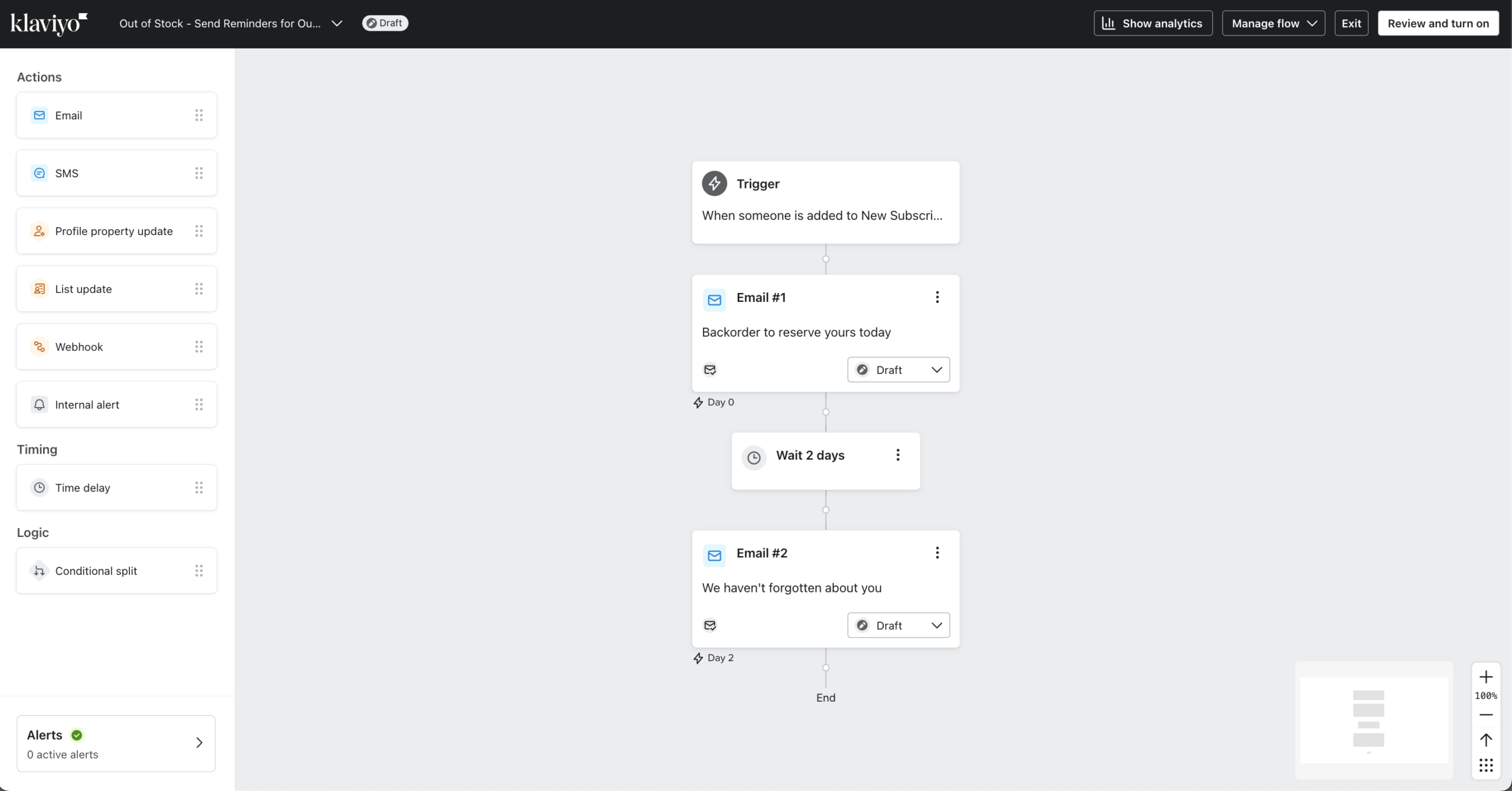
To see how Klaviyo fares compared to ActiveCampaign, I started by setting up a welcome series and abandoned cart sequence using prebuilt templates – both were live in around 20 minutes since the ecommerce triggers and timing logic were already mapped. The structure removed the condition-building that general email platforms still require for store-specific flows.

The predictive segmentation is where Klaviyo separates itself. I created segments based on expected behavior – likely repeat buyers, at-risk customers, predicted next purchase date – rather than past actions alone. Campaigns could be built around what customers are likely to do next, not just what they’ve already done.
However, the data mapping setup required more effort. Getting product attributes to surface correctly in emails took two iterations before recommendations displayed as intended – worth factoring in for teams without a dedicated developer.
Segment calibration also needed adjustment. My first predicted-purchase segment returned a much smaller audience than expected because Klaviyo requires a minimum purchase history to generate predictions – something not flagged clearly during setup.
For ecommerce teams with enough transaction history to fuel predictive segmentation, the targeting depth is unmatched. The ceiling shows up in setup, not capability.
Klaviyo is the right choice if you’re running a Shopify store with more than 5,000 customers and want deep purchase-behavior segmentation.
Pros & Cons
- Deep Shopify integration & segmentation
- Powerful, flexible automation builder
- Strong deliverability infrastructure
- Advanced A/B testing (beyond subject lines)
- Real-time data syncing
- Pricing scales quickly
- Steeper learning curve
- Slower support for lower tiers
- Limited non-ecommerce integrations
- Template editor can be glitchy
Key Features
- Predictive analytics. Customer behavior can be estimated using built-in models to guide targeting and messaging;
- Pre-built ecommerce flows. Ready-made workflows like welcome sequences and abandoned cart emails can be launched with minimal setup;
- Revenue-focused ecommerce analytics. Campaign and segment performance can be tracked with revenue attribution included;
- Ecommerce-native personalization. Product, browsing, and purchase data can be used to personalize content and recommendations in campaigns.
ActiveCampaign vs. Klaviyo Pricing
| Plan tier | ActiveCampaign | Klaviyo |
| Free Plan | 14-day free trial | $0/month (250 subscribers + 500 monthly emails) |
| Entry plan | $15/month (1,000 contacts, basic automation) | $30/month* (1,000 subscribers + 1,000 monthly emails) |
| Mid-tier plan | $37/month (1,000 contacts + CRM + advanced automation) | – |
| High-tier plan | $79/month (1,000 contacts + advanced features, scales with contacts) | – |
| Enterprise | $145/month (1,000 contacts + advanced features, scales with contacts) | – |
Limitations
- Diminished value outside ecommerce. Data advantages depend heavily on store integrations.
- Retail-centric design. Built mainly for ecommerce, not sales-driven B2B workflows;
- No deal pipelines. Lacks CRM-style sales automation and task management;
- Event-heavy automation. Works best with commerce data, less flexible otherwise;
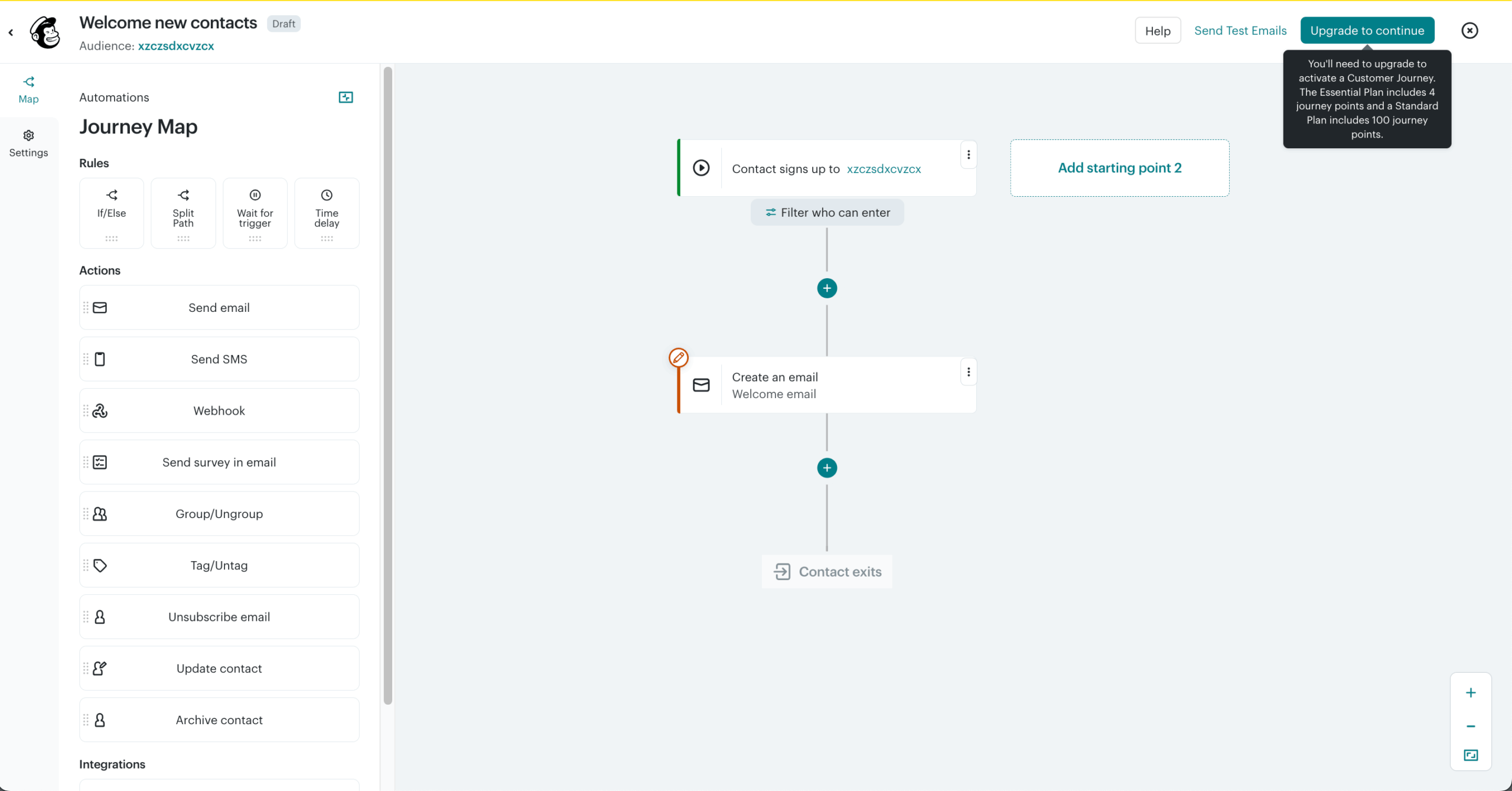
Mailchimp — Beginner-Friendly Email Marketing Platform
To start my Mailchimp testing, I connected a Shopify store and a Google Analytics account using native integrations – no custom configuration required. Once synced, purchase activity and contact behavior flowed into segments automatically. Building a targeted segment based on purchase history took around 5 minutes, compared to the manual list imports that non-native integrations typically require.

For campaign creation, I used the template editor to build a promotional email – adjusting layouts, adding content blocks, and applying brand styling without touching code. Starting from a template, I had a send-ready campaign in under 10 minutes.
On deliverability, SPF, DKIM, and suppression settings were pre-configured by default. According to third-party testing by EmailTooltester, inbox placement sits around 92.6%, which matched what I observed across test sends.
Where I hit a ceiling was segmentation. Targeting contacts who had opened a campaign in the last 30 days but hadn’t clicked anything required exporting, filtering, and reimporting, rather than setting a condition in the builder – a structural limitation that shows up quickly on more targeted campaigns.
For straightforward campaign management with reliable deliverability, this HubSpot alternative delivers. Mailchimp’s ceiling becomes apparent when segmentation needs to cross list boundaries.
Pros & Cons
- Intuitive, easy-to-use interface
- Reliable email deliverability
- Extensive integrations (Shopify, CRMs, etc.)
- Helpful AI tools (content & timing)
- Pricing increases with list size
- Limited automation on lower plans
- Advanced customization needs HTML/CSS
- A/B testing locked to higher tiers
- API limitations for advanced use
Key Features
- Content studio. Images, videos, and other assets can be stored and managed in one place;
- Website builder. Full multi-page websites can be created within the platform, not just landing pages;
- Extensive integration library. Connects with a wide range of third-party tools, including ecommerce platforms, CRMs, and analytics apps;
- Advanced template editor. Campaigns can be designed using a drag-and-drop builder with customizable layouts and content blocks.
ActiveCampaign vs. Mailchimp Pricing
| Plan tier | ActiveCampaign | Mailchimp |
| Free Plan | 14-day free trial | $0/month (250 subscribers + 500 monthly emails) |
| Entry plan | $15/month (1,000 contacts, basic automation) | $45/month* (1,000 subscribers + 10x your max contact list monthly emails) |
| Mid-tier plan | $37/month (1,000 contacts + CRM + advanced automation) | $27/month* (1,000 subscribers + 12x your max contact list monthly emails) |
| High-tier plan | $79/month (1,000 contacts + advanced features, scales with contacts) | $350/month* (1,000 subscribers + 15x your max contact list monthly emails) |
| Enterprise | $145/month (1,000 contacts + advanced features, scales with contacts) | – |
Limitations
- Basic automation depth. Advanced conditional logic and branching are limited;
- Weak CRM functionality. Sales pipelines and deal automation are minimal;
- Restricted segmentation. Complex behavioral targeting is harder to achieve;
- Lighter analytics. Reporting lacks deeper attribution and lifecycle insights.
Constant Contact — Newsletter-Focused Email Marketing
I started with Constant Contact’s event management features, setting up a simple event with registration, ticketing, and automated email confirmations. The process took around 30 minutes, and everything – from signup to attendee tracking – was handled inside the same system without connecting external tools like Eventbrite.
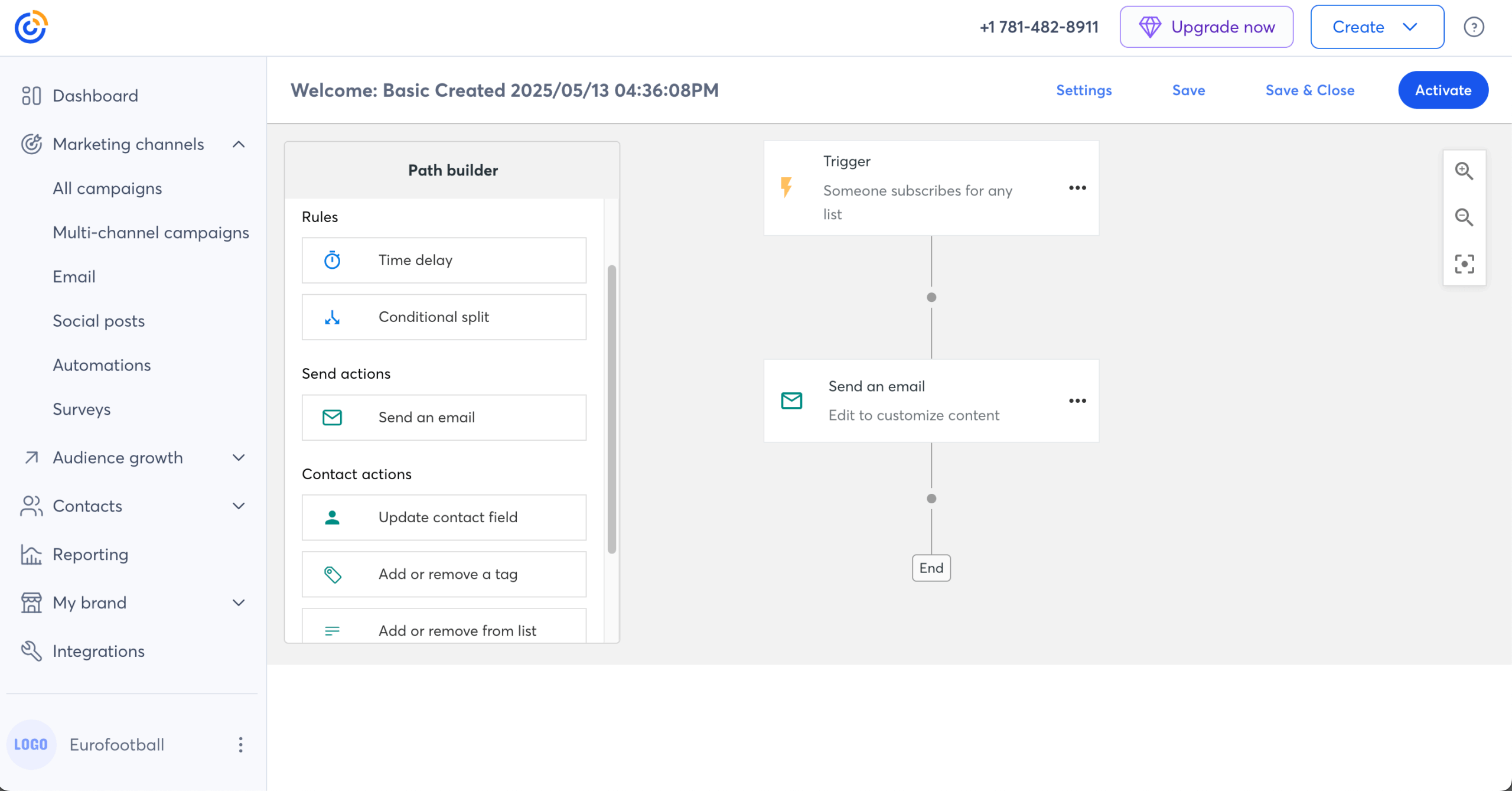
I also tested the resend-to-non-openers feature. After running an initial campaign, I set a condition to automatically resend to subscribers who hadn’t opened within 48 hours, with an adjusted subject line. The configuration was three steps inside the campaign editor rather than a separate automation builder – meaningfully faster than building a conditional flow from scratch.
Where I hit a limitation was list management. I wanted to build a segment targeting contacts across two separate lists – a straightforward cross-list re-engagement target. Constant Contact required a manual merge rather than a filter condition, which added overhead that the builder should have handled natively.
For small businesses running events alongside regular campaigns, Constant Contact removes real integration overhead. The ceiling shows up when audience targeting needs to cross-list boundaries or get more behaviorally specific.
Constant Contact is great for small businesses and event-driven teams that want email marketing, event management, and hands-on support in one platform without complex setup.
Pros & Cons
- Easy drag-and-drop email editor
- Large template library
- Strong contact management & segmentation
- Event marketing (RSVP, ticketing)
- Social media integrations
- Higher pricing than some competitors
- Limited automation on lower plans
- Steeper learning curve for advanced features
- Limited reporting on lower plans
Key Features
- Event management. Events can be promoted, tickets sold, and registrations managed within the same platform;
- Reliable customer support. Support is available throughout the week for setup, troubleshooting, and general questions;
- Resend to non-openers. Campaigns can be automatically resent to subscribers who didn’t open the first send;
- Built-in surveys and polls. Feedback can be collected using built-in survey and polling tools inside emails.
ActiveCampaign vs. Constant Contact Pricing
| Plan tier | ActiveCampaign | Constant Contact |
| Free Plan | No free plan, only a 14-day free trial | No free plan, only a 30-day free trial |
| Entry plan | $15/month (1,000 contacts, basic automation) | $30/month (1,000 subscribers + 10x your max contact list monthly emails) |
| Mid-tier plan | $37/month (1,000 contacts + CRM + advanced automation) | $55/month (1,000 subscribers + 12x your max contact list monthly emails) |
| High-tier plan | $79/month (1,000 contacts + advanced features, scales with contacts) | $110/month (1,000 subscribers + 24x your max contact list monthly emails) |
| Enterprise | $145/month (1,000 contacts + advanced features, scales with contacts) | – |
Limitations
- Very limited automation. Few triggers, conditions, or multi-step workflows;
- Minimal behavioral targeting. Lifecycle-based segmentation is basic;
- No real CRM automation. No deal management, scoring, or sales workflows;
- Short journey support. Complex customer paths are difficult to model.
HubSpot — CRM-Based Email Automation Platform
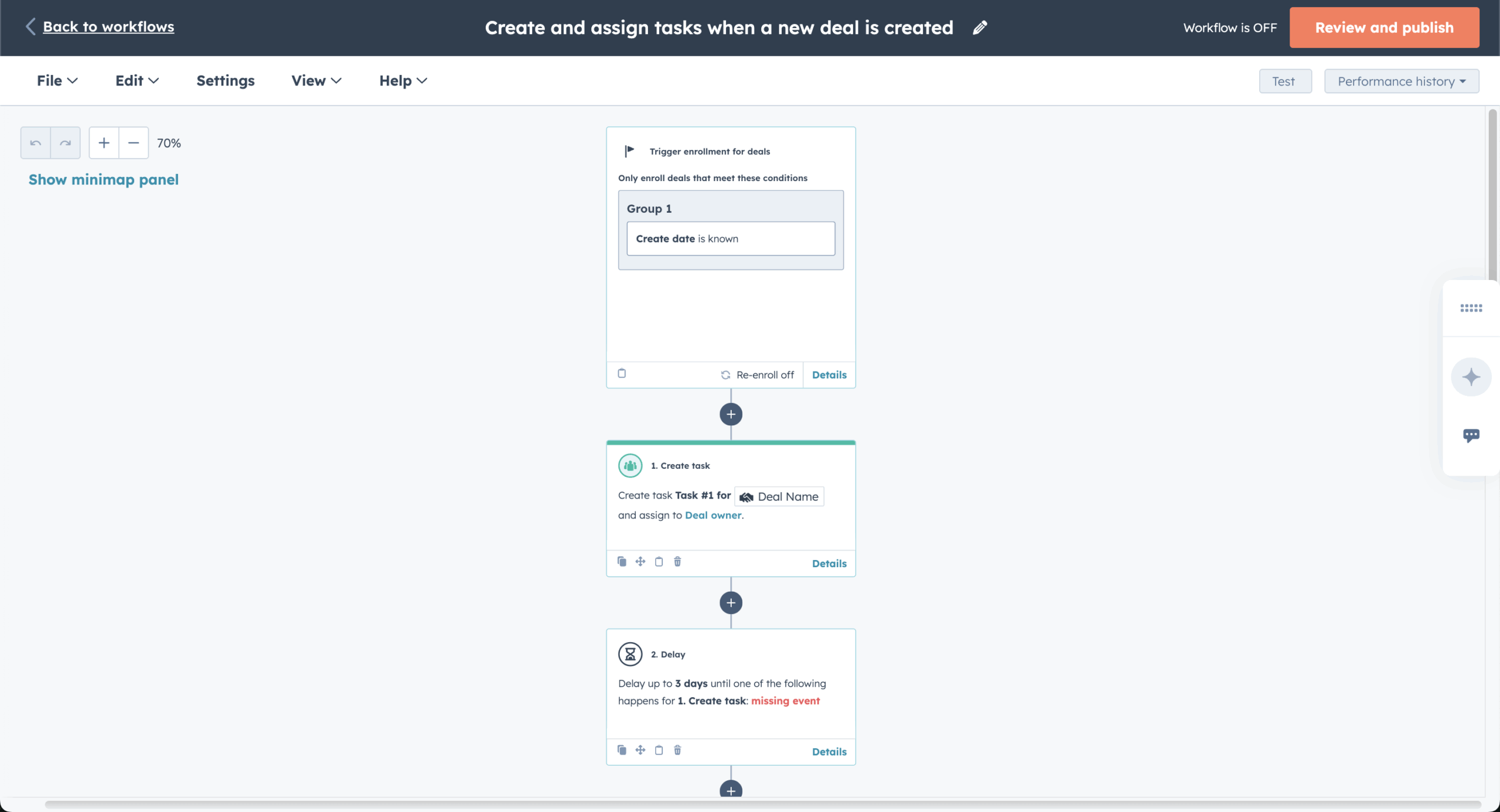
I began HubSpot’s testing by setting up a lead capture flow – landing page, form, email automation – which took around 40–50 minutes, mostly spent mapping how data moves between stages. The landing page builder, email editor, and CRM all sit in the same environment, so leads are moved into follow-up sequences without switching platforms.
The CRM connection changes how campaigns are built. I tested dynamic content blocks that changed based on the lifecycle stage – one version for leads, a different version for customers. The logic worked cleanly once configured, but finding where to set it up wasn’t obvious. It’s buried under a non-intuitive menu path in the email editor, and HubSpot’s documentation took two searches to surface the right article.
Where the ceiling becomes expensive: that level of personalization requires the Marketing Hub Professional tier at $926/month. For teams already on that plan for CRM reasons, the email capability adds genuine value. For teams evaluating HubSpot primarily for email, the cost is difficult to justify against more focused alternatives.
HubSpot is great for growing teams that want to manage marketing, sales, and customer data in one platform with a built-in CRM and full-funnel visibility.
Pros & Cons
- All-in-one suite (marketing, sales, support)
- Strong free plan (CRM, email, chat)
- Scales well with advanced automation
- Extensive third-party integrations
- Polished UI with drag-and-drop & AI
- Pricing jumps between tiers
- Seat-based pricing adds up
- Key features sold as add-ons
- Steeper learning curve
Key Features
- Landing page builder. Pages can be created within the platform and connected directly to campaigns for lead capture and conversions;
- 24/7 AI customer agents. Automated agents can handle customer inquiries and responses continuously;
- Automated prospecting. Leads can be identified and engaged using built-in data and outreach tools;
- Broader all-in-one business platform. Marketing, sales, service, and operations are managed in one system with shared data across teams.
ActiveCampaign vs. HubSpot Pricing
| Plan tier | ActiveCampaign | HubSpot |
| Free Plan | 14-day free trial | $0/month (1,000,000 subscribers + 2,000 monthly emails) |
| Entry plan | $15/month (1,000 contacts, basic automation) | $11/month (1,000 subscribers + 5x your max contact list monthly emails) |
| Mid-tier plan | $37/month (1,000 contacts + CRM + advanced automation) | $926/month (2,000 subscribers + 10x your max contact list monthly emails) |
| High-tier plan | $79/month (1,000 contacts + advanced features, scales with contacts) | $3,856/month (10,000 subscribers + 20x your max contact list monthly emails) |
| Enterprise | $145/month (1,000 contacts + advanced features, scales with contacts) | – |
Limitations
- Less email-centric. Marketing automation is part of a broader CRM-first system.
- Ecosystem dependency. Email automation works best when bundled with other HubSpot hubs;
- Heavier platform footprint. Can feel excessive if only email automation is needed;
- Advanced automation locked behind pricier tiers. Advanced automation is only available on higher-tier plans, which can be a deal-breaker for some.
FAQs
Who should consider switching from ActiveCampaign?
Businesses should consider switching from ActiveCampaign if they find its pricing too high for their needs, especially as advanced features like CRM, lead scoring, and deeper automation are only available on higher-tier plans. It may also not suit teams that prefer a simpler interface, faster setup, or don’t require complex, behavior-driven workflows. Smaller teams or beginners may benefit from more intuitive and cost-effective alternatives.
What is the best ActiveCampaign alternative for small businesses?
The best alternatives to ActiveCampaign for small businesses are Sender and Mailchimp. Sender is ideal for small teams that want advanced automation and segmentation on a generous free plan, making it a strong all-in-one starting point. Mailchimp, on the other hand, is better suited for beginners thanks to its user-friendly interface, templates, and AI-powered tools, making campaign setup easier for smaller teams.

even on the free plan.
How do automation features differ across ActiveCampaign alternatives?
Automation features vary a lot across ActiveCampaign alternatives, with some tools focusing on simple autoresponders and basic workflows, others offering advanced branching and multi-step customer journeys. Sender gives small businesses strong automation depth without a steep learning curve, while Mailchimp is better for simpler, beginner-friendly automations.
Are ActiveCampaign alternatives suitable for ecommerce businesses?
Yes, many alternatives to ActiveCampaign are well-suited for ecommerce businesses. Platforms like Omnisend and Klaviyo are built specifically for ecommerce, offering product recommendations, behavioral segmentation, and multi-channel automation. Meanwhile, tools like Sender provide a simpler, more affordable email marketing option for growing online stores.
Do ActiveCampaign alternatives support both marketing and transactional emails?
Yes, some ActiveCampaign alternatives do support both marketing and transactional emails. Platforms like Sender, Omnisend, and Brevo combine campaigns, automation, and transactional sending (like order confirmations or password resets) in a single dashboard, making it easier to manage everything together.