

Mailchimp built its reputation on being the approachable, affordable option for small businesses, but that reputation has aged poorly.
Since 2022, Standard plan prices have risen by as much as 92%, the free plan has been cut from 2,000 contacts to 250, and automations that once came standard have been moved behind higher paywalls. For a lot of businesses, the platform they signed up for no longer exists.
I spent two months testing 10 of the most credible Mailchimp alternatives in 2026—running each through the same deliverability tests, building the same automation sequences, and comparing pricing at the list sizes where the differences actually matter. What follows is what I found.
Why People Leave Mailchimp (With Real Numbers)
Mailchimp has raised its Standard plan prices by as much as 92% since 2022, increased lower plans limits, and removed automations from the free tier entirely. Those are not complaints; they are line items. This section documents exactly what changed, when, and what it costs a real business today.
The Pricing Escalation Problem
Mailchimp has raised Standard plan prices between 43% and 92% since 2022. The increases have not been announced with fanfare; they compound quietly across billing cycles.
Mailchimp Standard Plan — Monthly Price by List Size
| Contacts | 2022 | 2024 | 2026 (current) | % Increase 2022–2026 |
| 1,000 | ~$17 | ~$20 | ~$26 | +53% |
| 5,000 | ~$52 | ~$75 | ~$100 | +92% |
| 10,000 | ~$78 | ~$115 | ~$135 | +73% |
| 25,000 | ~$189 | ~$230 | ~$270 | +43% |
| 50,000 | ~$295 | ~$380 | ~$450 | +53% |
Three additional cost factors that do not appear in the table:
- April 2026 legacy increase: Third-party reporting (EmailToolTester, March 2026) indicates that accounts created before May 2019 were facing an approximately 11–13% price increase effective April 13, 2026. Mailchimp had not published a prominent primary announcement page for this change at the time of writing; treat this figure as directionally reliable but verify against your own account billing notices.
- The 10,000-contact threshold: Below 5,000 contacts, Mailchimp’s pricing is competitive. Above 10,000, alternatives like Brevo, MailerLite, and Sender typically cost 40–60% less for comparable functionality.
- Annual vs. monthly gap: The 15% annual discount requires upfront commitment. Businesses that pay month-to-month absorb the full price above.
The Contact-Counting Problem — Explained Concretely
Mailchimp charges based on the total number of stored contacts, not just active subscribers. This includes subscribed, unsubscribed, and non-subscribed contacts—unless you manually remove them.
What counts toward billing:
- Subscribed, unsubscribed, and non-subscribed contacts
- Duplicates across multiple audiences
What doesn’t count:
- Archived, cleaned, or deleted contacts
Example: A list with 3,000 subscribers, 400 unsubscribers, and 200 extra contacts can be billed as 3,600 contacts. Over time, this adds up. In older accounts, 20–40% of contacts are often inactive, yet still included in billing.
The issue? These contacts must be manually archived, and this step isn’t clearly surfaced in the interface. Many users only notice when their pricing tier increases—after already overpaying.
Platforms like MailerLite, Brevo, and Sender avoid this by charging only for active or unique contacts, making costs far more predictable.
The Free Plan Degradation Timeline
Mailchimp’s free plan was, for many years, the reason small businesses defaulted to the platform. That plan has been cut repeatedly and is now, by most practical measures, non-functional for any business with a real list.
| Year | Free plan features |
| 2019 | Up to 2,000 subscribers, 12,000 emails/month, single-step automations, landing pages, basic segmentation |
| 2022 | Up to 2,000 contacts, 10,000 emails/month, scheduling removed (January 2022), Mailchimp branding on all sends |
| 2023–2024 | 500 contacts, 1,000 emails/month, automations removed (December 2023), no A/B testing, Mailchimp branding, no scheduling |
| 2026 (current) | 250 contacts, 500 emails/month, daily send cap of 250, no automations, no A/B testing, Mailchimp branding, support available for first 30 days only |
A user who joined Mailchimp’s free plan in 2021 would face a very different product today. Key features like automations, scheduling, and A/B testing are no longer available without upgrading, and the free contact limit dropped from 2,000 to 250 (an 87.5% reduction).
What changed:
- Free plan lost core features (automation, testing, scheduling)
- Contact limit significantly reduced
- Many users pushed onto paid plans as lists grew
The biggest shift came in June 2025, when Mailchimp removed its Classic Automation Builder.
Impact of the change:
- Existing automations (welcome flows, reminders, winbacks) stopped working
- Users had to rebuild everything manually
- Free plan users lost automation entirely
- Essentials plan users get limited flows (up to 4 steps)
- Advanced automation requires higher-tier plans
In practice, this means more manual work, reduced functionality on lower tiers, and a clear push toward paid upgrades for anything beyond basic email sending.
When Mailchimp Is Still the Right Choice
Mailchimp is not the wrong choice for everyone. There are specific situations where staying makes more sense than switching to other email marketing software.
Stay on Mailchimp if:
- Your Marketing Automation Flows (rebranded from Customer Journey Builder in June 2025) are complex, multi-branch, and actively running. Rebuilding takes 2 to 8 hours per workflow.
- You use the native Intuit/QuickBooks integration inside your billing workflow. Most alternatives do not replicate it.
- You depend on several of Mailchimp’s 300+ native integrations simultaneously. Migration risk compounds with each active connection.
- You are on the free plan with under 250 contacts and send a simple monthly newsletter. The free tier still functions for minimal use cases.
Consider leaving if:
- Your list exceeds 10,000 contacts, and you are on a month-to-month Standard plan.
- You relied on automations that were removed from the free tier in 2023, or you need more than the 4-step flow limit on Essentials.
- Your annual Mailchimp spend has increased without a corresponding increase in features used.
How We Evaluated Each Platform
Each email marketing software platform was tested on its entry-level paid plan, or the most comparable tier to Mailchimp’s Essentials plan. I used a standardized 1,000-contact list sourced from a permission-based newsletter audience, all of whom had opened or clicked within the prior 90 days. Contacts were not purchased or scraped.
What I evaluated per platform:
- Email builder (drag-and-drop and HTML)
- Automation depth: trigger types, conditional logic, branching
- List and segment management
- Form builder and landing pages
- Deliverability (via GlockApps testing)
- Support responsiveness on the entry-tier plan
- Customer reviews across G2, Capterra, Trustpilot, and Reddit
- Pricing model and total cost at three list sizes: 1,000, 5,000, and 10,000 contacts
Deliverability testing: I ran each platform through GlockApps using identical plain-text and HTML emails sent from a warmed domain with no prior spam history. Inbox placement was recorded across Gmail, Outlook, and Apple Mail. Testing took place in February and March 2026. I’ve also consulted EmailToolTester for double-checking to reduce human error. Results reflect a point-in-time snapshot; deliverability varies based on sender reputation, domain age, and list quality.
User reviews: I pulled reviews from G2, Capterra, Trustpilot, and Reddit published between January 2024 and March 2026. I prioritized verified users on paid plans and excluded reviews that covered onboarding only, since those rarely reflect long-term platform behavior.
Pricing methodology: All pricing is verified as of April 2026. Annual billing discounts are noted separately from monthly pricing. All prices are shown in USD. Check each platform’s pricing page directly before purchasing; pricing in this category changes frequently.
Capterra, G2, Trustpilot, and Reddit to create an objective evaluation. Learn more about our review methodology
Mailchimp Competitors at Glance
These Mailchimp alternatives in 2026 cover the most common reasons people leave Mailchimp: pricing, contact-counting, missing automation, and ecommerce features. Not every tool here is a direct alternative to Mailchimp. Some do less but cost significantly less; others do more but require more setup.
Mailchimp Alternatives by Use Case
| Platform | Use case | Not ideal for | Starting price (1,000 contacts/month) | Free plan |
| Sender | Small businesses that need automation on a tight budget | Large teams needing advanced CRM features | ~$7 | Yes, up to 2,500 contacts |
| Omnisend | Small ecommerce shops running email and SMS from one platform | Service businesses or creators with no product catalogue | ~$16 | Yes, up to 250 contacts |
| Brevo | Businesses wanting email, SMS, and basic CRM without paying per contact | High-volume senders needing advanced segmentation | ~$9 (volume-based) | Yes, up to 300 emails/day |
| Klaviyo | Service businesses or creators with no product catalog | Creators, nonprofits, or service businesses with no purchase data | ~$45 | Yes, up to 250 contacts |
| Beehiiv | Newsletter operators and independent creators monetizing a subscriber list | Ecommerce or businesses needing marketing automation | ~$43 (Scale, billed annually) | Yes, up to 2,500 subscribers |
| Constant Contact | Brick-and-mortar businesses and event organizers needing simple list management | Cost-sensitive users; no free plan and higher base pricing than most alternatives | ~$35 | No |
| ActiveCampaign | Businesses that need email automation connected to a built-in CRM pipeline | Teams that want a simple tool; the feature depth has a learning curve | ~$29 | No |
| GetResponse | Businesses running webinars, landing pages, and email from a single platform | Users who need only email; the broader feature set adds cost and complexity | ~$19 | Yes, up to 500 contacts |
| Moosend | Budget-conscious teams that need solid automation without paying for brand recognition | Businesses that need a large native integration library | ~$9 | No (30-day trial) |
| MailerLite | Advanced email marketers who want A/B testing, automations, and landing pages at a lower price point than Mailchimp | Teams that need deep CRM integration or ecommerce revenue tracking | ~$10 | Yes, up to 1,000 subscribers |
Use this quick-pick list to match common business needs with the Mailchimp alternative that fits best, without digging through full feature comparisons.
- Sender — for small and growing businesses
- Omnisend — for ecommerce automation & SMS
- Brevo — for all-in-one sales and marketing
- Klaviyo — for data-driven ecommerce segmentation
- Beehiiv — for simply beautiful newsletters
- Constant Contact — for simple email blasts
- ActiveCampaign — for advanced CRM + sales automation
- GetResponse — for funnels, webinars, and lead generation
- Moosend — for digital marketing agencies
- MailerLite — for easy newsletter creation
10 Mailchimp Alternatives Reviewed in 2026
The reviews below cover each platform in detail: what it does well, where Mailchimp still has an edge, who it is not suited for, and a direct vs Mailchimp pricing comparison.
The order is not a ranking from best to worst. Each platform has a different strength, and the right choice depends on your use case, list size, and budget.
Sender
Best for: Small and growing businesses, marketing, and transactional emails;
Sender pricing: Paid plans start at $7/month for 1,000 subscribers + 12,000 monthly emails;
Sender Free plan: Up to 2,500 subscribers + 15,000 monthly emails.

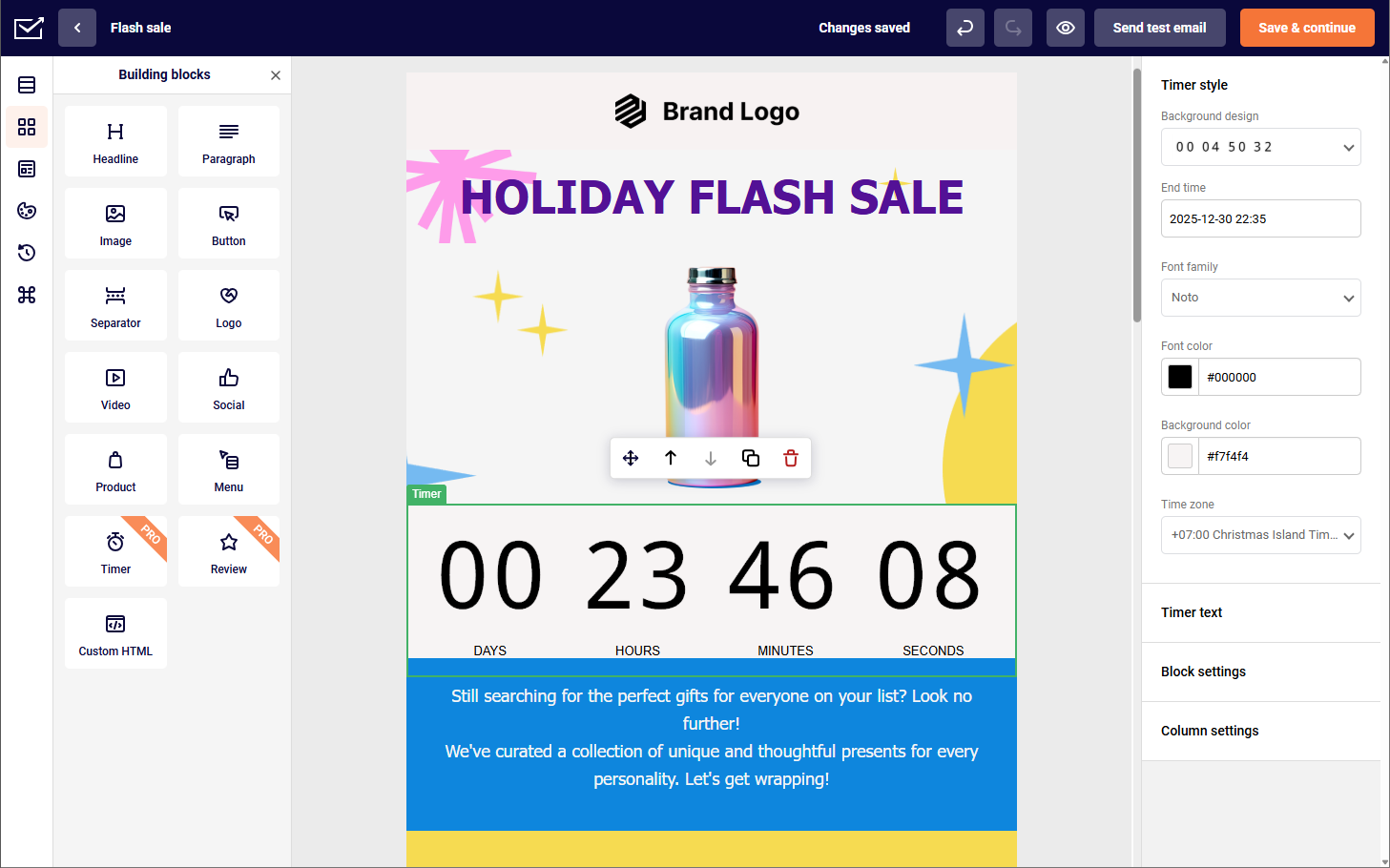
Sender is built for most small businesses that need reliable email delivery, basic automation, and a free entry point that does not expire. It does not try to compete with ecommerce-focused platforms or CRM-heavy tools, making it one of the strongest free Mailchimp alternatives for small businesses.
The generous free plan covers 2,500 subscribers and 15,000 emails per month with automation included, and honestly, I could not find free plans that offer as much as Sender, making it the most functional free tier on this list.
Sender’s affordable pricing stays below Mailchimp at every contact tier on paid plans, and the gap widens as list size grows. At 10,000 contacts, Sender’s Standard plan costs roughly 55% less than Mailchimp’s equivalent.
What worked better than Mailchimp?
- High deliverability. Deliverability on my GlockApps seed list test came in at 98.1% inbox placement across Gmail and Outlook combined. That is materially above Mailchimp’s 89.5% on the same seed list. EmailToolTester’s independently conducted test (October 2025) recorded 99.3%. My result was slightly lower, likely due to a younger sending domain.
- Pricing at scale is the clearest advantage. At 5,000 contacts, Sender’s Standard plan runs approximately $29/month on annual billing versus $100/month on Mailchimp Standard. That is a saving of roughly $852/year for comparable core functionality.
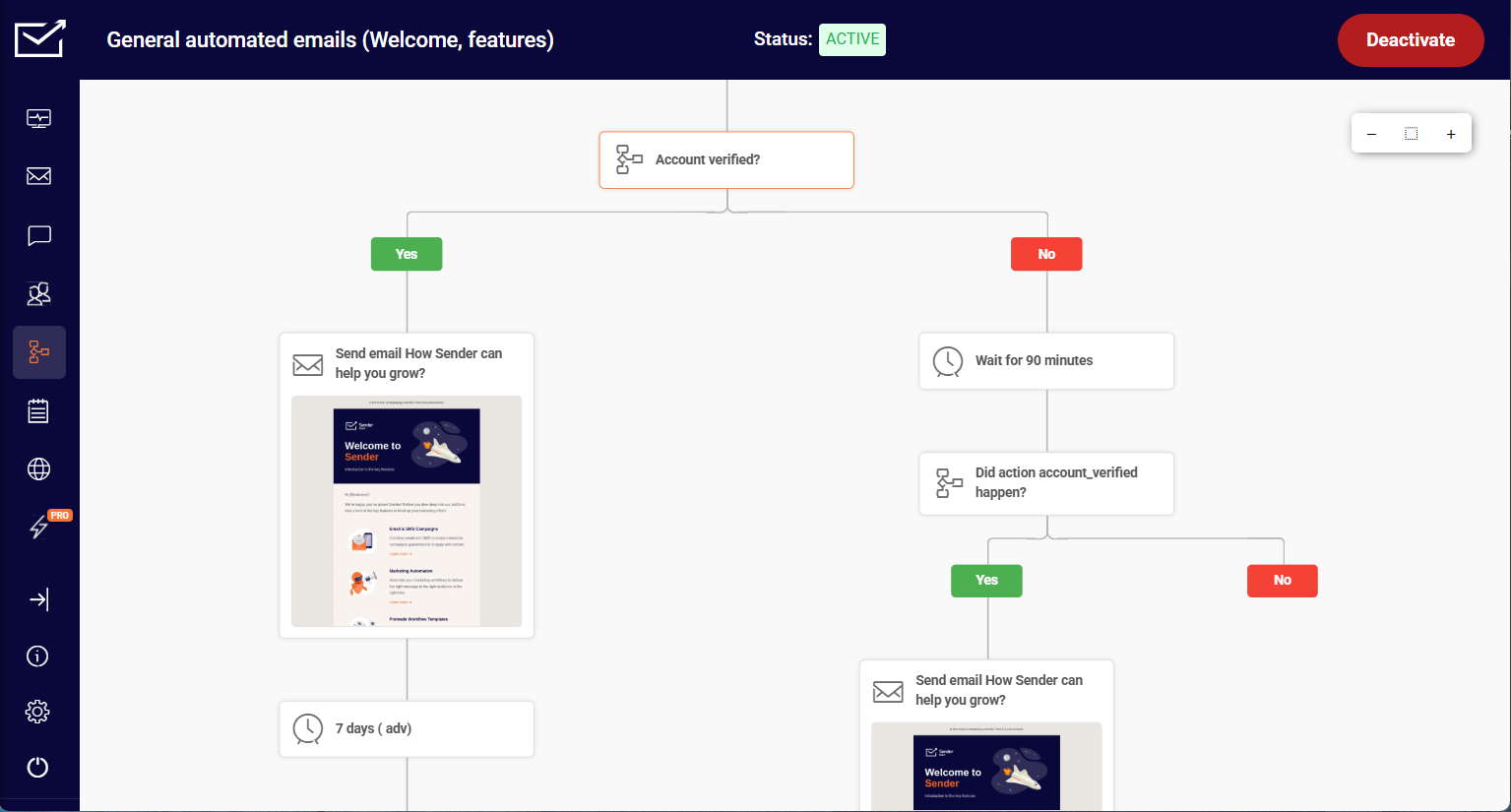
- Automation. Sender’s automation builder outperforms Mailchimp’s at equivalent plan levels, offering behavior-based triggers, conditional branching, and multi-step workflows without the paywall restrictions that limit Mailchimp’s automation on lower tiers.
- Support responsiveness on entry-tier plans. Support responsiveness on entry-tier plans. Live chat is available to free users. During my testing, the median first response was under two minutes. Mailchimp restricts support access on lower-tier plans. This matches the pattern in verified G2 reviews from 2024–2025, where support speed on free and entry-tier plans is consistently cited as a primary reason users stay on the platform long-term.
Where is Mailchimp better than Sender?
- Integration library. Mailchimp has 300+ native integrations. Sender connects natively with WordPress, WooCommerce, and Shopify, and relies on Zapier or Make for most other connections. If your stack includes more than two or three tools outside those platforms, you will need a workaround.
- Reporting depth. Mailchimp’s analytics dashboard includes audience growth trends, engagement over time, and comparative campaign reporting. Sender’s reporting covers the basics (opens, clicks, unsubscribes) but lacks the historical trend view that Mailchimp provides on Standard and above.
- Template volume. Mailchimp offers a larger template library with more design variety. Sender’s template selection is adequate but smaller, and customization options within templates are more limited.
Who should not use Sender?
Sender is not the right fit if your stack depends on more than a handful of third-party integrations, or if you need CRM-style contact management beyond basic tagging and segmentation. At that point, the native integration gaps require supplemental tools (Zapier, Make) that add cost and maintenance, and start to erode the pricing advantage that makes Sender worth considering in the first place.
Businesses running complex, multi-branch automation sequences with advanced conditional logic will also find the builder limiting compared to ActiveCampaign or Klaviyo.
Mailchimp vs. Sender Cost Comparison
Pricing (monthly billing):
| Contacts | Sender Standard | Mailchimp Standard | Annual saving (with Sender) |
| 1,000 | $10 | ~$26 | ~$192/year |
| 5,000 | $33 | ~$100 | ~$804/year |
| 10,000 | $57 | ~$135 | ~$936/year |
| 25,000 | $117 | ~$270 | ~$1,836/year |
| 50,000 | $227 | ~$450 | ~$2,676/year |
Deliverability: My GlockApps test recorded 98.1% inbox placement (February 2026) of Sender. EmailToolTester’s independent test (October 2025) recorded 99.3%. Mailchimp recorded 89.5% on the same seed list in my testing.
Omnisend
Best for: Ecommerce brands looking for a budget-friendly email marketing solution;
Omnisend pricing: Starts at $16/month for up to 500 contacts + 6,000 monthly emails;
Omnisend free plan: Available for up to 250 contacts + 500 monthly emails.

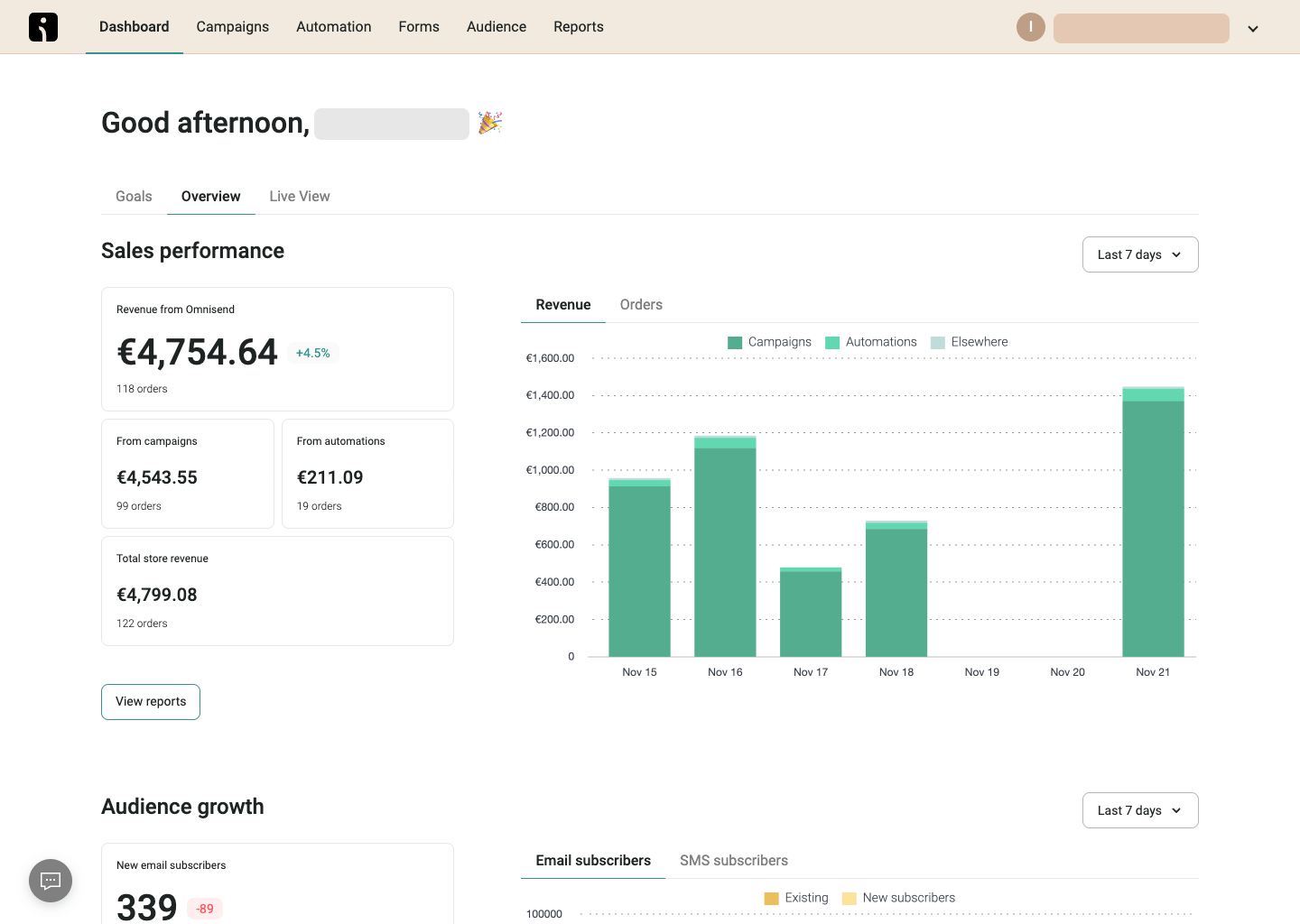
Omnisend is purpose-built for ecommerce email marketing. Every feature—from its 27 pre-built automation workflows to its shoppable email blocks—assumes you have a product catalog and want to turn customer behavior into revenue.
The platform combines email, SMS marketing, and web push notifications under one plan, which eliminates the need to manage separate tools for each channel. For ecommerce brands already paying for a dedicated SMS tool, consolidation can offset the plan cost.
Pricing is contact-based, but the free plan includes all core features at every tier, which is unusual. The catch is that the free tier caps you at 250 contacts—the same ceiling as Mailchimp’s free plan as of 2026.
What worked better than Mailchimp?
- Ecommerce-specific automation out of the box. During testing, I activated a pre-built abandoned cart sequence in under ten minutes. Mailchimp’s equivalent requires building the flow manually from scratch in its Marketing Automation Flows builder. The time difference is material for small store operators without a dedicated marketing staff.
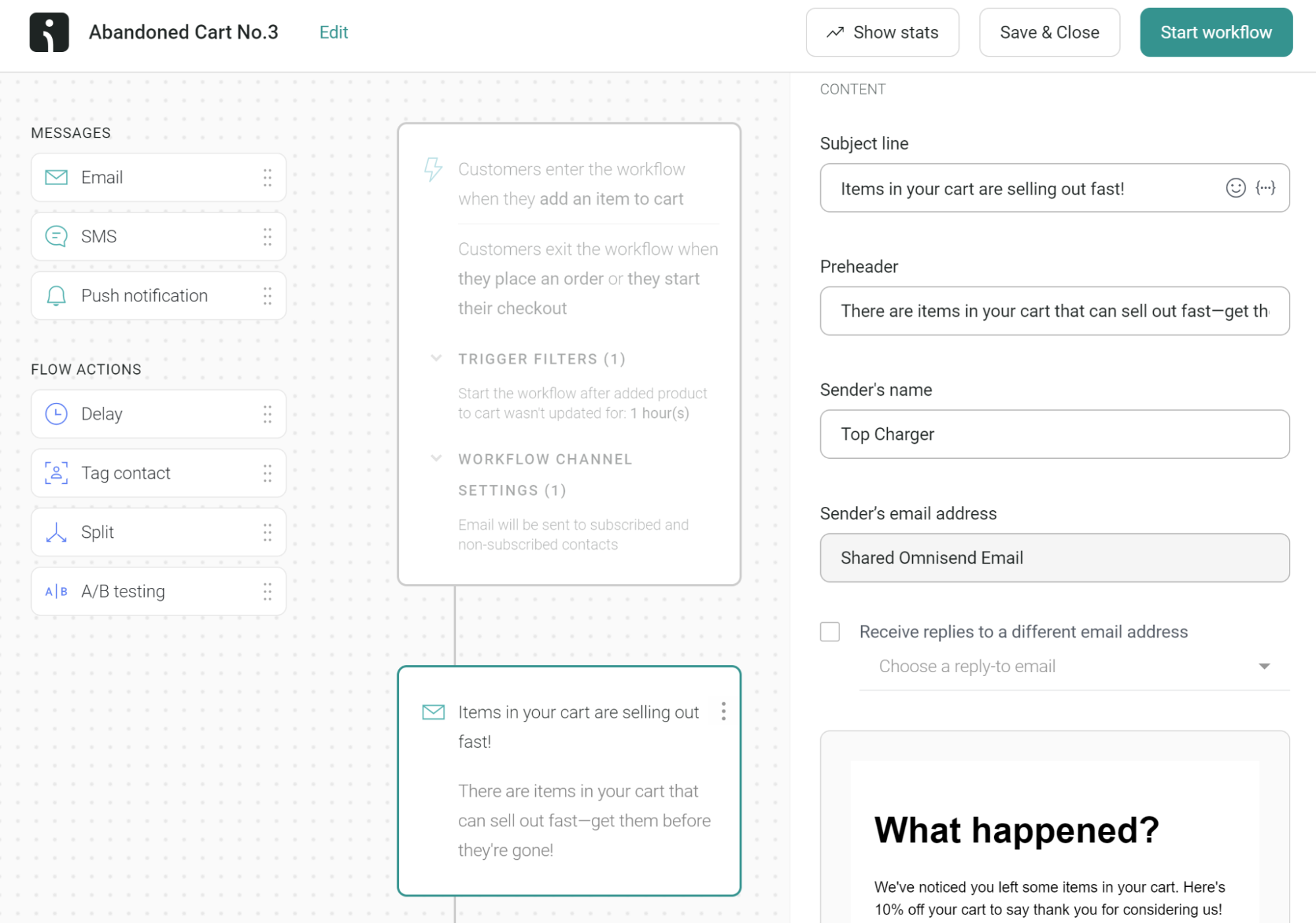
- SMS and email managed from one dashboard. I set up a post-purchase sequence that sent an email immediately after checkout, followed by an SMS three days later if the email went unopened. Replicating this in Mailchimp requires an SMS add-on at extra cost and does not offer the same native trigger logic.
- Contact-inclusive feature access. Unlike Mailchimp, where automation sits behind the Standard plan paywall, Omnisend includes automation, segmentation, and A/B testing across all paid tiers. I did not hit a feature gate during Standard plan testing. Capterra reviewers on paid plans frequently highlight this as a differentiator, particularly smaller ecommerce operators who found feature gating on Mailchimp a consistent frustration before switching.
Where is Mailchimp better than Omnisend?
- Non-ecommerce use cases. Omnisend’s builder, automation templates, and reporting are oriented around purchase data. A service business, B2B company, or content creator will find the interface full of product-related prompts and features they cannot use.
- Integration breadth. Mailchimp’s 300+ native integrations cover a far wider range of tools than Omnisend’s library, which concentrates on ecommerce platforms. If your stack includes CRM tools, project management software, or niche SaaS products, Mailchimp is more likely to have a native connection.
- SMS cost predictability. On Omnisend’s Standard plan, SMS credits are purchased separately and expire after 60 days. In testing, a business sending moderate SMS volume found monthly costs harder to forecast than anticipated. The Pro plan bundles SMS credits equal to the plan cost, but the entry point is $59/month.
Who should not use Omnisend?
Omnisend is not suited for businesses without a product catalogue. The platform’s segmentation logic, automation triggers, and reporting dashboards are built around purchase events—browse abandonment, cart recovery, post-purchase upsell. A consultant, agency, or newsletter operator will pay for ecommerce infrastructure they cannot put to use.
It is also a poor fit for anyone whose primary concern is minimising per-contact cost at scale; at 10,000 contacts the Standard plan reaches approximately $132/month, which is comparable to Mailchimp rather than substantially cheaper.
Mailchimp vs. Omnisend Cost Comparison
Pricing (monthly billing, Standard plan):
| Contacts | Omnisend Standard | Mailchimp Standard | Difference |
| 500 | ~$16 | ~$20 | Omnisend cheaper |
| 2,500 | ~$44 | ~$60 | Omnisend cheaper |
| 5,000 | ~$81 | ~$100 | Omnisend cheaper |
| 10,000 | ~$132 | ~$135 | Near parity |
| 25,000 | ~$270 | ~$270 | Near parity |
Deliverability: My GlockApps test recorded 91.3% inbox placement across Gmail and Outlook. EmailToolTester’s independently conducted test (2025) recorded 89.5%. Results are broadly comparable to Mailchimp on the same seed list.
Brevo
Best for: Ecommerce startups looking for a reliable Mailchimp alternative;
Brevo pricing: Starts at $9/month for up to 500 contacts + 5,000 monthly emails;
Brevo Free plan: Available for up to 2,000 contacts + 9,000 emails/month.

Brevo prices by email volume sent, not by contacts stored. On higher-volume paid plans, you can hold a very large number of contacts and your bill rises with what you send rather than what you store. For businesses with large lists but infrequent sending cadences, this is a structurally different cost model from Mailchimp.
There is a catch at the lower tiers, however: Brevo’s entry Starter plan (5,000 emails/month) stores up to 500 contacts; the next tier (10,000 emails/month) stores up to 1,500 contacts; from 20,000 emails/month upward, storage reaches up to 500,000 contacts. The “send by volume, not by contacts” advantage is most meaningful once you reach the higher tiers.
The platform includes a lightweight marketing CRM tool, SMS, WhatsApp, and live chat across most paid tiers, which makes it one of the more complete multichannel marketing stacks at this price range.
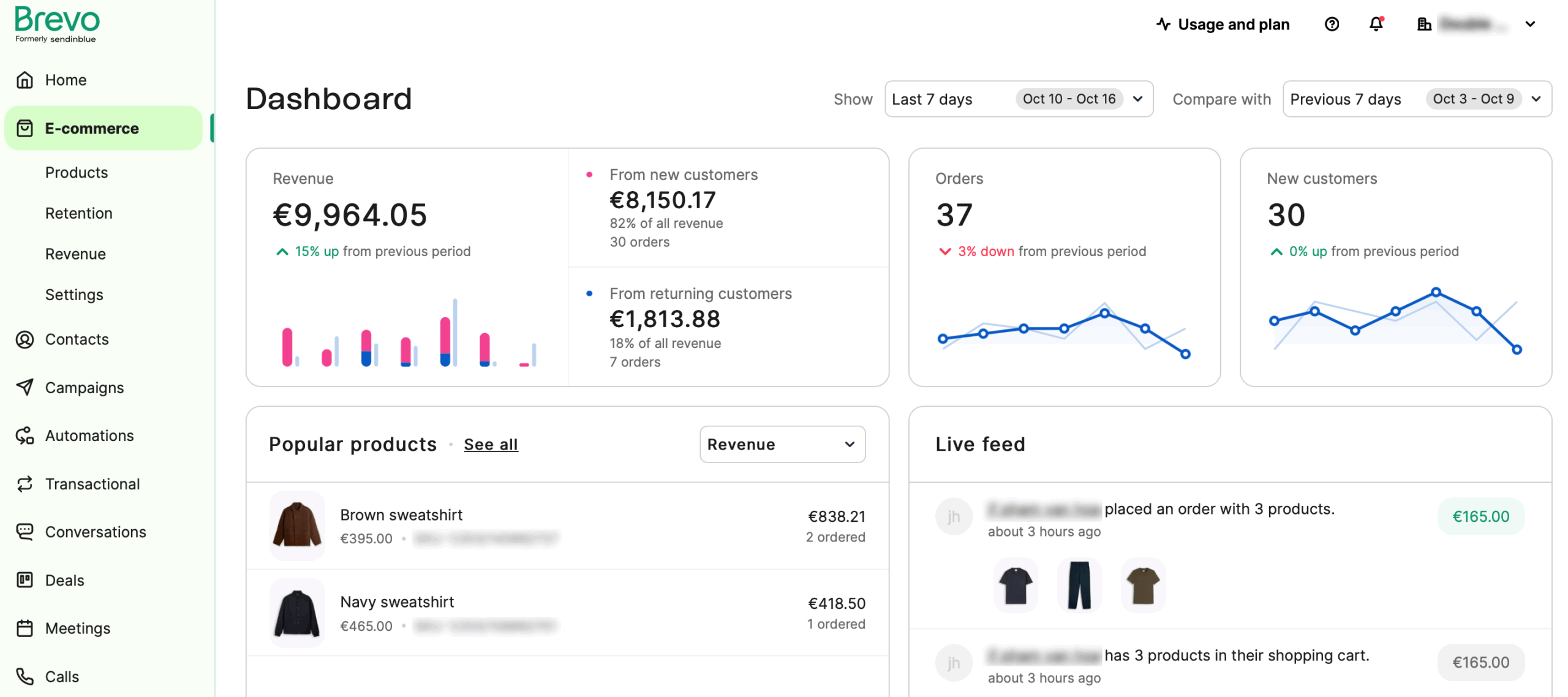
At 10,000 contacts sending 20,000 emails per month, Brevo’s Business plan costs approximately $18/month versus Mailchimp Standard’s $135/month. That gap exists because Mailchimp charges for contacts stored, not emails sent.
What worked better than Mailchimp?
- Volume-based pricing is the clearest structural advantage at mid-to-higher tiers. In my testing, once I reached the 20,000 emails/month threshold, I could hold a very large contact list and pay only for the emails I actually sent. On Mailchimp, a large list size triggers a higher monthly tier regardless of send frequency.
- CRM is included. Brevo’s built-in CRM handles basic pipeline management without requiring a separate tool or Zapier connection. During testing, I used it to track follow-ups from a contact form alongside email sequences. Mailchimp offers no equivalent native CRM. In G2 reviews from 2024–2025, the CRM inclusion is one of the most cited reasons B2B users choose Brevo over other Mailchimp alternatives, though reviewers on lower-tier plans frequently flag the branding removal cost as an unwelcome surprise — consistent with what the pricing section notes above.
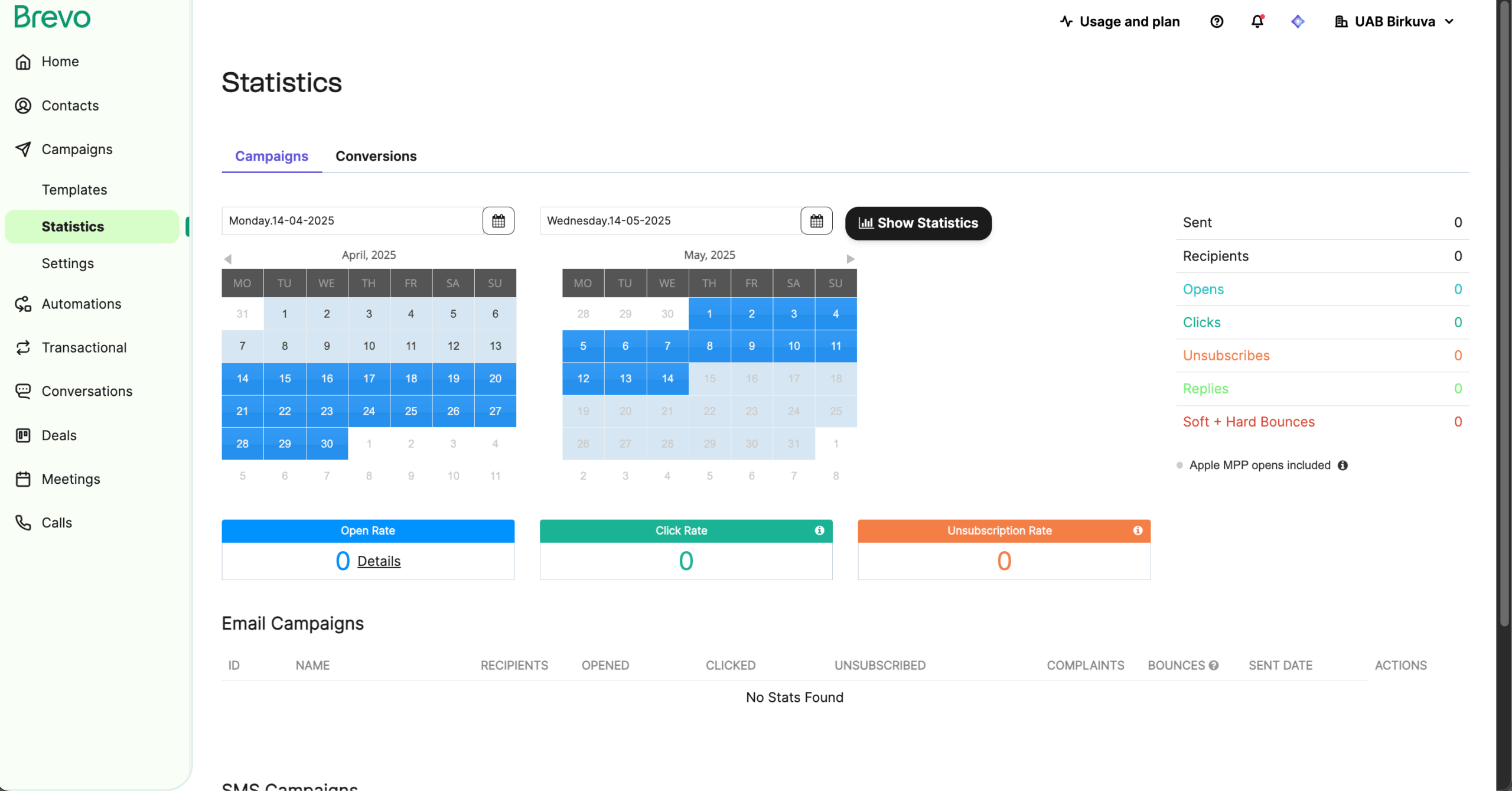
- Reporting and analytics. Brevo’s reporting dashboard gives cleaner, more actionable campaign-level data than Mailchimp at equivalent plan levels, with real-time open and click stats, geographic breakdowns, and email heat maps that are easier to act on without digging through multiple report views.
Where is Mailchimp better than Brevo?
- Automation visual experience. Mailchimp’s Marketing Automation Flows canvas is easier to navigate for multi-branch sequences. Brevo’s automation builder is functional but the interface feels less polished when building flows with five or more steps and conditional branches.
- Template library. Mailchimp offers more templates and more design flexibility within its drag-and-drop builder. Brevo’s templates are adequate but the selection is smaller and customisation options are more limited.
- Logo removal cost. On Brevo’s Starter plan, removing Brevo branding from outbound emails costs an additional $10.80/month. This is not disclosed prominently. Mailchimp’s Essentials plan removes branding as standard.
Who should not use Brevo?
Brevo’s pricing advantage disappears for high-frequency senders at smaller list sizes, and lower-tier plans carry meaningful contact storage limits—businesses with a large existing list will need to reach the higher volume tiers before the contact-storage model works in their favor.
Businesses that need deep ecommerce automation (predictive segmentation, revenue-attributed flows, product-specific triggers) will also find Brevo’s capabilities limited compared to Klaviyo or Omnisend.
Mailchimp vs. Brevo Cost Comparison
Pricing (monthly billing, volume-based):
| Monthly emails sent | Brevo plan | Brevo cost | Mailchimp Standard (5,000 contacts) |
| 5,000 | Starter | ~$9 | ~$100 |
| 20,000 | Business | ~$18 | ~$100 |
| 40,000 | Business | ~$27 | ~$100 |
| 100,000 | Business | ~$65 | ~$100 |
Deliverability: My GlockApps test recorded 94.2% inbox placement across Gmail and Outlook. EmailToolTester’s independent test (2025) recorded 96.3%. Both figures are above Mailchimp’s 89.5% on the same seed list.
Klaviyo
Best for: Ecommerce businesses looking for advanced segmentation features;
Klaviyo pricing: Starts at $20/month for up to 500 contacts + 5,000 monthly emails;
Klaviyo free plan: Available for up to 250 contacts and 500 monthly emails.

Klaviyo is built for ecommerce brands where purchase behavior drives marketing decisions. Its segmentation engine updates in real time as customers browse, buy, and churn—which enables targeting that static list-based tools cannot replicate.
Predictive analytics are included on paid plans: expected next order date, churn risk, customer lifetime value, and purchase likelihood are calculated from your store data and available as segmentation conditions. These are the key features that justify Klaviyo’s pricing for stores where email is a primary revenue channel.
Pricing is steep relative to most alternatives in this review. At 1,001 to 1,500 contacts, the entry paid plan runs approximately $45/month. At 10,000 contacts, it reaches approximately $150/month—matching or exceeding Mailchimp’s Standard tier despite Mailchimp’s broader general feature set.
What worked better than Mailchimp?
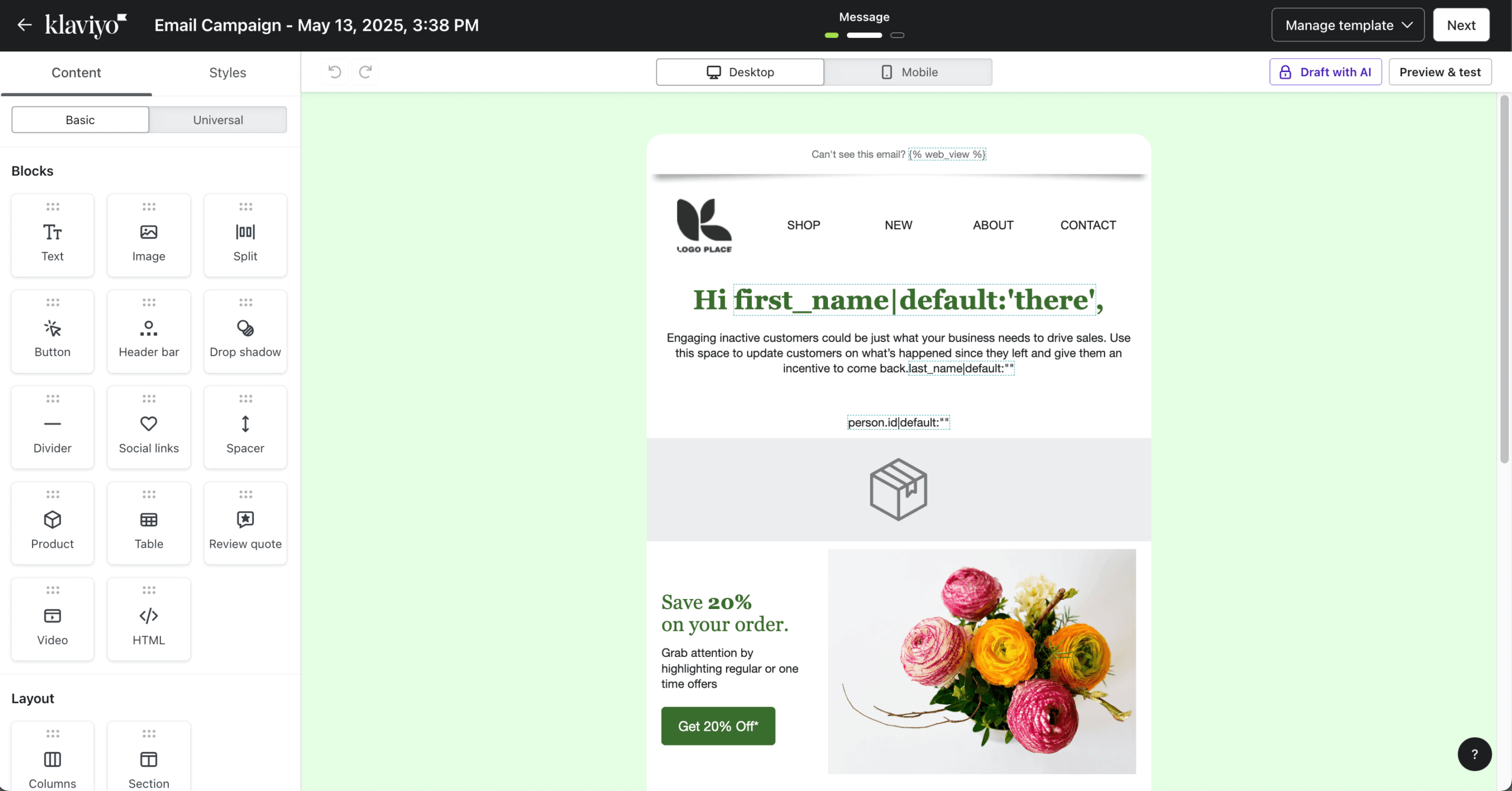
- Ecommerce segmentation depth. During testing I built a segment targeting customers who had purchased more than twice in the last 90 days, had a predicted lifetime value above a specified threshold, and had not opened the last three emails. Mailchimp’s segmentation does not support predictive lifetime value or churn risk as native conditions.
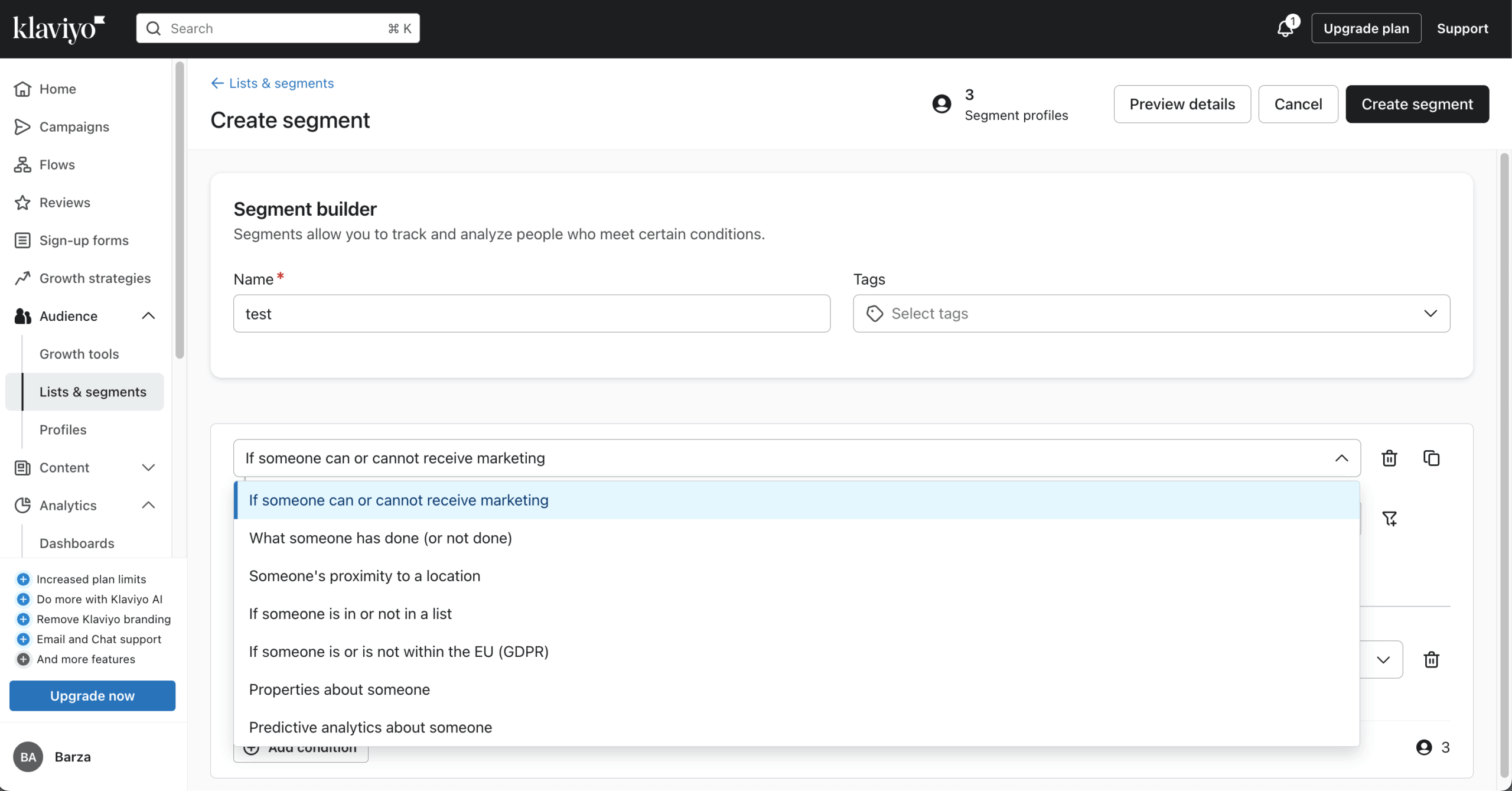
- Revenue attribution and advanced reporting. Every campaign and flow in Klaviyo shows attributed revenue—meaning you can see directly how much money a specific automation sequence generated. During testing, I confirmed this tracked correctly against Shopify order data. Mailchimp’s revenue reporting exists but is less granular and requires e-commerce integration to be configured manually.
- Shopify sync depth. Product catalogs, order history, and browse abandonment data sync natively and update in real time. I tested browse abandonment triggers and confirmed they fired within 15 minutes of the behavior event. Mailchimp’s Shopify connection requires more manual configuration to achieve the same result.
Where is Mailchimp better than Klaviyo?
- Price per contact for non-ecommerce use. Klaviyo’s pricing is designed around the assumption that store data will generate a return that offsets the cost. For businesses without purchase data to activate—service companies, B2B, newsletters—the cost per contact is high relative to what the platform can actually do for them.
- Ease of setup. Mailchimp’s onboarding is faster. Klaviyo requires more initial configuration: connecting the store, setting up flows, and understanding the profile-based billing model. In testing, initial setup to first campaign took roughly four times longer on Klaviyo than on Mailchimp.
- Support on lower-tier plans. Klaviyo’s free plan offers email support only. G2 reviewers consistently note slow response times across plans, ranking support as a top complaint. Mailchimp’s support is not exceptional but it is faster at equivalent plan levels.
- General-purpose email marketing. Klaviyo’s email builder, template library, and broadcast campaign tools are functional but not a priority feature area. Mailchimp’s builder and template selection are more polished for general newsletter use.
Who should not use Klaviyo?
Anyone without an ecommerce store. The pricing model, feature set, and onboarding process all assume you have product and purchase data to segment and automate against. A content creator, consultant, nonprofit, or B2B company will pay Klaviyo’s premium pricing for a fraction of its capability.
Even for ecommerce businesses, Klaviyo’s value only becomes clear once the store reaches a volume where behavioral segmentation makes a measurable difference—typically above $50,000 in monthly revenue, where the predictive analytics have enough data to act on.
Mailchimp vs. Klaviyo Cost Comparison
Pricing (monthly billing):
| Contacts | Klaviyo | Mailchimp Standard | Difference |
| 1,000 | ~$45 | ~$26 | Klaviyo 73% more |
| 5,000 | ~$100 | ~$100 | Near parity |
| 10,000 | ~$150 | ~$135 | Klaviyo 11% more |
| 25,000 | ~$400 | ~$270 | Klaviyo 48% more |
| 50,000 | ~$700 | ~$450 | Klaviyo 56% more |
Deliverability: My GlockApps test recorded 94.8% inbox placement across Gmail and Outlook. EmailToolTester’s independent test (2025) recorded 95.6%.
Beehiiv
Best for: Newsletter operators and independent creators;
Beehiiv pricing: Starts at $43/month for up to 1,000 contacts + unlimited emails;
Beehiiv free plan: Up to 2,500 emails/month and unlimited emails.

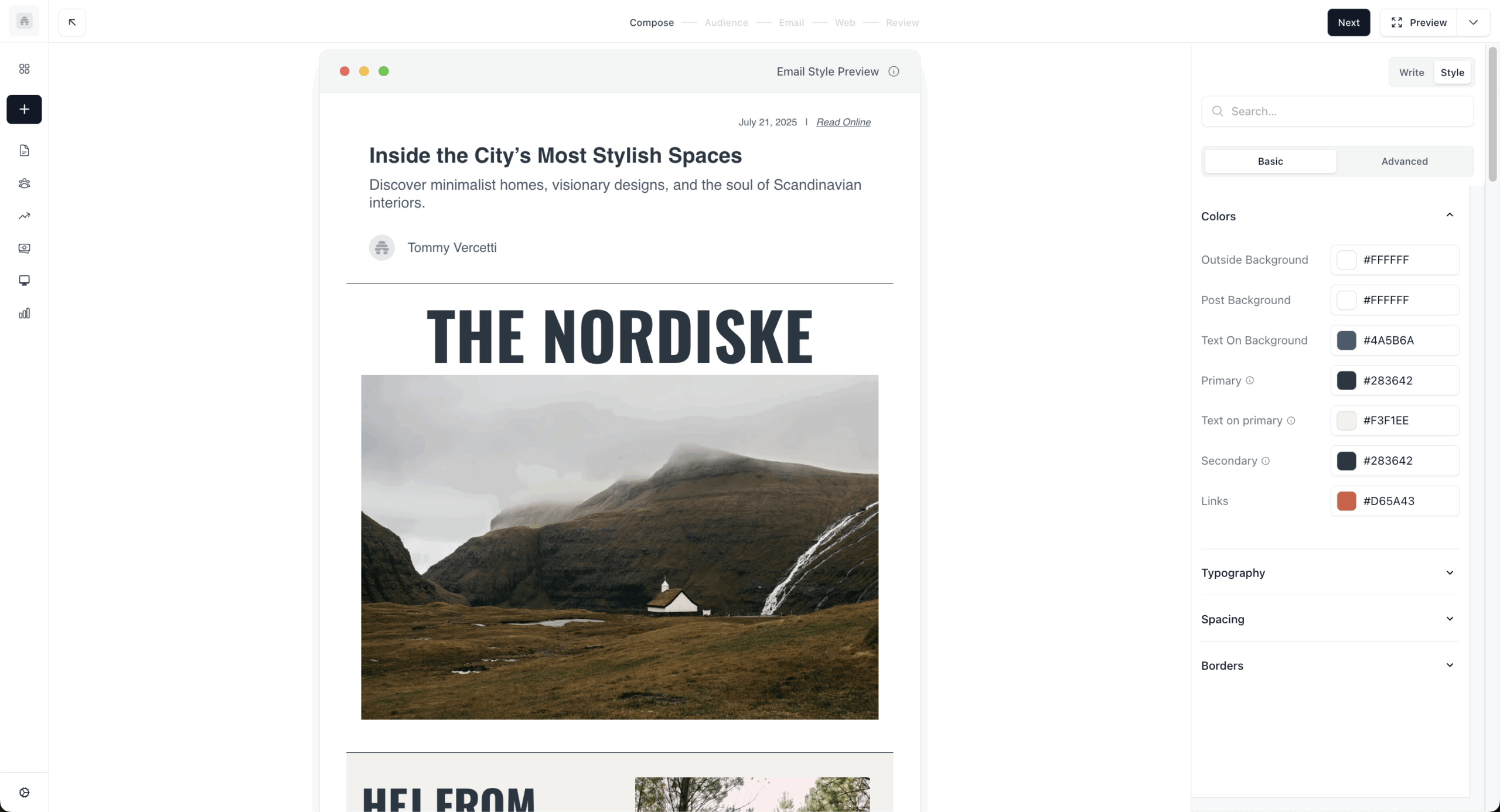
Beehiiv is not a general-purpose email service provider (ESP). It is a publishing platform built specifically for newsletter operators—individual writers, media brands, and creator-led businesses—where subscriber growth and monetization are the primary goals, not marketing automation.
The platform includes a built-in referral program, paid subscription tiers, ad network access, and subscriber segmentation built around content engagement rather than purchase behavior. These are features that do not exist in Mailchimp at any price.
Beehiiv’s paid plans start at $43/month (billed annually) for the Scale plan, covering up to 10,000 subscribers. The free Launch plan supports up to 2,500 subscribers with no time limit. At the Scale and Max tiers, Beehiiv is significantly cheaper than Mailchimp for comparable subscriber counts.
What worked better than Mailchimp?
- Monetization tools are native. During testing, I set up a paid subscription tier and a referral program within a single session. Neither required third-party tools. Mailchimp has no equivalent for either. For a newsletter operator, these features remove the need for Memberful, SparkLoop, or similar add-ons.
- Newsletter-specific analytics. Beehiiv reports on subscriber growth rate, 30-day retention, audience quality scores, and referral attribution. Mailchimp’s analytics focus on campaign performance (opens, clicks). For a creator whose primary metric is audience growth, Beehiiv’s reporting is more directly useful.
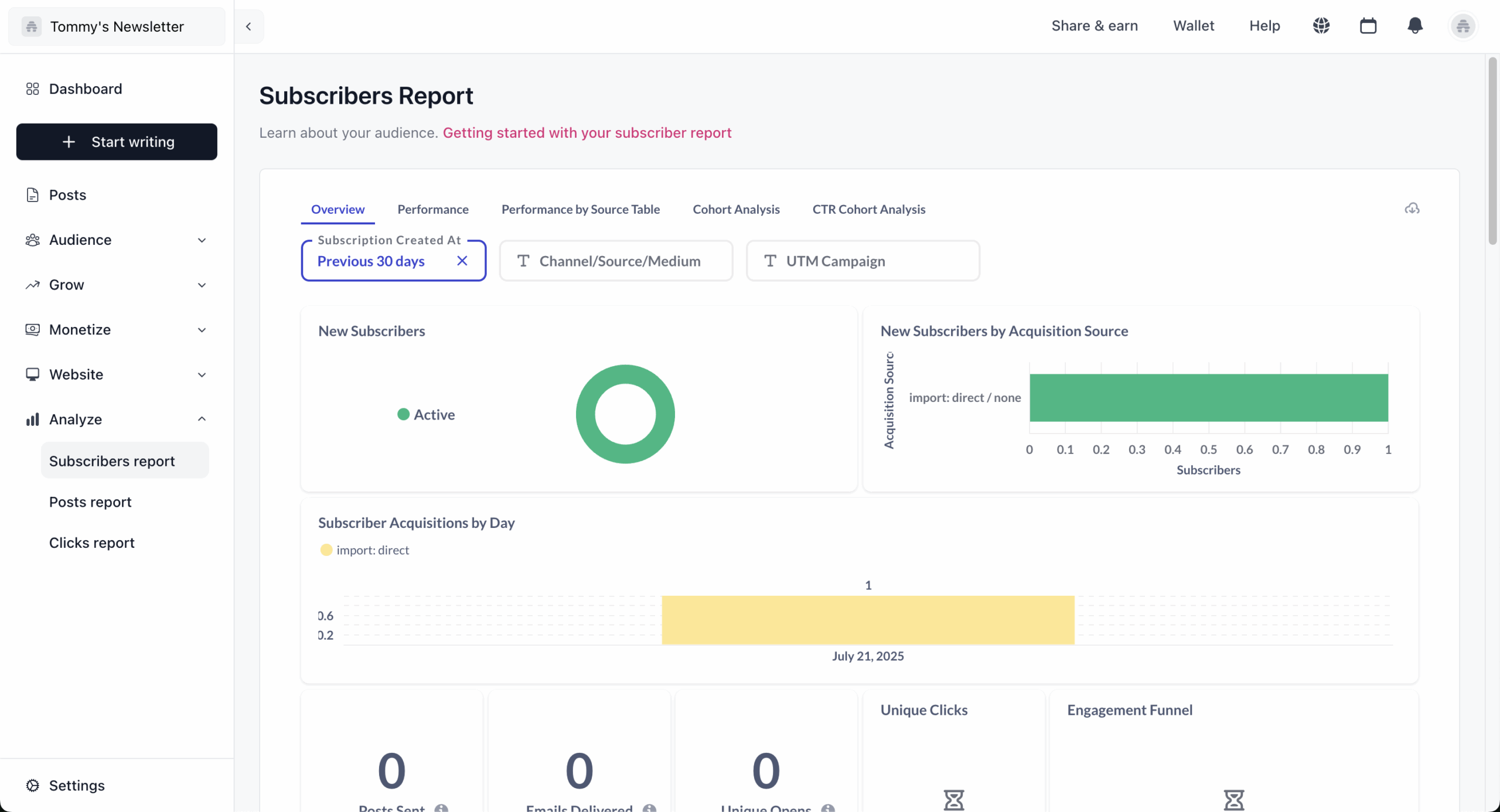
- Web presence included. Every Beehiiv account includes a hosted newsletter website with an archive, a subscribe page, SEO indexing, and a dynamically updating RSS block for automatically distributing new content to subscribers. During testing, a post published in Beehiiv appeared in Google search within 72 hours. Mailchimp’s web tools require a separate Websites plan tier.
Where is Mailchimp better than Beehiiv?
- Marketing automation. Beehiiv has basic email sequences but no visual automation builder, conditional branching, or behavior-triggered flows beyond a simple welcome series. A business that needs multi-step nurture sequences, abandoned cart emails, or behavioral segmentation should not use Beehiiv.
- Ecommerce integrations. Beehiiv has no native Shopify or WooCommerce integration. For any store-adjacent use case, it is not a viable tool.
- Segmentation control. Mailchimp’s segmentation allows conditions based on email activity, demographics, purchase history, and custom fields. Beehiiv’s segmentation is primarily content-engagement focused—useful for newsletter operators, limiting for general marketing.
- Broad integration library. Mailchimp connects to hundreds of tools across CRM, ecommerce, and advertising. Beehiiv’s integration library is limited to a small set of creator-adjacent tools.
Who should not use Beehiiv?
Any business that needs marketing automation, ecommerce integration, or CRM-connected email workflows. Beehiiv is built for people who publish newsletters and want to grow and monetize a subscriber audience.
It is not built for marketing teams running product launches, lead nurturing sequences, or sales pipeline automation. If your primary output is not a written newsletter, Beehiiv is the wrong tool regardless of price.
Mailchimp vs. Beehiiv Cost Comparison
Pricing (monthly billing):
| Subscribers | Beehiiv | Mailchimp Standard | Notes |
| 2,500 | Free (Launch) | ~$55 | Beehiiv free; Mailchimp paid |
| 10,000 | ~$96 (Scale) | ~$120 | Beehiiv 20% cheaper |
| 25,000 | ~$149 (Scale) | ~$270 | Beehiiv 45% cheaper |
| 100,000 | ~$290 (Max) | ~$670+ | Beehiiv 57% cheaper |
Deliverability: My GlockApps test recorded 93.1% inbox placement across Gmail and Outlook. Beehiiv’s infrastructure uses established sending networks; results were consistent across three test sends.
Constant Contact
Best for: Small and medium-sized businesses looking for reliable Mailchimp alternatives;
Constant Contact pricing: Starts at $12/month for 500 contacts + 5,000 emails/month;
Constant Contact free plan: Not available (30-day free trial).

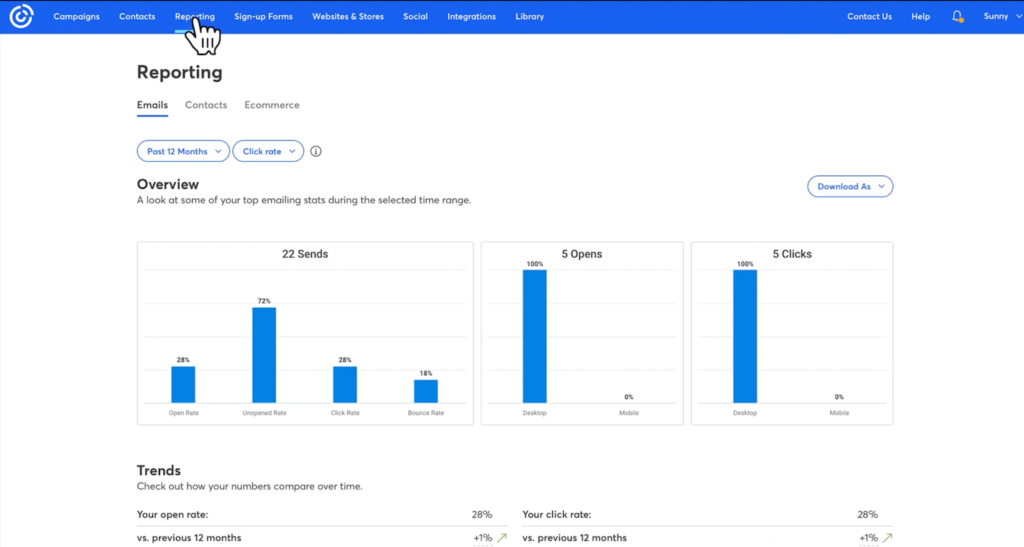
Constant Contact is oriented toward traditional businesses, brick-and-mortar operators, and organizations that want simple list management, event registration, and reliable delivery without a learning curve.
The platform has no free plan. It is consistently among the more expensive options at every contact tier in this review. The pricing is offset, in part, by the quality of phone support available on paid plans and the simplicity of the interface for non-technical users.
Event management features—including invitation sends, RSVP tracking, and Eventbrite integration—are included natively and are more developed than anything in Mailchimp. For businesses where events are a primary communication channel, this is a genuine differentiator.
What worked better than Mailchimp?
- Subscriber management. Constant Contact makes it easier to organize, segment, and maintain a clean list than Mailchimp does at equivalent plan levels. Importing contacts, merging duplicates, and applying tags can all be done without navigating multiple menus, and the platform surfaces list health issues more proactively than Mailchimp’s billing-focused contact interface.
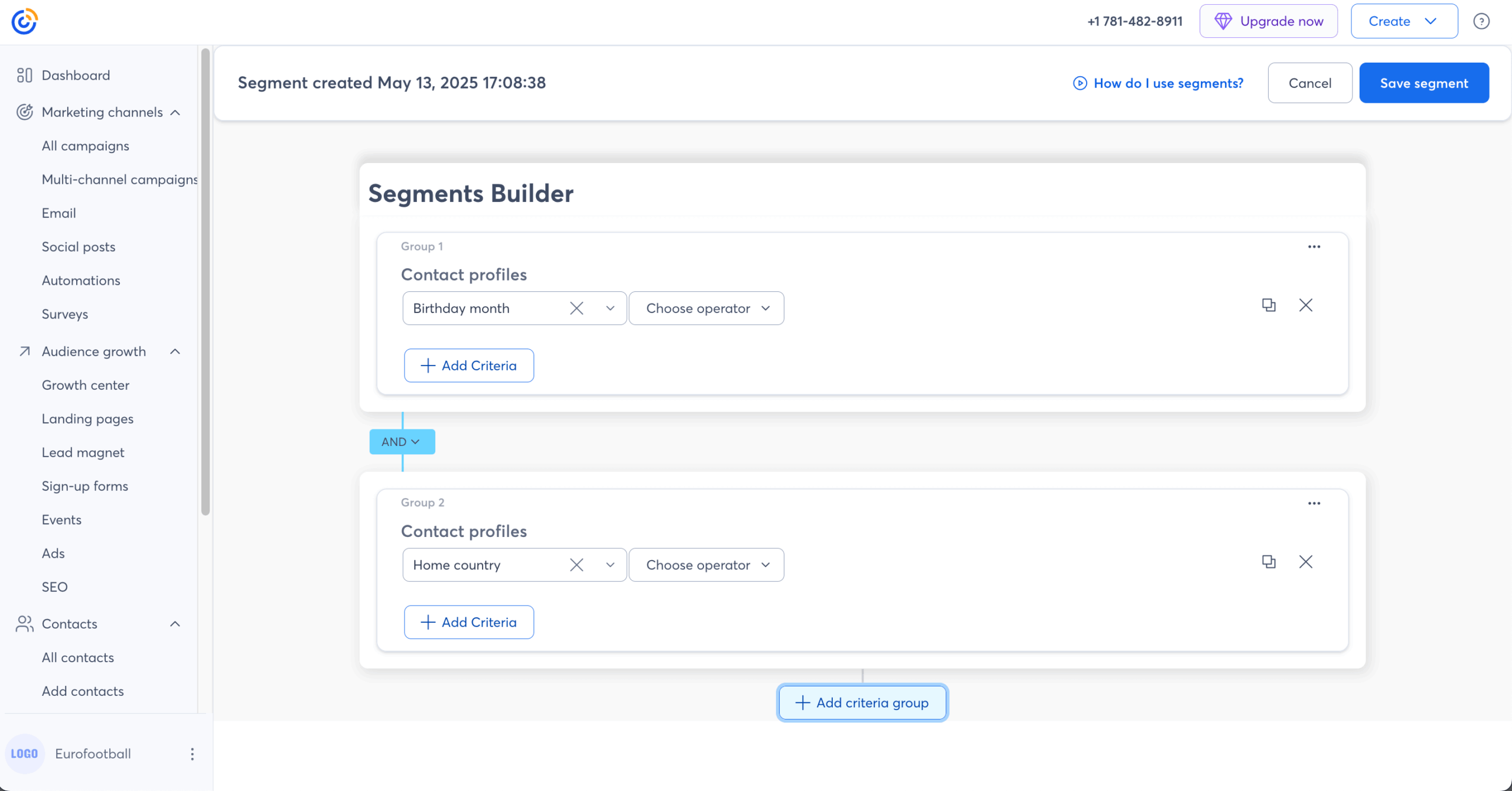
- Event management tools. I built and sent an event invitation with RSVP tracking, reminder sequences, and a post-event follow-up in a single session. Mailchimp has no equivalent native event workflow; replicating this requires Eventbrite or a third-party integration.
- Interface simplicity. The email builder requires fewer clicks to complete a standard campaign than Mailchimp’s equivalent. Non-technical users in my review consistently found Constant Contact’s interface more approachable than Mailchimp’s on first use.
Where is Mailchimp better than Constant Contact?
- Price. Constant Contact is more expensive than Mailchimp at every contact tier I tested and significantly more expensive than most other alternatives in this review. At 5,000 contacts, the Standard plan runs approximately $80/month. There is no free plan entry point.
- Automation capability. Constant Contact’s automation is limited to linear sequences; multi-branch conditional logic is not supported at the level Mailchimp’s Marketing Automation Flows provide on its Standard plan.
- Template volume and design quality. Mailchimp offers more templates with more design flexibility. Constant Contact’s templates are functional but dated in appearance.
- Integration library. Mailchimp’s 300+ integrations include deeper connections to ecommerce, CRM, and advertising tools than Constant Contact’s ecosystem.
Who should not use Constant Contact?
Cost-sensitive businesses, startups, and anyone who does not need event management or phone support. Constant Contact’s pricing premium is only justified if you actively use the features that differentiate it: event tools, physical mailings (available as an add-on), and accessible phone support.
If your use case is straightforward email marketing, you will pay substantially more here than on MailerLite, Sender, or Brevo for comparable output.
Mailchimp vs. Constant Contact Cost Comparison
Pricing (monthly billing):
| Contacts | Constant Contact (Standard) | Mailchimp Standard | Difference |
| 1,000 | ~$35 | ~$26 | Mailchimp 26% cheaper |
| 5,000 | ~$80 | ~$100 | Constant Contact cheaper |
| 10,000 | ~$125 | ~$135 | Near parity |
| 25,000 | ~$225 | ~$270 | Constant Contact cheaper |
Deliverability: My GlockApps test recorded 90.2% inbox placement across Gmail and Outlook. EmailToolTester’s 2025 data recorded approximately 91%. The result is functional but sits at the lower end of this review.
ActiveCampaign
Best for: Businesses looking for advanced email automation and CRM integration;
ActiveCampaign pricing: $15/month for up to 1,000 contacts + 10k emails/month;
Active Campaign Free plan: Not available (14-day free trial).
ActiveCampaign combines advanced email marketing automation with a built-in CRM and sales pipeline, making it the only platform in this review where both marketing email automation and sales follow-up live in the same tool without requiring a third-party CRM connection.
The automation builder supports conditional logic, goal tracking, split testing of entire sequences, and automation-to-automation triggers. In my testing, it handled the most complex workflow I built in this review—a 12-step nurture sequence with three conditional branches—without requiring workarounds.
There is no free plan. The Starter plan begins at approximately $15/month for 1,000 contacts, making the entry point accessible, but meaningful CRM and sales automation features require the Plus plan at approximately $49/month.
What worked better than Mailchimp?
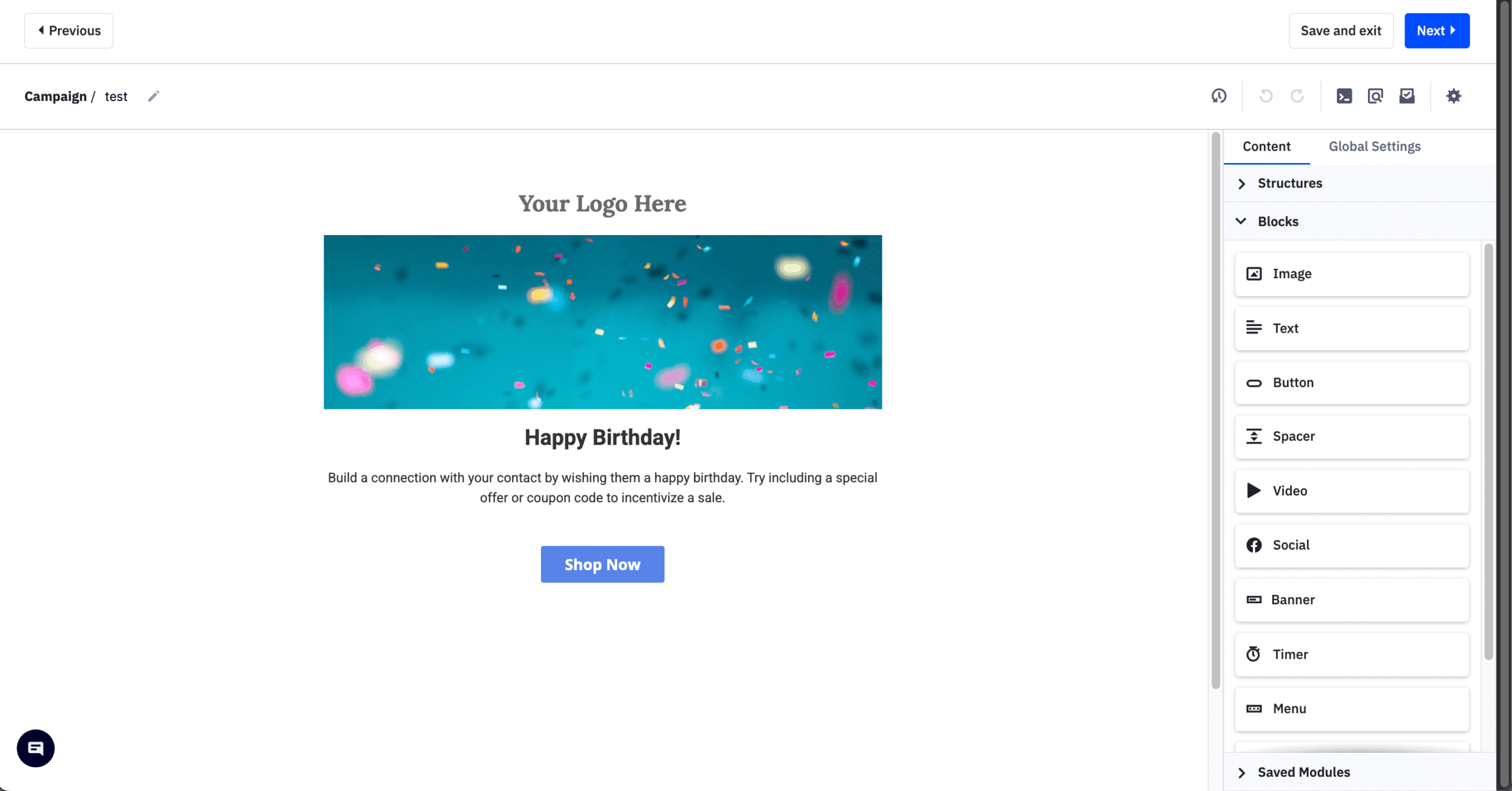
- Automation depth is categorically different. During testing, I connected a form submission to a CRM deal creation, a sales task notification, and a three-step email nurture sequence through a single workflow. Mailchimp’s Marketing Automation Flows are email-only and cannot create CRM records or sales tasks natively.
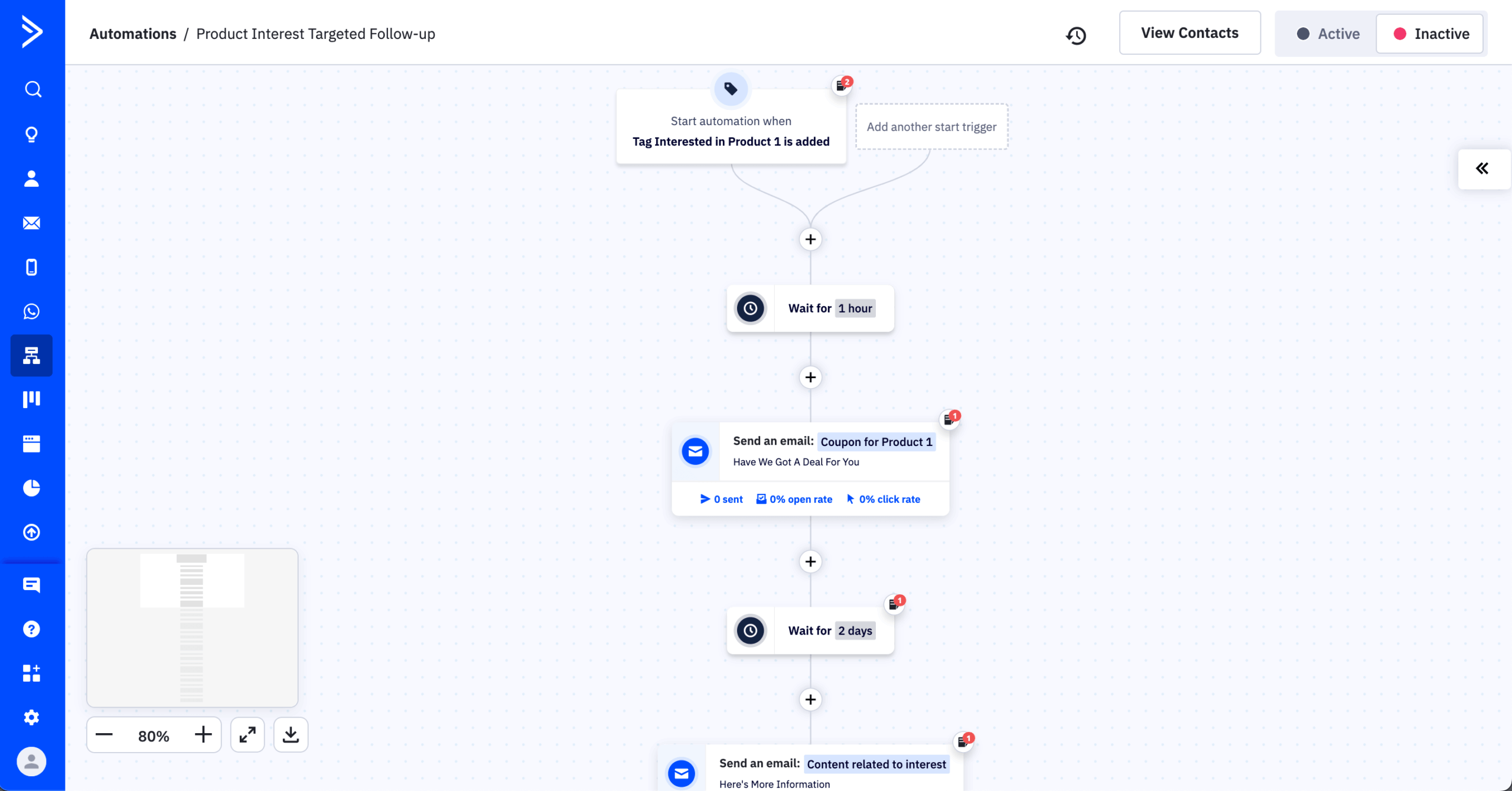
- CRM is included without integration. The built-in CRM tracks deals, pipeline stages, and contact history alongside email activity. During testing, I built and ran a full sales pipeline — including deal stages, contact history, and task notifications — over two weeks, verifying that contact activity from email sequences updated CRM records automatically without any manual input or Zapier connections.
- 1,000+ native integrations. ActiveCampaign connects to over 1,000 apps and integrations, more than any other platform in this review, including Mailchimp’s 300+. During testing, I connected Typeform, Shopify, Slack, and a webhook in a single afternoon without leaving the integrations panel.
Where is Mailchimp better than ActiveCampaign?
- Ease of entry. Mailchimp’s interface is more accessible for users who are new to email marketing. ActiveCampaign’s feature density creates a steep learning curve that is significant for non-technical users. In my testing, building a first campaign in Mailchimp took approximately 25 minutes; the equivalent in ActiveCampaign took closer to 45 minutes due to the number of configuration options presented at each step. This pattern appears consistently in G2 and Capterra reviews from 2024–2025—long-term users rate the platform highly, but first-month reviews frequently cite onboarding complexity as the primary friction point.
- Email template design. Mailchimp’s drag-and-drop builder offers more polished templates out of the box. ActiveCampaign’s templates are functional but require more manual styling work to produce comparable visual quality.
- Pricing for simple use cases. If you need only email marketing without CRM, ActiveCampaign’s price-to-value ratio is lower than simpler alternatives at equivalent list sizes.
Who should not use ActiveCampaign?
Teams that need only straightforward email marketing. ActiveCampaign’s value is in the intersection of email and CRM. If your workflow does not include a sales pipeline, lead scoring, or multi-channel automation sequences, you are paying for infrastructure you will not use.
Small businesses sending a monthly newsletter to under 5,000 contacts will find Sender, MailerLite, or Brevo deliver equivalent email functionality at a fraction of the cost. ActiveCampaign is also not suitable for users who want to be operational quickly without a significant configuration investment.
Mailchimp vs. ActiveCampaign Cost Comparison
Pricing (monthly billing):
| Contacts | ActiveCampaign (Starter) | Mailchimp Standard | Difference |
| 1,000 | ~$15 | ~$26 | ActiveCampaign 42% cheaper |
| 5,000 | ~$79 | ~$100 | ActiveCampaign cheaper |
| 10,000 | ~$149 | ~$135 | ActiveCampaign 10% more |
| 25,000 | ~$279 | ~$270 | Near parity |
Deliverability: My GlockApps test recorded 93.5% inbox placement across Gmail and Outlook. EmailToolTester’s independent test (2025) recorded 94.2%.
GetResponse
Best for: B2B & SMBs looking for lead nurturing software & SaaS email tool;
GetResponse pricing: Starts at $16/month for up to 1,000 contacts + unlimited emails;
GetResponse free plan: Available for up to 500 contacts + 2,500 monthly emails.

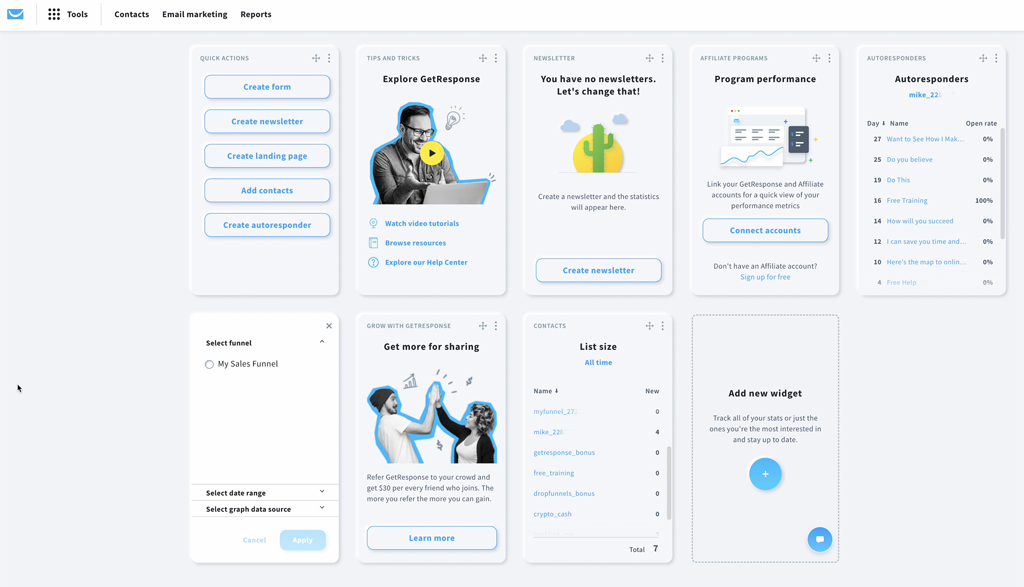
GetResponse is the only platform in this review with a native webinar hosting tool. However, webinar availability depends on your plan: webinars are included in the Creator package, while on the Starter and Marketer plans, they are a paid add-on. For coaches, course creators, and businesses that use webinars as a lead generation channel, consolidating webinars and email marketing within one platform can remove the need for standalone tools like Zoom or Demio—provided you’re on the right plan.
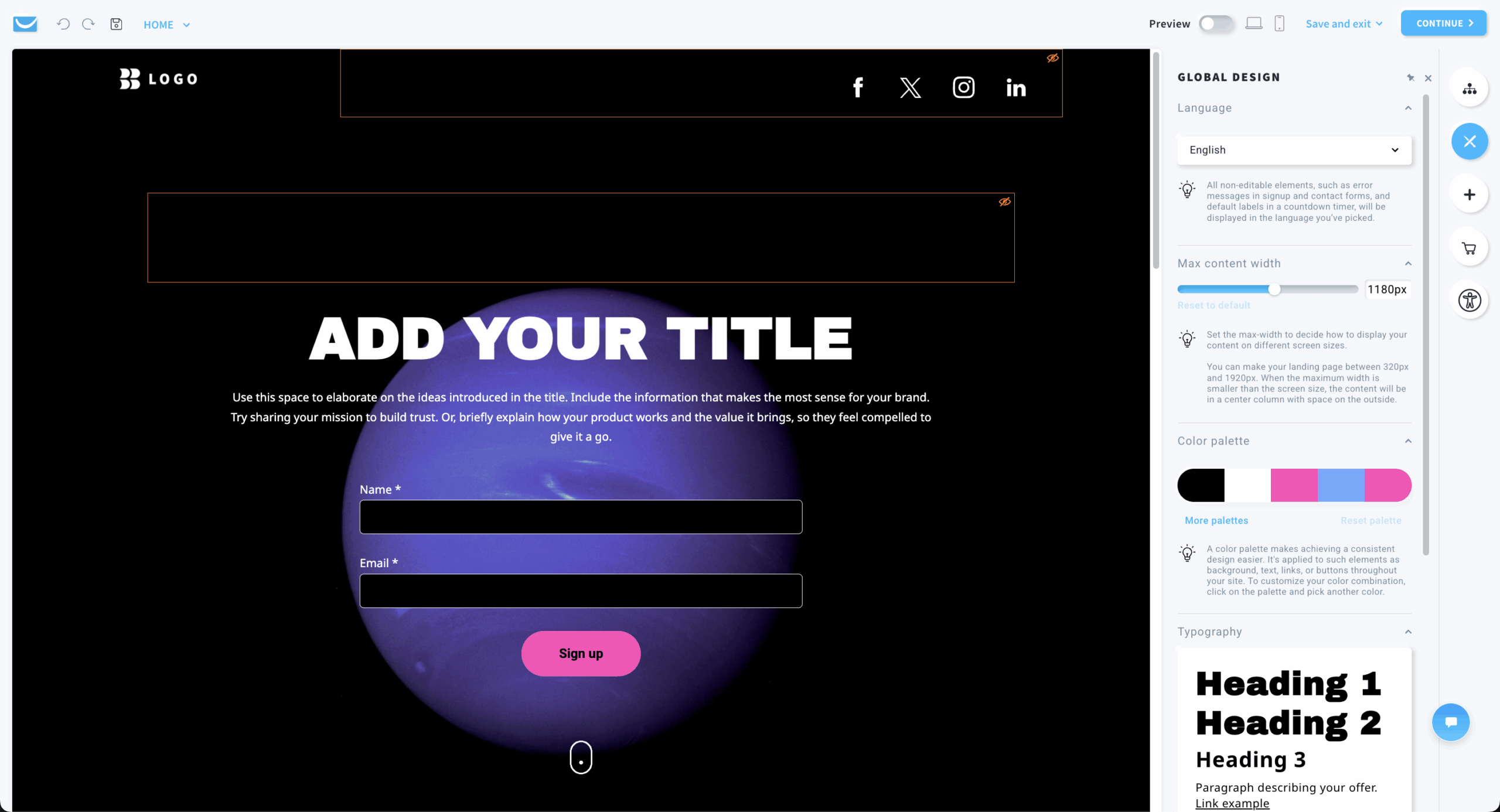
The platform also includes a conversion funnel builder—a landing page, opt-in form, email sequence, and payment processing flow linked into a single workflow. During testing, I built a lead magnet funnel from scratch in under two hours without leaving the platform.
Pricing is contact-based. The free plan supports 500 contacts and 2,500 emails per month, which is more generous than most free tiers in this review. Paid plans start at approximately $19/month for 1,000 contacts.
What worked better than Mailchimp?
- Webinar integration within one platform (Creator plan). I hosted a 45-minute test webinar with registration, reminder sequences, and a post-attendee follow-up flow entirely within GetResponse on the Creator plan. The comparable Mailchimp workflow requires a third-party webinar tool, a Zapier connection, and manual tagging of attendees. Note that accessing webinars on lower GetResponse plans requires a paid add-on.
- Conversion funnel builder. The built-in funnel tool connected a landing page, email opt-in, product sale, and thank-you sequence without requiring a separate page builder or payment processor integration. Mailchimp’s landing page tool is simpler and does not include payment processing natively.
- Landing page builder includes a larger selection of templates, A/B testing for pages, and direct integration with the conversion funnel builder so that a landing page, opt-in form, and follow-up sequence can be connected in a single workflow.
Where is Mailchimp better than GetResponse?
- Interface clarity. GetResponse’s dashboard has accumulated features over many years and the navigation reflects that. During testing, finding specific automation settings required more clicks than expected. Mailchimp’s interface is more straightforward for users who only need email marketing tools.
- Email template design quality. Mailchimp’s templates are more polished visually. GetResponse’s templates work but feel less current in design style, and the drag-and-drop builder required more adjustment to produce consistently clean output.
- Value for email-only use. If you do not use webinars or sales funnels, GetResponse’s pricing is not more competitive than Mailchimp at equivalent list sizes. The platform’s value is contingent on activating the features that differentiate it.
Who should not use GetResponse?
Businesses that will not use webinars, landing pages, or conversion funnels. GetResponse charges a premium over simple email tools, and that premium is only justified by the additional features. An ecommerce brand, a service business sending newsletters, or a creator without a course or webinar product will find Sender, MailerLite, or Brevo more cost-efficient for equivalent email marketing output.
Also be aware that native webinar access requires either the Creator plan or a paid add-on—teams expecting webinars out of the box on the entry plan will need to budget accordingly.
Mailchimp vs. GetResponse Cost Comparison
Pricing (monthly billing):
| Contacts | GetResponse (Email Marketing) | Mailchimp Standard | Difference |
| 1,000 | ~$19 | ~$26 | GetResponse cheaper |
| 5,000 | ~$54 | ~$100 | GetResponse 46% cheaper |
| 10,000 | ~$79 | ~$135 | GetResponse 41% cheaper |
| 25,000 | ~$174 | ~$270 | GetResponse cheaper |
Deliverability: My GlockApps test recorded 91.8% inbox placement across Gmail and Outlook. EmailToolTester’s independent test (2025) recorded 93.4%.
Moosend
Best for: Digital marketing agencies & email marketing for startups;
Moosend pricing: Starts at $9/month for up to 500 contacts + unlimited emails;
Moosend free plan: 30-day free trial available.
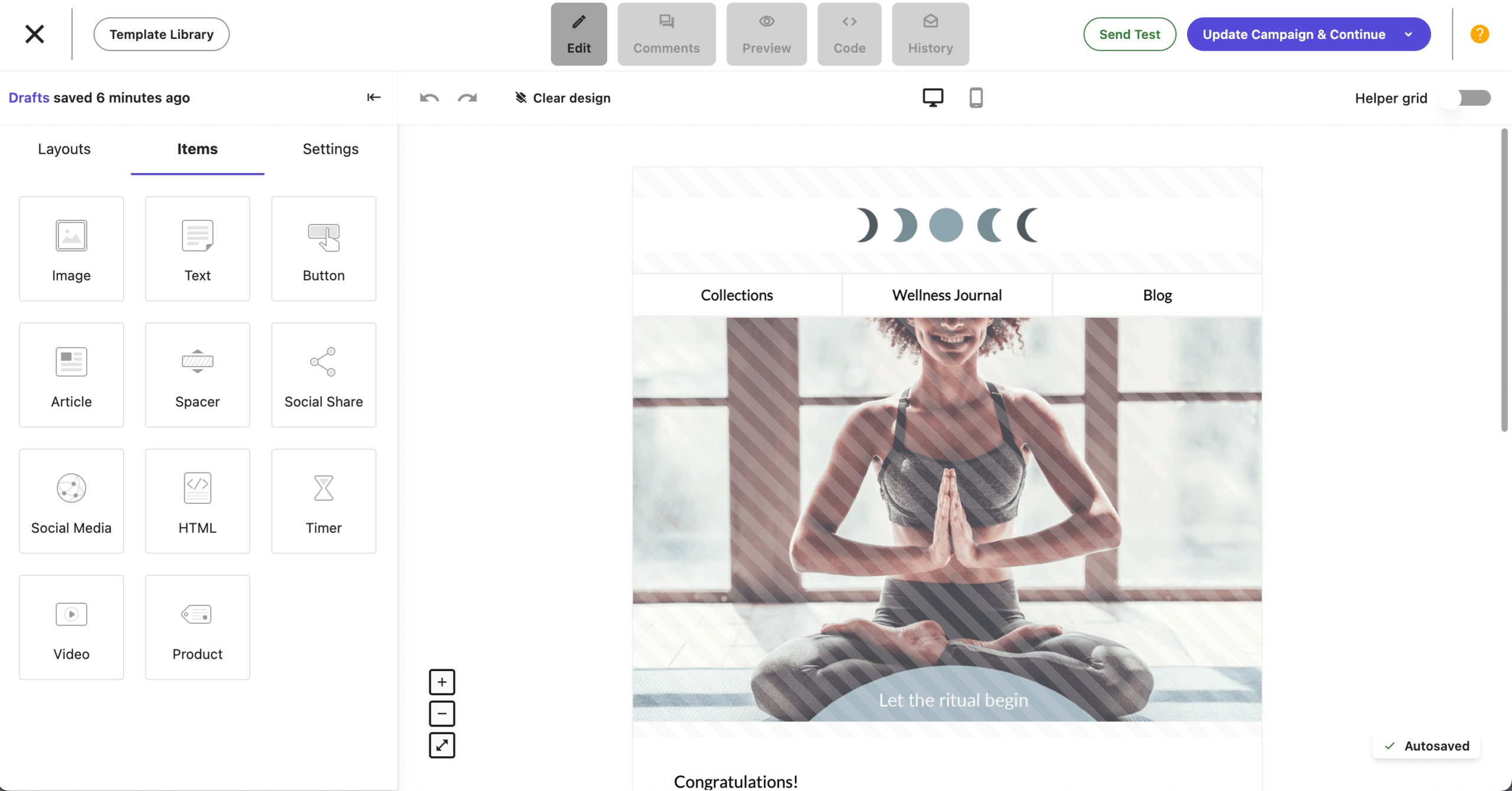
Moosend offers a feature set that includes advanced automation, AI-generated email copy, landing pages, and SMTP relay access at a starting price of $9/month—making it the lowest-cost entry point among paid-only platforms in this review.
There is no free plan; Moosend offers a 30-day full-feature trial instead. The trial was one of the most genuinely useful I encountered during testing—all features, including automation and A/B testing, were available without a credit card for the full trial period.
The platform’s agency plan allows managing multiple client accounts under one subscription, which, combined with the low per-contact pricing, makes it a viable option for agencies managing five or more client lists simultaneously.
What worked better than Mailchimp?
- Automation builder at this price point. During testing I built a six-step re-engagement flow with conditional branching based on email opens and link clicks. The builder handled the logic cleanly. For a $9/month starting price, this level of automation is not matched by any competitor in this review.
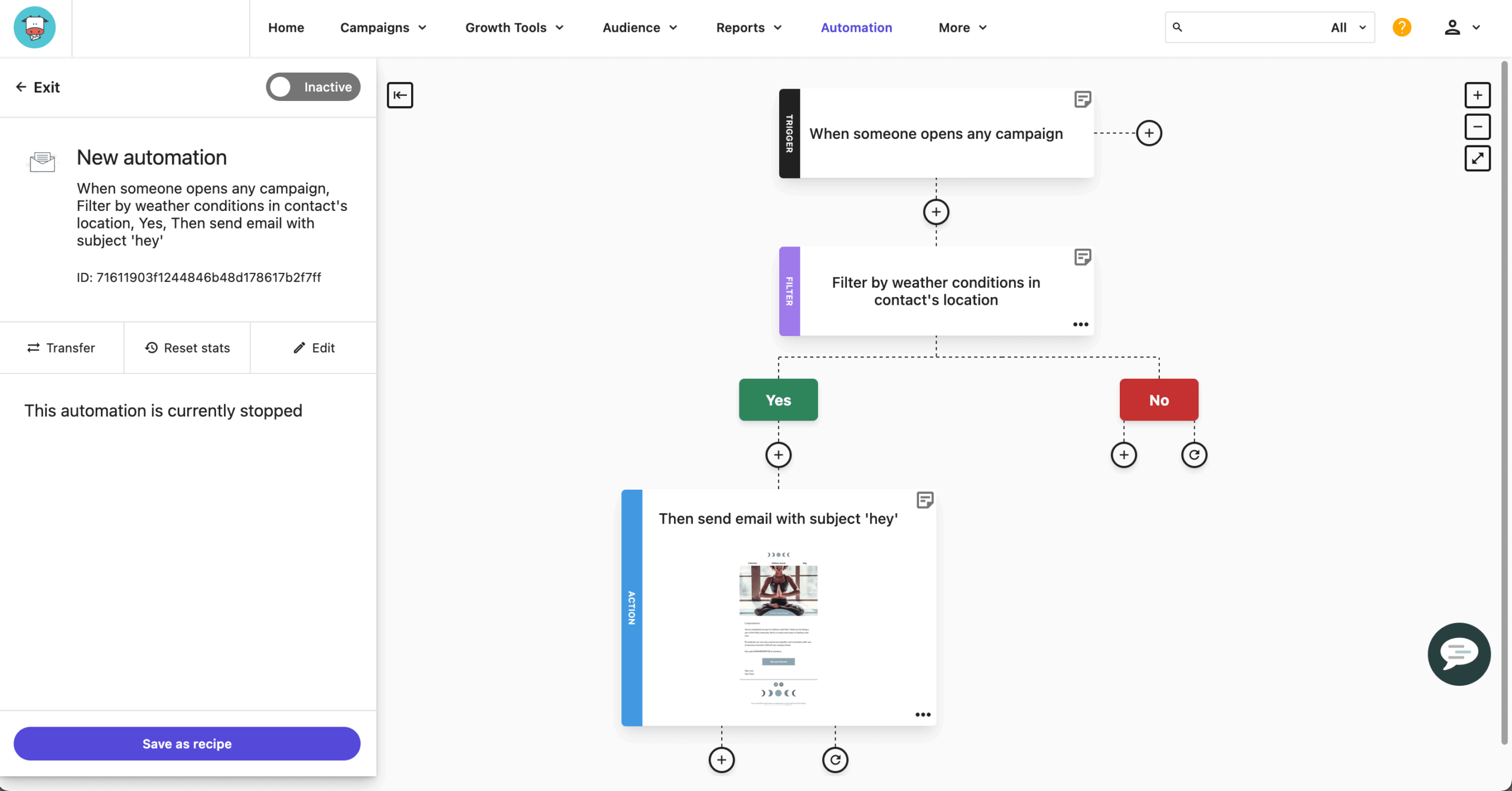
- SMTP access included. Moosend includes SMTP relay access on all paid plans, enabling transactional email sends from the same account as marketing campaigns. Mailchimp’s transactional email (Mandrill) is a paid add-on on Standard and Premium plans only.
- AI content tools. Email copy and subject line suggestions are included natively. During testing the AI drafts were usable as starting points without significant editing. Mailchimp’s AI content tools are comparable on Standard and above, but locked behind the same tier that costs significantly more.
Where is Mailchimp better than Moosend?
- Integration library. Moosend’s native integrations are limited compared to Mailchimp’s 300+. During testing, connecting my CRM required a Zapier workaround. Mailchimp’s broader ecosystem is a genuine advantage for businesses running multi-tool stacks.
- No free plan. Mailchimp’s 250-contact free tier still functions for genuinely minimal use. Moosend’s 30-day trial is time-limited and reverts to paid after the period.
Who should not use Moosend?
Businesses that depend on a wide native integration library or need guaranteed platform stability for high-frequency, time-sensitive sends. Moosend is also not the right fit for ecommerce brands needing deep product catalog integration—its ecommerce features are present but less developed than Klaviyo or Omnisend.
If your team needs a platform that a non-technical client can pick up without guidance, Moosend’s interface, while functional, has a steeper onboarding curve than MailerLite or Sender.
Mailchimp vs. Moosend Cost Comparison
Pricing (monthly billing):
| Contacts | Moosend Pro | Mailchimp Standard | Annual saving (Moosend) |
| 1,000 | ~$9 | ~$26 | ~$204/year |
| 5,000 | ~$32 | ~$100 | ~$816/year |
| 10,000 | ~$64 | ~$135 | ~$852/year |
| 25,000 | ~$135 | ~$270 | ~$1,620/year |
Deliverability: My GlockApps test recorded 90.1% inbox placement across Gmail and Outlook. Results were consistent across two test sends on different sending days. The score sits at the lower end of this review, which is worth flagging for high-volume senders.
Moosend operates on shared infrastructure at entry-tier levels and does not enforce domain authentication during onboarding — meaning inbox placement is more sensitive to the individual sender’s domain reputation and list quality than on platforms like Sender that handle more of that configuration at the platform level.
MailerLite
Best for: Small businesses and retailers looking for budget-friendly marketing solution;
MailerLite pricing: Starts at $10/month for up to 500 contacts + unlimited emails;
MailerLite free plan: Available for up to 500 contacts + 12,000 monthly emails.

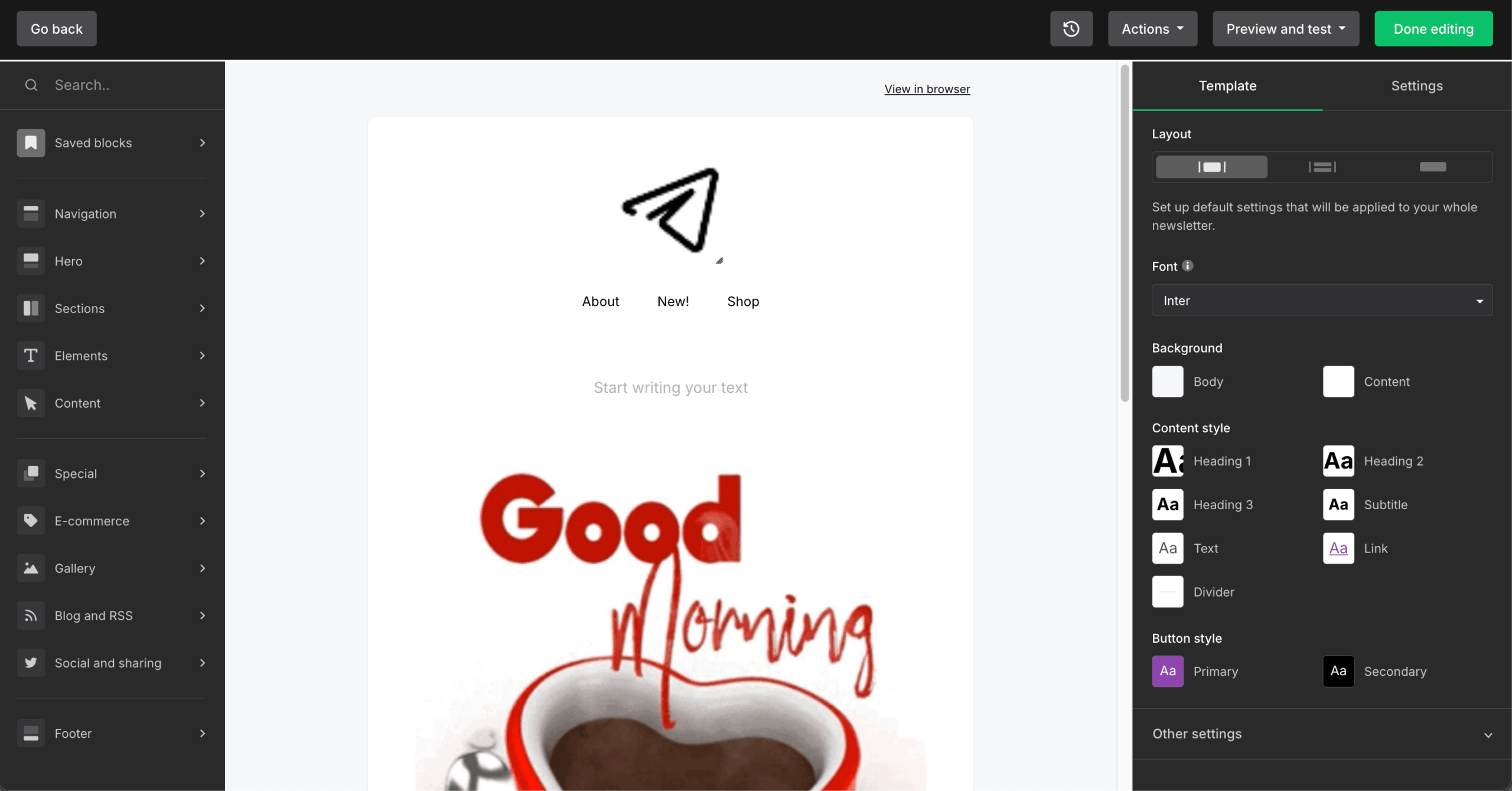
MailerLite covers the use cases most SMBs actually need—drag-and-drop email campaigns, basic automation, landing pages, and A/B testing — at a price point consistently 50 to 70% below Mailchimp’s Standard tier. It does not attempt to be a CRM, a sales platform, or an ecommerce engine.
The free plan supports 500 subscribers and 12,000 emails per month with automation and A/B testing included. MailerLite reduced its free plan from 1,000 to 500 subscribers in September 2025, following a pattern seen across the category, though 500 remains double Mailchimp’s current 250-contact ceiling.
The platform’s clean interface was the most immediately navigable in my testing for users new to email marketing—first campaign to first send was faster on MailerLite than on any other platform reviewed. This is consistently reflected in G2 and Capterra reviews from 2024–2025, where ease of use and interface clarity are the most cited reasons users choose MailerLite over Mailchimp, ahead of pricing.
What worked better than Mailchimp?
- Price gap is consistent and significant. At 5,000 contacts, MailerLite’s Growing Business plan costs approximately $32/month versus Mailchimp Standard’s $100/month. That is a saving of approximately $816/year. At 10,000 contacts, MailerLite costs approximately $57/month against Mailchimp’s $135/month.
- Deliverability on my test. My GlockApps seed list test recorded 95.7% inbox placement across Gmail and Outlook, above Mailchimp’s 89.5% on the same list. MailerLite’s strong performance at this price point is partly attributable to stricter list hygiene enforcement during onboarding — new accounts are reviewed before sending is enabled, which keeps the shared IP pool cleaner than platforms with instant unrestricted access. Senders on shared IPs benefit directly from that policy.
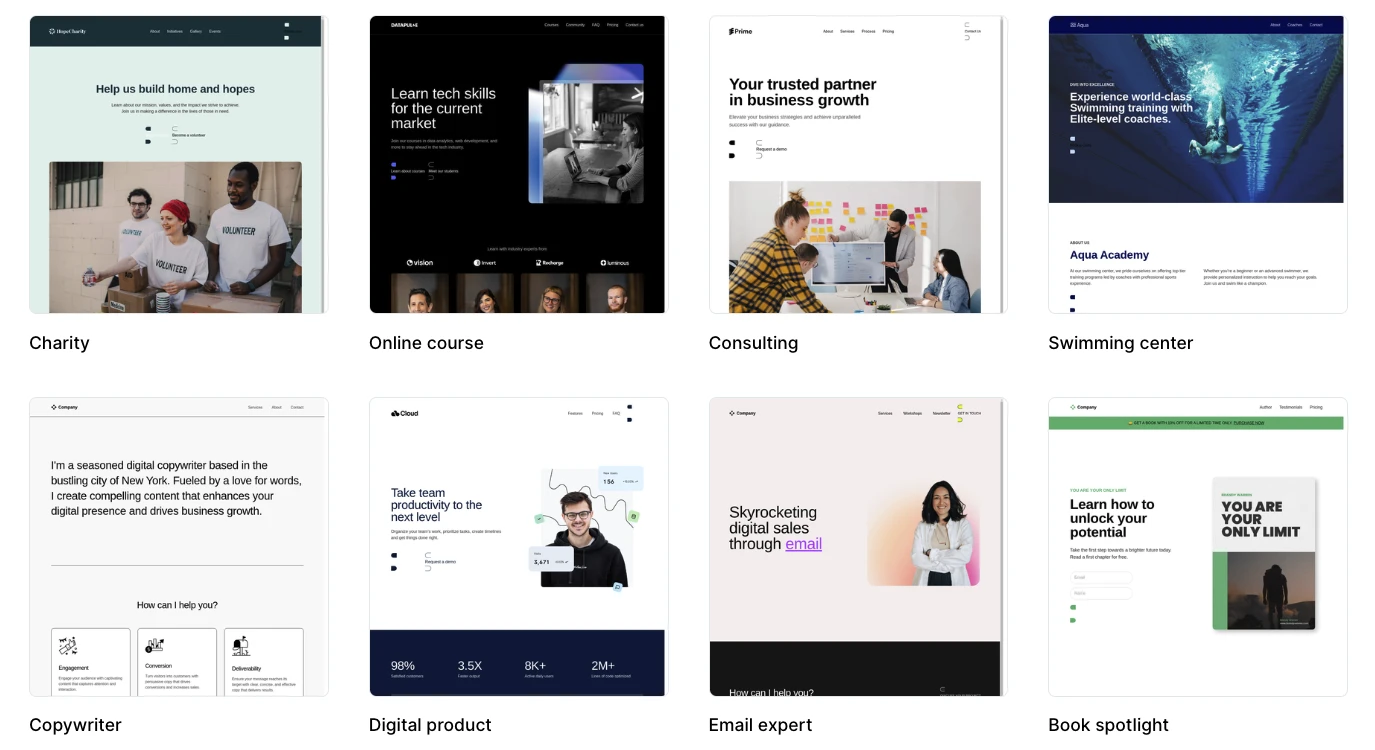
- Landing pages included. MailerLite’s landing page builder is included on all plans, including free. Mailchimp’s landing page tool exists but the feature set is more limited at equivalent plan levels.
Where is Mailchimp better than MailerLite?
- Automation visual complexity. MailerLite’s automation builder handles multi-step sequences well but becomes limiting when building flows with five or more branches and complex conditional logic. Mailchimp’s Marketing Automation Flows canvas is more capable for intricate customer journeys.
- Ecommerce depth. MailerLite connects to Shopify and WooCommerce, but product-specific automation, revenue attribution, and purchase-based segmentation are not as developed as in Mailchimp’s ecommerce features at the Standard level.
- Reporting depth. Mailchimp’s analytics dashboard provides more historical trend data, audience growth reporting, and campaign comparison features than MailerLite’s reporting, which covers standard open, click, and unsubscribe metrics adequately but without the same depth.
Who should not use MailerLite?
Businesses that need deep CRM integration, advanced ecommerce automation, or complex multi-branch workflows that go beyond MailerLite’s automation builder. It is also not the right fit for teams with large integration stacks relying on niche SaaS tools that are unlikely to be in MailerLite’s native integration library.
For those use cases, ActiveCampaign, Klaviyo, or even Mailchimp itself will serve better. MailerLite’s strength is in doing the core job cleanly and cheaply—if your needs go significantly beyond that core, you will outgrow it.
Mailchimp vs. MailerLite Cost Comparison
Pricing (monthly billing):
| Contacts | MailerLite (Growing Business) | Mailchimp Standard | Annual saving (MailerLite) |
| 1,000 | ~$10 | ~$26 | ~$192/year |
| 5,000 | ~$32 | ~$100 | ~$816/year |
| 10,000 | ~$57 | ~$135 | ~$936/year |
| 25,000 | ~$109 | ~$270 | ~$1,932/year |
| 50,000 | ~$190 | ~$450 | ~$3,120/year |
Deliverability: My GlockApps test recorded 95.7% inbox placement across Gmail and Outlook. EmailToolTester’s independent test (2025) recorded 95.1%.
Mailchimp Competitors Price Comparison
All prices reflect annual billing on each platform’s standard paid plan that includes automation. Annual billing reduces most prices by 15–20%. Prices verified April 2026.
| Platform | Entry price | 10,000 contacts | 20,000 contacts | 50,000 contacts | 100,000 contacts |
| Mailchimp (Standard) | ~$20/mo | ~$135/mo | ~$240/mo | ~$450/mo | ~$800/mo |
| Sender (Standard) | ~$7/mo | ~$40/mo | ~$75/mo | ~$159/mo | ~$257/mo |
| Omnisend (Standard) | ~$16/mo | ~$132/mo | ~$240/mo | ~$420/mo | ~$700/mo |
| Beehiiv (Scale)* | ~$43/mo | ~$43/mo | ~$96/mo | ~$96/mo | ~$96/mo |
| Brevo** | ~$9/mo | — | — | — | — |
| Klaviyo (Email) | ~$20/mo | ~$150/mo | ~$375/mo | ~$720/mo | ~$1,380/mo |
| Constant Contact (Standard) | ~$35/mo | ~$120/mo | ~$230/mo | ~$430/mo | Custom |
| ActiveCampaign (Starter) | ~$15/mo | ~$149/mo | ~$311/mo | ~$609/mo | Custom |
| GetResponse (Email Marketing) | ~$19/mo | ~$66/mo | ~$141/mo | ~$246/mo | ~$477/mo |
| Moosend (Pro) | ~$9/mo | ~$70/mo | ~$128/mo | ~$252/mo | ~$499/mo |
| MailerLite (Growing Business) | ~$10/mo | ~$66/mo | ~$125/mo | ~$260/mo | ~$396/mo |
* Beehiiv uses subscriber-tier pricing billed annually. The Scale plan covers up to 100,000 subscribers at a flat $43/month (annual). The Max plan ($96/month annual) removes branding and adds priority support, and covers the same subscriber range. Entry price of $43/month reflects Scale plan minimum.
** Brevo charges by email volume sent, not by contact count.
Migration Guide — How to Actually Leave Mailchimp
Migrating away from Mailchimp is manageable, but it is not a single-step process. Contact lists and tags move quickly; automations, templates, and integrations require planned rebuilding time. The sections below cover what transfers cleanly, what needs to be rebuilt from scratch, and what to do before you cancel your account.
What Migrates Easily
In my testing, the following transferred without meaningful friction across all 13 platforms in this review:
- Contact lists: Every platform accepts Mailchimp CSV exports. Standard fields (email, first name, last name, tags) import cleanly. Expect 15 to 30 minutes, depending on list size.
- Tags: Klaviyo, ActiveCampaign, and MailerLite handle Mailchimp tags natively. Custom fields may require remapping, but standard tags carry over as-is.
- GDPR and opt-in history: Mailchimp records subscription dates in your CSV export. Most platforms accept an opt-in date field for compliance records. Export this before closing your account.
One exception worth noting: saved segments do not export. They exist only inside Mailchimp’s interface. Document your segment logic (conditions, filters, rules) in a spreadsheet before you start migrating, or you will be rebuilding them from memory.
What Requires Rebuilding
Two things will consume the most time in any Mailchimp migration:
Automation workflows: Mailchimp’s Marketing Automation Flows export as visual diagrams, not importable files. Every workflow must be rebuilt natively in your new platform. Before migrating, document each flow in a spreadsheet using the format: trigger, step, delay, condition, action. Based on my testing, realistic rebuild times are:
- Simple welcome sequence (3 to 5 emails): 1 to 2 hours
- Re-engagement flow with segmentation: 2 to 4 hours
- Complex multi-branch flow (6+ steps, conditional logic): 4 to 8 hours
Email templates: HTML templates export and import with minimal modification. Drag-and-drop templates do not transfer; the structure is Mailchimp-proprietary. Rebuilding a drag-and-drop template typically takes 1 to 3 hours, depending on complexity.
Integrations: Check each one individually. Where a native connection does not exist in your destination platform, a Zapier bridge is usually the practical workaround.
What to Do Before You Cancel Mailchimp
Run through this checklist before clicking “cancel.” Most of these steps take under five minutes individually; skipping them can mean losing data that is not recoverable after account closure.
- Export all audiences as CSV with full fields
- Document all active automation workflows (trigger, steps, timing, conditions)
- Export or screenshot campaign performance data (open rates, click rates)
- Download all email templates in HTML format
- Record active integration connections and API keys
- Note your billing cycle date and cancel after it, not before
- Download compliance documentation (opt-in confirmations, list source notes)
- Screenshot audience settings and GDPR fields
Billing note: Mailchimp bills at the start of each cycle and does not refund unused days. Time your cancellation to the end of a billing period.
Platforms That Offer Migration Assistance
Most entry-tier migrations are self-service. The documentation from MailerLite, Sender, and Beehiiv is sufficient for a standard list and template move. For businesses with complex automations, several platforms offer hands-on help:
- Sender: Self-service migration documentation on all paid plans. Dedicated migration support on higher tiers.
- ActiveCampaign: Free one-to-one onboarding and migration assistance on Plus plans and above, including automation rebuild support.
- Klaviyo: Migration guide and email support for new accounts. Dedicated onboarding on higher plans.
- Constant Contact: Dedicated onboarding specialist on Standard and Premium plans.
If your migration involves more than two active automation workflows, prioritize platforms that offer onboarding assistance. The time saving is meaningful.

even on the free plan.
FAQs
What do you lose when you leave Mailchimp?
The short answer: less than most people expect. Contact lists, tags, and HTML templates migrate cleanly to every platform in this review. What you actually lose is harder to replace: working automation workflows (which must be rebuilt from scratch), your campaign performance history (which stays in Mailchimp and cannot be exported in a reusable format), and any active integrations that connect specifically to Mailchimp’s API rather than a universal standard. If you use Mailchimp’s Intuit/QuickBooks integration or rely on several of its 300+ native connections simultaneously, those require individual assessment before you cancel.
Can I migrate from Mailchimp for free?
Yes, for the core migration. Exporting your contact list as a CSV and importing it into a new platform costs nothing and takes 15 to 30 minutes on any platform in this review. Rebuilding automation workflows, templates, and segments is free in terms of platform cost but not in time—budget 1 to 8 hours per workflow depending on complexity. Platforms that offer free migration assistance on paid plans include ActiveCampaign (Plus and above), Klaviyo (new accounts), Sender, and Constant Contact (Standard and above). For most SMBs on entry-tier plans, migration is self-service.
Which Mailchimp alternatives have the best deliverability?
Based on my GlockApps seed list testing conducted in February and March 2026, the top two in this review were Sender (98.1%) and MailerLite (95.7%), all measured against Mailchimp’s 89.5% on the same seed list. Brevo recorded 94.2% and ActiveCampaign 93.5%. It is worth noting that deliverability varies significantly based on your own sender reputation, domain age, and list hygiene—platform infrastructure is one factor, not the only one. A clean, engaged list on a lower-ranked platform will consistently outperform a cold or unmanaged list on a higher-ranked one.