


Brevo is a solid entry point for email marketers, especially with its generous free plan and built-in multichannel features like email, SMS, and chat. But as your needs grow, limitations can start to show–particularly in automation depth, segmentation flexibility, ecommerce functionality, and pricing as you scale.
In this guide, I will break down 10 of the best Brevo alternatives, comparing them across key email marketing factors like pricing, automation capabilities, segmentation, and ecommerce features. Whether you’re looking for more advanced workflows, better targeting, or a more cost-effective solution long-term, these platforms offer strong options to support and scale your email marketing strategy.
Best Brevo Alternatives: A Snapshot
- Top pick for small business growth: Sender – strongest free plan with full automation, segmentation, and 15,000 emails/month, making it the most accessible all-in-one starting point.
- Ideal choice for ecommerce personalization: Klaviyo – advanced segmentation using purchase behavior, predictive data, and dynamic product recommendations for highly targeted campaigns.
- Go-to option for omnichannel marketing: Omnisend – combines email, SMS, and push notifications in one workflow, making multi-channel automation easy to manage from a single builder.
- Best fit for all-in-one marketing campaigns: GetResponse – integrates email, funnels, and built-in webinars, allowing you to run complete lead generation and conversion flows without extra tools.
- Leading solution for CRM-driven marketing: HubSpot – connects email campaigns directly to CRM data, enabling deep personalization based on lifecycle stage, deals, and customer activity.
- Strongest for behavior-based automation: ActiveCampaign – advanced workflows with lead scoring, CRM integration, and dynamic journeys based on real-time user actions.
- Most beginner-friendly with AI support: Mailchimp – AI-powered campaign creation and reliable infrastructure make it easy to launch and deliver campaigns without technical setup.
- Best value for analytics and pricing: Moosend – real-time insights like click maps and device data combined with generous features on entry-level plans.
- Top choice for design-focused campaigns: Campaign Monitor – precise control over email layout, branding, and templates for polished, professional emails.
- Best for simple marketing + event campaigns: Constant Contact – combines AI-assisted emails and built-in event marketing tools.
Brevo’s Strengths and Limitations
Before we see what the best Brevo alternatives are and for what reasons, let’s break down the best and the worst of Brevo.
Pros
- Solid free plan. With 300 daily emails and 100,000 contacts, Brevo is a great entry point for startups or creators who want to build a list without upfront costs.
- Built-in CRM and SMS/email tools in one dashboard. Ideal for small teams that want to manage multichannel campaigns without juggling multiple tools.
- Intuitive drag-and-drop editor with dynamic personalization. Makes it easy for non-technical users to create tailored campaigns quickly.
- Built-in AI assistant for subject lines and content. Helpful for marketers who want to speed up campaign creation and improve open rates with minimal effort.
- Native integrations with Shopify, WordPress, and major CRMs. Useful for businesses that need a quick setup and seamless data syncing across platforms.
Cons
- Email template selection is limited & lacks advanced customization. Restrictive for brands that want highly unique or design-heavy emails.
- Reporting lacks advanced funnel tracking and revenue attribution. A drawback for data-driven teams that rely on deep performance insights.
- Automation builder lacks deep branching logic. Limiting for advanced marketers who need complex, behavior-based workflows.
- Advanced features like A/B testing are only available on higher plans. Frustrating for growing businesses that want to optimize campaigns without upgrading early.
Who Should Look for a Brevo Alternative?
Brevo works well for simple campaigns and early-stage growth, but it starts to show limitations as your marketing becomes more advanced. If your strategy relies on deeper email workflow automation, personalization, or ecommerce-driven workflows, it may no longer be the right fit.
You’ve outgrown the automation limits
If you’re hitting the 2,000 contact automation ceiling or struggling with rigid workflows, Brevo can feel restrictive. Especially when your sequences need to branch based on behavior like purchases, browsing, or engagement.
You run an ecommerce store
Brevo lacks native product recommendations, dynamic discounting, and ecommerce-focused reporting. If you’re running a Shopify store or scaling retention campaigns, these gaps become hard to ignore.
You need advanced segmentation
Basic list splits work, but Brevo falls short when you need predictive data, CLV-based targeting, or multi-condition behavioral segmentation. It’s not built for highly granular audience targeting.
You care deeply about email design
With limited templates, no custom CSS, and minimal advanced design options, Brevo can hold back brands that prioritize visual identity and polished email experiences.
You need better support
If email marketing is business-critical, slow or gated support can become a risk. Brevo’s live support is limited on lower-tier plans, which can be frustrating during urgent issues.
You’re scaling, and pricing is becoming unpredictable
As your contact list and send volume grow, Brevo’s pricing can quickly become less competitive–especially for teams planning long-term growth.
How We Evaluated These Brevo Alternatives
- Hands-on platform testing. We evaluated Brevo alternatives by creating live accounts, building real campaigns, setting up automation workflows, importing contact lists, and sending test emails to assess real-world usability beyond feature lists and demos;
- Automation depth and flexibility. We assessed how well each platform supports multi-step workflows, trigger variety, conditional logic, and behavioral segmentation compared to Brevo’s more limited automation capabilities;
- Segmentation and personalization. We reviewed the available segmentation logic, use of engagement and behavioral data, and how effectively each platform supports targeted messaging beyond basic list-based targeting;
- Support quality and accessibility. We compared the availability of live chat, onboarding resources, response times on lower-tier plans, and overall support accessibility for day-to-day operational issues;
- Email deliverability tools. We assessed each platform’s tools for ensuring emails reach inboxes, including list hygiene, domain authentication, and reputation monitoring, to improve deliverability and campaign performance;
- Email marketing scalability. We analyzed pricing transparency, feature availability across tiers, and how costs and limitations evolve as subscriber counts and sending volumes grow.
Capterra, G2, Trustpilot, and Reddit to create an objective evaluation. Learn more about our review methodology
Brevo Alternatives: A Quick Comparison
Let’s quickly compare Brevo vs other platforms before we dig deeper into different Brevo alternatives.
| Provider | Best For | Key Strength vs. Brevo | Pricing Model | Free Plan |
| Sender | SMBs looking for email marketing and transactional campaigns | More advanced email automation and greater design flexibility | Contact-based | Yes |
| Klaviyo | Ecommerce personalization and segmentation | Powerful segmentation and in-depth integration with ecommerce platforms | Contact-based | Yes |
| Omnisend | Omnichannel marketing strategies | Strong omnichannel capabilities with email, SMS, and more | Contact-based | Yes |
| GetResponse | All-in-One marketing and webinars | Comprehensive toolset including webinars and landing page builder | Contact-based | Yes |
| HubSpot | Integration and enterprise marketing | Seamless CRM integration and enterprise-level marketing tools | Contact-based | Yes |
| ActiveCampaign | Email marketing automation | Advanced automation capabilities with personalized workflows | Contact-based | Free trial only |
| Mailchimp | Beginners and AI-driven tools | User-friendly platform with strong AI-driven suggestions | Contact-based | Yes |
| Moosend | Affordability and functionality | Cost-effective with solid automation and segmentation tools | Contact-based | Yes |
| Campaign Monitor | Best for email campaigns design | Advanced design features and flexibility for campaign creation | Contact-based | Free trial only |
| Constant Contact | Reliable email automation for small business | Excellent support and simple automation for small businesses | Contact-based | Yes, with basic features |
10 Best Brevo (Sendinblue) Alternatives Worth Considering
Now that you’ve got a glimpse into alternatives to Brevo, let’s explore what is better than Brevo in detail, including the pros and cons of all email marketing software.
Sender — Email Automation and Marketing Campaigns
Sender is an email marketing platform built for small to scaling teams that want flexible automation without added complexity.

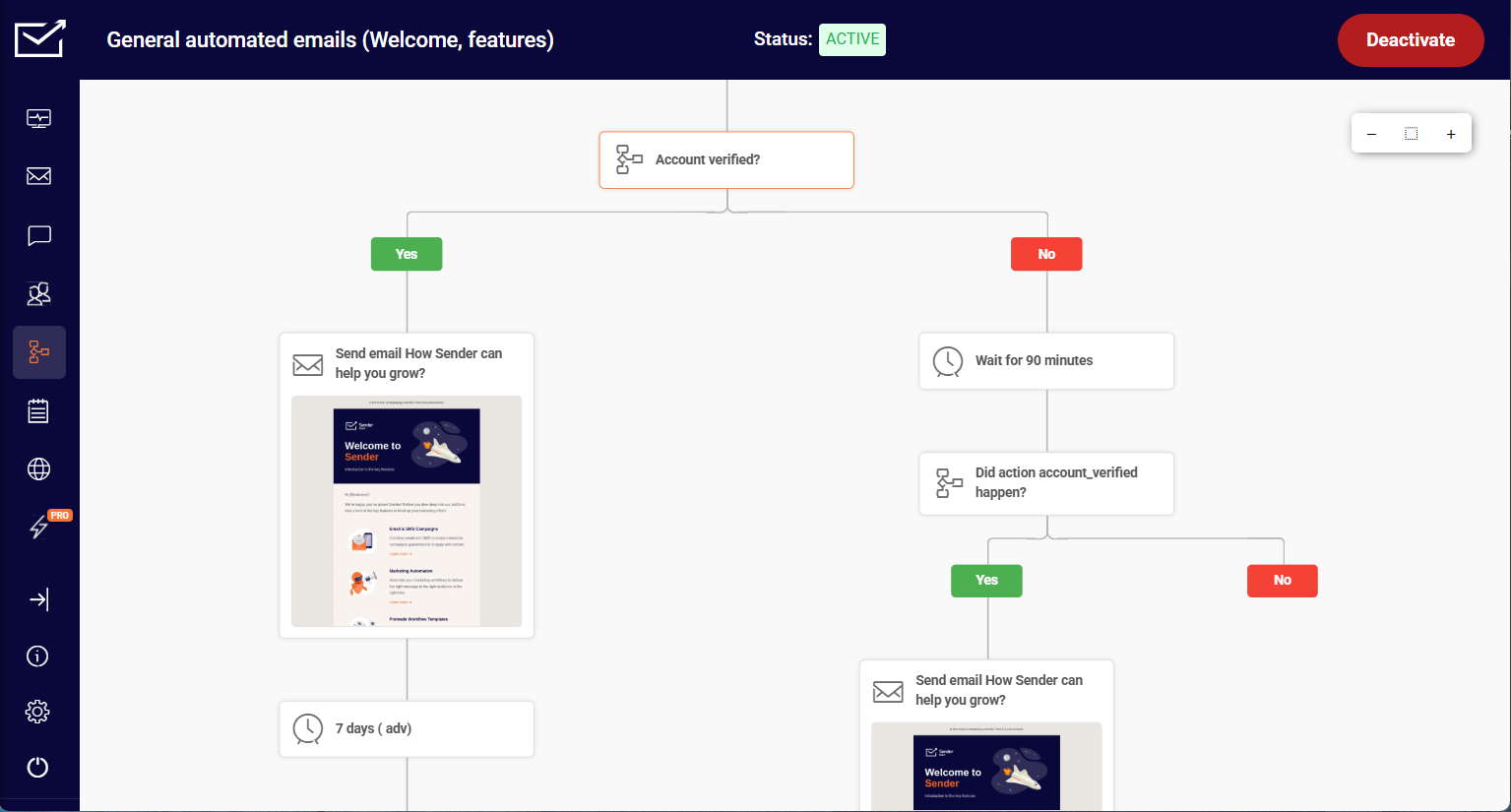
For starters, its automation feels more practical than most tools in its price range. I was able to create flows triggered by actions like email clicks, page visits, or list joins, then branch them using conditions and delays without hitting feature limits. Building a full onboarding journey – welcome email, two-day delay, link-click condition, two different follow-up paths – took around 35 minutes from blank canvas to activated flow.
That same structure takes slightly longer in tools like Klaviyo, not to mention Brevo (around 1.5 hours), where branching logic requires workarounds or separate integrations.
The builder itself is approachable without feeling simplified. I could see the full customer journey in one visual flow, which made it easier to spot gaps – like a missing re-engagement branch for users who never opened the first email – and fix them without rebuilding from scratch.
Where I noticed the ceiling: Sender isn’t the right choice if you need deep CRM-style contact records or granular scoring based on multi-channel behavior. The segmentation is solid for most use cases, but if you’re building complex lead scoring models, you’ll hit the edges of what’s available.
I tested this Brevo alternative throughout on the free plan – 2,500 subscribers and 15,000 emails/month – and automation was fully included, which isn’t standard across competitors at this tier.
Where Sender Beats Brevo
- Scalable pricing model. Free email marketing plan for up to 2,500 subscribers and 15,000 monthly emails (compared to Brevo’s ± 9,000), with accessible paid plans increasing contact and send limits. For businesses sending regular newsletters or multiple campaigns monthly, Sender’s free tier provides 67% more sending capacity without daily bottlenecks.
- 24/7 human support. Live chat and email assistance available even on the free tier every day of the week (with Brevo offering ticketing support on its Free plan), ensuring fast issue resolution without upgrading to higher-tier plans (that offer priority support).
- Superior deliverability. 90% inbox placement rates (self-reported), as compared to Brevo’s 88.3%, with fewer spam placements across Gmail and Outlook. Even small gains here can noticeably lift opens and clicks, making your campaigns more effective and your results more reliable.
- More in-depth branching logic. Advanced automation builder with multi-step workflows, conditional splits, and behavior-based triggers available without heavy plan restrictions. Compared to Brevo’s simpler automation paths, Sender allows for more precise targeting and lifecycle-based messaging without needing higher-tier upgrades.
Automation & Free Plan Depth
Sender’s automation depth stands out because it gives you access to multi-step workflows, event-based triggers, and segmentation from the start – not just on premium plans. You can build full customer journeys (think welcome flows or abandoned cart sequences) using a visual builder without needing complex setup or upgrades.
Its free plan, meanwhile, is another highlight of Sender. You get up to 15,000 emails/month for 2,500 subscribers, plus automation, segmentation, templates, and even transactional emails are included – with no 300 emails per day limits that Brevo does. With many established competitors downsizing their Free Forever plans, a generous bundle like this in this economy feels rare.
Pricing
Free plan covers up to 2,500 contacts and 15,000 emails/month. Paid starts at $7/month for 1,000 contacts.
Brevo vs. Sender
Where Brevo wins: Broader all-in-one functionality – combines email marketing, CRM, and transactional messaging in a single platform, which is better for teams needing everything in one place.eature set for campaign execution.
Where Sender wins: Stronger automation and segmentation on lower tiers – you get multi-step workflows and behavioral targeting without needing to upgrade, making it more accessible for growing teams.
Klaviyo — Ecommerce Personalization and Segmentation
Klaviyo is an ecommerce email marketing platform built for users who want deeper personalization and data-driven targeting.

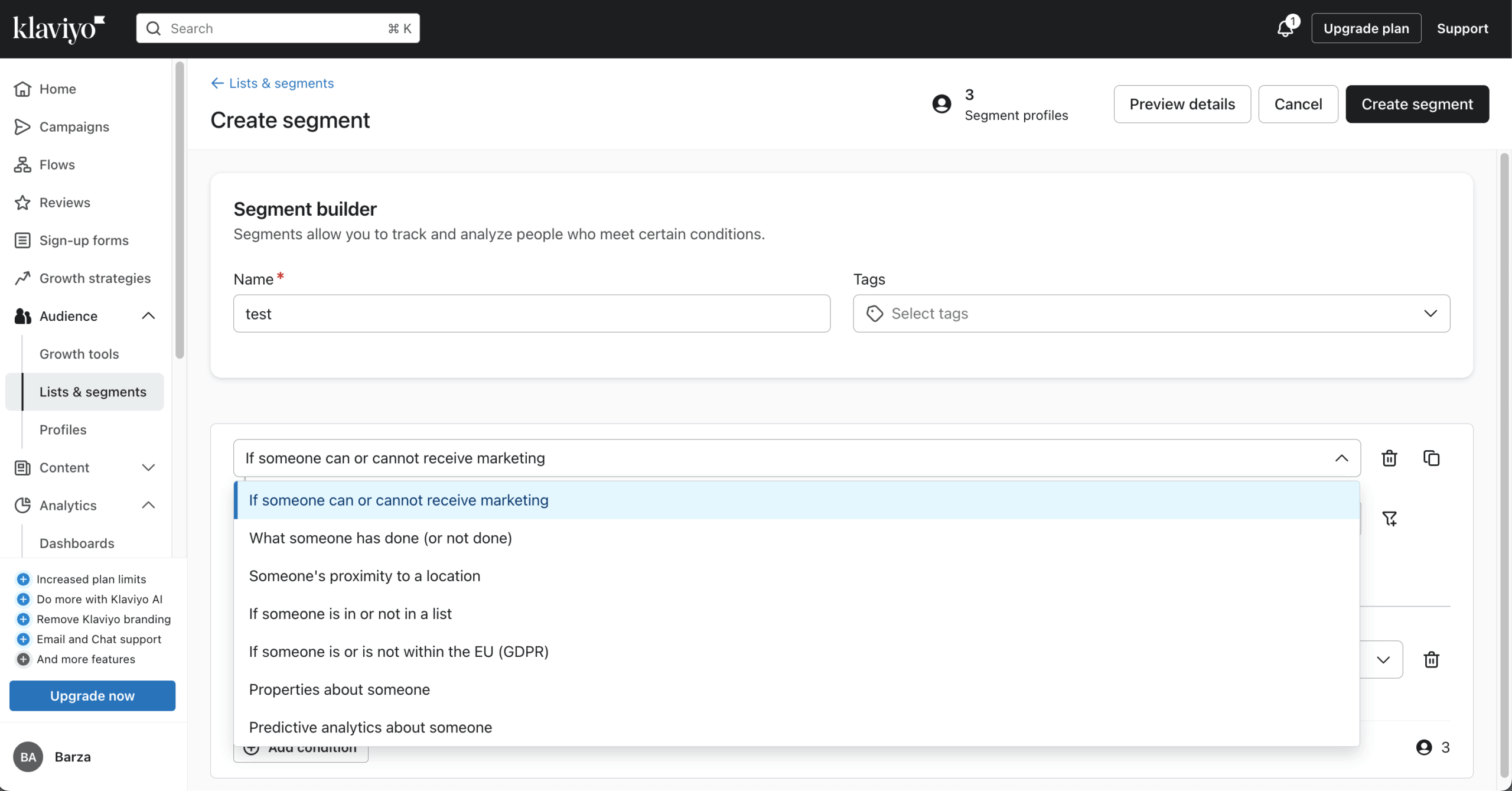
What I enjoyed right out of the box is how much control you get over Klaviyo’s segmentation. Instead of relying on basic lists, I could build segments using real customer behavior – browsing history, past purchases, average order value, or predicted next purchase date. It’s not just “who opened an email,” it’s “who is likely to buy again,” and that makes all the difference.
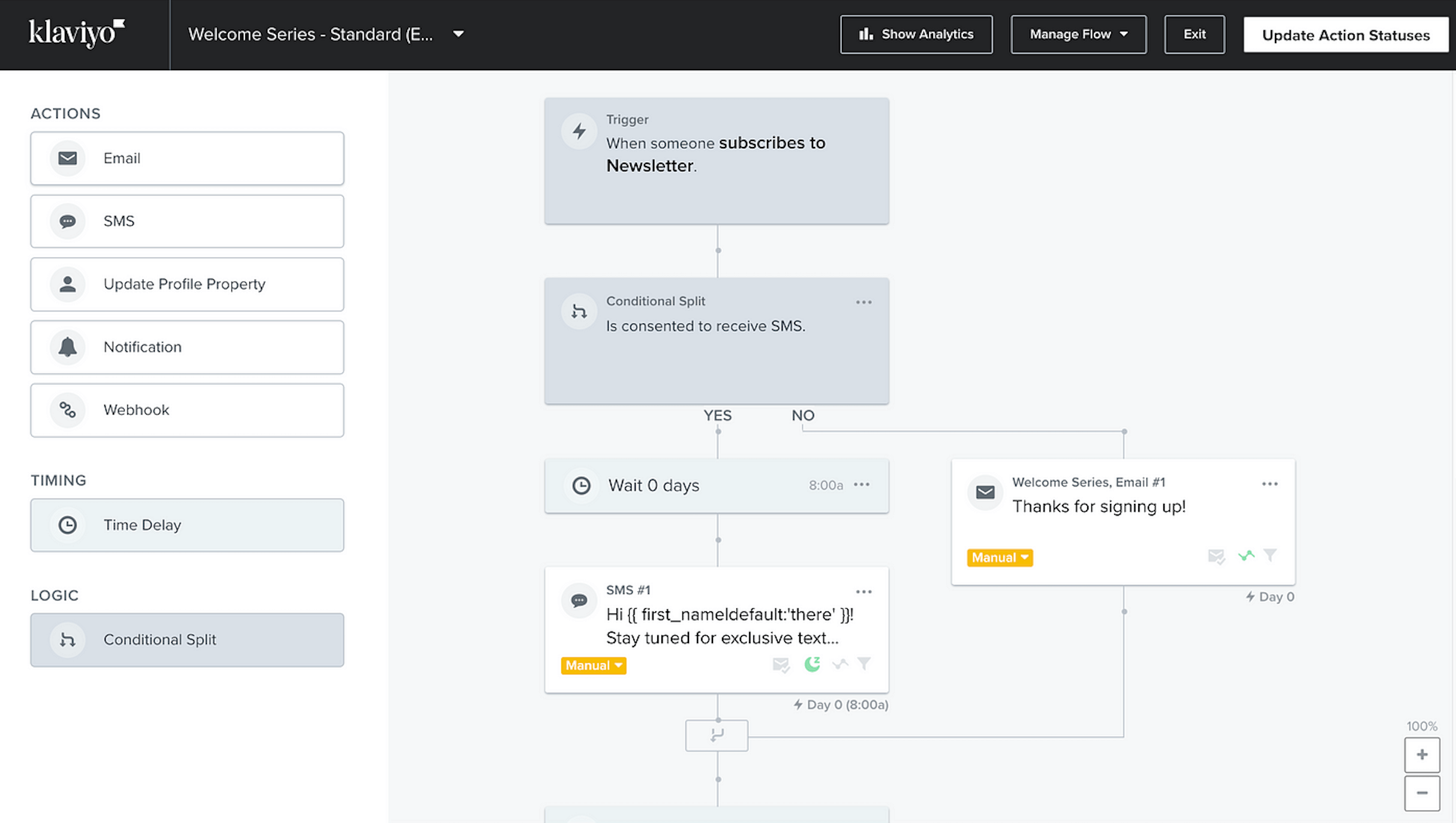
Klaviyo’s personalization follows the same logic. I tested a browse abandonment flow – pulling in the exact products a user viewed, triggering after a 1-hour delay – and had it running in around 40 minutes. The product feed integration was straightforward once set up, but the initial data mapping between my store and Klaviyo took longer than expected. Getting the right product attributes to surface correctly in the email required a couple of iterations before it looked right.
That level of specificity is where this Brevo alternative separates itself from the crowd. I tried building a comparable browse abandonment flow in a more general platform and couldn’t replicate the per-product dynamic content without a custom workaround. In Klaviyo, it was a native block.
That said, even great tools like Klaviyo have things to improve. In this case, building advanced segments with multiple behavioral conditions takes time to get right. My first attempt at a predicted-purchase segment returned a much smaller audience than expected because I hadn’t accounted for the minimum purchase history Klaviyo requires to generate predictions. Once adjusted, it worked well – but that kind of calibration isn’t obvious upfront.
Where Klaviyo Beats Brevo
- Predictive targeting. Klaviyo’s predictive analytics targets customers based on likelihood to buy, churn risk, or expected next order date–not just past actions. So instead of “purchased in 30 days,” you can trigger flows before a repeat purchase or disengagement happens. Brevo can approximate this with rule-based segments, but it relies on manual timing and thresholds. Klaviyo automates that prediction layer, making campaigns more proactive and reducing the need for constant optimization.
- Dynamic personalization. Klaviyo builds individualized product blocks at send time using browsing behavior, purchase patterns, and predictive scores – meaning one campaign can surface different product grids for different recipients without segmentation workarounds. Meanwhile, Brevo handles dynamic product feeds competently, inserting the right data based on contact attributes or recent purchases, but it doesn’t independently determine what that data should be.
- Wider ecommerce automation trigger selection. Klaviyo supports ecommerce-native automation triggers – price drops on wishlisted items, low-stock alerts for browsed SKUs, back-in-stock notifications – that fire directly from catalog and inventory changes, not just user behavior. Brevo covers core triggers like purchases and site activity competently, but catalog-driven events aren’t natively supported.
Predictive ecommerce segmentation
Klaviyo’s predictive ecommerce segmentation uses historical customer data to forecast behaviors like purchase likelihood, churn risk, and expected next order date. This lets you target users based on what they’re likely to do – not just what they’ve already done. In practice, it makes campaigns more timely and relevant, helping ecommerce brands send the right offers or reminders before a customer drops off or becomes inactive.
Pricing
Paid plans start at $30/month for up to 1,000 subscribers and 10,000 emails | Free plan available for 500 monthly emails and 250 contacts.
Brevo vs. Klaviyo
- Where Klaviyo wins: Advanced personalization and segmentation – enables highly targeted, behavior-driven campaigns instead of one-size-fits-all emails.
- Where Brevo wins: Simplicity and cost – easier to use and more affordable for teams that don’t need deep personalization.
Interested in more tools like Klaviyo? Check out these 10 Best Klaviyo Alternatives for Ecommerce in 2026
Omnisend — Email, SMS, and Push in One Platform
Omnisend is an email marketing platform built for ecommerce teams that want to run email, SMS, and push campaigns from one place.

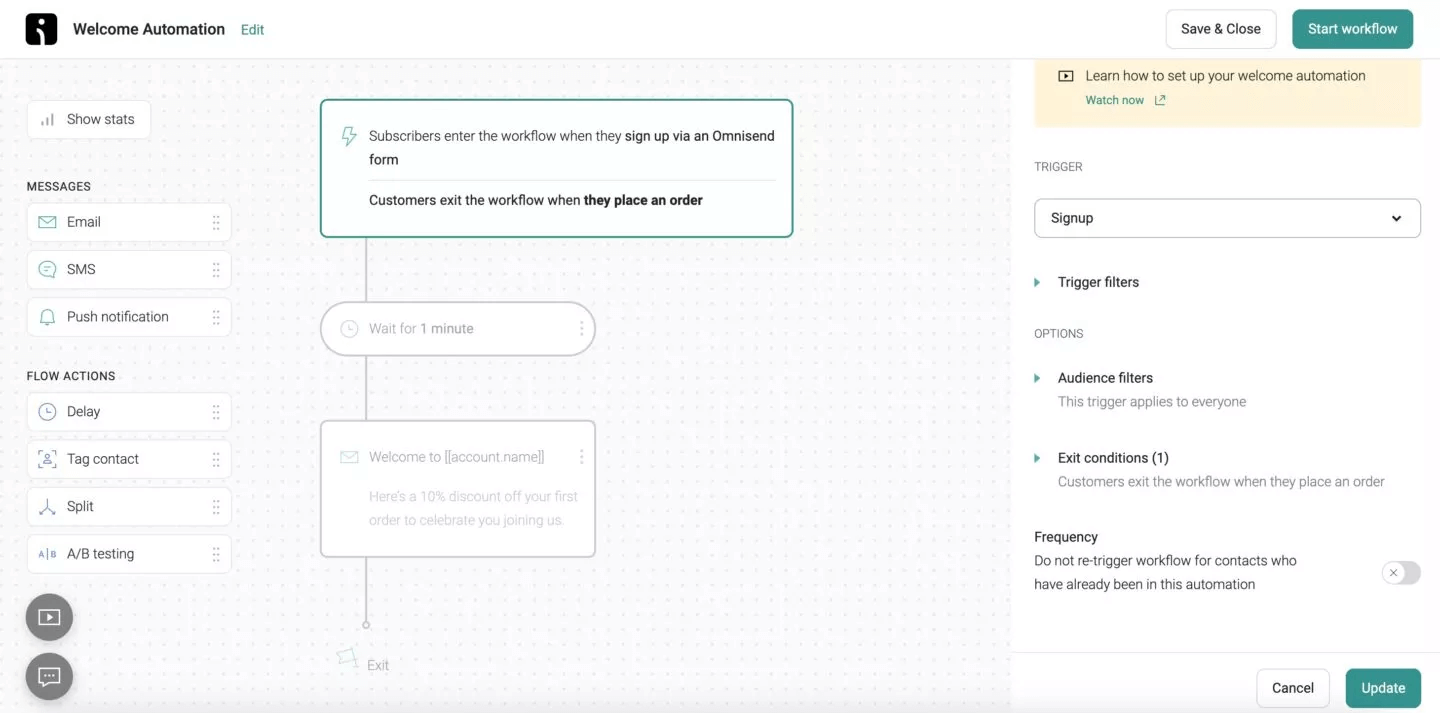
The core difference from single-channel tools is how these channels work together in one workflow. Rather than building three separate campaigns, I could create a single flow where a user gets an email first, then an SMS if they don’t engage, then a push notification as a final nudge – all triggered by the same cart abandonment event, all controlled from one visual builder.
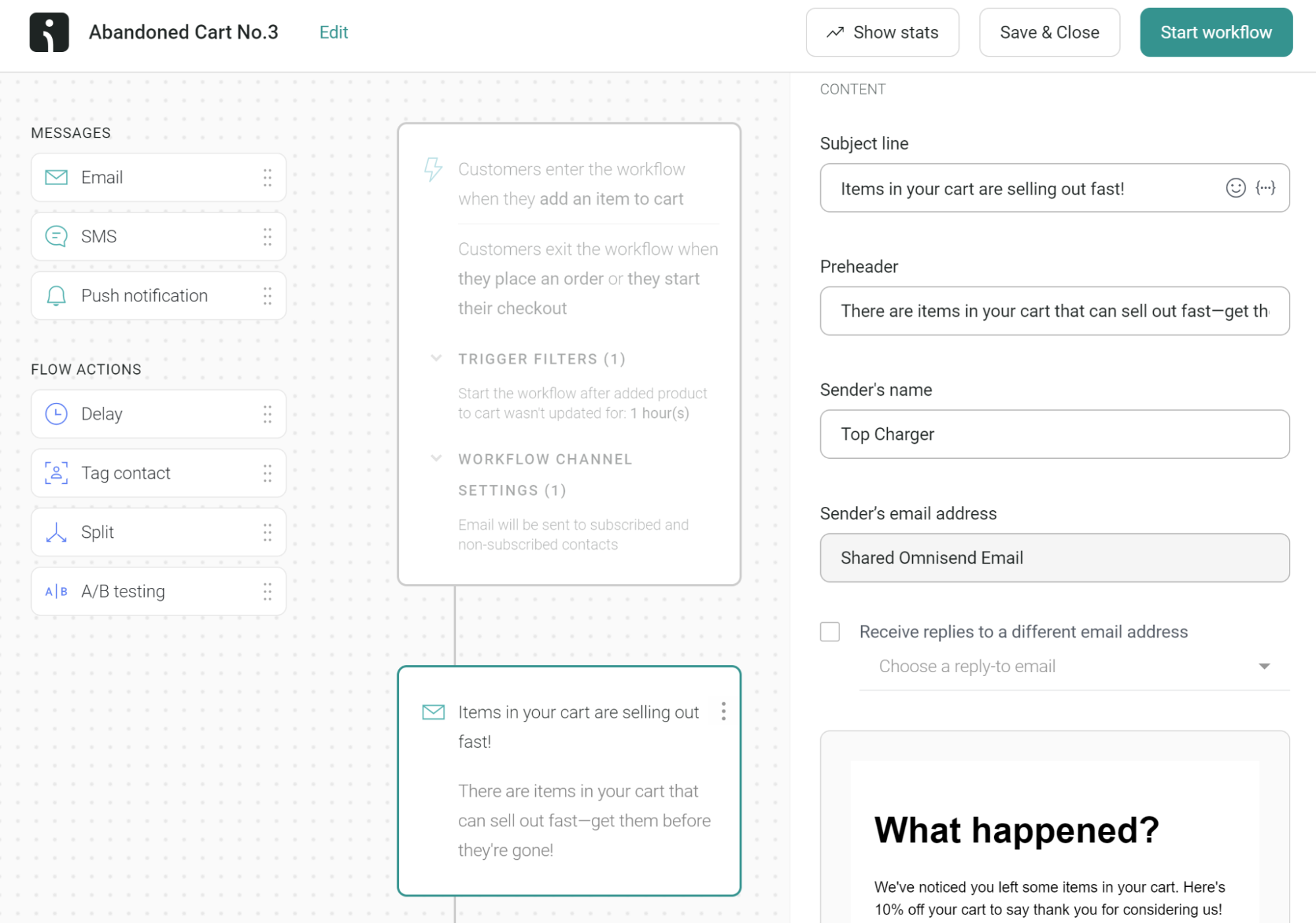
I tested this with a cart recovery flow: email with product recommendations, SMS with a discount, push notification as a final touchpoint. The whole thing took around 45 minutes to build and activate. One snag I didn’t anticipate: the push notification step showed as inactive after the flow was already live. The channel requires a separate SDK installation on the storefront – something that wasn’t flagged during setup – and costs around 20 additional minutes to resolve.
The multi-store dashboard works cleanly for campaign sending, but segment audiences stay siloed per store. Identifying customers who’ve bought across multiple stores isn’t available natively, which matters if cross-store retargeting is part of your strategy.
For coordinated multi-channel campaigns without stitching together separate tools, it delivers. The ceiling shows up when you need data to move between stores rather than just messages.
Where Omnisend Beats Brevo
- Shoppable email blocks. Omnisend’s email builder includes ecommerce-native blocks that Brevo’s doesn’t: a product picker that pulls live catalog items directly into the editor, unique auto-generated discount codes per recipient, and gamified elements like a scratch card or spin-to-win wheel. These aren’t third-party embeds – they’re native components built for conversion. Brevo’s builder is competent for general email design but lacks this layer of store-connected functionality.
- Better built-in web push ecommerce automation. Omnisend lets you add web push into the same ecommerce workflows as email and SMS, with push available on all plans, including 500 monthly pushes on Free and unlimited on paid plans. Brevo has push, but it is not included in the free or entry plan.
- Built-in multichannel messaging. Omnisend treats email, SMS, and web push as native channels inside a single automation workflow – channel consent, contact status, and sequencing all managed in one builder. That makes coordinated flows straightforward: email first, SMS for non-openers showing high purchase intent, push for final urgency. Brevo supports more channels overall, including WhatsApp, but multichannel setup isn’t organized around store journeys the way Omnisend’s is.
Omnichannel Marketing Automation
Omnisend’s marketing automation is very practical–especially if you’re running ecommerce campaigns across multiple channels. The visual builder makes it easy to combine email, SMS, and push notifications into a single workflow, so you’re not jumping between tools.
I was able to set up multi-step flows with delays, conditions, and behavior-based triggers (like browsing or purchases) without much friction. The pre-built automations–like abandoned cart or post-purchase sequences–also speed things up, so you’re not starting from scratch every time.
Pricing
Paid plans start at $20/month for up to 1,000 contacts and 12,000 emails/month | Free plan available for 250 contacts and 500 monthly emails.
Brevo vs. Omnisend
- Where Omnisend wins: Stronger omnichannel marketing – combines email, SMS, and push notifications in one place with ecommerce-focused features like Shopify review integration.
- Where Brevo wins: More flexible and cost-efficient for broader use – built around a CRM-first approach with email, SMS, WhatsApp, and live chat in one system, plus a send-based pricing model that scales better for large lists and moderate sending frequency.
GetResponse — Email Marketing with Built-in Webinars
GetResponse is a marketing platform built for teams that want more than just email – it brings campaigns, funnels, and webinars into one system.
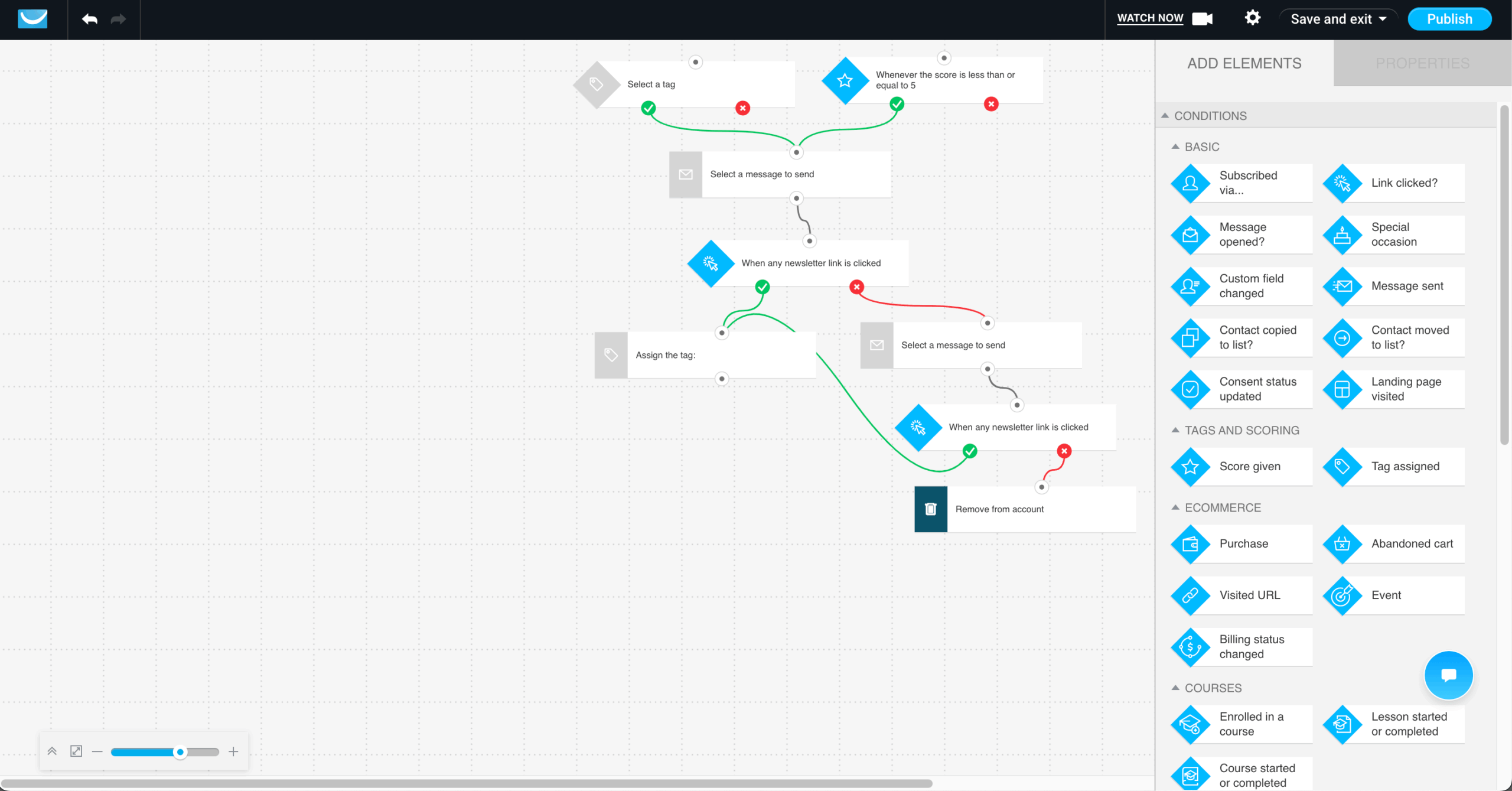
The feature that genuinely separates it from general email platforms is how tightly webinars connect to the rest of the marketing workflow. I was able to build a full campaign where users registered through a landing page, received automated reminder emails, attended the webinar, and then got different follow-up sequences depending on whether they showed up or not. The whole flow took around 55 minutes to configure end-to-end.
The learning curve is real and front-loaded. The platform packs a lot into one interface, and the first session involved more orientation than actual building. GetResponse’s own documentation helped, but it took a second session before the navigation felt intuitive rather than effortful.
For teams running webinar-led marketing or lead generation funnels, the all-in-one setup saves meaningful time. The ceiling shows up if you need pixel-perfect landing pages or highly granular automation logic – both are present but not best-in-class.
Where GetResponse Beats Brevo
- Built-in webinar hosting. GetResponse includes native live webinars with chat, polls, and automatic recording – meaning registrations, reminder sequences, attendance follow-up, and replay access all stay inside one platform. That’s a meaningful operational difference from stitching together an email tool and a separate webinar platform. Brevo has no native webinar functionality, making this a hard feature gap rather than a difference in depth or execution.
- Dedicated conversion funnel builder. Most platforms give you landing pages and automations and leave the assembly to you. GetResponse’s Conversion Funnel is different: it’s a guided, end-to-end funnel tool where product page, cart recovery, and post-purchase upsell live inside one structured flow rather than across separate menus. Brevo supports all the underlying components, but there’s no dedicated funnel layer tying them together.
- AI course creator. GetResponse extends beyond marketing into content monetization with a built-in course creation tool – allowing creators to build, package, and sell educational content from the same platform they use for email and automation. Brevo’s focus remains on communication channels, CRM, and campaign tooling, with no native equivalent on the content or course side.
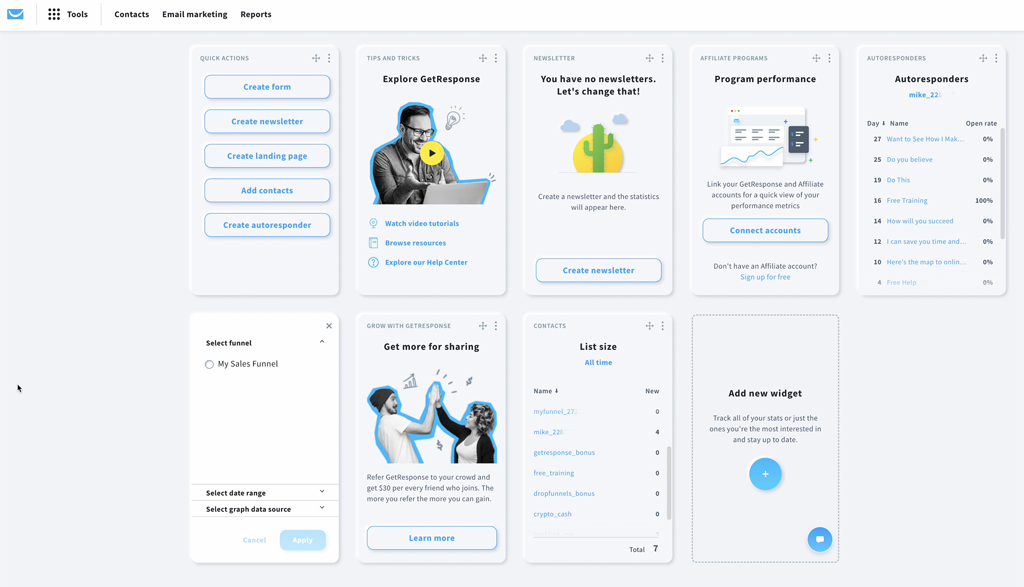
Built-in Webinars and Funnels
GetResponse’s built-in webinars and funnels make it easier to run lead generation and conversion campaigns without stitching together extra tools. Instead of setting up separate newsletter software for registration pages, follow-up emails, and the event itself, you can manage the whole flow in one place.
The funnel builder also comes with ready-made scenarios for things like list building, lead magnets, sales, and both free and paid webinars, which makes campaign setup much faster.
Pricing
Paid plans start at $15/month for up to 1,000 contacts and unlimited email sending | 14-day free trial available.
Brevo vs. GetResponse
- Where GetResponse wins: More advanced all-in-one marketing – includes landing pages, webinars, social media tools, and AI features to manage and scale multi-channel campaigns from a single platform.
- Where Brevo wins: Simpler email-focused workflows – better suited for teams that need straightforward automation and campaign management without the added complexity of broader marketing tools.
HubSpot — CRM-Integrated Email Marketing
HubSpot is a marketing platform built around its CRM, where email marketing runs on live customer data rather than static lists.

The practical difference shows up in personalization depth. I built a nurture sequence for leads in the proposal stage of a sales pipeline – emails that referenced the specific deal name, included content relevant to that pipeline stage, and automatically skipped contacts once a deal closed. Setting that up took around 50 minutes, most of which was mapping the right CRM properties to the email tokens rather than building the flow itself.
I also tested dynamic content blocks that changed based on lifecycle stage – one version for leads, a different version for customers. The logic worked cleanly once configured, but finding where to set it up wasn’t obvious. It’s buried in the email editor under a non-intuitive menu path, and HubSpot’s own documentation took two searches to surface the right article.
Where the ceiling becomes expensive: the flow I built required access to custom behavioral events, which isn’t available below the Marketing Hub Professional tier (currently at $800/month). For teams already on that plan for CRM reasons, the email capability adds genuine value. For teams evaluating HubSpot primarily for email, that pricing threshold is a significant commitment before the platform’s real personalization depth becomes accessible.
For sales-led teams where marketing and CRM data already live together, this Brevo alternative removes a genuine integration problem. For teams that don’t need that CRM depth, the cost is hard to justify against more focused email tools.
Where HubSpot Beats Brevo
- More flexible CRM data structure. HubSpot’s data model goes well beyond contacts and deals – custom objects let teams map their CRM to reflect how their business actually operates, whether that’s subscriptions, properties, projects, or any other entity that doesn’t fit a standard sales structure. Brevo’s CRM handles contacts, pipelines, and deals competently for straightforward use cases, but its data structure is relatively fixed.
- Deeper sales insights and coaching tools. HubSpot’s Sales Hub includes conversation intelligence that records, transcribes, and analyzes sales calls – surfacing coaching opportunities, tracking talk ratios, and flagging deal risks without requiring a separate tool. Brevo’s sales functionality covers pipeline management and basic deal tracking, but there’s no equivalent layer of performance analysis or rep-level coaching built in.
- Broader all-in-one business platform. HubSpot is built as a unified operating layer across marketing, sales, customer support, and operations – meaning data, reporting, and workflows flow across teams without integration overhead. Brevo is a strong marketing and messaging platform with CRM capabilities layered on, but it isn’t designed to run an entire customer-facing operation from a single system.
CRM-Powered Email Marketing
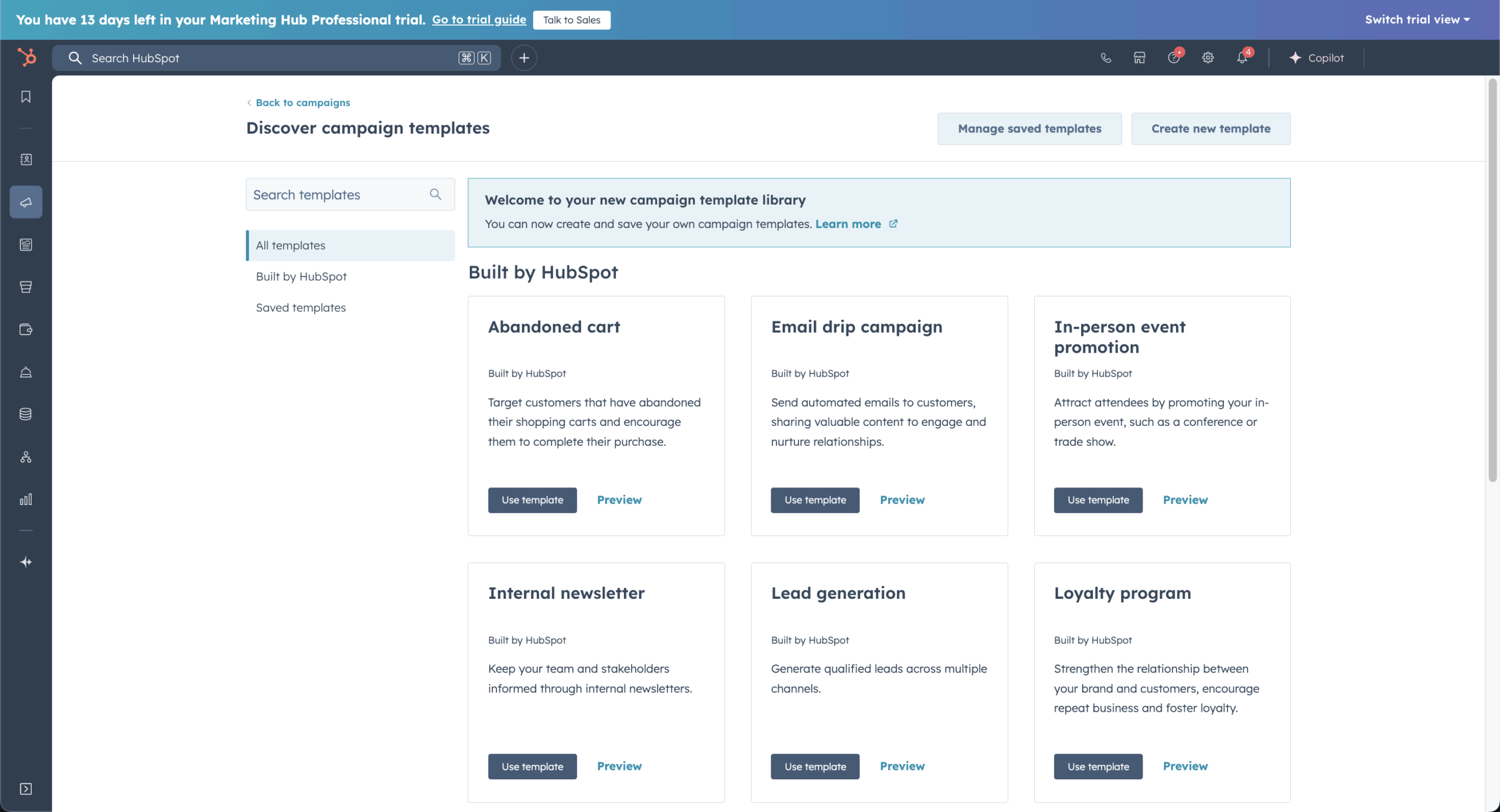
HubSpot’s CRM-powered email marketing is built around one big advantage: your campaigns run on live customer data, not disconnected contact lists. That means email personalization, automation, and reporting all pull from the same system your sales and support teams use, which makes campaigns feel more connected to the full customer journey.
In practice, that makes it easier to send emails based on lifecycle stage, engagement, deal activity, or other CRM data without constantly syncing tools or updating lists manually. HubSpot also layers in automation, A/B testing, and reporting, so you can build campaigns that are not just personalized but easier to optimize over time.
Pricing
HubSpot’s paid plans start at $11/month for up to 1,000 marketing contacts | Free plan available for 1,000 contacts and 2,000 monthly emails.
Brevo vs. HubSpot
- Where HubSpot wins: Full customer journey and CRM depth – connects marketing, sales, support, and operations in one system with advanced automation and lifecycle tracking.
- Where Brevo wins: Simplicity and ease of use – better suited for teams that just need email campaigns and basic automation without a steep learning curve.
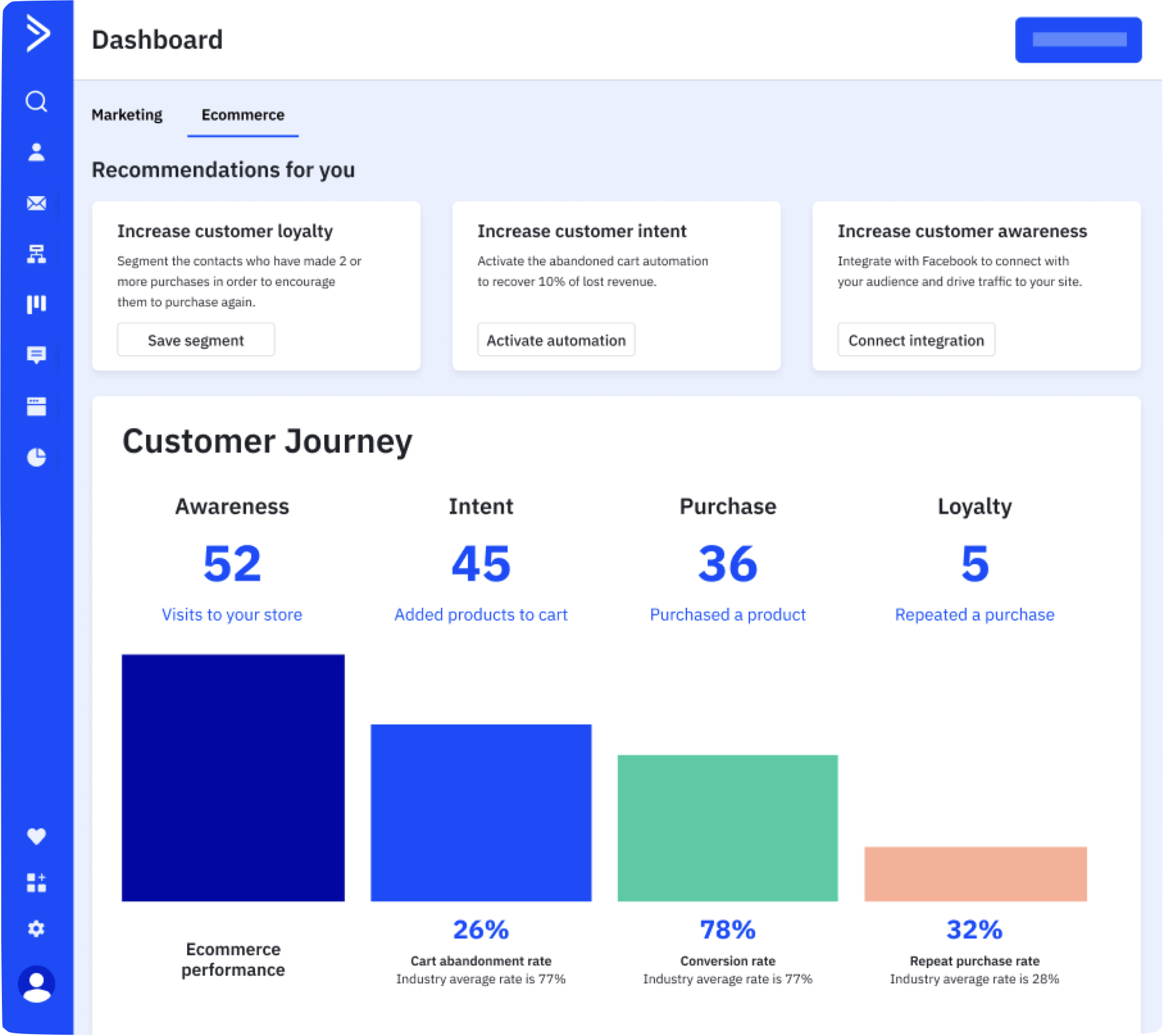
ActiveCampaign — Behavior-Based Automation
ActiveCampaign is a marketing platform built for teams that want behavior-driven automation paired with deeper CRM control.
The lead scoring setup is where it separates itself. I configured a model where email opens scored 1 point, link clicks scored 3, and product page visits scored 5 – once a contact crossed 15 points, they automatically moved into a sales pipeline and triggered a higher-intent email sequence.
The whole flow took around 60 minutes to build, most of which was locating where scoring rules attach to specific actions. It’s not prominently surfaced in the builder, and finding it required more digging than it should for a core feature.
That friction aside, the logic it enables – automation that reacts to sales intent rather than just engagement – isn’t available in simpler tools at this price point. The features that make it worth using, CRM, lead scoring, and advanced segmentation, are locked behind the Plus plan at $49/month.
For teams already running sales and marketing from one system, that’s justified. For teams that need straightforward email sequences, it’s more than necessary.
Where ActiveCampaign Beats Brevo
- Goal-based automation paths. ActiveCampaign allows contacts to move dynamically through workflows using goal conditions and jump logic – so if a contact completes a target action mid-sequence, they’re routed accordingly rather than continuing a flow that’s no longer relevant. Brevo’s automation builder handles linear and conditional sequences competently, but this level of dynamic path adjustment isn’t supported natively.
- Advanced lead and deal scoring. ActiveCampaign scores both contacts and deals independently, allowing sales and marketing teams to prioritize opportunities based on engagement depth and pipeline stage. Brevo offers contact scoring, but deal-level scoring – and the ability to trigger automations based on combined lead and deal signals – requires a more advanced CRM setup that Brevo doesn’t natively provide.
- Custom event tracking. ActiveCampaign can trigger automations from custom product or app events – a SaaS trial expiring, a specific in-app action, a milestone in a customer lifecycle – making it viable for more technically complex marketing programs. Brevo supports standard behavioral triggers well, but custom event-based automation requires workarounds or external tooling that adds implementation overhead.
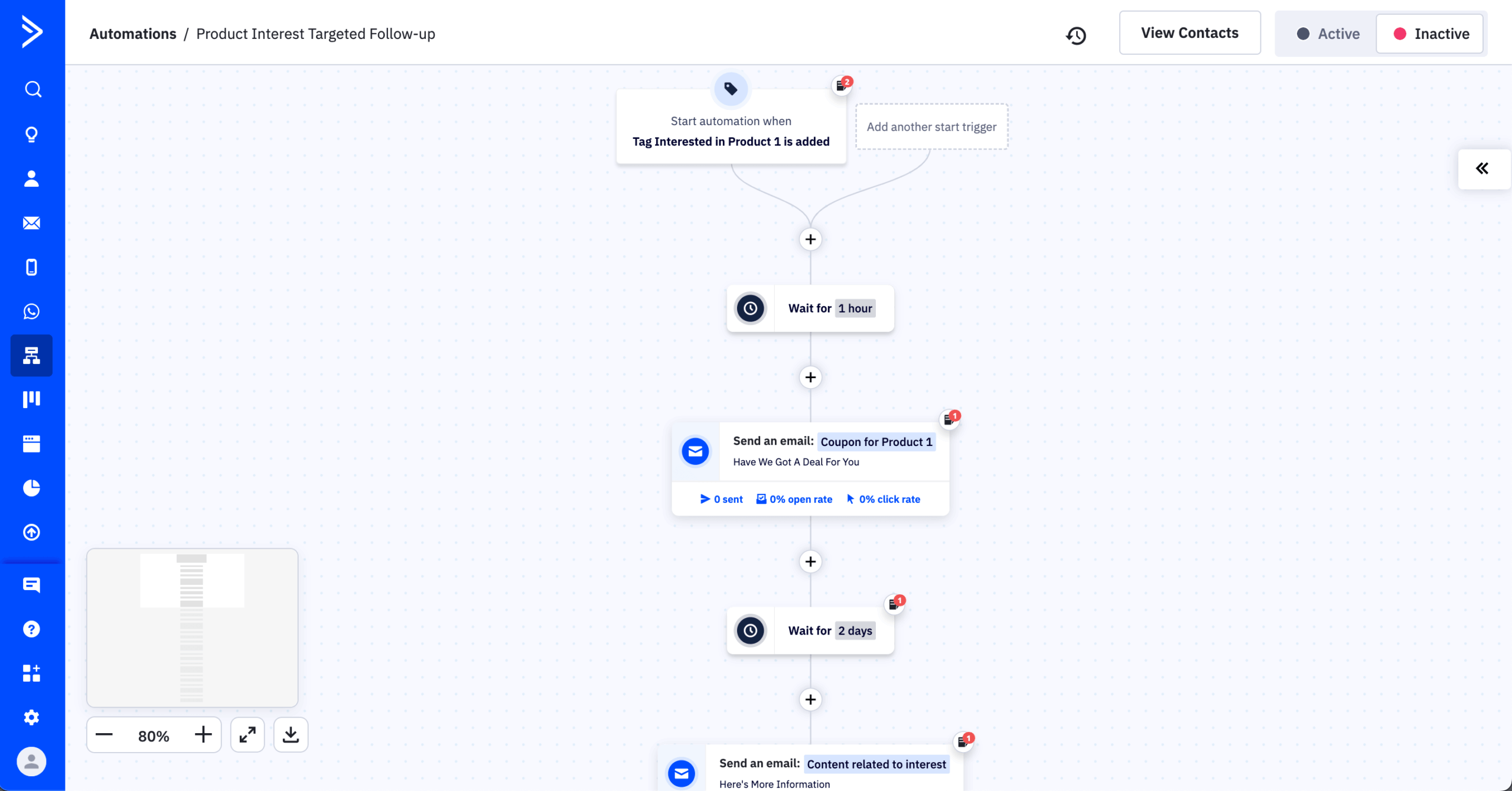
Behavior-Based Automation Workflows
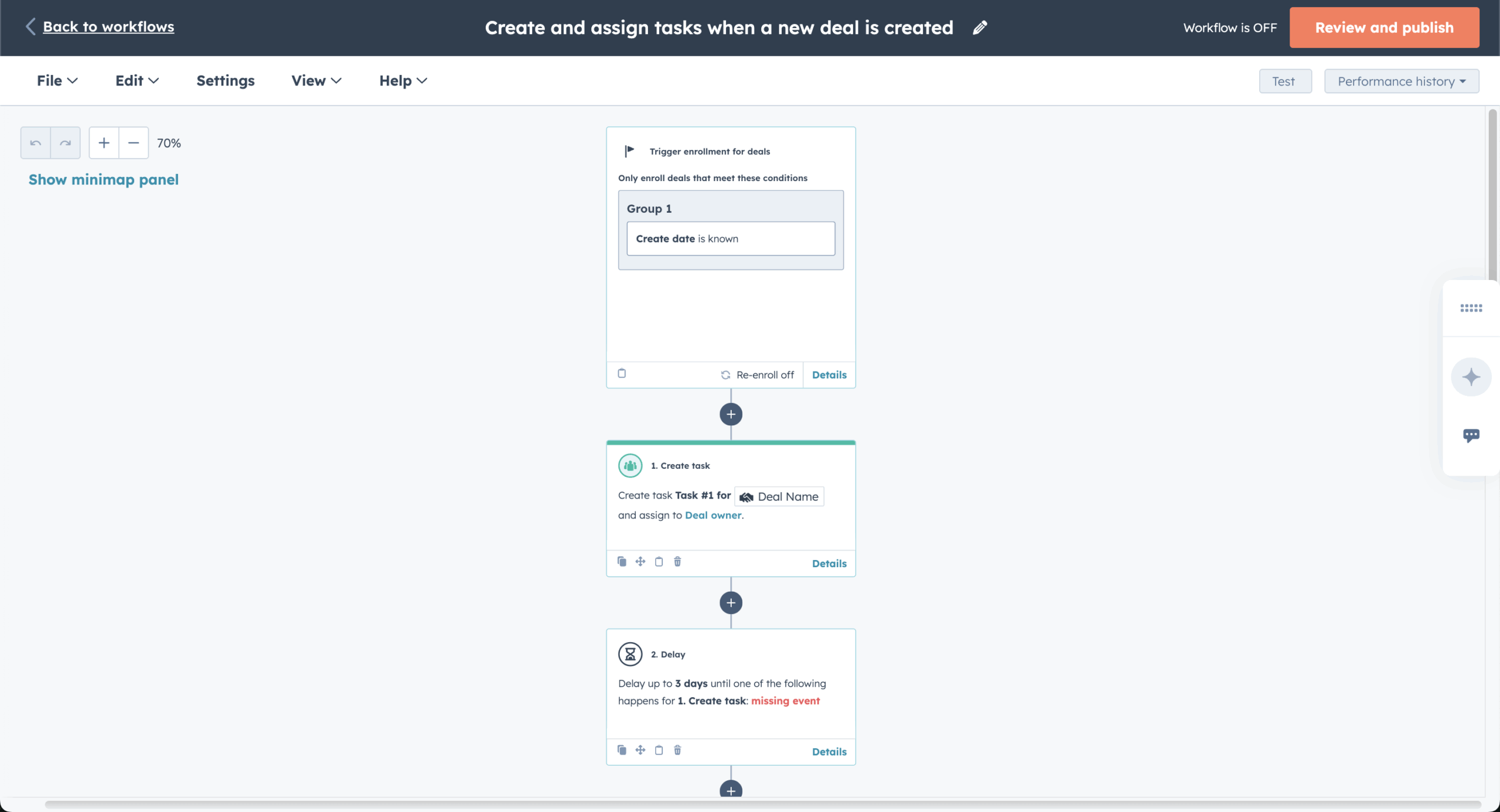
ActiveCampaign’s behavior-based automation workflows feel noticeably more advanced than what you get with most email tools. Instead of building simple time-based sequences, you’re working with automations that react to real user behavior–like email clicks, site visits, or changes in contact data–and then branch out based on conditions, goals, and logic you define.
In practice, this gives you a lot more control over how journeys evolve. I could set up flows that changed direction depending on engagement, skip steps when certain conditions were met, or trigger entirely new sequences based on actions. It does take a bit more time to set up, but once it’s running, the level of personalization and flexibility is on a different level compared to basic automation builders.
Pricing
ActiveCampaign’s paid plans start at $15/month for up to 1,000 contacts and has a monthly email send limit of 10,000 emails/month | 14-day free plan available.
Brevo vs. ActiveCampaign
- Where ActiveCampaign wins: Advanced and flexible automation – supports complex, behavior-based customer journeys that adapt dynamically, making it ideal for teams with sophisticated nurturing needs.
- Where Brevo wins: Simplicity and ease of setup – better suited for teams that want quick, straightforward automations without dealing with complex logic or configuration.
Mailchimp — Beginner-Friendly with AI Tools
Mailchimp is an email marketing platform built for ease of use, and its AI tools are where it’s adding the most meaningful new capability.

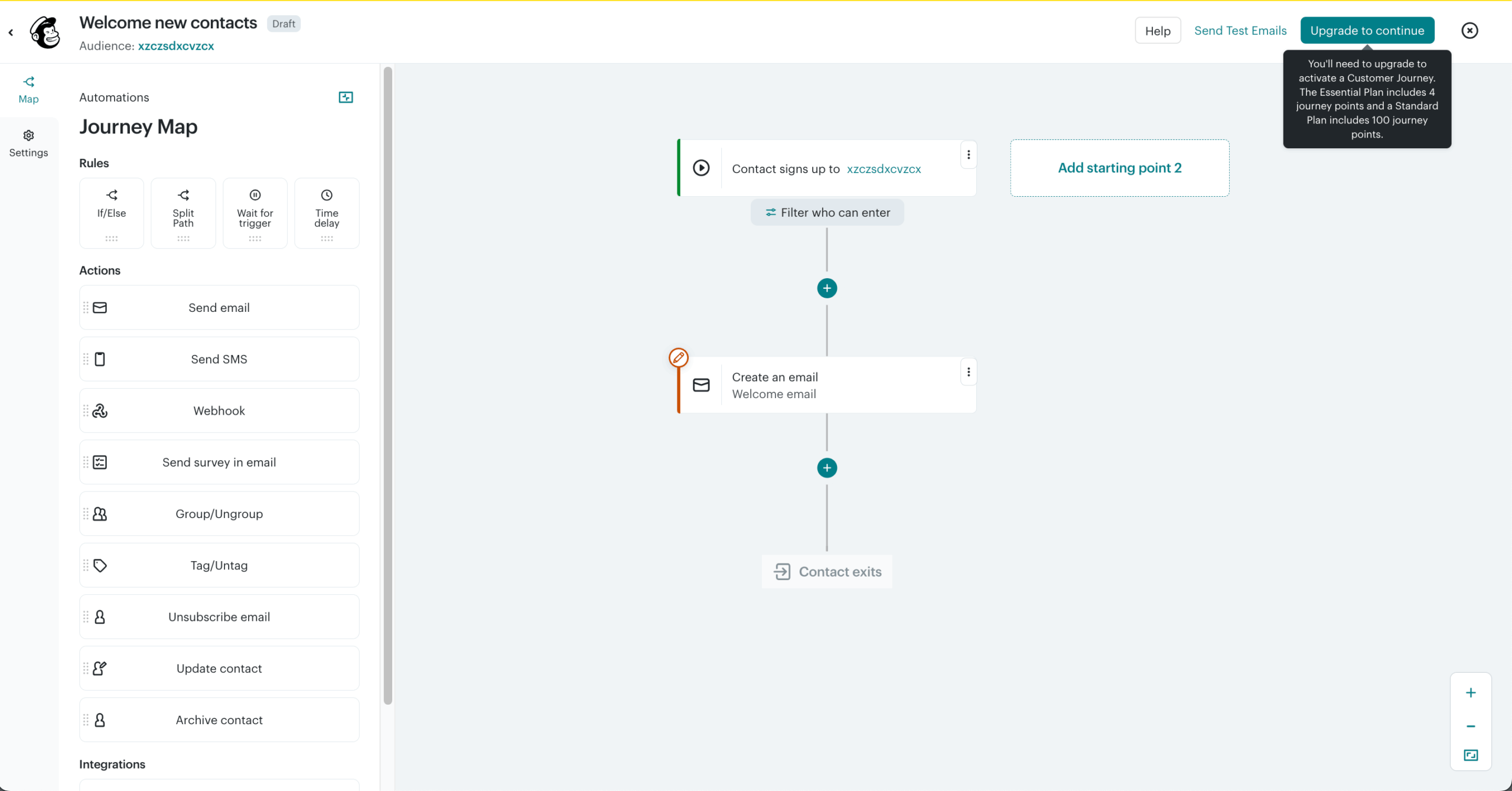
I used the AI assistant to generate subject lines and draft body copy for a promotional campaign. The first subject line draft was usable with minor edits – it took around 3 minutes to get something sendable, compared to the 10-15 minutes I’d typically spend writing and testing variations manually. The body copy needed more work – the tone was generic out of the box and required two rounds of editing before it felt on-brand. Useful as a starting point, but not a replacement for an editor.
On the infrastructure side, I set up a basic welcome sequence – three emails over seven days – and didn’t have to touch SPF, DKIM, or suppression settings manually. Everything was pre-configured. For a team without a dedicated developer, that’s a genuine time saving compared to platforms like Mailgun or Amazon SES where that setup is your responsibility.
Where I hit a ceiling was segmentation. I wanted to target contacts who had opened a campaign in the last 30 days but hadn’t clicked anything – a straightforward re-engagement segment. Because Mailchimp ties contacts to lists rather than a unified audience, building that segment required exporting, filtering, and reimporting rather than setting a condition in the builder.
For straightforward campaigns with limited segmentation needs, it’s one of the fastest tools to work with. The ceiling shows up quickly once you need behavioral targeting that crosses list boundaries.
Where Mailchimp Beats Brevo
- Integration ecosystem. Mailchimp connects with 300+ third-party tools natively, covering ecommerce platforms like Shopify, WooCommerce, and BigCommerce, payment processors like Stripe, and a wide range of CRMs, analytics, and ad platforms. Brevo’s native marketplace lists 75+ integrations, which cover the core essentials well but represent a narrower out-of-the-box footprint.
- Full website builder. Mailchimp extends beyond landing pages into full multi-page website creation – meaning a small business or creator can build a functional web presence, connect it to their audience, and run campaigns all from one platform. Brevo supports landing pages well within its campaign tooling, but a comparable multi-page website builder isn’t part of its current feature set.
- Multivariate testing. Mailchimp supports multivariate testing with up to eight campaign versions simultaneously, allowing teams to test combinations of subject lines, sender names, and content variables in a single send rather than running sequential A/B tests. Brevo offers A/B testing across its plans, but multivariate testing – where multiple variables are isolated and measured at once – isn’t part of its feature set.
AI Tools & Campaign Creation
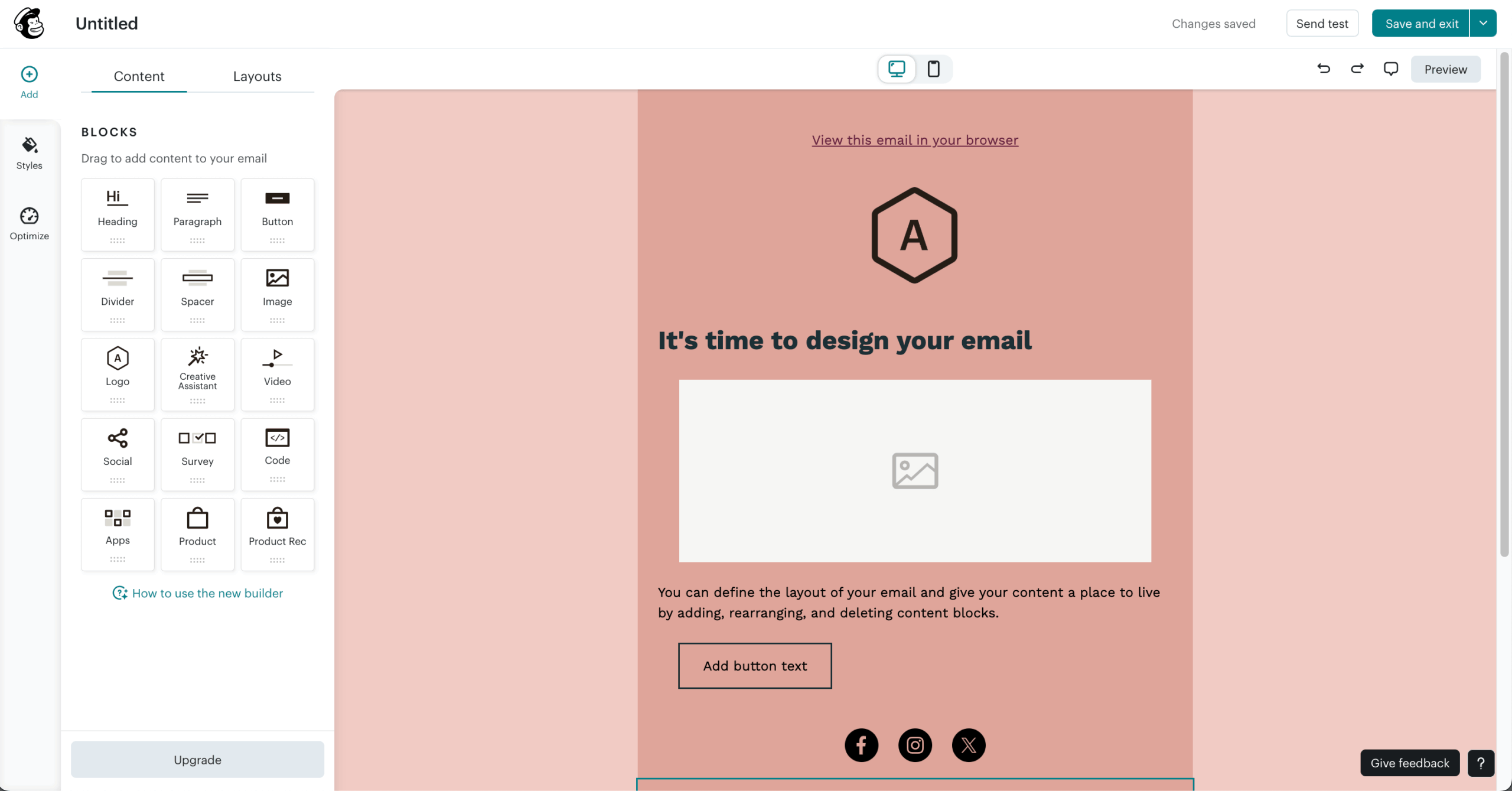
Mailchimp’s AI tools and campaign creation features are clearly designed to speed things up. Instead of starting with a blank canvas, you can lean on AI to generate email copy, suggest layouts, and even recommend send times based on past performance data. It feels more guided compared to traditional builders, which can be helpful if you’re trying to move fast or need inspiration.
In practice, this makes campaign creation more efficient, but a bit more templated. I could quickly spin up emails with AI-generated content and pre-built designs, then tweak them to fit the brand voice. The recommendations–like subject lines or content blocks–are useful, though not always perfect out of the box. It’s a solid boost for productivity, especially for smaller teams, but you’ll still want to refine things if you’re aiming for more distinct or high-converting campaigns.
Pricing
Mailchimp’s paid plans start at $13/month for up to 500 contacts and up to 5,000 emails/month | Free plan available for 250 contacts and 500 monthly emails.
Brevo vs. Mailchimp
- Where Mailchimp wins: Faster campaign setup and a more polished editing experience – the AI assistant speeds up subject lines and draft creation, while the drag-and-drop builder and pre-configured infrastructure make it easier to launch campaigns without technical setup.
- Where Brevo wins: Simplicity and ease of campaign creation – beginner-friendly templates and intuitive reporting make it easy to launch and track campaigns quickly.
We actually have a dedicated article for the best Mailchimp alternatives. Check it out if you’re looking for a cheap email marketing tool similar to Mailchimp.
Moosend — Full Automation at Lower Price Points
Moosend is an email marketing platform built for teams that want solid analytics and core features without paying premium prices.
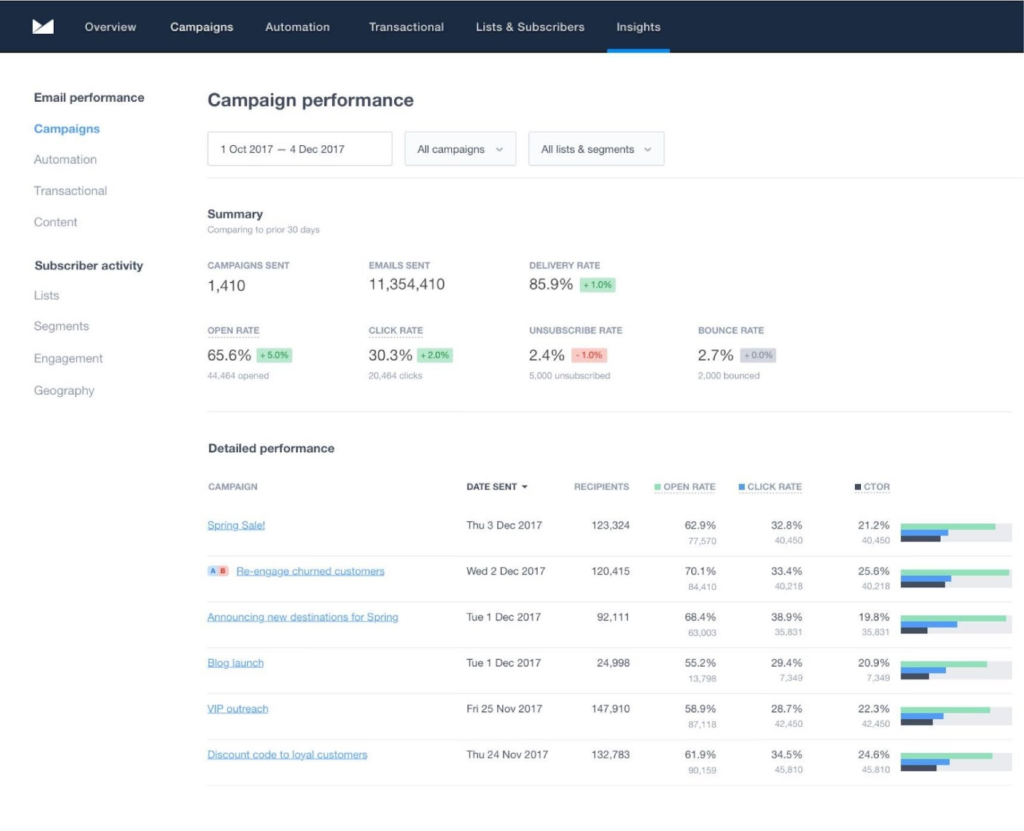
The analytics go deeper than most tools at this price point. I ran a promotional campaign to around 500 contacts and used the click map to review engagement – it showed a clear pattern where the CTA button in the upper third of the email drove nearly all clicks, while a secondary product block lower down was almost entirely ignored.
That finding took about 2 minutes to surface and directly informed a layout change for the next send. Device-level data showed 68% of opens came from mobile, which prompted a template adjustment I wouldn’t have prioritised without the numbers in front of me.
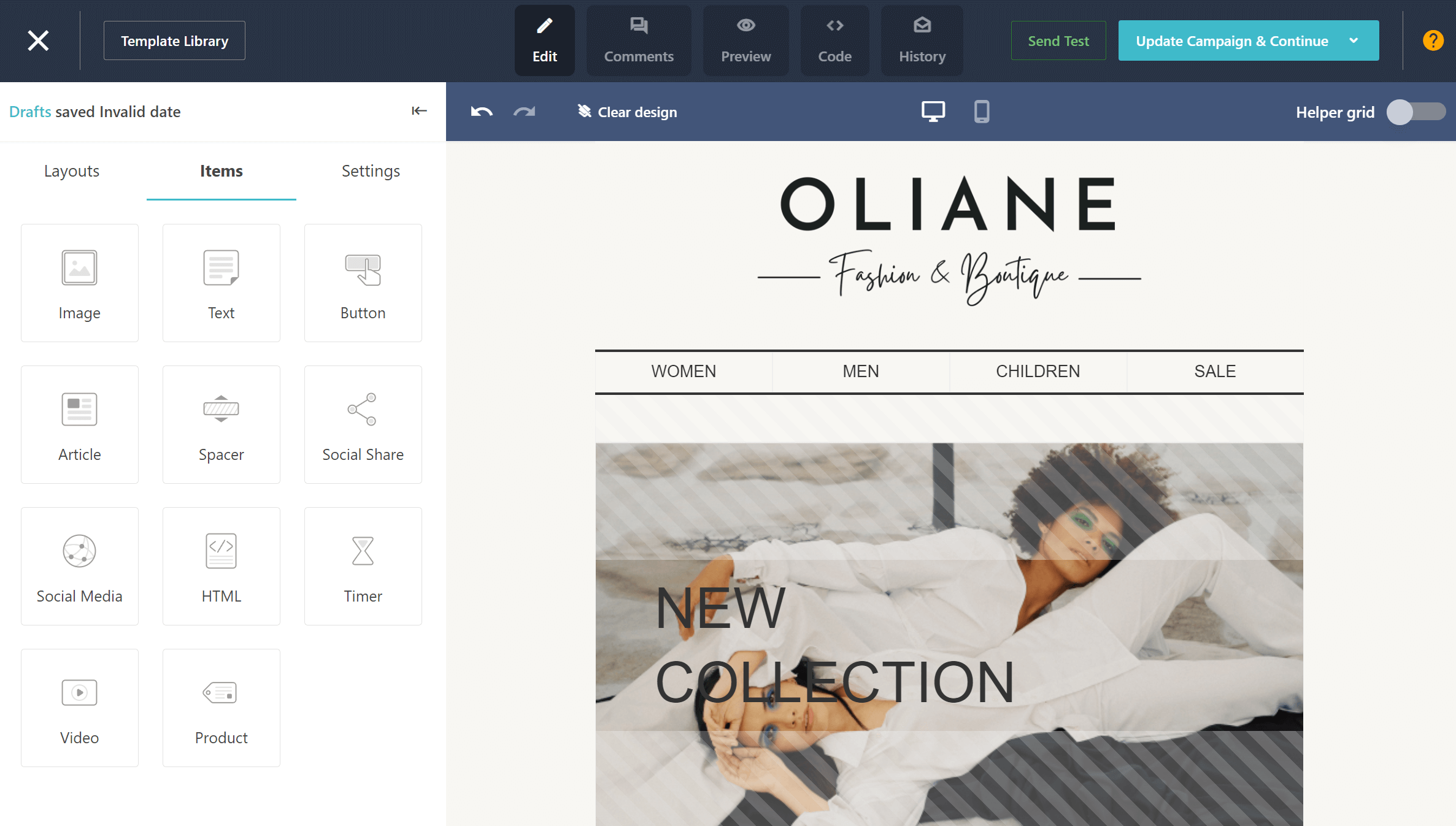
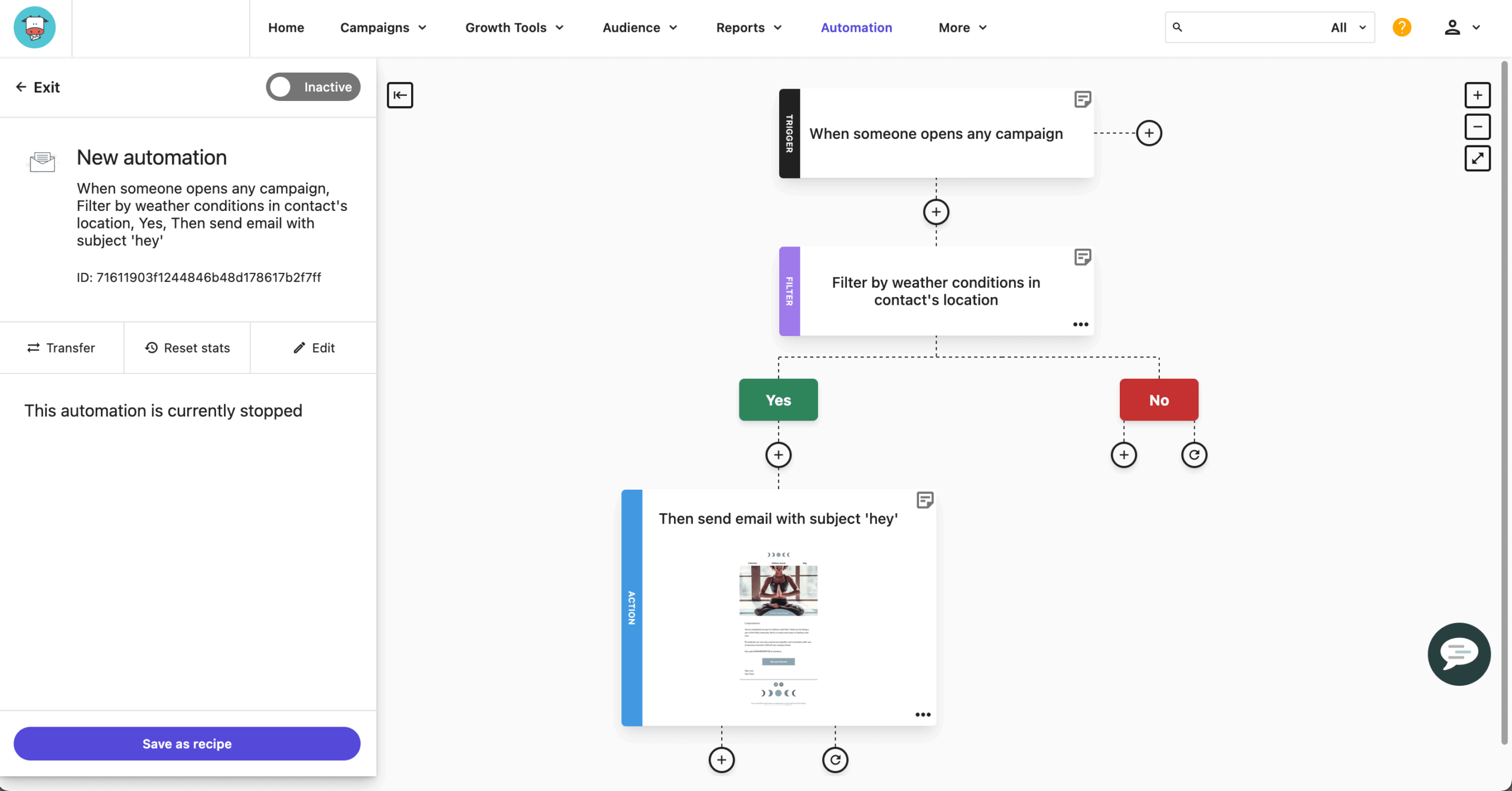
I also played around with welcome automation – triggered on signup, with a 48-hour delay and a condition checking whether the first email was opened before sending the second. The whole flow took around 25 minutes to configure, and A/B testing was available at that plan level without an upgrade prompt.
Where I hit a ceiling was behavioral triggers. I wanted to set up a flow triggered by a specific product page visit, but custom event tracking required manual implementation via Moosend’s tracking script – something that wasn’t pre-configured and added around 45 minutes of additional setup outside the platform itself.
Where Moosend Beats Brevo
- Meaningful pricing plan. Moosend’s pricing model gives you access to core features – automation, segmentation, landing pages, transactional emails – without fragmenting them across tiers. Brevo’s entry-level plans are competitively priced, but key capabilities like marketing automation and A/B testing are locked behind higher tiers, which can push the effective cost well above the advertised starting price;
- Smart contact management. Moosend’s segmentation goes beyond list-based filtering, allowing segments to be built from behavioral signals, device type, custom fields, and campaign engagement data. Brevo supports contact segmentation across its plans, but the depth of behavioral and custom-field logic available at lower tiers is more limited.
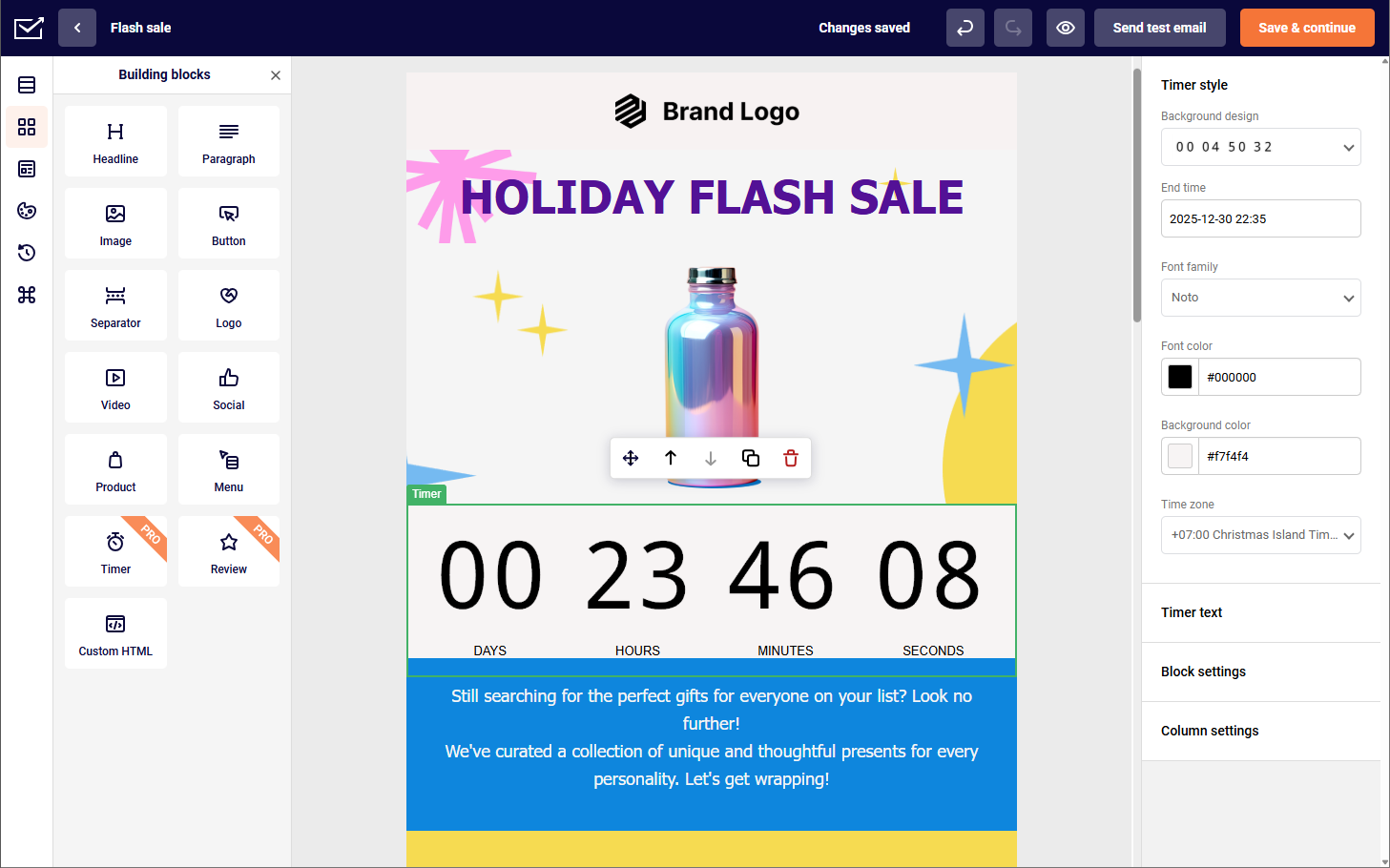
- Built-in countdown timer block. Moosend includes a native countdown timer block directly in its email editor – a conversion-focused element that most platforms require third-party tools like Sendtric or Motionmail to replicate. Brevo’s email builder doesn’t offer a native equivalent, meaning users who want live countdown timers in campaigns either depend on external tools or go without. It’s a small feature on paper, but for promotional campaigns, flash sales, or limited-time offers, having it built in removes a meaningful point of friction.
Automation and A/B Testing on Every Plan
You have to give it to Moosend, since they’re giving away A/B testing from the start, no matter what plan you’re on, which isn’t something you see with many email tools. Instead of experimenting behind higher-tier plans, Moosend lets you build workflows and test variations early on, so you can optimize campaigns as you scale, not after.
In practice, that makes a noticeable difference, especially for smaller teams. I could set up automated flows using a visual builder with behavior-based triggers, then layer in A/B tests for subject lines or content. The testing itself is fairly straightforward–more practical than advanced–but it’s enough to continuously improve performance.
Pricing
Moosend paid plans start at $13/month for up to 1,000 contacts | 30-day free trial available.
Brevo vs. Moosend
- Where Moosend wins: More value at lower tiers – includes automation and A/B testing without heavy restrictions, making it a better fit for growing teams that don’t want to upgrade constantly.
- Where Brevo wins: Broader functionality and integrations – better suited for teams that need transactional emails, native integrations, and a more complete marketing stack beyond just promotional campaigns.
Campaign Monitor — Email Design and Brand Control
Campaign Monitor is an email marketing platform built for teams that prioritise design quality and clean audience targeting.

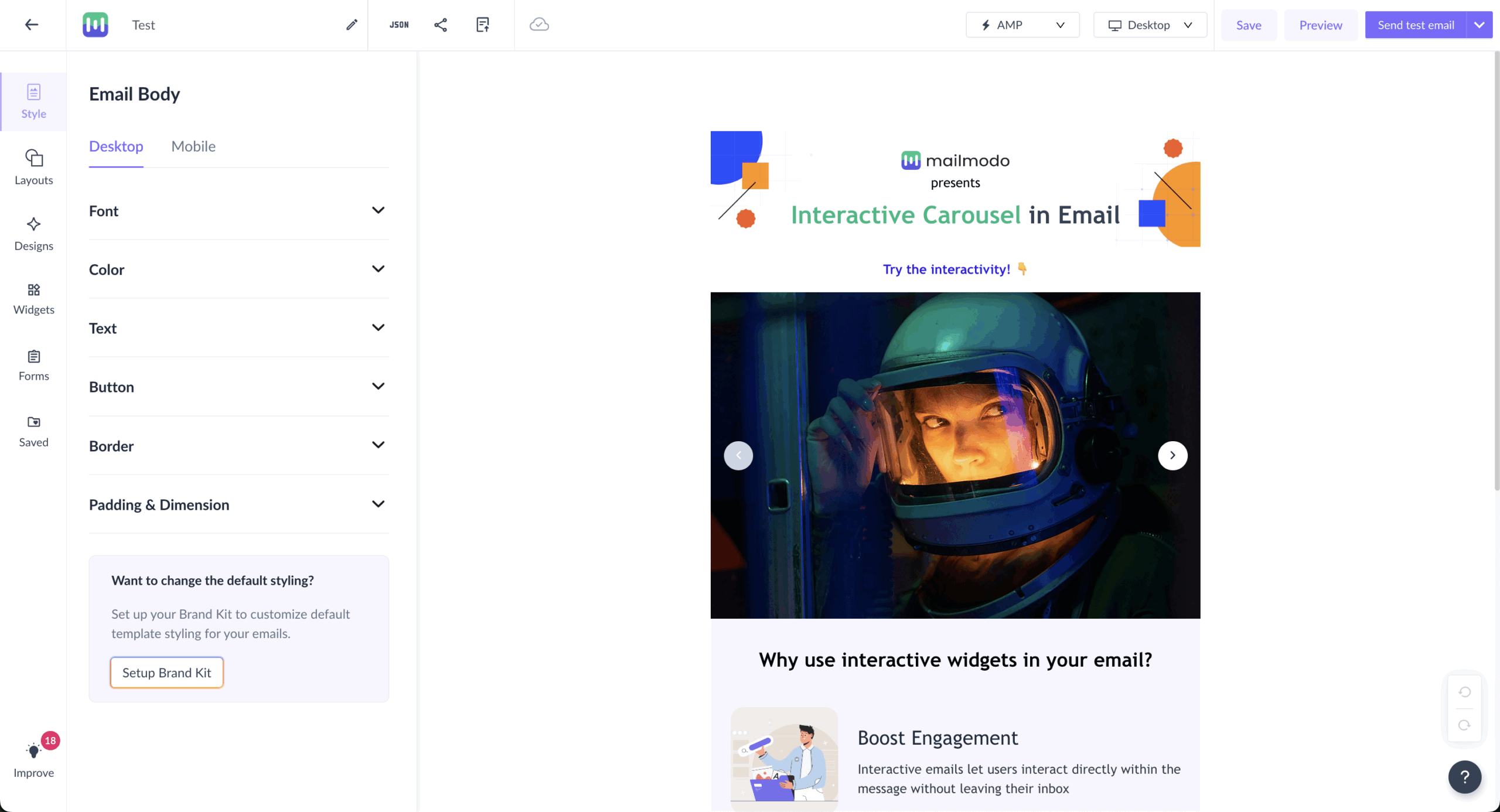
The email builder is the shining star of this Brevo alternative. I was able to recreate a branded template from scratch – matching specific hex colours, adjusting column padding to 24px, and setting custom line spacing for the body font – without touching code once. The whole process took around 40 minutes, and the output matched brand guidelines closely enough that it wouldn’t have needed a designer sign-off.
Where I hit the ceiling was automation depth. I wanted to build a flow that branched based on whether a contact clicked a specific link rather than just any link. Campaign Monitor doesn’t support link-level click conditions natively – you can branch on clicked or not clicked, but not on which link. That’s a meaningful limitation for teams running content with multiple CTAs who need to route contacts based on specific interests.
One practical consideration before committing: there’s no free plan. Unlike most Sendinblue alternatives on this list, Campaign Monitor runs on a trial model that gives you 30 days to see if it’s what you’re looking for.
Where Campaign Monitor Beats Brevo
- Stronger design control for teams. Campaign Monitor allows administrators to lock specific sections of email templates – header, footer, brand colors – while leaving content areas editable for other team members. That makes it possible to maintain visual consistency across campaigns without relying on trust or manual review. Brevo’s email builder supports collaborative use, but granular template-level permission controls aren’t available yet.
- Pre-send quality checks. Campaign Monitor includes built-in pre-send checks that flag issues like broken links, missing alt text, or incomplete content before a campaign goes out. Brevo covers standard pre-send previewing and spam testing, but automated link and content validation isn’t a native part of the sending workflow. For high-volume senders or teams without a dedicated QA step, having that safety net built into the platform reduces the risk of avoidable errors reaching a live audience.
- More agency-focused workflows. Campaign Monitor includes built-in pre-send checks that flag issues like broken links, missing alt text, or incomplete content before a campaign goes out. Brevo covers standard pre-send previewing and spam testing, but automated link and content validation isn’t a native part of the sending workflow.
Email Design and Brand Control
Campaign Monitor puts a strong emphasis on email design and brand consistency, giving you more control over how campaigns look compared to most tools. The editor makes it easy to fine-tune layouts, colors, and typography so everything stays aligned with your brand, rather than relying on generic templates.
In practice, this means you can create polished, professional emails quickly while still maintaining a consistent visual identity across campaigns, making it especially useful for teams that care about design quality as much as performance.
Pricing
Campaign Monitor paid plans start at $46/month for up to 1,000 subscribers and unlimited emails | Free 30-day trial available.
Brevo vs. Campaign Monitor
- Where Campaign Monitor wins: Email design and simplicity – ideal for teams that want polished, professional emails quickly without spending time on complex setup.
- Where Brevo wins: Broader functionality and automation – better suited for teams building multi-step funnels and running campaigns across multiple channels.
Constant Contact — Email Marketing for Small Teams
Last on the list, Constant Contact. This email marketing platform, built for businesses and teams on smaller side, offers reliable performance, combined with practical automation and AI assistance.
The AI tools reduce campaign creation friction in a measurable way. I used the subject line generator for a promotional send – the first suggestion was usable with one edit, and generating three variations to test took under 2 minutes. Body copy suggestions were less polished and needed more rewriting than Mailchimp’s equivalent output, but as a starting point for teams without dedicated copywriters – it’s a great way to jump-start your creative process.
The event marketing toolkit is the most distinctive feature in the set. I built a full event flow – registration landing page, two reminder emails, and a post-attendance follow-up sequence that branched based on whether someone showed up – in around 50 minutes. The branching logic for attended versus no-show follow-ups was straightforward to configure, and everything stayed inside one platform without third-party integrations.
Where I hit friction was list management. Constant Contact still organises contacts into separate lists rather than a unified audience, which created the same cross-list targeting problem as Mailchimp – building a segment across two lists required a manual merge rather than a filter condition.
For small businesses running events alongside regular email campaigns, it covers both without needing separate tools. The ceiling shows up when targeting needs to get more behaviorally specific.

Where Constant Contact Beats Brevo
- Extensive template library. Constant Contact’s template library spans 600+ professionally designed, mobile-responsive options, organized across industries and campaign types – promotional emails, event invites, newsletters, seasonal sends, and more. Brevo offers a solid template selection of 40+ with a capable drag-and-drop editor, but its library is much narrower in scope.
- Built-in event management tools. Constant Contact keeps the entire event workflow in one place – creating an event, collecting registrations, sending reminders, posting on social media, and following up – without needing separate tools. It also handles ticket sales and payments via Stripe or PayPal, with promo codes, early-bird pricing, and a reporting dashboard covering attendance and post-event stats. Brevo, meanwhile, has no native event management equivalent, so replicating this setup means stitching together a separate tool like Eventbrite with your email workflows.
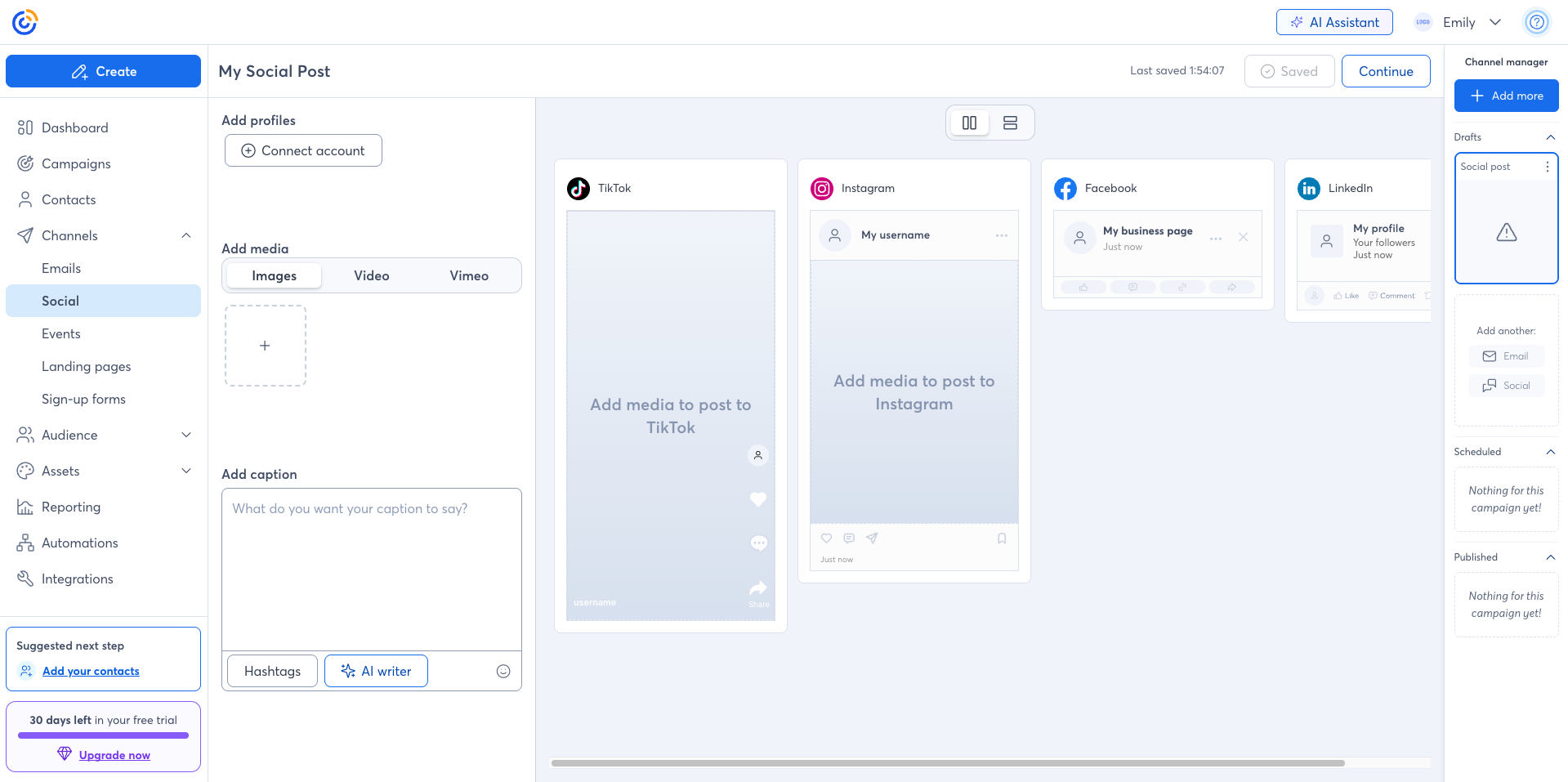
- Integrated social media management. Constant Contact lets you schedule and publish posts across Facebook, Instagram, LinkedIn, and TikTok from the same dashboard – and can automatically repurpose email campaigns into social content. Brevo’s toolset is focused on direct communication channels and doesn’t include native social scheduling.
Email & Social Campaign Tools
Constant Contact’s email and social campaign tools feel built for small businesses that want to manage both channels without juggling extra software. Instead of treating social as a separate workflow, it lets you turn email content into social posts, schedule across platforms like Facebook, Instagram, LinkedIn, and TikTok, and track performance from one place, which makes the whole process feel more connected and easier to manage.
Pricing
Constant Contact paid plans start at $12/month for up to 500 subscribers and unlimited emails | Free trial available.
Brevo vs. Constant Contact
- Where Constant Contact wins: Simplicity and support – focused on email marketing for small businesses, with hands-on phone support and strong educational resources.
- Where Brevo wins: Broader functionality – better suited for teams that need CRM features and multichannel marketing beyond just email.
Top Brevo Alternatives Ranked by Pricing
Wondering which bulk email services from the above alternatives will give you the best bang for your buck? Here’s a quick breakdown of the top Brevo alternatives, mapped as per real monthly costs.
| Provider | 5,000 Contacts | 10,000 Contacts | 25,000 Contacts |
| Sender | $23 | $40 | $82 |
| Klaviyo | $100 | $150 | $400 |
| Omnisend | $63 | $105 | $280 |
| GetResponse | $45 | $65 | $141 |
| HubSpot | $152* | $302 | $752 |
| ActiveCampaign | $79 | $149 | $391 |
| Mailchimp | $100 | $135 | $264 |
| Moosend | $38 | $70 | $128 |
| Campaign Monitor | $73 | $113 | $231 |
| Constant Contact | $80 | $120 | $280 |
Note: Prices may vary based on features, usage limits, or promotional offers. Refer to each provider’s official pricing page for accurate costs.
Which Brevo Alternative Is Right for You?
Brevo works well as a starting point–especially if you need basic multichannel marketing without spending much. But once you start pushing into more advanced use cases, its limitations become more noticeable, whether that’s automation depth, segmentation flexibility, or design control.
That said, if you’re looking for the strongest free plan with real automation capabilities, Sender is the most practical place to start–giving you automation, segmentation, and landing pages without forcing an upgrade early.

even on the free plan.
For ecommerce-focused teams that rely on personalization, Klaviyo and Omnisend are the obvious next steps. Klaviyo gives you deeper segmentation and predictive targeting, while Omnisend makes multichannel campaigns (email, SMS, push) much easier to manage in one place.
If your bottleneck is automation complexity, ActiveCampaign offers far more control with behavior-driven workflows–just expect a bit of a learning curve.
If you want email marketing tightly connected to sales data, HubSpot stands out with its CRM-driven approach, making campaigns feel more aligned with the full customer journey.
For teams prioritizing affordability without losing core features, Moosend offers the most balanced value–especially since you’re not constantly hitting feature paywalls.
And if your focus is on design quality rather than automation depth, Campaign Monitor gives you more control over how emails actually look and feel.
Brevo Alternatives FAQs
What is the best email marketing platform for small businesses?
Sender is one of the best options for small businesses, thanks to its generous free plan, built-in automation, and easy-to-use interface. It combines email campaigns, segmentation, and workflows without requiring a large budget or technical setup. That said, the right choice depends on your needs–tools like Mailchimp or Constant Contact may suit simpler use cases, while more advanced platforms fit growing teams.
How do email marketing platforms compare in terms of automation depth?
Simpler platforms usually cover basic autoresponders, welcome emails, and scheduled campaigns, while more advanced tools support multi-step workflows, branching logic, behavior-based triggers, and dynamic segmentation. While platforms like ActiveCampaign, Klaviyo, and Sender offer deeper automation than Brevo, especially for personalized customer journeys and lifecycle campaigns.
Which email marketing platform is best for ecommerce?
Klaviyo is often considered the best email marketing solution for ecommerce due to its advanced segmentation, real-time data, and deep integrations with platforms like Shopify and WooCommerce.
What is Brevo’s strength compared to other email marketing platforms?
Brevo’s main strength is that it combines email marketing, CRM features, and transactional messaging in one platform. That makes it appealing for businesses that want a broader toolset without stitching together multiple apps. It’s especially useful for teams that value simplicity and multi-purpose functionality over deeper automation or advanced segmentation.
What is the best email marketing platform for omnichannel strategies?
Omnisend is one of the best choices for omnichannel purposes because it combines email, SMS, and push notifications in a single platform, making it easier to manage campaigns across channels. That said, platforms like Klaviyo are better if you need deeper data-driven personalization, while user-friendly tools like Sender offer a simpler, more affordable omnichannel setup for growing businesses.