


Bottom line: Of the 11 email list management software tools tested, Sender has the best free plan with segmentation, automation, and custom events. Brevo has the largest free contact allowance (100,000). Kit fits creators, ActiveCampaign fits CRM-linked segmentation, HubSpot fits cross-team CRM, Omnisend fits ecommerce, MailerLite is the simplest list manager, and ZeroBounce handles list verification. We ranked tools by use case, not by one overall score, based on the list management features each one handled in testing.
Choosing email list management software, also called a mailing list manager, comes down to how a platform handles email segmentation, email list cleaning, and billing as your database grows. Beyond features, this comparison prices each tool at 5,000 contacts and shows which ones bill for unsubscribed contacts.
Transparency notice: One of the platforms reviewed here is Sender, the product our company makes and sells. To mitigate that bias, we applied the same evaluation criteria to every platform, including our own, and noted where competitors outperform Sender. We earn no affiliate commissions, prices checked on each vendor’s pricing page in October, 2026.
How We Evaluated Email List Management Software
We tested each platform on its entry-level paid plan, using the tier closest to Mailchimp’s Essentials plan. Every platform received the same standardized list of 1,000 contacts, all of whom had interacted with a newsletter in the last 90 days. We did not purchase or scrape any contacts.
Features evaluated per platform:
- Email builder
- Automation depth (trigger types, conditional logic, branching)
- List and segment management
- Form builder and landing pages
- Support responsiveness on the entry-level plan
- Customer reviews (G2, Capterra, Trustpilot, Reddit)
- Pricing model
User reviews: We gathered customer feedback from G2, Trustpilot, and Capterra and tracked recurring themes: ease of use, support quality, pricing transparency, and feature reliability. To avoid cherry-picking, we focused on patterns across a large volume of recent reviews and balanced positive and negative feedback.
What was not tested: Enterprise features (SSO, dedicated IPs, custom SLAs), SMS sending at volume, and transactional email infrastructure beyond basic SMTP. This review is aimed at SMBs, independent creators, and agencies with lists of up to 50,000 contacts.
Pricing methodology: All pricing was checked as of October 2026. Annual billing discounts are noted separately from monthly pricing, and all prices are in USD. We recommend checking each platform’s pricing page directly before you buy a subscription. You can read more about how we test tools on our review methodology page.
Capterra, G2, Trustpilot, and Reddit to create an objective evaluation. Learn more about our review methodology
Compare Email List Management Tools Side-by-Side
Mailing list software differs most in three places: how deep segmentation goes, how much list cleanup runs automatically, and what the free plan allows. The table compares all 11 tools, from full contact list management software to a verification-only service, on those points.
| Tool | Best for | Segmentation depth | List hygiene automation | Free plan (contacts / emails) |
| Sender | Small businesses that need segmentation and automation on a free plan | Behavior and purchase filters, groups as tags, custom events | Bounce handling, duplicate management across lists, suppression | 2,500 / 15,000 a month |
| Brevo | Teams that want a large free contact allowance | Engagement, purchase, and attribute filters with CRM data | Invalid and spam-reported addresses flagged and suppressed | 100,000 / 300 a day |
| Kit | Creators who organize audiences by tags | Tags, custom fields, and subscription dates in one database | One database merges duplicate subscribers; cleanup rules need the Creator plan | 10,000 / unlimited broadcasts |
| GetResponse | Marketers who want contact scoring | Scoring, tagging, and website visitor tracking | Automations suppress low-scoring contacts | 500 / 2,500 a month |
| Constant Contact | Small businesses and nonprofits with simple lists | Lists, tags, and segments; branching needs Premium | Flags inactive and bounced contacts; deduplicates sends | None (free trial only) |
| ActiveCampaign | Teams that link segments to CRM data | AND/OR conditions on all plans; deal stage and lead score filters | Automation-driven cleanup; segments by bounced and unsubscribed status | None (free trial only) |
| Mailchimp | Small businesses that want tags, groups, and segments | Tags, groups, and segments; predicted analytics on Standard | Unsubscribed contacts count toward billing until archived or deleted | 250 / 500 a month |
| HubSpot | Sales and marketing teams on one CRM | CRM properties, lifecycle stage, and active lists | Import deduplication; CRM-only contacts stay unbilled | 1,000 / 2,000 a month |
| MailerLite | Small teams that want simple groups and segments | Groups, segments, and real-time filters | Hard bounces removed automatically; inactive subscribers flagged | 250 / 2,500 a month |
| Omnisend | Ecommerce stores on Shopify or WooCommerce | RFM lifecycle segments and purchase behavior | Lifecycle segments surface at-risk and lost contacts | 250 / 500 a month |
| ZeroBounce | Cleaning imported or aging lists | Not applicable (verification only) | Verifies and scores addresses; flags catch-all, spam trap, and abuse addresses | 100 verification credits a month |
Email list management tools compared, checked October 2026. Free plan figures show contacts first, then emails.
What Email List Management Software Costs at 5,000 Contacts
Most platforms bill by contact count, so the same 5,000-person list costs between $39 and $210 a month before extras. Our email marketing costs guide covers how those totals change as lists grow.
| Tool | Plan for 5,000 contacts | Monthly price at 5,000 | Starting price | Extra fees | Who’s billed |
| Sender | Standard | $39 | Free; paid from $9 | SMS credits sold separately | Billed by active and unique subscribers |
| Brevo | Starter or Standard at the 40,000-email tier | $46 | Free; paid from $9 | Logo removal add-on, $10.80/month on Starter | Priced by email volume; each tier caps stored contacts |
| Kit | Creator | $75 | Free; Creator $39 at 1,000 subscribers | None listed | Priced by unique subscribers |
| GetResponse | Starter | $54 | $19 at 1,000 contacts | None listed | All subscribers added in the billing month; an address on several lists counts once per list |
| Constant Contact | Standard | $110 | Lite, $12 at 500 contacts | Email overage fee of $0.002 per email | Priced by active, unique subscribers |
| ActiveCampaign | Plus | $179 | Starter, $19 at 1,000 contacts | None listed | All contacts on accounts created from November 3, 2025; active contacts only on older accounts |
| Mailchimp | Standard | $100 | Free; Essentials $13 at 500 contacts | Transactional email is a paid add-on | Subscribed, unsubscribed, and non-subscribed contacts; archived or deleted contacts excluded |
| HubSpot | Marketing Hub Starter | $210 | Free CRM; Starter $20 per seat | Extra marketing contacts billed separately | Marketing contacts only; CRM-only contacts not billed |
| MailerLite | Comfort | $49 | Free; paid from $12 at 500 subscribers | None listed | Active subscribers; unsubscribed and bounced contacts excluded |
| Omnisend | Standard | $81 | Free; paid from $16 at 500 contacts | None listed | Subscribed and non-subscribed contacts, such as cart abandoners; unsubscribed contacts excluded |
| ZeroBounce | Pay-as-you-go credits | $69 one-time for 5,000 credits | $39 for 2,000 credits | None listed | Per verification credit |
Cost at 5,000 contacts, checked October 2026. All monthly figures use monthly billing.
Annual billing lowers these totals on some platforms, including a 30% discount on Sender and about 18% on GetResponse.
Quick Picks: The Best Email List Manager for Each Use Case
- Best free plan: Sender (segmentation, tagging, automation, and custom events for up to 2,500 subscribers at no cost).
- Largest free contact allowance: Brevo (up to 100,000 contacts, with sending capped at 300 emails a day).
- Creators: Kit (one tag-based database, free up to 10,000 subscribers).
- CRM-linked segmentation: ActiveCampaign (segments built from deal stages, lead scores, and site tracking).
- Cross-team CRM: HubSpot (marketing, sales, and service work from one contact record).
- Ecommerce: Omnisend (RFM lifecycle segments for Shopify and WooCommerce stores).
- Simplest email list manager: MailerLite (groups, segments, and billing based on active subscribers).
- List verification: ZeroBounce (flags invalid, catch-all, and spam trap addresses before you send).
Checked October 2026.
11 Best Email List Management Software: Our Reviews
Each of the 11 tools below was tested as software to manage email lists, on its list management features. From my experience, manual tracking of an email list gets harder as the business grows.
Sender — Best Free Plan for List Management
Sender combines segmentation, tags, automation, and custom events on a free plan that covers 2,500 subscribers and 15,000 emails a month. It is a marketing and transactional email platform built for small to mid-sized businesses that want straightforward list management.

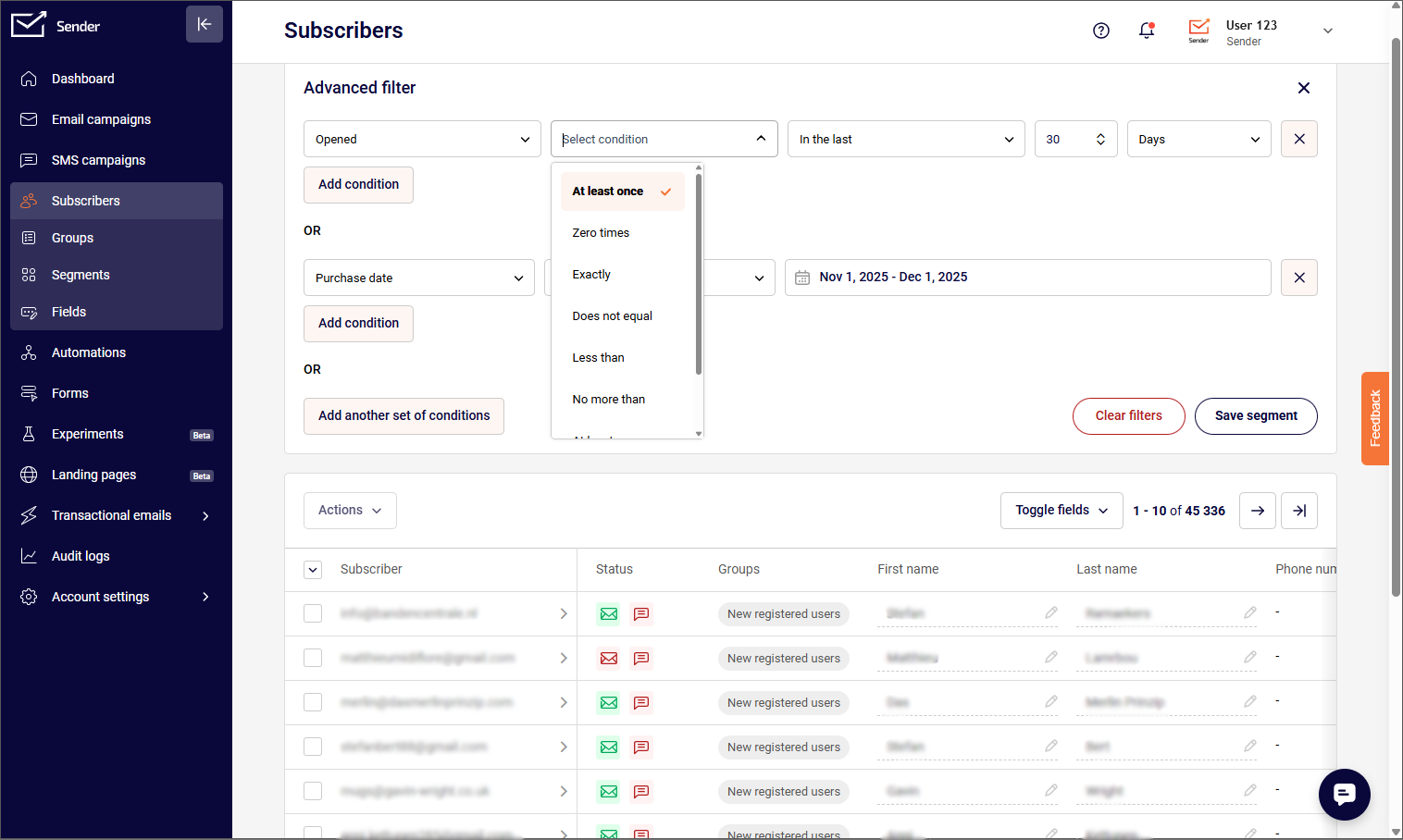
Sender’s segmentation engine uses dynamic filters that update as contact data changes. I set up a segment targeting WooCommerce customers who spent over $80 in the last 60 days but had not opened the last three campaigns. It updated automatically, with no manual rebuilding.
You can filter by campaign activity, purchase history, custom fields, and ecommerce metrics like total spend, average order value, items purchased, and order count.
The automation builder supports decision splits, delay logic, and omnichannel steps that combine email and SMS in one workflow; SMS steps in automation are available from the Pro plan. Custom events track specific actions on your site, such as “Watched 50% of a Video” or “Renewed Subscription,” and send that data to Sender in real time to trigger automations or build behavioral segments. Premade automation templates are included on the free plan.
Sender has gaps in list management. It has no lead scoring, no built-in CRM or deals pipeline, no preference center, and no built-in email verification, so imported lists need a separate verifier. It also lacks send-time optimization and predictive analytics, where ActiveCampaign and HubSpot are ahead.
Verdict
Sender is the best free plan on this list for combining segmentation and automation: up to 2,500 subscribers and 15,000 emails a month on the free plan. It suits small to mid-sized businesses that want dynamic segments, tags, and custom events without paying for a CRM. Choose ActiveCampaign instead for deeper CRM-linked segmentation and lead scoring, or GetResponse if contact scoring and more advanced engagement tracking matter more.
Key List Management Features
- Behavior-based segmentation. Sender filters contacts by actions such as email opens, link clicks, purchases, or location using drop-down selectors.
- Tags and custom fields. Label and organize subscribers with user-defined tags and customizable fields for targeted campaign sends.
- Contact group management. Move, copy, or remove subscribers between groups through automation actions or manual bulk operations.
- Flexible contact import. Add subscribers via CSV upload or third-party integrations.
- Custom events. Sender tracks site actions such as “Watched 50% of a Video” or “Renewed Subscription” in real time to trigger automations or build behavioral segments.
Best For
- Sender suits small to mid-sized businesses that need segmentation, automation, and list cleaning in a single platform without a large budget.
- Teams starting out with email marketing that want access to core list management features on a free plan before scaling to a paid tier.
- Not a fit for teams that need CRM deal pipelines, contact scoring, or built-in email verification; ActiveCampaign, HubSpot, or ZeroBounce cover those.
Pros & Cons
- Sender’s free plan includes segmentation, tagging, and automation for up to 2,500 subscribers
- Automated bounce handling and duplicate handling across lists reduce manual list maintenance
- Simple drop-down filters make segment creation accessible without technical knowledge
- Limited segmentation depth compared to platforms with CRM-level contact data
- No lead scoring, CRM, or deals pipeline; ActiveCampaign and HubSpot cover both
- No preference center or built-in email verification; imported lists need a separate verifier
Pricing
Sender is free for up to 2,500 subscribers, and paid plans start at $9 a month; 5,000 subscribers costs $39 a month on Standard with monthly billing.
| Plan | Price | Subscribers | Key features |
| Free Forever | $0/month | Up to 2,500 (15,000 emails a month) | Segmentation, automation, tagging, templates, transactional emails |
| Standard | $9/month (monthly billing); $6.30/month (annual billing) | From 500 | Everything in Free + no Sender branding, multi-user access |
| Professional | $15/month (monthly billing); $10.50/month (annual billing) | From 500 | Everything in Standard + SMS steps in automation, dedicated IP (on the 20,000-subscriber plan or above), countdown timers and feedback blocks |
| Enterprise | Custom | Unlimited | Everything in Professional + dedicated success manager, SSO, advanced permissions |
Sender pricing, checked October 2026. Annual billing includes a 30% discount.
See Sender’s pricing page for current tiers.
Brevo — Email Management Software with Smart Segmentation
Brevo offers the largest free contact allowance in this roundup, up to 100,000 contacts, but paid plans cap stored contacts by email volume tier.

Brevo’s billing meter runs on email volume rather than contact count, but that does not mean contacts are unlimited, a distinction I missed until I hit the wall. On the $9 a month Starter plan at the 5,000-email tier, the contact cap is 500. The 10,000-email tier allows 1,500 contacts and 15,000 allows 2,500 contacts. Both 20,000 and 40,000-email tiers allow 500,000 stored contacts. Standard and Professional also impose contact limits that scale with the volume tier you select, and Brevo prompts you to upgrade if you store more.
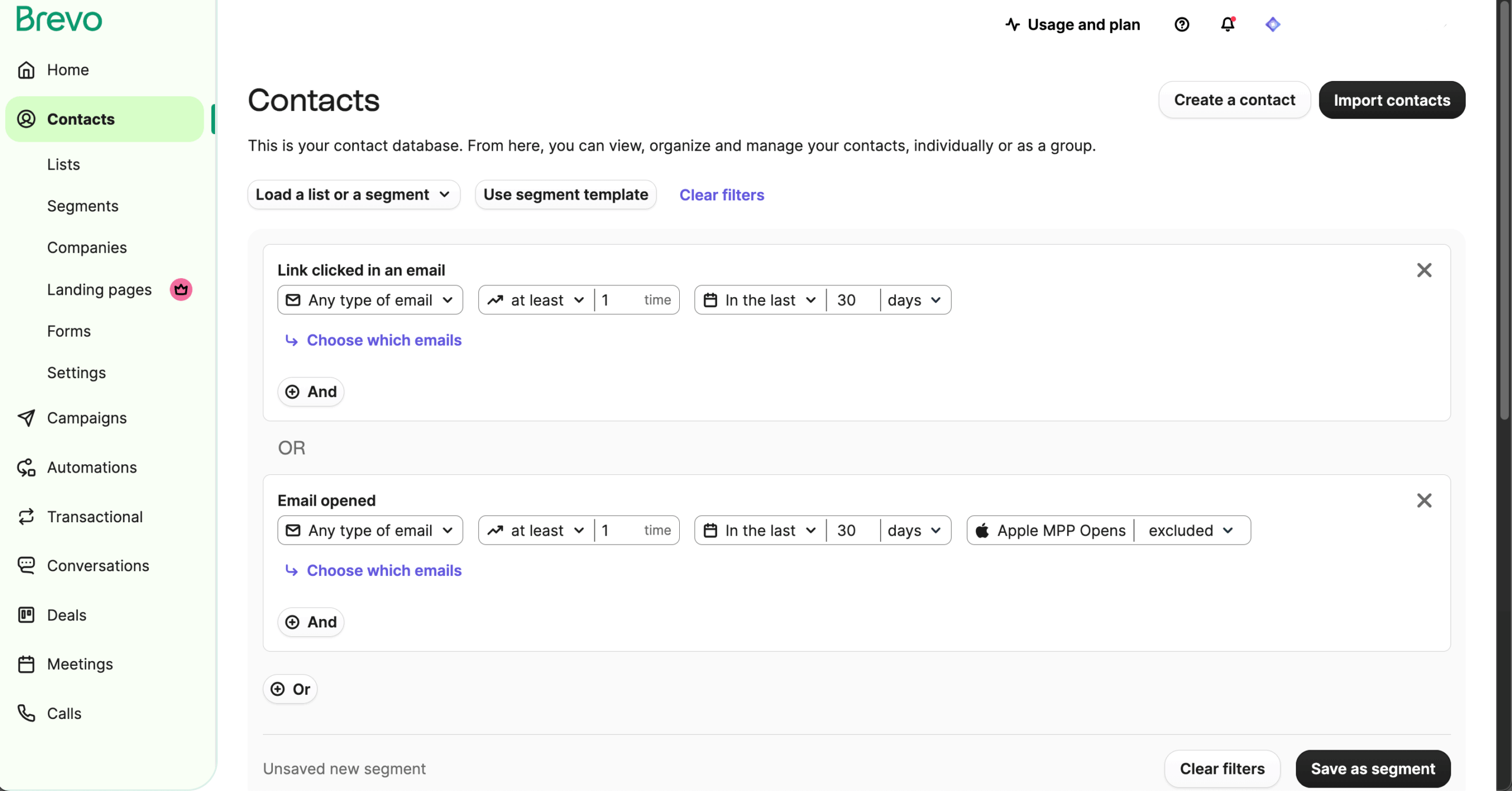
Where Brevo earns its place is cross-channel segmentation. I could build segments filtering by customer engagement across email, SMS responses, live chat interactions, and web behavior from a single contact timeline, a unified view that most email-first platforms in this roundup do not offer natively.
Contact scoring on Professional assigns values based on engagement, purchases, and RFM metrics, feeding directly into automation triggers. Automation on the Free and Starter plans is capped at 2,000 contacts, and Standard removes that cap. The volume-based model saves money for large, low-frequency lists, but only once you account for the contact caps tied to each volume tier.
Verdict
Brevo is best for budget-conscious businesses that want up to 100,000 contacts on the free plan, built-in list cleaning, and multi-channel contact management across email, SMS, and chat. Choose ActiveCampaign instead for deeper automation and CRM-linked segmentation, or Mailchimp if you want a broader integration ecosystem and more layered audience management.
Key List Management Features
- Multi-criteria segmentation. Brevo segments contacts by engagement, demographics, purchase behavior, and custom attributes from the entry-level plan.
- Automated list cleaning. Invalid addresses and contacts who report messages as spam are automatically flagged and added to suppression lists.
- CRM with unified inbox. Centralize contact interactions across email, SMS, and chat in a single CRM view for complete engagement history.
- Automation-based contact management. Workflows can update contact attributes, move contacts between lists, and apply segment filters based on triggers.
- Flexible contact import. Add contacts via CSV upload, API, or direct integrations with ecommerce and CRM platforms.
Best For
- Brevo suits budget-conscious businesses that need advanced segmentation and generous contact storage without paying per subscriber.
- Teams managing multi-channel outreach across email, SMS, and chat who want contact data in one CRM, and large databases that need automated list cleaning from entry-level plans.
- Not a fit for teams that need deeper CRM-linked automation; ActiveCampaign covers that.
Pros & Cons
- Brevo includes advanced segmentation by engagement, demographics, and behavior from the entry-level tier
- Automated list cleaning handles invalid addresses and spam-flagged contacts without manual review
- Free plan stores up to 100,000 contacts
- Paid plans cap stored contacts by email volume tier, such as 500 contacts at the 5,000-email tier
- Free plan limits sending volume rather than contacts, which can restrict campaign frequency
- Automation on the Free and Starter plans is capped at 2,000 contacts
Pricing
Brevo is free for up to 100,000 contacts (300 emails a day), and paid plans start at $9 a month on Starter.
| Plan | Price | Contacts | Key features |
| Free | $0/month | Up to 100,000 | Segmentation, contact management, templates, transactional emails; 300 emails a day |
| Starter | From $9/month | Tier-dependent (500 at 5,000 emails) | No daily limit, basic analytics |
| Standard | From $18/month | Tier-dependent | Marketing automation, A/B testing, advanced segmentation, landing pages |
| Professional | From $499/month | Higher caps | Dedicated IP, priority support, advanced integrations |
| Enterprise | Custom | Unlimited | Custom limits |
Brevo pricing, checked October 2026. All prices shown use monthly billing.
Brevo branding appears on Free and Starter plans; the logo removal add-on is $10.80/month on Starter. Standard removes the 2,000-contact limit on automations.
Kit — Subscriber Management & Automation for Creators
Kit stores every subscriber in one tag-based database, which removes duplicates across lists but puts visual automations and subscriber scoring behind paid plans.

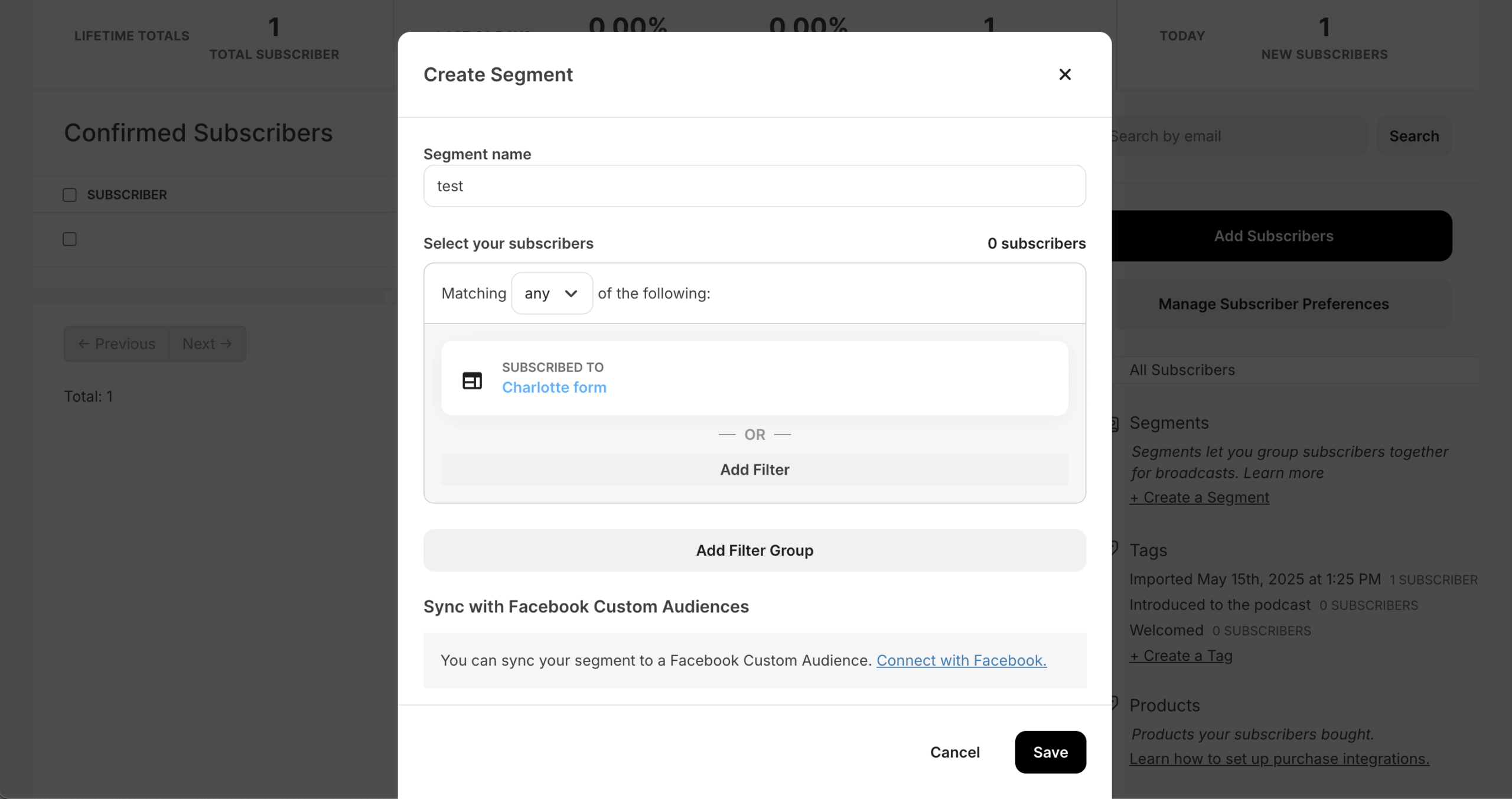
Kit replaces the traditional list model entirely: every subscriber lives in one database with tags as the sole organizational unit. When I migrated a course creator’s 6,500 contacts from Mailchimp, 340 duplicates that had been inflating the bill across three separate audiences collapsed into single profiles automatically. Segments built on tag combinations (“purchased Course A AND clicked upsell link AND NOT tagged VIP”) worked without the cross-list workarounds I needed on list-based platforms.
The visual automation builder, available from the Creator plan, handles conditional branching and tag-based routing. The email editor includes 40+ designed templates and a visual template editor. Engagement scoring and email deliverability reporting require Creator Pro ($79 a month at 1,000 subscribers on monthly billing).
Kit’s free plan covers up to 10,000 subscribers with landing pages, forms, and digital product sales, but no automations or sequences. Kit raised paid-plan prices in September 2025 (Creator from $29 to $39 a month at 1,000 subscribers, according to Audienceful’s breakdown of the increase), which remains the dominant complaint from long-time users.
Verdict
Kit is best for creators, coaches, and solopreneurs who want a simple tag-based subscriber system, visual automations, and built-in audience growth through its creator network.
Choose GetResponse instead if you need contact scoring, stronger reporting, or ecommerce-focused automation, or Mailchimp if you want more flexible audience structures with tags, groups, and segments.
Key List Management Features
- Unified subscriber database. Kit keeps all contacts in a single database organized by tags and custom fields instead of separate lists.
- Tag-based segmentation. Group subscribers using tags and custom fields to build targeted segments without managing multiple lists.
- Behavior-triggered automation. Workflows apply or remove tags automatically based on subscriber actions like email clicks or form completions.
- Conditional logic. Supports conditional logic for routing subscribers through different sequences based on tags or engagement.
- Single-dashboard subscriber management. Filter and manage all contacts by tag, segment, or engagement status from one centralized view.
Best For
- Kit suits independent creators such as bloggers, podcasters, and authors who need simple tag-based subscriber organization in one database.
- Coaches and solopreneurs who want an automation builder for email sequences without complex setup, and creator-led brands that grow their list through Kit’s built-in recommendation network.
- Not a fit for businesses that need separate lists for distinct audience groups, or subscriber scoring without paying for Creator Pro ($79 a month at 1,000 subscribers).
Pros & Cons
- Kit’s single unified database eliminates the complexity of managing subscribers across multiple lists
- Tag-based organization keeps segmentation simple and scalable for growing audiences
- Built-in creator network supports organic list growth through cross-promotion
- No multi-list structure, which may limit flexibility for businesses with distinct audience groups
- Reporting and list health analytics are less detailed than similarly priced platforms
- Paid plans start at $39/month, which is higher than some competitors for basic list management
Pricing
Kit is free for up to 10,000 subscribers without automations, and Creator costs $39 a month at 1,000 subscribers on monthly billing.
| Plan | Price | Subscribers | Key features |
| Free (Newsletter) | $0/month | Up to 10,000 | Landing pages, signup forms, audience tagging, creator network, unlimited broadcasts; no automations |
| Creator | $39/month (monthly billing); $33/month (annual billing) | Up to 1,000 | Everything in Free + automated sequences, visual automation builder, third-party integrations |
| Creator Pro | $79/month (monthly billing); $66/month (annual billing) | Up to 1,000 | Everything in Creator + subscriber scoring, advanced reporting, newsletter referral system |
Kit pricing, checked October 2026. Prices shown for 1,000 subscribers and scale with list size.
GetResponse — Email Marketing Tool with List Management
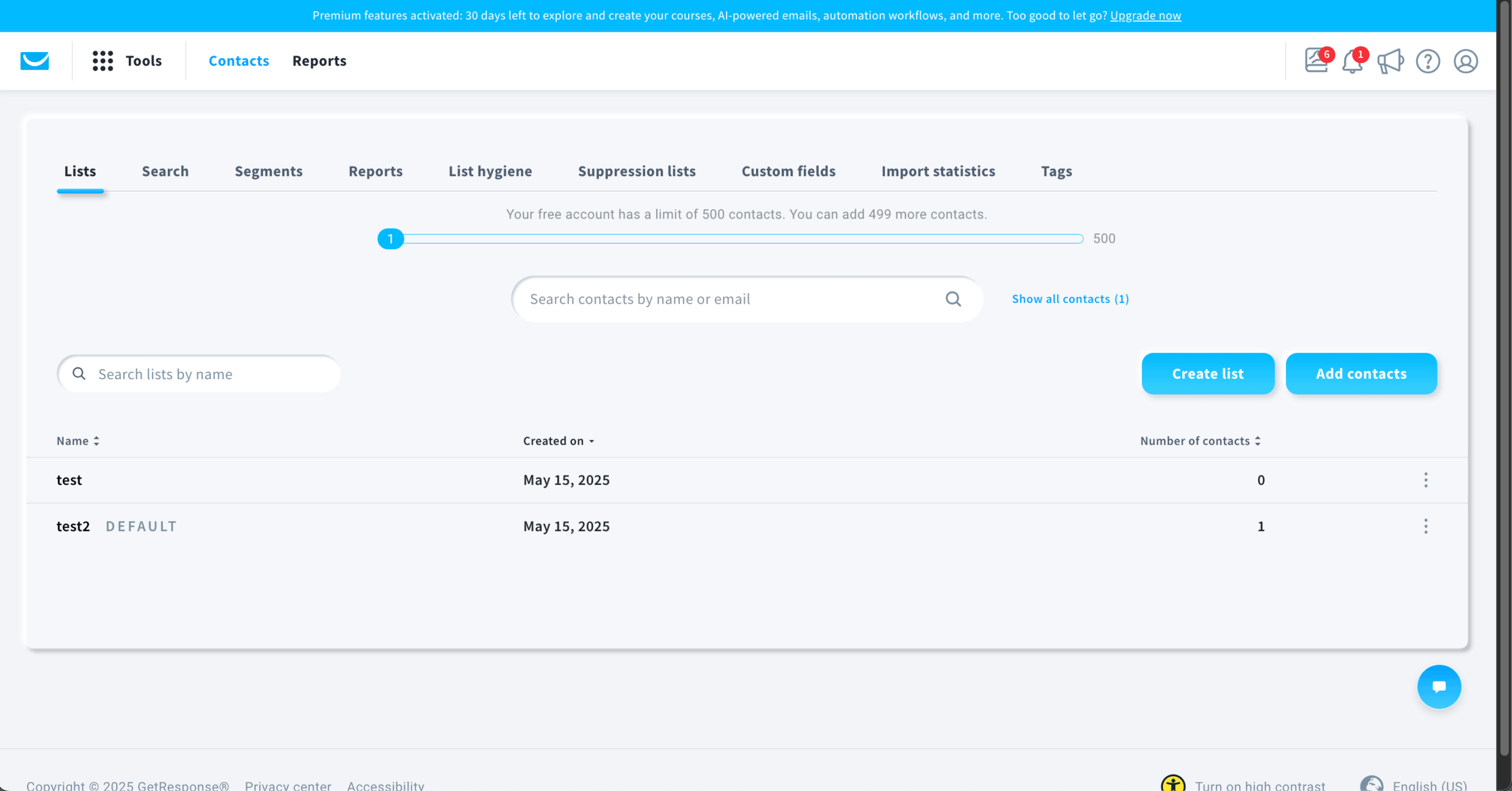
GetResponse ties contact scoring, website visitor tracking, and automated suppression into one loop, but A/B testing and unlimited automations start on the Marketer plan.

Subscriber scores updated based on email opens, link clicks, and on-site behavior, and I set an automation to suppress contacts whose score dropped below threshold for 45 days. The list cleaned itself without manual intervention.
Segmentation pulls from scoring data, ecommerce activity, funnel stage, and custom events. I built a segment filtering contacts scored above 60 AND purchased in the last 30 days AND NOT tagged as “Received Upsell,” a multi-condition filter that works on the Marketer plan. To see how scoring models work in practice, read our guide to lead scoring.
A/B testing starts on the Marketer plan $59 a month at 1,000 contacts on monthly billing, so the Starter plan ($19) cannot test automated flows, and Starter is limited to one automation workflow. Perfect Timing, which delivers emails when each subscriber is statistically most likely to engage, is also available from Marketer only. Billing counts each list separately, so an address on several lists counts as several contacts.
GetResponse earns its price if you use the scoring-to-suppression loop and the course builder together, but if you only need one half of that equation, lighter platforms deliver it cheaper.
Verdict
GetResponse is best for ecommerce businesses and creators that want dynamic segmentation, contact scoring, and automation tied to subscriber behavior.
Choose Sender instead for lower-cost list management with custom events that trigger automations, or ActiveCampaign if you need deeper CRM integration and more advanced multi-condition workflows.
Key List Management Features
- Dynamic segmentation. GetResponse updates segments automatically based on subscriber behavior, engagement levels, demographics, and applied tags.
- Contact scoring. Assign point values to contacts based on actions like email opens, link clicks, and purchases to rank engagement.
- Inactive subscriber suppression. Set automation rules to suppress or remove non-engaged contacts from active campaign sends.
- Automated tagging. Apply or remove tags through automation workflows triggered by subscriber actions such as form fills or link clicks.
- Ecommerce activity segmentation. Segment contacts by purchase history, cart events, back-in-stock alerts, and product page views through platform integrations.
Best For
- GetResponse suits Ecommerce businesses that need to segment subscribers by purchase history, cart activity, and product browsing behavior.
- Content creators and course sellers who combine email automation with landing pages, webinars, sales funnels, and product launch emails, plus growing businesses that want dynamic segmentation and contact scoring.
- Not a fit for teams that need deep CRM integration (ActiveCampaign) or a low price at larger list sizes.
Pros & Cons
- GetResponse’s dynamic segments update automatically as subscriber behavior and engagement change
- Contact scoring helps prioritize active subscribers and identify disengaged contacts
- Website tracking feeds visitor data directly into contact profiles for behavior-based segmentation
- A/B testing, contact scoring, ecommerce segmentation, and unlimited automations start on Marketer ($59 a month at 1,000 contacts); Starter allows one automation workflow
- Each list is billed separately, so an address on several lists counts as several contacts
- Pricing scales quickly as contact count grows, increasing costs for larger lists
Pricing
GetResponse has a free plan for up to 500 contacts, and Starter costs $19 a month at 1,000 contacts on monthly billing.
| Plan | Price | Contacts | Key features |
| Free | $0/month | Up to 500 (2,500 emails a month) | Email campaigns, website builder, landing pages, signup forms |
| Starter | $19/month (monthly billing); $15.58/month (annual billing) | Up to 1,000 | Everything in Free + one automation workflow, basic segmentation, 24/7 chat |
| Marketer | $59/month (monthly billing); $48.38/month (annual billing) | Up to 1,000 | Everything in Starter + unlimited automations, A/B testing, contact scoring, ecommerce segmentation |
| Creator | $69/month (monthly billing); $56.58/month (annual billing) | Up to 1,000 | Everything in Marketer + webinars |
| Enterprise | Custom | Custom | Dedicated IP, SSO, SMS marketing |
GetResponse pricing, checked October 2026.
Free 14-day trial available. Annual billing saves about 18%. Charges apply for duplicates across lists.
Constant Contact — Email Marketing & Contact Management
Constant Contact organizes contacts into lists and segments with a short setup, but branching automations require Premium at $80 a month.
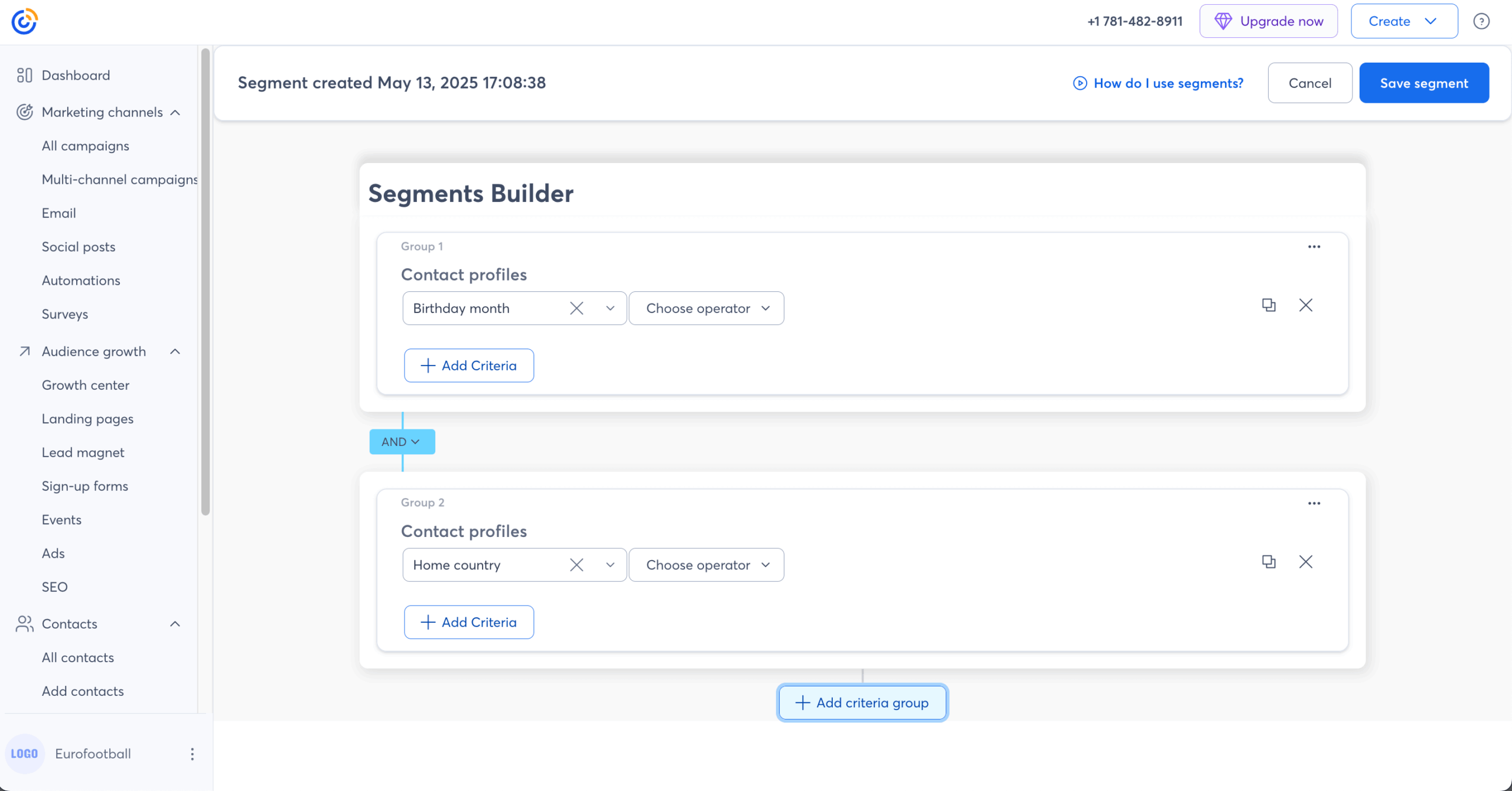
I tested Constant Contact’s contact management for list organization, segmentation, and automation. Lists are static collections built by hand or by import. Segments are dynamic views based on engagement, contact details, purchase history, and tags. The options cover opened or did not open, clicked or did not click, joined within a date range, and tagged with a specific label.
Standard costs $35 a month at 500 contacts and adds automation sequences and segmentation. On Premium, which starts at $80 a month, I built a welcome series and a re-engagement workflow that tag and move subscribers on their own. If subscriber clicked X, send Y, otherwise send Z is conditional branching. At 5,000 contacts Standard costs $110 a month on monthly billing, and email overage costs $0.002 per email.
Imports accept CSV, Excel, Outlook, and direct integrations with Shopify, WooCommerce, Salesforce, and 300+ apps. An import matches each row to an existing contact by email address and updates that record instead of creating a second one. Near-duplicates, such as typos or one person with several addresses, are not flagged, and you merge them by hand. The contact screen lists contacts, tags, and segments in a plain layout that a team without a dedicated email marketer can work in. Constant Contact has no free plan, only a free trial.
Verdict
Constant Contact suits small businesses and nonprofits that want contact lists, segments, and event tools with a short learning curve. Branching sits behind the $80 Premium tier. Choose Sender (which adds custom events), Brevo, or MailerLite instead if you need conditional automation at a lower price. Choose ActiveCampaign instead if you need layered segmentation.
Key List Management Features
- Lists and segments. Constant Contact offers static lists plus dynamic segments based on engagement, tags, and purchase data.
- Automation sequences. Available on Standard; branching requires Premium.
- Import with duplicate detection. CSV, Excel, and Outlook imports flag potential matches.
- App integrations. 300+ connections including Shopify, WooCommerce, and Salesforce.
- Event marketing tools. Manage attendee lists and registrations.
Best For
- Constant Contact suits small businesses and nonprofits that run events and want simple contact management.
- Teams without a dedicated email marketer that want a short setup.
- Not a fit for anyone who needs branching automations below $80 a month, or for lists above 10,000 contacts, where per-contact costs climb.
Pros & Cons
- Constant Contact has a short learning curve for list and segment setup
- Event marketing tools manage attendee lists and registrations
- 300+ integrations for importing contacts from existing tools
- Branching automations require Premium at $80 a month
- No free plan; a free trial only
- Contact-based pricing rises quickly at larger list sizes
Pricing
Constant Contact has no free plan; Lite costs $12 a month and Standard, the first plan with automation, costs $35 a month at 500 contacts.
| Plan | Price | Key features |
| Lite | $12/month | Basic email, 1 user |
| Standard | $35/month | Automation, segmentation, A/B testing |
| Premium | $80/month | Branching automations, dynamic content, SEO tools |
Constant Contact pricing, checked October 2026. Prices shown for 500 contacts on monthly billing.
Costs rise with list size. No free plan; a free trial is available.
ActiveCampaign — All-in-One Marketing & List Management
ActiveCampaign has the deepest segmentation and scoring on this list, at a higher entry price and with a steeper setup than the simpler tools here.
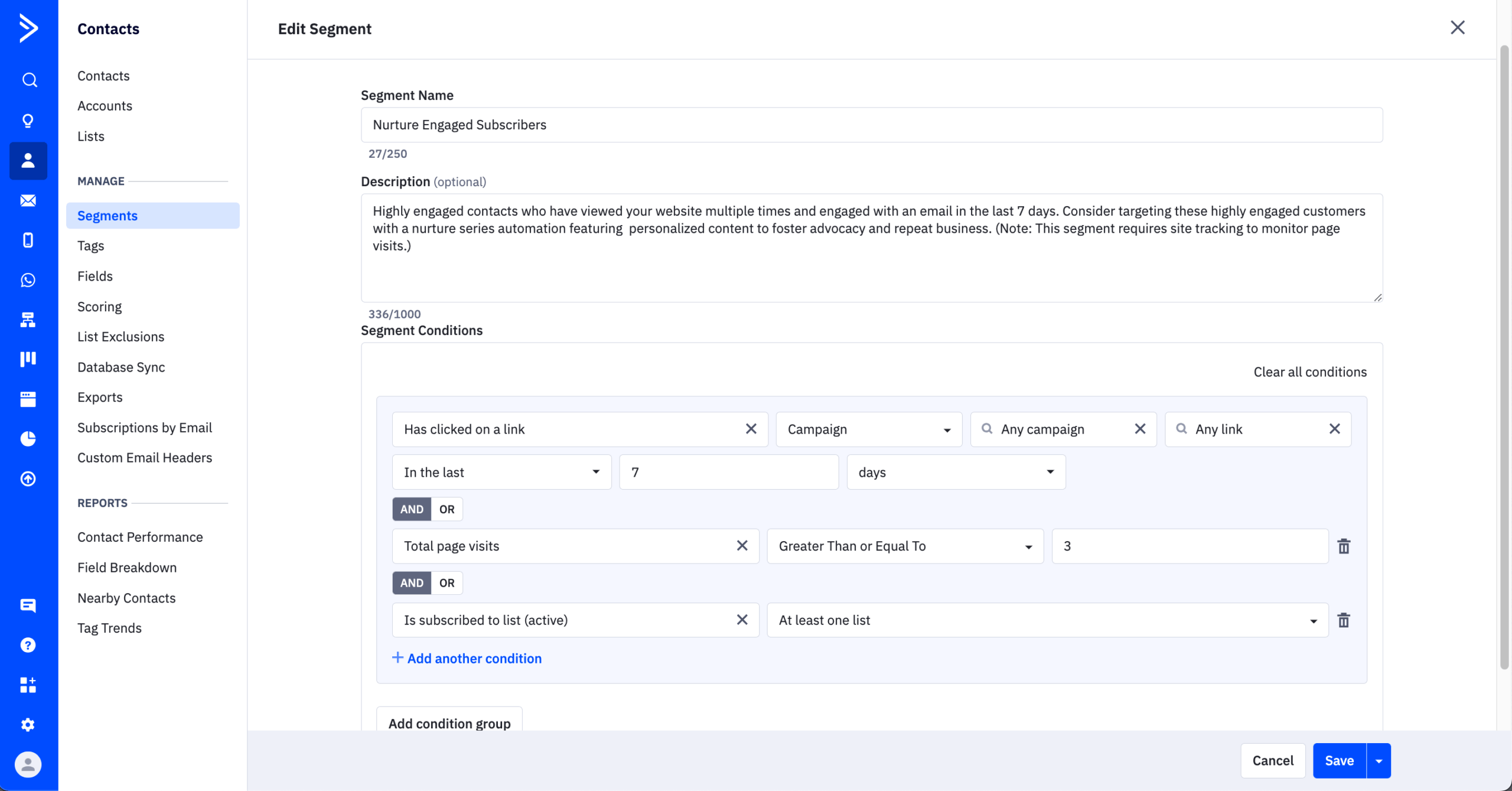
I tested ActiveCampaign from basic subscriber organization through CRM-driven scoring and automated list hygiene. AND/OR segment conditions work on all plans, Starter included. I built segments that combined engagement (opened email X AND clicked link Y), contact properties (industry is SaaS OR company size above 50), custom fields, site tracking events, and deal stage. Advanced segmentation with saved segments and finer filters is on Pro and above. AI-suggested segments surface engagement trends, such as subscribers whose engagement dropped in the past 30 days, as well as groups like contacts who opened the last three campaigns but never purchased.
The built-in CRM, on Plus and above, extends contact management into pipeline management. Each contact has a timeline of email engagement, site visits, form submissions, deal stages, and notes. A marketing-qualified lead can create a deal, assign a rep, and start a sales sequence from one automation.
Scoring assigns points to actions (opened email: +5, visited pricing page: +20, unsubscribed from segment: -10) and to demographic matches (job title is VP: +15). Score-based automations can move contacts between lists, notify sales when a contact becomes a sales lead, or suppress low-engagement subscribers.
Entry limits matter. Starter allows 5 actions per automation and no if/else branching. Plus unlocks branching and the CRM. Pro adds predictive sending and split-action A/B testing. At 5,000 contacts, Plus costs $179 a month on monthly billing. Accounts created from November 3, 2025 are billed for all contacts, and older accounts for active contacts only.
Verdict
ActiveCampaign is the choice for teams that want contacts to move between segments, collect scores, and trigger sales actions from one record. Starter begins at $15 a month on annual billing ($19 monthly), and advanced segmentation requires Pro. Choose Sender instead if you want custom events and tags on a free plan. Choose MailerLite instead if the learning curve is a concern.
Key List Management Features
- AND/OR segment conditions. ActiveCampaign supports them on all plans, Starter included.
- AI-suggested segments. Recommends audience groups from behavior patterns.
- Contact scoring. Behavioral and demographic point values.
- Built-in CRM. Unified contact timeline on Plus and above.
- Score-based automation. Moves, suppresses, or hands off contacts by score.
Best For
- ActiveCampaign suits marketing teams that need layered segmentation and contact scoring tied to a CRM.
- Teams that use the 950+ pre-built automation recipes as a starting point for segmentation workflows.
- Not a fit for anyone who needs a free plan, or for teams that cannot absorb a longer setup.
Pros & Cons
- ActiveCampaign includes AND/OR conditions on all plans, Starter included
- CRM and contact scoring connect to marketing workflows
- AI-suggested segments surface audience groups you may miss
- No free plan; Starter begins at $15 a month on annual billing
- Advanced segmentation requires Pro at $79 a month for 1,000 contacts
- Starter limits automations to 5 actions with no conditional branching
Pricing
ActiveCampaign has no free plan; Starter costs $15 a month on annual billing ($19/month monthly) for 1,000 contacts, and Plus costs $49 a month.
| Plan | Price | Key list features |
| Starter | $15/month | AND/OR segments, 5-action automations |
| Plus | $49/month | CRM, landing pages, lead scoring, branching |
| Pro | $79/month | Advanced segmentation, predictive sending, split A/B |
| Enterprise | $145/month | Custom objects, SSO |
ActiveCampaign pricing, checked October 2026. Prices shown for 1,000 contacts, paid annually.
Costs rise with list size.
Mailchimp — Advanced Segmentation and Audience Management
Mailchimp offers predicted-analytics segmentation on Standard and Premium, but unsubscribed contacts count toward billing until you archive or delete them.

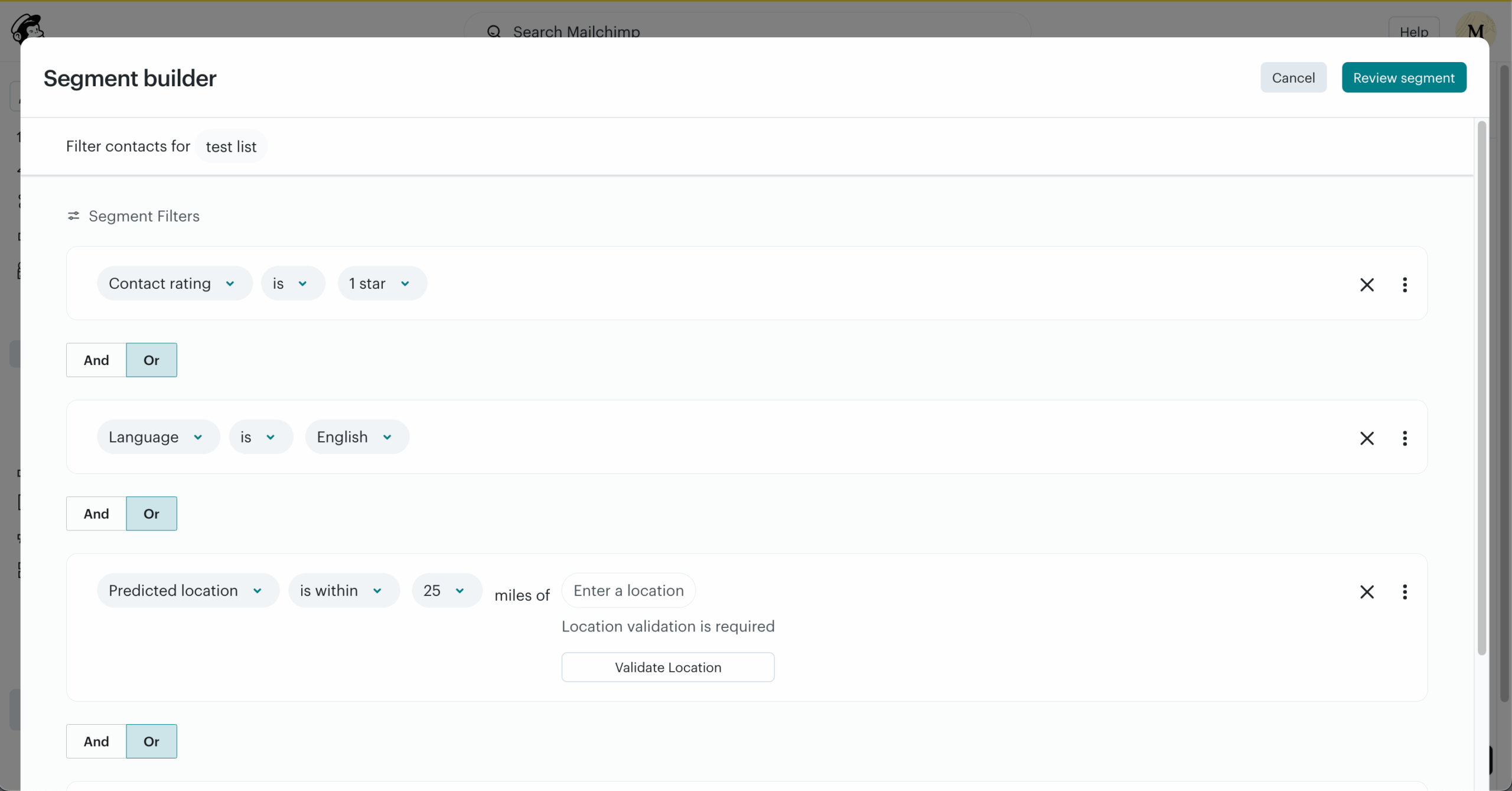
I tested Mailchimp’s audience management across segmentation, predicted analytics, and organization. Mailchimp calls a list an audience. Inside one, I built segments from behavior (opened, clicked, purchased), predicted analytics (customer lifetime value, purchase likelihood), demographics, and custom merge fields. Standard allows up to 5 conditions per segment, and Premium removes that limit.
The Customer Journey Builder, on Standard and Premium, builds multi-step flows with conditional branching. Essentials allows 4 flow steps per journey, which caps how much list upkeep you can automate there. Standard and Premium allows up to 200 journeys. Predicted analytics rank each contact by estimated lifetime value and purchase likelihood, so segments can follow revenue potential, which helps ecommerce stores spot high-value subscribers with little purchase history.
Billing is the main watch point. Mailchimp counts subscribed, unsubscribed, and non-subscribed contacts toward your plan, so you archive or delete unsubscribed and cleaned contacts yourself to lower the count. At 5,000 contacts Standard costs $100 a month on monthly billing
Tags are internal labels for your team, and groups let subscribers pick preferences on signup forms. Landing pages are free and unlimited.
Verdict
Mailchimp is the pick for small businesses already in the Intuit and QuickBooks ecosystem that want predicted analytics for segmentation. The free plan covers 250 contacts. Choose MailerLite instead if your list has many inactive subscribers you would otherwise pay for. Choose Kit instead if you want one tag-based database.
Key List Management Features
- Predicted analytics. Mailchimp estimates lifetime value and purchase likelihood per contact.
- Customer Journey Builder. Conditional branching on Standard and Premium; 4 flow steps on Essentials.
- Tags, groups, and merge fields. Internal labels, subscriber-chosen preferences, and custom data.
- A/B testing. Up to three variants.
- Landing pages. Free and unlimited.
Best For
- Mailchimp suits small businesses in the Intuit and QuickBooks ecosystem that want predicted analytics in their segments.
- Ecommerce stores that want to target high-value contacts early.
- Not a fit for lists with many inactive subscribers, or for teams that need automation on fewer than 500 contacts without paying for Standard at $20 a month.
Pros & Cons
- Mailchimp’s predicted analytics support revenue-based segmentation
- Email editor with a large template library and AI content suggestions
- Free, unlimited landing pages on every plan
- Unsubscribed contacts count toward billing until archived or deleted
- Customer Journey Builder needs Standard at $20 a month; Essentials limits journeys to 4 flow steps
- Contact-based pricing rises quickly (about $135 a month on Standard at 10,000 contacts)
Pricing
Mailchimp is free for up to 250 contacts, and Standard, which adds predicted analytics, costs $20 a month at 500 contacts.
| Plan | Price | Emails per month | List management |
| Free | $0/month (250 contacts) | 500 | Basic segments, 1 audience |
| Essentials | $13/month | 5,000 | 4 flow steps per journey |
| Standard | $20/month | 6,000 | 200 journeys, predicted analytics |
| Premium | $350/month | 7,500 | 200 journeys, advanced segments |
Mailchimp pricing, checked October 2026. Prices shown for 500 contacts on monthly billing.
Costs rise with list size. Unsubscribed contacts count toward billing unless archived or deleted.
HubSpot — CRM Platform with Advanced Contact Management
HubSpot gives marketing, sales, and service teams one contact record, and its free CRM stores up to 1,000 contacts, but full automation workflows start on a plan that costs far more than the entry tier.

I tested HubSpot’s contact management across its CRM, marketing automation, and list tools. HubSpot separates CRM contacts, which are free to store, from marketing contacts, which are billable and used for email campaigns and ads. As a contact management system, it lets a business keep customer data for partners, vendors, and past customers in the CRM and pay only to market to the active list.
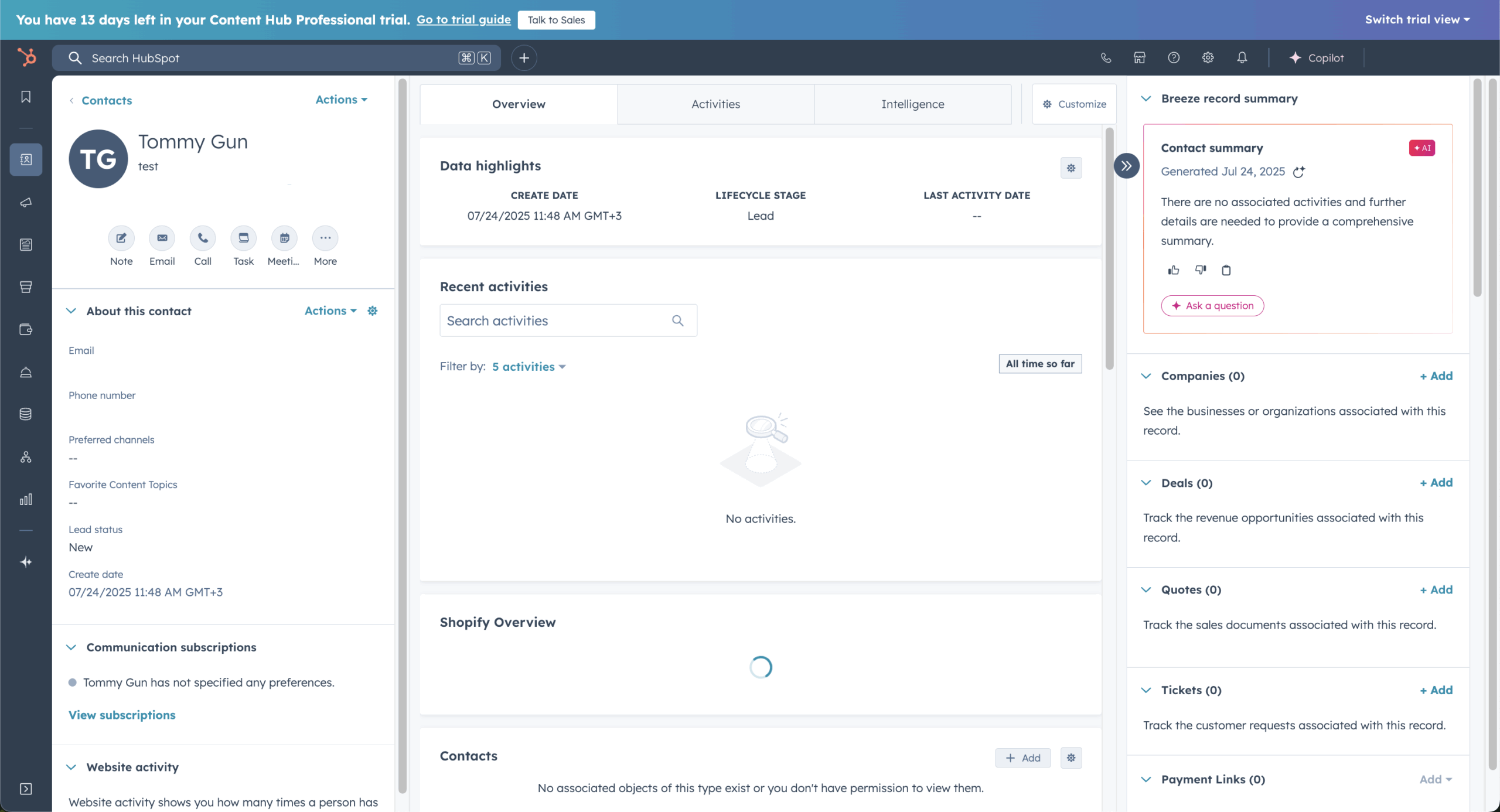
Each contact record carries a timeline of customer interactions: emails opened, pages visited, forms submitted, deals created, tickets filed, and phone calls logged. Marketing and sales teams see the same record, so the communication history stays with the contact through the sales process, and a handoff needs no export between multiple tools. Lists run on contact, company, and deal properties plus behavior data. Active lists update on their own; static lists capture a snapshot. I segmented by lifecycle stage (subscriber, lead, MQL, SQL, customer), deal stage, email engagement, and website activity, and the filters held up across all of them.
Lifecycle stages handle lead management and follow the customer journey from subscriber to customer on one shared field, and deal stages add pipeline management to the same record. Lead scoring assigns numeric values to actions and demographic matches, which gives sales teams a ranked view of sales leads. Predictive scoring, which ranks contacts by conversion likelihood, sits on Enterprise.
The gap is in the middle of the price ladder. Marketing Hub Starter gives you 1,000 marketing contacts and 10 automated actions, not workflows. Full workflows, scoring, and attribution begin on Professional at $890 a month for 2,000 marketing contacts, plus a $3,000 one-time onboarding fee. At 5,000 contacts I priced Starter at $210 a month, and that tier still lacks workflows.
Verdict
HubSpot is the choice for teams where sales and marketing need an integrated platform with the same contact data. The free CRM stores up to 1,000 contacts, and the marketing-contact billing split keeps large non-marketing databases out of your bill. Choose Brevo instead if you need a larger free contact allowance (100,000). Choose ActiveCampaign instead if you need conditional automation workflows below HubSpot Professional’s price.
Key List Management Features
- Unified contact timeline. HubSpot shows marketing, sales, and service activity on one record.
- Marketing vs. CRM contact billing. Only contacts you market to count toward the bill.
- Active and static lists. Active lists recalculate as contact data changes; static lists stay fixed.
- Lead scoring. Behavior and demographic criteria add up to a numeric score, with predictive scoring on Enterprise.
- Lifecycle stage tracking. Contacts move from subscriber to customer on one shared field.
Best For
- HubSpot suits mid-market and enterprise teams where marketing, sales, and service work from one contact database.
- Companies holding large lists of customers, partners, or vendors they track but do not email.
- Not a fit for small teams that only need email list management, or for any budget under $890 a month that requires full automation workflows.
Pros & Cons
- In HubSpot, CRM, marketing, sales, and service share one contact database
- Marketing and CRM contact separation reduces billing for large databases
- Free CRM with contact management for up to 1,000 contacts
- Starter allows 10 automated actions, not full workflows
- Professional at $890 a month is where full automation begins, a steep step up
- $3,000 one-time onboarding fee on Professional
Pricing
HubSpot’s CRM is free for up to 1,000 contacts, Marketing Hub Starter costs $20 a month per seat, and full workflows start on Professional at $890 a month.
| Plan | Price | Marketing contacts | List management |
| Free CRM | $0/month | 1,000 | Contact management, basic lists |
| Starter | $20/month per seat | 1,000 | 10 automated actions |
| Professional | $890/month | 2,000 | Full workflows, scoring, attribution |
| Enterprise | $3,600/month | 10,000 | Predictive scoring, custom objects |
HubSpot Marketing Hub pricing, checked October 2026. Prices use monthly billing.
Professional requires a $3,000 one-time onboarding fee. Extra marketing contacts are billed separately.
MailerLite — Simple List Management for Small Teams
MailerLite bills only for active subscribers, which makes its cost easy to predict, but its segment logic stops short of multi-layer AND/OR rules.

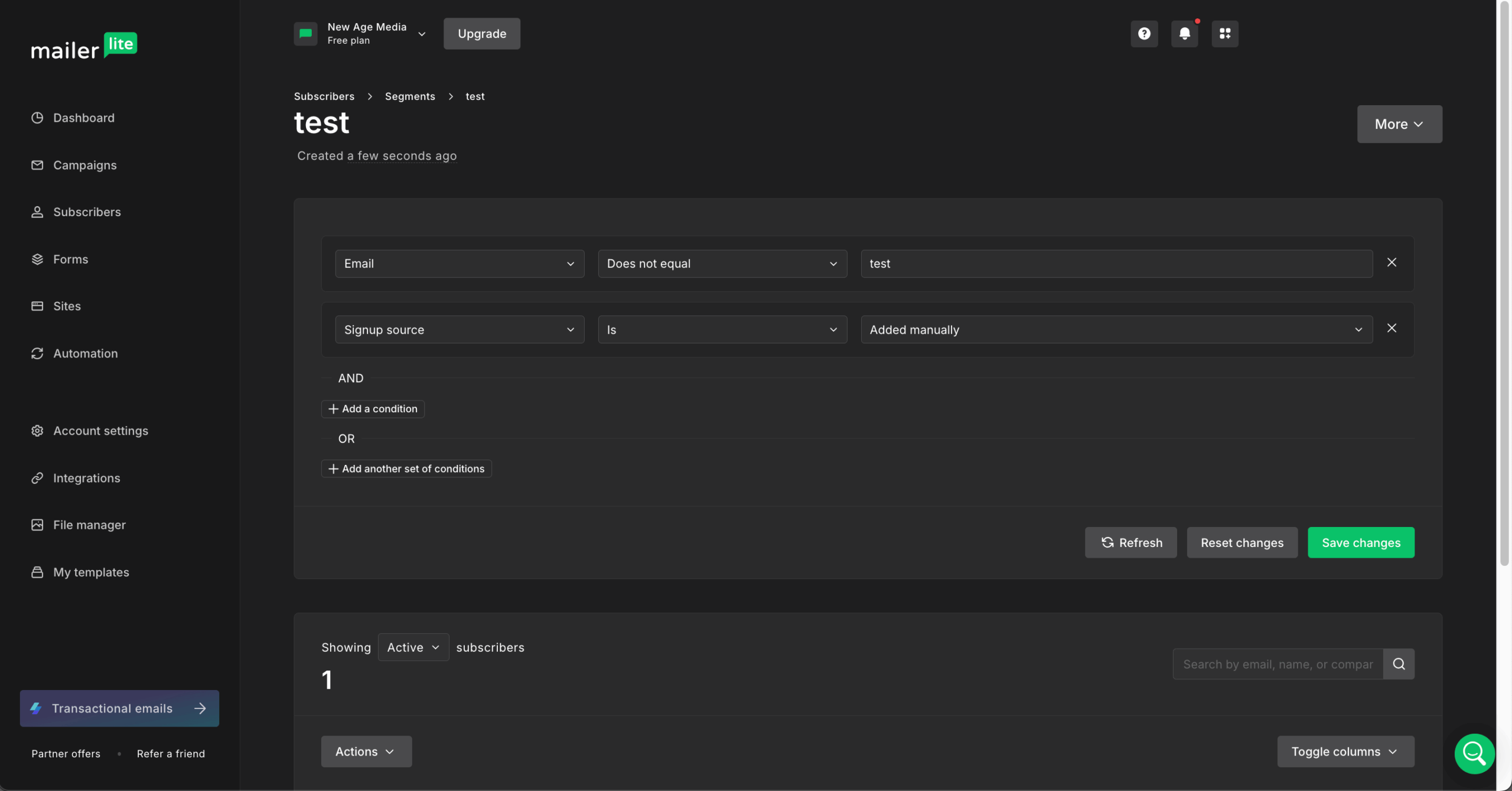
I tested MailerLite’s subscriber management across groups, segments, and automated tagging. Groups are static collections you build by hand or through form signups. Segments are dynamic and update from behavior, custom fields, signup date, location, engagement, and tags. You can combine several conditions in one segment, though the builder offers fewer layers than ActiveCampaign’s.
Subscriber profiles store custom fields, tags, engagement history, and notes. The real-time filter applies search filters across the full list: tag, signup date, timezone, campaign engagement, or email action. It gives quick access to one-off audience pulls without saving a segment, which is how I used it.
Multi-step automation starts on the paid plan, which begins at $12 a month for 500 subscribers. Triggers include form submission, group join, link click, date match, and custom field update. Actions include sending emails, adding delays, adding conditions, updating fields, and moving subscribers between groups. The free version covers 250 subscribers and 2,500 emails a month with 3 active automations, each up to 5 steps.
Hygiene is partial. MailerLite removes hard bounces automatically and flags inactive subscribers, but it has no email verification, so an imported list needs a separate verifier such as ZeroBounce. Billing counts active unique subscribers contacted within the billing cycle. Bounces, unsubscribes, and contacts you have not emailed recently do not count. At 5,000 contacts the Growing Business plan costs $49 a month on monthly billing.
Verdict
MailerLite is the simplest mailing list manager on this list for a small team. It offers groups, dynamic segments, and a billing rule that excludes contacts you cannot email. Choose ActiveCampaign instead if you need layered AND/OR segmentation or CRM-linked contact data. Choose Sender instead if you want custom events and branching automation on a free plan.
Key List Management Features
- Groups and segments. MailerLite organizes subscribers with static groups and dynamic segments.
- Real-time filter. Search the whole list by tag, date, timezone, or engagement without saving a segment.
- Automation-driven tagging. Workflows add tags and move subscribers between groups on paid plans.
- Subscriber profiles. Custom fields, tags, engagement history, and notes sit on one record.
- Active-subscriber billing. Bounced, unsubscribed, and dormant contacts are excluded.
Best For
- MailerLite suits small teams, small businesses, and creators who want straightforward groups and segments with predictable billing.
- Teams that email regularly and want unsubscribed contacts kept off the invoice.
- Not a fit for teams that need multi-layer AND/OR segmentation, CRM-integrated contacts, or built-in email verification.
Pros & Cons
- MailerLite’s active-subscriber billing excludes bounces, unsubscribes, and dormant contacts
- Paid plans start at $12 a month for 500 subscribers
- Website and landing page builder included at no extra cost
- Free plan covers 250 subscribers with 5-step automation only
- Segments cannot use CRM data such as deal stage or lead score, which ActiveCampaign offers
- No built-in email verification or list cleaning
Pricing
MailerLite is free for up to 250 subscribers, and paid plans start at $12 a month for 500 subscribers.
| Plan | Price | Emails per month | List management |
| Free | $0/month (250 subscribers) | 2,500 | Groups, segments, single-step automation |
| Comfort | $12/month | 10x subscriber count | Multi-step automation, unlimited segments |
| Power | $25/month | Unlimited | Unlimited automation triggers and seats, 24/7 support |
| Enterprise | Custom | Unlimited | Dedicated IP, success manager |
MailerLite pricing, checked October 2026. Prices shown for 500 subscribers on monthly billing.
Billing covers active unique subscribers contacted within the billing cycle. A 30% nonprofit discount is available.
Omnisend — List Management for Ecommerce Stores
Omnisend sorts store contacts into lifecycle segments from purchase data, but it bills for non-subscribers and only suits ecommerce.

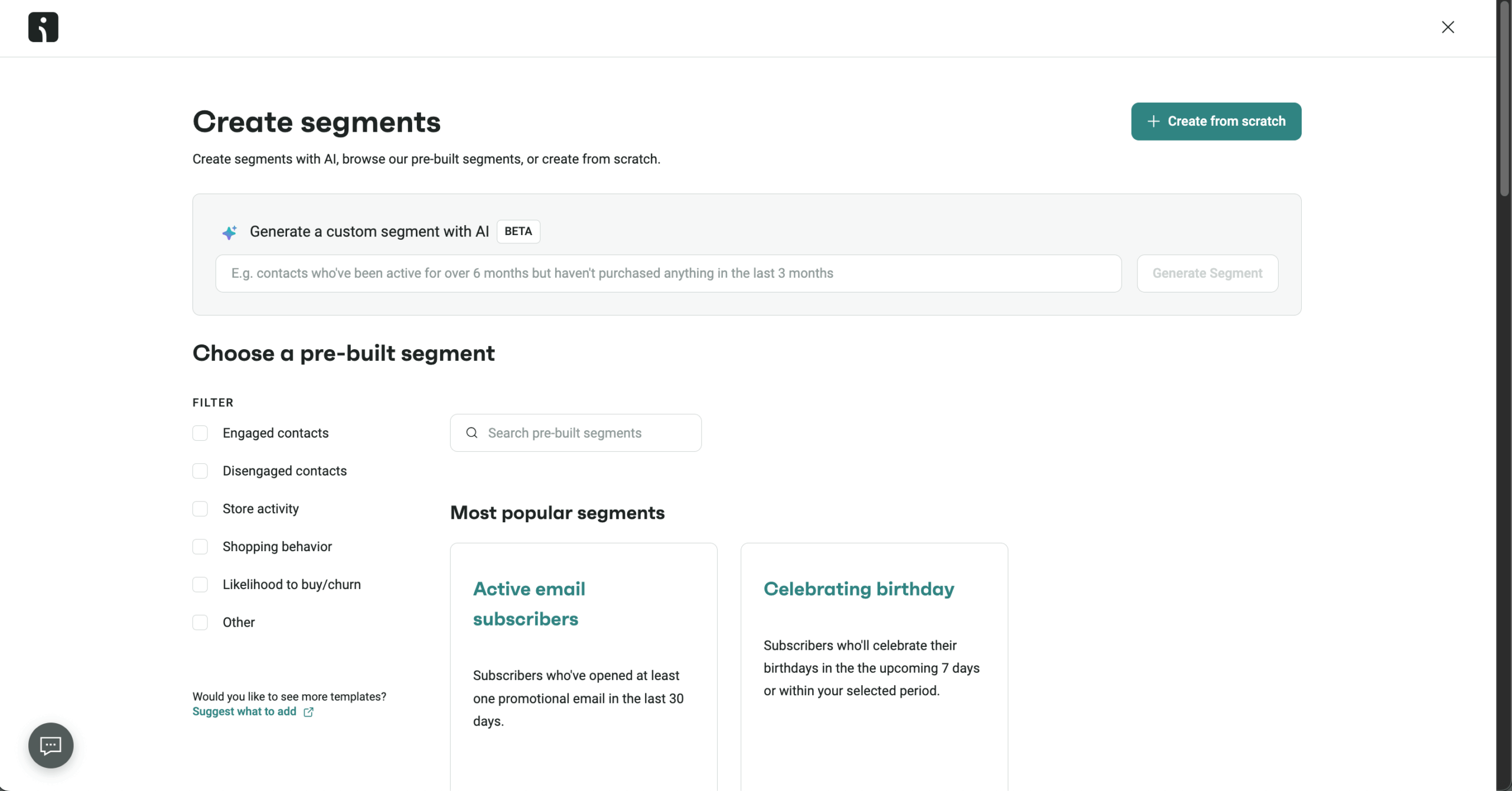
I tested Omnisend’s contact management on Shopify and WooCommerce stores. Contacts filter by purchase history, browsing behavior, email engagement, SMS opt-in status, and custom properties. The AI Segment Builder takes a plain-language description, such as customers who bought shoes in the last 90 days but did not open an email in 30 days, and writes the segment rules from it.
The Customer Lifecycle Map splits contacts into champions, loyal customers, at-risk, and lost groups from recency, frequency, and spend (RFM). It needs at least 100 customers and 5 to 7 percent recent purchase activity to give a useful split. Each group comes with a suggested retention action, which tells you whom to re-engage and whom to suppress.
The free plan stores unlimited contacts but only 250 are billable and 500 emails go out a month. I could import a full customer database for analysis and setup, but only 250 contacts could receive messages. That makes the free tier a place to test segments, not to run a list.
Billing is the main risk. Omnisend charges for all active profiles, including non-subscribers such as abandoned cart contacts and unconfirmed imports. Importing a store’s contacts without cleaning them first raises the bill. At 5,000 contacts the Standard plan costs $81 a month on monthly billing. Signup forms, popups, and landing pages come on every plan, and forms can place new contacts into segments from custom field answers.
Verdict
Omnisend is the ecommerce pick: RFM segments build themselves from store data, and the AI Segment Builder shortens setup. Choose GetResponse instead if you want contact scoring and webinars alongside ecommerce segmentation. Choose MailerLite instead if your list is not tied to purchase data.
Key List Management Features
- Customer Lifecycle Map. Omnisend’s RFM analysis sorts contacts into champions, loyal, at-risk, and lost groups.
- AI Segment Builder. Plain-language descriptions turn into segment rules.
- Ecommerce segmentation. Filter by purchase history, browsing, and engagement.
- Unlimited free storage. Store any number of contacts; 250 are billable on the free plan.
- Segment-aware forms. Signup forms route new contacts into segments.
Best For
- Omnisend suits Shopify and WooCommerce store owners who want lifecycle segments built from purchase data.
- Stores that need to find at-risk customers and suppress unresponsive ones.
- Not a fit for B2B, SaaS, or content businesses, or for teams that want list management without purchase data.
Pros & Cons
- Omnisend’s Customer Lifecycle Map automates RFM segmentation
- AI Segment Builder creates audiences from plain-language descriptions
- Unlimited contact storage on the free plan for analysis and setup
- Bills for all active profiles, including non-subscribers and abandoned cart contacts
- Free plan limits billable contacts to 250 and emails to 500 a month
- Built for ecommerce only
Pricing
Omnisend has a free plan with 250 billable contacts, and Standard starts at $16 a month for 500 contacts.
| Plan | Price | Emails per month | Key difference |
| Free | $0/month | 500 (250 billable contacts) | Unlimited storage, basic segmentation |
| Standard | From $16/month | 12x contact count | Lifecycle map, advanced segments |
| Pro | From $59/month | Unlimited | Advanced reporting, AI features |
Omnisend pricing, checked October 2026. Prices shown for 500 contacts on monthly billing.
Prices scale with billable contacts. A 30% discount on the first three months is available.
ZeroBounce — Specialized Email List Verification & Hygiene Tool
ZeroBounce verifies addresses before you send but sends no campaigns, so it works alongside an email platform, not instead of one.

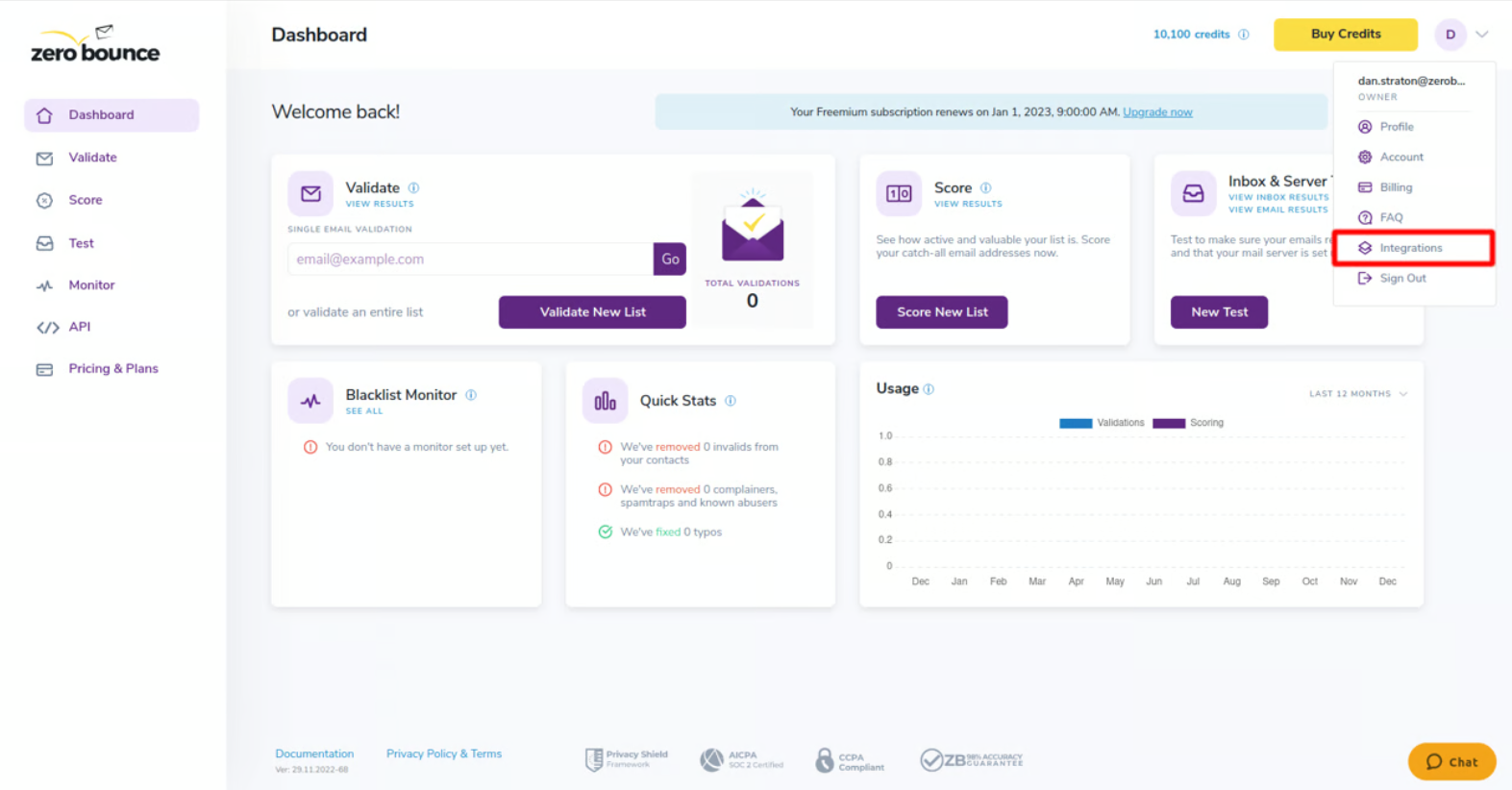
I tested ZeroBounce on bulk list cleaning, real-time API validation, and deliverability monitoring. Each address is checked for validity, activity, domain status, and risk, then labeled valid, invalid, catch-all, spamtrap, abuse, do-not-mail, or unknown. Seven categories let you choose how hard to clean: remove invalids only, or also suppress catch-all and unknown addresses.
Bulk cleaning takes a CSV upload or one of 95+ integrations, 37 of them direct, so you can clean inside an existing email platform. Real-time API validation checks an address at signup, which keeps invalid entries out of the list. Email Activity Data shows when an address was last active, so a valid mailbox that has been silent for 12 months can be separated from one that is live.
ZeroBounce ONE costs $99/month ($79/month annual billing) and bundles 10,000 monthly credits with inbox placement testing, blacklist monitoring, DMARC analysis, and email server warm-up. The free tier gives 100 credits a month, enough to test the service, not to maintain a list. Pay-as-you-go starts at $39 for 2,000 credits, and per-credit cost falls to $0.003 at 1,000,000 credits.
The cost of repeat cleaning adds up. Buying 50,000 credits each quarter at $379 per pack costs $1,516 a year (4 x $379). Two 100,000-credit purchases a year at $449 each cover 200,000 credits for $898, so a bulk purchase costs less than quarterly top-ups if your list can wait.
Verdict
ZeroBounce is the tool for cleaning an imported, inherited, or aging list before the first send. It does not segment, automate, or send, so pair it with any platform in this roundup. Choose a platform with built-in verification instead if your list is small enough that manual cleanup is practical.
Key List Management Features
- Multi-step verification. ZeroBounce sorts addresses into valid, invalid, catch-all, spamtrap, abuse, do-not-mail, and unknown.
- Bulk cleaning. Upload a CSV or connect through 95+ integrations.
- Real-time API validation. Check addresses at the point of signup.
- Email Activity Data. See when an address was last active.
- Deliverability suite. Inbox placement, blacklist monitoring, DMARC analysis, and warm-up.
Best For
- ZeroBounce suits businesses with an imported, purchased, inherited, or aging list that needs verification before sending.
- Teams that want to block invalid addresses at signup through the API.
- Not a fit for anyone looking for a sending platform, or for lists small enough to clean by hand.
Pros & Cons
- ZeroBounce’s seven result categories let you set how aggressively to clean
- ZeroBounce ONE bundles verification with deliverability monitoring
- 95+ integrations connect to existing email platforms
- Verification only; it sends no email
- Free tier of 100 credits a month is too small for ongoing hygiene
- Pay-as-you-go starts at 2,000 credits ($39), with no smaller entry point
Pricing
ZeroBounce gives 100 free credits a month, and pay-as-you-go starts at $39 for 2,000 credits.
| Option | Price | Credits | Includes |
| Free | $0/month | 100 a month | Basic verification |
| Pay-as-you-go | From $39 | 2,000 | Bulk and API verification |
| Pay-as-you-go | $129 | 10,000 | Lower per-credit cost |
| ZeroBounce ONE | $99/month ($79/month annual billing) | 10,000 a month | Deliverability suite |
ZeroBounce pricing, checked October 2026.
Pay-as-you-go credits do not expire. Volume discounts run to 1,000,000 credits at $0.003 each. ZeroBounce ONE replaces the former Starter, Team, and Pro subscriptions.
Email List Management Best Practices
Five habits keep a list healthy: double opt-in, a regular cleaning cadence, immediate suppression of hard bounces and complainers, a preference center, and re-engagement campaigns. Together they reduce bounces, limit spam complaints, and protect the sender reputation that drives email deliverability.
Use double opt-in for new subscribers. Double opt-in asks people to confirm through a verification email before they join your active list. It keeps mistyped, fake, or unwanted addresses out and creates clearer proof of consent. It adds one signup step, but it usually produces a more engaged audience and fewer complaints.
Follow a regular cleaning cadence. Do not wait for deliverability problems before starting email list cleaning. Remove duplicate contacts and process invalid addresses as they appear, then review engagement at least every 30 days. Contacts who stop opening or clicking can move to an inactive segment before they weaken campaign performance.
Suppress hard bounces and complainers immediately. An address that hard bounces should not get another campaign, and neither should anyone who marks your messages as spam. Keeping them in active sends raises bounce and complaint rates, which mailbox providers read as a reputation signal. Use your platform’s suppression list instead of deleting and reimporting records.
Give subscribers a preference center. An unsubscribe link should not be the only option. A preference center lets people choose topics, change frequency, or pause messages, which can prevent unnecessary unsubscribes and gives you better data for segmentation.
Run re-engagement campaigns for inactive contacts. When subscribers have not engaged for 60 to 90 days, send a short win-back or re-permission sequence that asks whether they still want your emails. Contacts who respond return to active segments. Those who stay silent should be suppressed.
ESP vs. Email List Cleaning Software: Which Do You Need?
For routine upkeep, your email service provider (ESP) is usually enough. Its built-in tools process hard bounces, unsubscribes, duplicate contacts, and spam complaints, and engagement rules can suppress inactive subscribers. That covers the routine email list cleaning a list in active use needs.
A dedicated cleaning tool earns its cost on an imported, purchased, inherited, or aging database that has not been contacted recently. Those lists carry invalid mailboxes, disposable addresses, spam traps, catch-all domains, and abuse-flagged accounts that an ESP often detects only after a campaign bounces. ZeroBounce is one example: it checks single addresses or bulk lists, scores each address, and connects to major email platforms. It does not segment, automate, or send, which is where Sender, Brevo, and the other platforms here take over. Sender’s custom events, for instance, feed site actions into segments after the list is clean.
In practice, use your ESP for ongoing upkeep and a validator before the first send to any older or unfamiliar list.
Example Email List Management Workflows
Most platforms in this roundup can run automations that organize subscribers, track engagement, and clean the list without manual work. Three workflows apply across them.
1. Welcome and early engagement workflow
Trigger: A new subscriber joins through a signup form, landing page, or import.
Flow: Signup confirmation, then a welcome email that introduces the brand, then a short check on engagement with the first message. Subscribers who click move to an engaged segment. Those who do not receive a follow-up on a separate nurture path.
Purpose: Early engagement separates active subscribers from passive ones in the first week, when list quality is easiest to shape.
2. Inactive subscriber re-engagement workflow
Trigger: No opens or clicks within 60 to 90 days.
Flow: A check-in email asking whether the subscriber still wants your messages, then a reminder with a clear value proposition or incentive. If there is no click after the reminder, suppress the contact or move it to an inactive segment.
Purpose: The workflow catches disengaged subscribers before they hurt deliverability metrics. Contacts who respond return to active segments. Those who do not are suppressed, which lowers bounce risk and protects sender reputation.
3. Engagement-based segmentation workflow
Trigger: Ongoing tracking of opens, clicks, purchases, and site visits.
Flow: Subscribers who engage consistently move to a VIP or high-engagement segment. Subscribers idle for 30 days move to a watchlist segment. Subscribers idle for 90 days enter the inactive subscriber re-engagement workflow (workflow 2).
Purpose: Segments stay current without manual sorting, and campaigns reach subscribers who are likely to engage.
What is Email List Management?
Email list management is the practice of collecting, organizing, segmenting, and cleaning the contacts you email. It covers how to build an email list, grouping subscribers by behavior or attributes so each group receives relevant information, honoring unsubscribes, and removing addresses that bounce.
Most mailing list management software follows the same sequence: import contacts, apply customer segmentation, suppress the ones who should not receive a message, and clean out invalid addresses. Marketing list management differs from LISTSERV-style discussion-list software, which L-Soft still sells and which runs group mailing lists where members email one another, not campaigns from a business to its audience. It is also narrower than contact management software, which stores full contact records and is a core part of CRM software.
FAQs
Email marketing covers creating and sending campaigns. List management covers what happens to your contact database before and after those sends: removing bounced addresses, segmenting subscribers by behavior or demographics, suppressing inactive contacts, and handling unsubscribes. A platform can be stronger at one than the other, which is why both matter when you choose software.
Choose contact-based pricing if you send often to a stable subscriber base, since cost follows list size, and volume-based pricing if you have a large database and a lower send frequency, since you pay for emails sent. Check both models against your real sending pattern, and check what each plan caps, since Brevo’s volume tiers also limit stored contacts.
Mailchimp, ActiveCampaign, and GetResponse each count contacts beyond your active subscribers (checked October 2026). Mailchimp bills for subscribed, unsubscribed, and non-subscribed contacts, so you archive or delete contacts to lower the count. ActiveCampaign bills all contacts on accounts created from November 3, 2025, and active contacts only on older accounts. GetResponse counts a contact once per list, so an address on three lists is billed three times. Sender tracks site actions as custom events for segments, and its help center covers how to manage duplicate recipients across lists.
If you send to a list you built through your own signup forms, your platform’s bounce handling is usually enough. If you import an older, purchased, or inherited list, verify it first with a tool such as ZeroBounce, because risky addresses surface only after bounces damage your sender reputation.
No. Contact management software works like an address book for business contacts: it stores phone numbers, company information, and each conversation, and CRM systems add deals and support history for customer relationship management processes. Email list management covers the narrower job of preparing a list for sending. HubSpot, ActiveCampaign, and Brevo work as contact list management software with email attached, while MailerLite sticks to groups and segments.