


Marketing automation is software that sends the right message to the right person at the right time, without a human pressing “send”, based on what that person does.
A trigger (a signup, a purchase, a week of silence) starts a workflow; conditions decide the path; actions deliver the email, SMS, or push message; timing controls the gaps between them.
If you’ve ever stayed late sending the same welcome email for the hundredth time, watched high-value leads go cold because no one followed up fast enough, or hit a wall the moment your subscriber list outgrew your manual capacity, you already know the problem.
Marketing doesn’t break because the ideas are bad. It breaks because there are only so many hours in a day, and human effort doesn’t scale the way inboxes do. You end up drowning in repetitive sends and manual data entry while your most promising opportunities wither in the gaps.
This guide to marketing automation is a walkthrough for marketers, founders, and operators who want to move past the bottleneck of manual work. You will walk away with a clear understanding of the logic every platform shares under the hood, the essential message types you need to build, and a step-by-step plan to get a working system in place without burning a whole quarter on setup.
It does not compare vendors feature by feature, and it does not cover paid ad campaigns or CRM sales sequencing; those topics have their own guides.
What is Marketing Automation?
Marketing automation is software that sends the right message to the right person at the right time, automatically, based on what that person actually does.
Here’s the simplest example. Someone signs up for your newsletter. Two minutes later, they get a welcome email – without you touching anything. You wrote that email once, weeks ago, and the system handles every signup from now on. You went to bed; the email still went out at 2 a.m.
That’s the core idea, and it’s worth being clear about what automation is not. It’s not a mass email blast – that’s a broadcast. It’s not just scheduling a post for tomorrow morning.
And it’s definitely not a bot writing whatever it wants to your customers. Automation is a set of rules you design once that respond to real customer behavior across email and other channels, every time it happens.
Modern platforms can chain these messages into long sequences, branch them based on conditions, and pull in AI to optimize timing and copy. But it all starts from that one idea: a behavior happens, a message fires.
How Does Marketing Automation Work?
Marketing automation works on a four-part loop: trigger, condition, action, timing. Every platform, whether an all-in-one suite or a focused email tool, runs this same loop under the hood, and every workflow you will ever build is a combination of those four ingredients.
Walk through one of the simplest marketing automation examples, which uses all four. A visitor fills out a form on your site (the trigger). The system checks whether this is their first signup (the condition). If yes, it sends a welcome email (the action). It then waits two days (the timing) before the next message in the series.
If the condition returns “no, they’ve signed up before,” the workflow skips the welcome and sends a different message instead.
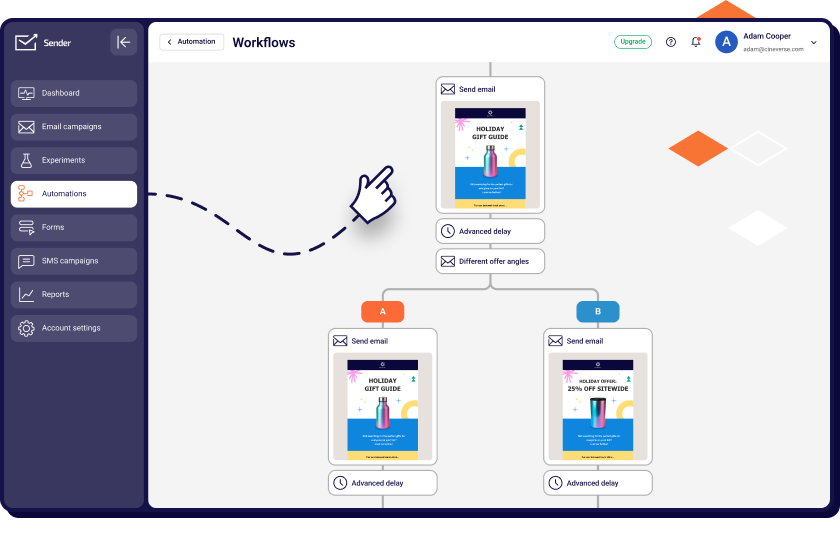
This loop is why automation scales where manual tasks hit a ceiling. A person can’t check every signup against a database, send a personalized email within ninety seconds, and remember to follow up two days later for ten thousand people. A workflow can.
That is what marketing automation lets a small team do, and once it’s running, the effort is roughly the same whether ten people sign up this week or ten thousand.
The message that fires at the start of that loop is called a trigger email.
Triggers, Conditions, and Actions
The three pieces of an automation loop are the trigger, the condition, and the action. Here is each one with a single example threaded through all three: a customer making their first purchase.
An automation trigger is the event that starts a workflow. It’s the “something just happened” signal – a form submission, a purchase, a page visit, a click on a specific link, even inactivity (like “this person hasn’t opened an email in 60 days”). In our example, the trigger is the order being placed. The system sees that event and says, “okay, time to do something.”
A condition is the rule the system checks before deciding what happens next. Conditions sort people into different paths so the same workflow can handle different situations – Is this a first-time buyer? Is the order over $100? Did they buy a subscription or a one-off? Each “yes” or “no” sends them down a different branch. In our example, the condition might be: “is this their first order ever?”
An action is what the system actually does once the conditions are met. Actions are the visible output – sending an email, adding a tag to the contact, bumping a lead score, notifying a salesperson on Slack, updating a field in your CRM, or starting another workflow entirely.
For our first-time buyer, the action could be sending a thank-you email plus a discount code for their next order, while a returning customer gets a different message entirely.
Triggers start the loop, conditions decide the path, actions deliver the result. Chain enough of them together and you’ve got a system.
Why “Trigger Emails” Are the Building Block
A trigger email is a message that fires in response to a specific behavior, and it is the atomic unit every automated system is built from. A broadcast email campaign goes to everyone on a list at a time you pick, like a weekly newsletter. A trigger email exists only because one individual took an action.
That difference shows up in the numbers. Across 27 billion emails sent by 150,000 ecommerce brands in 2025, behavior-based automated emails made up 2% of sends but produced 30% of email-attributed revenue, earning $2.87 per send against $0.18 for scheduled campaigns (Omnisend, 2026 Ecommerce Marketing Report).
The dataset is ecommerce-only, so treat the exact ratio as a store-side figure, but the direction holds across industries: a message that answers a behavior earns more than a message that interrupts a schedule.
This shifts the dynamic from a batch-and-blast announcement to a timely, one-to-one conversation. Whether a user clicks a high-intent link, visits a pricing page three times, or hits a milestone in their journey, the trigger makes sure you respond within minutes rather than at next Tuesday’s send.
Once you are comfortable with event-driven sends, you stop thinking in scheduled blasts and start thinking in responses: every message exists because something happened. That is what keeps a brand at the top of the inbox when it matters.
What are the Benefits of Marketing Automation?
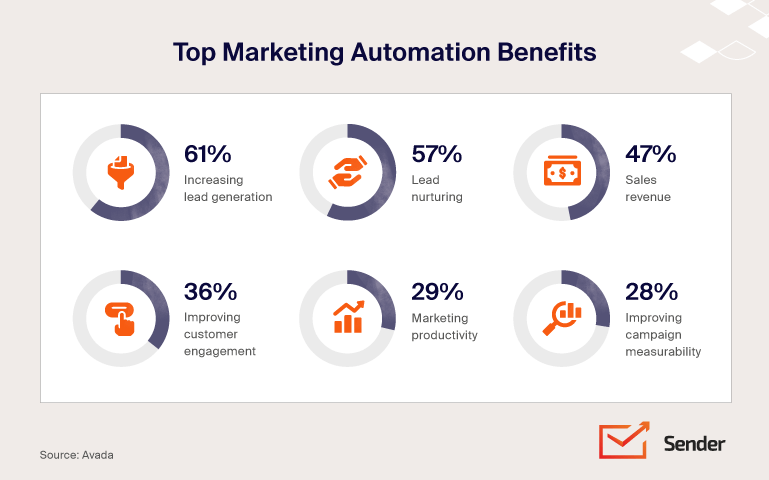
Marketing automation benefits fall into four areas: return on investment, operational efficiency through lower marketing overhead, more qualified leads ready for sales, and time handed back to the team. Each has a measured figure behind it, and each figure has a date.
On ROI, Nucleus Research reviewed 16 marketing automation case studies published between 2016 and 2020 and found that deploying organizations realized $5.44 in benefits for every dollar spent over the first three years after deployment, with a payback period under six months (Nucleus Research, March 2021).
The same note identified where the value came from: marketer productivity (mostly time freed from repetitive marketing tasks such as lead management and manual data imports), campaign efficiency, cost savings from simplified infrastructure, and improved prospect engagement.
On overhead and lead quality, two older studies are still the ones most vendors quote, so it is worth knowing their age. Nucleus Research’s earlier note, Marketing Drives CRM ROI (2012), measured a 12.2% reduction in marketing overhead and a 14.5% increase in sales productivity for companies running marketing automation alongside their CRM.
Forrester Research (2014) found that companies that excel at lead nurturing generate 50% more sales-ready leads at 33% lower cost per lead. Statistics in this section were last verified on 14 September 2026.
The real story in 2026 isn’t the ROI figure. It is that automation has moved from a competitive edge to a baseline requirement of any modern marketing strategy, and three forces are driving that.
First, customer expectations have risen. Buyers expect a brand to remember their preferences across every channel, so a generic mass email no longer just underperforms; it reads as a lapse in service.
Second, tighter margins and leaner headcounts mean marketing departments have to produce more pipeline with fewer people. An automated welcome or cart flow keeps working through a hiring freeze.
Third, AI has cut the build cost of sophisticated marketing workflows. Flows that once needed a specialist with technical expertise can now be drafted and deployed in a fraction of the time, which puts advanced setups within reach of small teams.
The flip side is the cost of not automating. Without it, leads go cold while your team is buried in repetitive tasks like data entry, and your ability to personalize is capped by manual bandwidth.
While competitors compound their marketing efforts through systems that run every night, manual teams stay stuck pasting names into mail merges. In 2026, the gap widens every month those automated workflows keep running.
Email Marketing Automation: The Core Message Types
Email marketing automation runs on a small set of message types, each tied to a customer interaction: a signup, a booking, a purchase, a lapse.
You do not need to start from a blank canvas: welcome, confirmation, reminder and appointment, thank-you, win-back, and invoice emails cover most of the automated journey from first signup to repeat purchases by existing customers.
Welcome Emails
The welcome email is the first message a new subscriber or customer receives, usually within minutes of signing up. Its job is to set expectations, deliver whatever was promised (a discount code, a guide), and make a first impression while your brand is fresh in their mind.
It is also the most-opened marketing email you will send. In GetResponse’s Email Marketing Benchmarks (2024 edition, based on 4.4 billion messages sent in 2023), welcome emails averaged an 83.63% open rate, against 40.08% for newsletters. Apple Mail Privacy Protection inflates open counts across the board, so the two-to-one ratio is more reliable than either absolute number.
For copy examples and subject line patterns that work, see our collection of welcome message examples. No other automated send gets this much built-in goodwill, so deliver something useful in the first message rather than saving it for email three.
Confirmation Emails
Confirmation emails verify that a specific action went through: a subscription was confirmed, an account was created, a booking was finalized. Their job is reassurance and a record, so the user knows the system didn’t quietly fail.
Because the recipient is actively waiting for the message, confirmations are opened far more reliably than promotional sends, which makes them an underused surface for a short brand note or a relevant cross-sell. Keep the confirmation itself at the top; the receipt is the reason they opened it, and anything promotional belongs below it.
To help you get started, we’ve put together a library of confirmation email templates covering the most common triggers. Treat them as more than plumbing, and a routine verification becomes a touchpoint at the moment of highest intent.
Reminder and Appointment Emails
Reminder emails nudge a recipient toward a pending action they haven’t taken; appointment emails confirm and re-confirm a meeting already on the calendar. Both exist to cut no-shows and keep deadlines from slipping.
Reminders typically fire for unfinished tasks like an abandoned cart, a looming subscription renewal, or an unanswered event RSVP.
In contrast, appointment emails handle the logistics of a booking, providing an immediate confirmation, a 24-hour heads-up, and a day-of nudge to keep the event top-of-mind. We have a dedicated guide on writing appointment confirmation emails.
By surfacing these pending items when a recipient is most likely to act, you significantly reduce the operational friction of missed appointments and stagnant leads.
Thank You Emails
Thank-you emails do exactly what the name says: acknowledge an action the customer took. A purchase, a signup, a form submission, a referral, a piece of feedback – anything where the customer gave you something. The point is the relationship, not the transaction. You’re not asking for anything; you’re just saying thanks.
That’s why they work. Because the framing isn’t “buy now” or “click here,” recipients drop their defenses, and engagement tends to outperform straight promotional sends. A thank-you also creates a small emotional anchor – the kind of moment people remember a brand for. It’s the cheapest customer retention tool you have, and most teams underuse it.
For templates and real-world examples, see our guide on thank you emails. This simple step humanizes your brand, shifting the tone from a sterile business exchange to a genuine partnership with your audience.
Win-back and Re-engagement Emails
A win-back email is an automated message to a subscriber who has stopped opening, offering a fresh value proposition, a question, or a last-chance offer to bring them back. Subscribers go quiet.
It happens to every list: they opted in once, circumstances changed, and now they haven’t opened an email in months. Left alone, that decay damages your email deliverability, because inbox providers track engagement and a list full of dead weight drags down your reach even with active fans.
Send it before the silence becomes permanent. For subject lines and body copy, see our library of win back email examples.
A “we miss you” email is a specific tone variant: softer and more relational, it leads with the relationship before making any ask. See our dedicated breakdown of the we miss you email format. Sent before the silence turns permanent, these two messages recover subscribers you would otherwise lose to list decay.
Invoice and Transactional Emails
Invoice and transactional emails are the billing messages a system sends automatically: invoices, payment confirmations, overdue notices, receipts. These are some of the most-opened emails any business sends, because the customer is actively looking for them. That makes them a real branding and retention touchpoint, not just a piece of accounting plumbing.
A clean, well-designed invoice email signals professionalism. A generic plain-text receipt signals you don’t care. It is worth distinguishing that an invoice email is the specific message landing in an inbox, while email invoicing as a practice refers to the broader workflow of systematically managing billing communications.
Start with our guide on writing an invoice email. A professional, well-designed transactional send signals that you care about the customer experience at every stage, turning a routine billing event into a moment of brand reinforcement.
Marketing Automation Workflows & Sequences
Once your individual email types are ready, you chain them into a workflow. The workflow is the logic layer of your system: pacing, branching, and conditions turn single messages into one continuous, personalized customer journey.
To build a complete system, we’ll look at four key angles: drip campaigns, sequences versus broadcasts, premade templates that remove the build time, and remarketing flows that recover revenue mid-decision.
Drip Campaigns Explained
A drip campaign is a pre-scheduled sequence of emails sent on a fixed cadence – Day 0, Day 2, Day 5, and so on – usually regardless of how the recipient behaves. The steady rhythm is the whole point.
Drips are ideal when you need to deliver a specific body of content over a set timeline, making them the perfect shape for a user onboarding sequence, lead nurturing in long sales cycles, or course delivery. This structure trades real-time reactivity for total predictability; you know exactly what is going out on Day 10, and so does your team.
For instance, a five-email post-signup drip might include an initial welcome, a “first win” tutorial, a customer use case, a feature deep-dive, and an invitation to a live walkthrough. For the full concept and when to use it, see our guide on drip marketing.
By using a “drip” approach, you ensure that every prospect receives the same foundational education at the same pace, regardless of when they joined your list. For inspiration, browse our roundup of drip campaign examples.
Email Sequences vs. One-off Campaigns
A one-off broadcast, or email campaign, goes to a list at a moment you pick: your Tuesday newsletter, a Black Friday announcement, a launch email. Everyone gets it at roughly the same time. A sequence is multi-step and tied to either a trigger (a behavior) or a timeline (Day 1, Day 3, Day 7), so different recipients sit at different points of the sequence depending on when they entered.
Both have their place. Broadcasts fit news, time-sensitive promos, and announcements where the relevance is the timing itself. Sequences fit nurturing leads through a lead qualification process (the backbone of B2B marketing automation), onboarding, retention, and any situation where the relevance is where this person is in their journey.
Most email marketing strategies over-rely on broadcasts because they are easier to ship. That leaves revenue on the table, because marketing automation makes it possible for every new signup to enter an automated campaign that keeps working long after the send. For a step-by-step on structuring one, see our guide to building an email sequence.
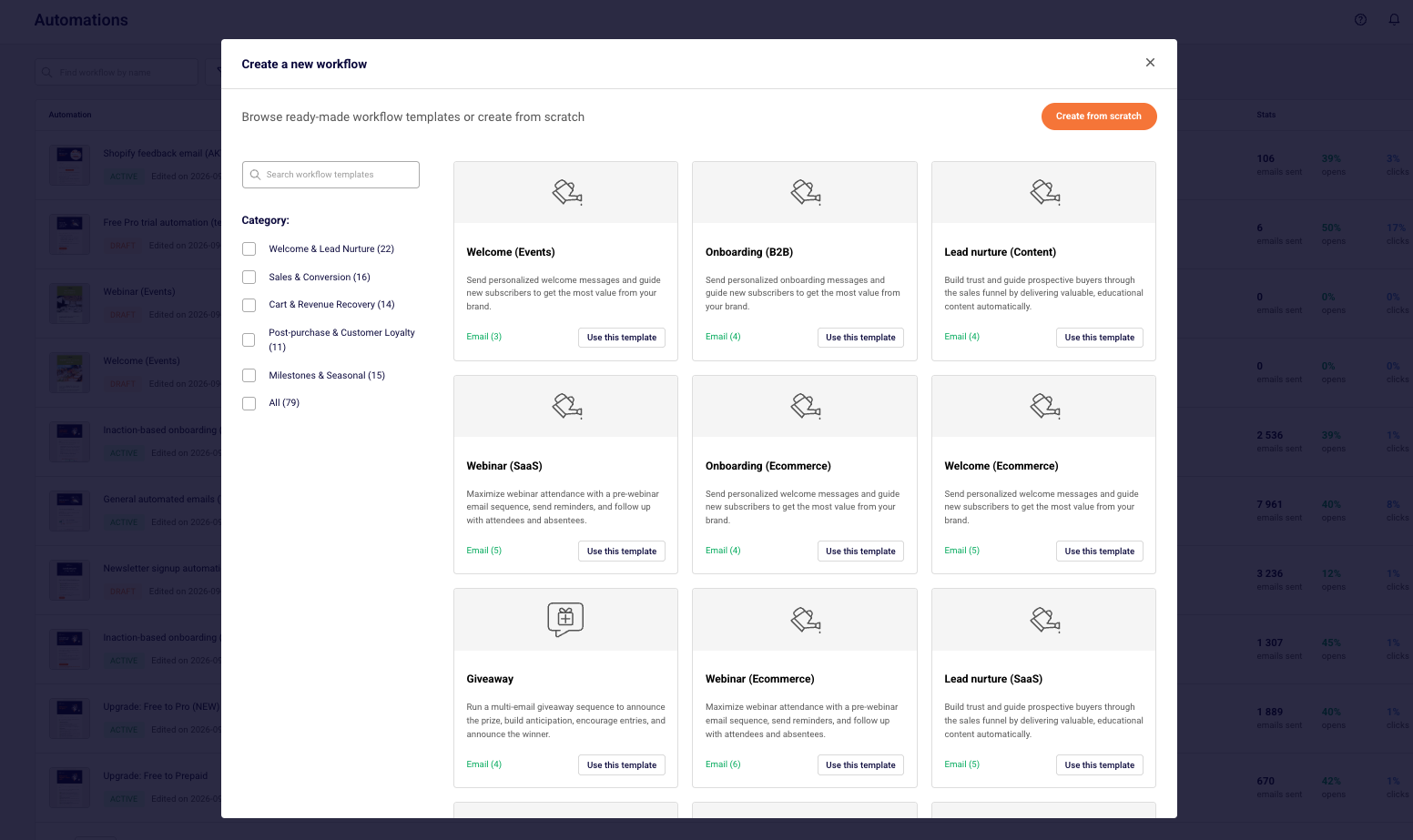
Premade Workflow Templates
A premade workflow template is a skeleton (trigger, sequence, timing, decision points) already wired up, so instead of building the architecture, you get the time back to create engaging content and tune the schedule.
Most teams stall the second they sit down to design an automation from scratch. The blank canvas of a visual workflow builder is a notorious productivity black hole: what’s the first email? How long do I wait? What if they don’t open it? Three hours later, you’ve built nothing, and your tab count has tripled. That’s the problem premade templates solve.
The most common template categories cover the bulk of what most businesses need. Welcome series templates handle new-subscriber onboarding across three to five emails. Cart recovery (or browse abandonment) templates handle the abandoned-purchase pattern.
Re-engagement templates handle the inactive-subscriber problem. Post-purchase templates handle thank-you, shipping updates, review requests, and replenishment cues. Those four cover most of the sequences a typical business runs.
Browse our library of premade automation workflow templates to skip the blank-page problem entirely.
Email Remarketing Flows
Email remarketing is a set of sequences triggered by behaviors that signal immediate interest or sudden drop-off.
Unlike general win-back or re-engagement campaigns, which target customers who have been inactive for months, remarketing targets in-session drop-off where timing is measured in minutes or hours. The customer hasn’t gone cold; they walked away mid-decision, and a well-timed flow brings them back while the intent is still warm.
The three most common remarketing triggers are cart abandonment (adding items but not checking out), browse abandonment (viewing specific products without adding to cart), and high-intent page visits, such as hitting a pricing page several times without acting.
Cart and browse recovery are the core of automated ecommerce email marketing, and that pillar covers the store-side setup in depth. Each behavior fires a sequence built to surface common objections, restate the value, and lower the barrier to returning.
Because these recipients are already deep in the funnel, remarketing flows sit consistently among the top-earning automations: in Omnisend’s 2025 data, abandoned cart and welcome flows together produced 76% of all automation-generated orders, and back-in-stock alerts had the highest conversion rate of any flow at 6.46% (Omnisend, 2026 Ecommerce Marketing Report).
For the full playbook on setting these up, see our guide to email remarketing. Closing the gap between interest and exit recovers revenue that would otherwise be lost to simple distraction.
Omnichannel & AI: The 2026 Shift
Two connected shifts are reshaping marketing automation in 2026: omnichannel orchestration and agentic AI. Most of what gets written about “the future of automation” is one of these two stories.
The first is omnichannel orchestration. For years, email was the main channel automation touched. In 2026, it is one of several marketing channels automation coordinates, alongside SMS, push notifications, in-app messages, and web personalization.
The bar has moved from “we have email and SMS” (multichannel) to omnichannel, where the system coordinates the full set so a customer isn’t hit on multiple channels with the same message. The system watches where a customer responds and picks the next best channel for the touchpoint.
For a deeper look at coordinating channels end-to-end, see our guide to omnichannel marketing automation.
SMS deserves its own note because it behaves differently from email: messages are short, read within minutes, and governed by stricter consent rules (TCPA in the US, GDPR in the EU). Our SMS marketing guide covers opt-in, quiet hours, and the flows where a text outperforms an email.
The second shift is agentic AI. The “copilot” era, where AI suggested a subject line and stopped, is ending. Automation is moving into an “operator” role, where AI agents plan, execute, and adjust marketing campaigns in real time within guardrails a human sets. The marketer moves from building every step to setting the goals and quality bars while the agent handles execution.
Several AI-powered features have moved from differentiator to standard on mid-market plans. Predictive send time, a predictive analytics feature that picks a delivery window per contact from their past opening behavior, ships as Klaviyo’s Smart Send Time, Mailchimp’s Send Time Optimization, and Brevo’s Send Time Optimization.
Generative subject-line and copy variants and AI-assisted segment suggestions are similarly common. Multi-armed bandit testing is rarer and worth defining: where a classic A/B test splits traffic evenly for a fixed period and then declares a winner, a bandit test shifts more sends toward whichever variant is winning while the test is still running, so less volume is spent on the losing version.
Braze offers it as Intelligent Selection, and it remains mostly an enterprise-tier feature. What is still emerging are fully autonomous campaign agents that run end-to-end without review; most working deployments today are narrow, one supervised workflow at a time.
Both shifts depend on the same input: zero-party data. That is the information customers share on purpose (preferences, intent, the reason they signed up) combined with first-party behavior on your own channels.
On third-party cookies, the premise has changed even though the conclusion has not. Third-party cookies are blocked by default in Safari, Firefox, and Brave, but the Chrome-led “cookieless future” was abandoned.
On 22 April 2025, Google confirmed it would keep third-party cookies in Chrome and would not add a choice prompt; on 17 October 2025, it retired most Privacy Sandbox technologies; and the UK Competition and Markets Authority closed its investigation the same month. Last verified 14 September 2026.
So the case for zero-party data no longer rests on cookies disappearing. It rests on consent and signal quality: data a customer gave you deliberately is more accurate than inferred tracking, holds up under GDPR and the growing list of US state privacy laws, and can be read by the automation directly.
The brands winning in 2026 have built the habit of asking customers what they want and storing the answers where the workflows can use them.
How to Get Started: a 5-step Rollout
The most common marketing automation mistake isn’t a tooling choice. It’s trying to build ten flows before any of them work. The five steps below are the marketing automation best practices successful rollouts follow, in order.
1. Audit what you already send. Before you turn anything on, write down every manual email and repeat task your team currently does. The Tuesday newsletter, the welcome email someone sends from their personal inbox, the “did you see this?” follow-up your sales team sends every Friday, the weekly report you copy-paste together.
You’re looking for patterns already happening – those are the repetitive tasks worth automating first, because the use case is proven and the copy is already written. Skip this step and you’ll automate flows nobody actually needed.
2. Pick one workflow to build first. The instinct is to start with the impressive one (a six-branch nurture split by lifecycle stage, with AI personalization). Resist it. The first workflow should be the one with the clearest trigger, the smallest scope, and the highest known ROI. For most businesses, that’s a welcome series or, for ecommerce, a cart recovery flow.
Both have well-understood mechanics, fast feedback loops, and direct revenue tied to them. You’ll learn the platform’s quirks on a low-risk workflow before stakes rise.
3. Clean your list and segments before switching anything on. Automation amplifies whatever customer data you point it at, including the bad parts. If your list has typos in email fields, duplicate contacts, broken tags from two CRMs ago, and people who haven’t engaged since 2019, your new welcome flow will hit unsubscribe spirals and deliverability problems on Day One.
Spend a week sunsetting dead contacts, fixing tag taxonomies, and confirming the segments you’ll use actually contain who you think they contain. If those segments were built ad hoc, our email segmentation guide covers the data types and a process for rebuilding them. This unglamorous work disproportionately determines whether the rollout succeeds.
4. Launch, measure against one primary metric. Pick one metric per workflow that defines success – for a welcome series, it might be 7-day activation rate; for cart recovery, it’s revenue per recipient. Launch, track campaign performance on that metric for at least two full cycles (often two to four weeks depending on volume), and only then identify optimization opportunities.
Teams that change everything at once, like the subject line, the send time, the offer, and the sequence length in week one, have no idea what moved the metric. Change one variable at a time, and let the data accumulate.
5. Expand to the next workflow only after the first is stable. “Stable” means the metric has settled into a predictable range, deliverability is healthy, and you’re not actively firefighting. Then – and only then – add the next workflow. Repeat. Most effective marketing automation programs have five to ten meaningful workflows running, not fifty.
Depth and reliability beat breadth, especially in year one. Teams that build slowly end up with systems that compound; teams that build everything at once end up with brittle messes.
Choosing Marketing Automation Tools
Choosing automation software can feel overwhelming, but implementation quality matters far more than a vendor name. However, picking the wrong category of tool makes the right implementation impossible.
You should avoid picking based on a long feature list alone – a complex marketing automation solution that sits idle is always less valuable than a simpler tool your team actually uses.
All-in-one vs. Specialist Platforms
There are two broad categories of marketing automation platforms, and they trade off in opposite directions.
All-in-one platforms, such as HubSpot, Salesforce Marketing Cloud, or ActiveCampaign, bundle email and automation with a full customer relationship management (CRM) system, lead generation landing pages, and social media automation. The pitch is operational simplicity: one login, one customer record, and one set of permissions.
The trade-off is that no suite leads in every module; you typically accept adequate social media posting or CMS features in exchange for a unified stack. For most mid-sized teams, the time saved not stitching tools together outweighs the rougher edges. Our roundup of all-in-one marketing platforms compares the main suites on exactly that trade-off.
Specialist platforms go deeper in one domain: Klaviyo for ecommerce email, Iterable for cross-channel orchestration, and email marketing software like Sender (our platform) for email and SMS automation. They generally don’t include a full sales CRM or social media management suite and expect you to integrate with the tools you already run.
The pitch here is depth: more workflow options, stronger deliverability, richer customer segmentation, and more advanced analytics in the core channel. For teams where one channel drives the bulk of the revenue, the extra performance is usually worth the integration work.
The shortcut: all-in-one = simpler ops plus CRM and social; specialist = more depth and channel-specific performance.
What to Evaluate (Fit, Integrations, AI Features)
Once the category is set (all-in-one suite or specialist platform), five criteria should drive the actual decision in 2026.
Use-case fit for the workflows you need this quarter. Don’t buy for the workflows you might build next year. If your immediate need is cart recovery and welcome flows, evaluate platforms by how well they handle those specific workflows. If sequences are central to how you’ll use the platform, read up on drip campaign software options before committing.
Integration depth. Prioritize native connections over middleware. A native integration with your store, CRM, or support tool will outlast and outperform a Zapier-style connection by syncing more data fields with fewer breakages.
AI features that actually move metrics. Every platform now claims AI. Predictive send-time optimization should measurably lift open rates. Generative subject-line variants should beat your control.
Segment suggestions should surface audiences you’d otherwise miss. If a vendor can’t show you the lift in detailed analytics from real customer accounts, it’s a marketing veneer. Since the broader email marketing automation software landscape moves fast, prioritize vendors who can show real marketing performance lift on existing accounts.
Deliverability and compliance built in. A workflow that lands in spam doesn’t convert at any rate. Look for built-in authentication setup (SPF, DKIM, DMARC), reputation monitoring, and consent management for GDPR, CAN-SPAM, and the growing pile of US state privacy laws.
Pricing that scales with value. Avoid platforms that lock essential automation behind “Enterprise” paywalls while penalizing you for list size. Look for a model where your investment scales with functionality and results. You want full access to advanced features – like multi-step branching and autoresponder tools – without a price jump just because your database grew.
Picking deliberately matters more than picking the “best” tool. A B-tier platform that fits your workflow and that your team actually uses beats an A-tier platform that nobody touches.
Your Next Step
A marketing automation strategy in 2026 is less about sending faster and more about being relevant at scale. The mechanics (triggers, conditions, actions, timing) haven’t changed much.
What’s changed is the bar for what “good” looks like: customers expect coordinated, well-timed, personally relevant messages across every channel they use.
The teams pulling furthest ahead are investing in clean first-party data and zero-party data, picking tools that fit their actual workflows, and starting small enough that the first flows work before they build the next ten.
Agentic AI will keep changing what’s possible, but the fundamentals (relevance, timing, respect for the recipient) are the same as they’ve ever been.
Where to go after this marketing automation guide depends on where you’re stuck:
Building your first flow? Start with trigger emails, the atomic unit everything else is made of, then move on to the marketing automation workflow frameworks for designing a sequence from scratch.
Want to move faster? Skip the blank builder: the help center walkthrough on creating your first automation gets a premade template live in one sitting.
Need the email fundamentals first? Our email marketing guide covers list building, sending cadence, and the basics every workflow depends on.
Ready to choose marketing automation software? Our roundup of marketing automation tools lays out the trade-offs side by side.