


The most expensive number in your email reporting dashboard is the one labeled “delivered.” It looks like a green light. It usually isn’t.
Delivered just means a server somewhere accepted the handoff; it says nothing about where the message ended up: primary inbox, Promotions tab, spam folder, or a quiet quarantine the recipient will never check.
How wide is the gap? Unspam.email’s 2025 benchmark found that only about 60% of emails reach a visible mailbox location, 36% are filtered into spam, and 4% are blocked outright.
That’s a reach problem, a trust problem, and a revenue problem stacked together, and most senders never see it because their ESP only reports the green light.
Email deliverability is the percentage of your accepted mail that reaches a recipient’s primary inbox rather than the promotions tab, spam folder, or quarantine. It’s a different number from delivery, which only confirms a receiving server accepted the message.
After that handoff, deliverability depends on sender reputation, authentication, engagement, content, and list quality working together.
This guide is for marketers, email operations teams, and anyone accountable for inbox placement on campaign or transactional sends in 2026.
It covers what deliverability is, why the rules tightened through 2024 and 2025, what “good” looks like today, how to diagnose a placement problem, and how to fix email deliverability once you’ve found the cause.
It doesn’t cover email copywriting or subject-line strategy in depth, or the mechanics of SMS delivery; those live in their own guides.
What is Email Deliverability?
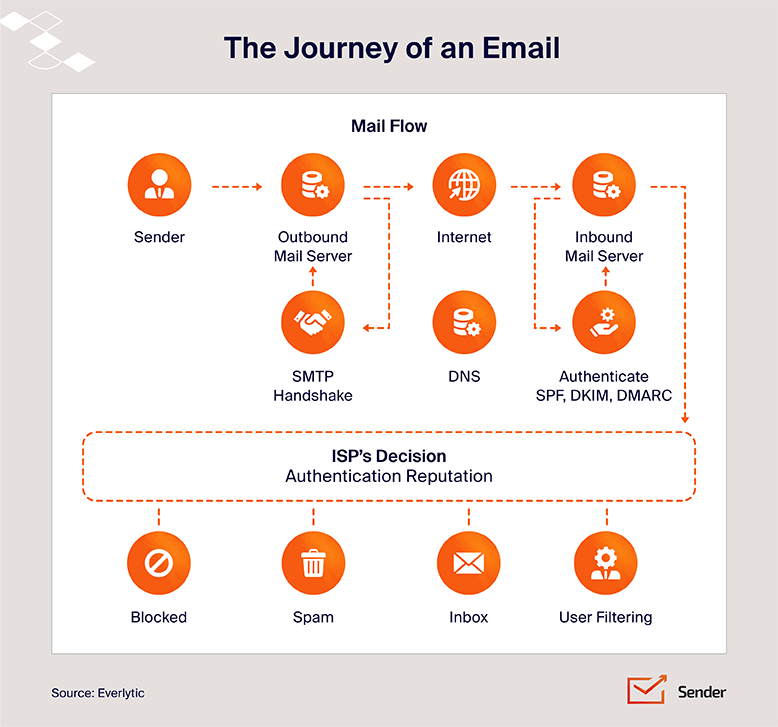
Delivery is the easy half, and it’s the one most often confused with deliverability itself. An email is “delivered” the moment a receiving server accepts the handoff from your sending server and doesn’t bounce it. The server said yes. Message accepted. Done.
Deliverability is the harder number defined above: what happens to that accepted message next.
Five forces decide where it lands:
- Sender reputation, the trust score mailbox providers have built about your domain and IP
- Email authentication, SPF, DKIM, and DMARC, which prove the mail is really from you
- Engagement signals, whether real humans open, reply, scroll, and don’t hit “report spam”
- Content, links, images, copy patterns, attachments
- List quality, how many intended recipients are real, active, and want to hear from you
Each gets its own treatment below. The thing to hold onto: deliverability isn’t a setting you configure once. It’s an ongoing reputation score, recalculated with every send.
Why is Email Deliverability Important?
Fewer messages reaching the inbox is often the actual culprit behind a stalled campaign, and it usually gets misdiagnosed as something else first. A campaign underperforms, and the team blames the subject line. Open rates drift down for a quarter, and someone proposes a redesign. Sales says the leads stopped converting.
The business case for why email deliverability matters comes down to three stacked issues:
Reach and engagement. Every email that lands in spam, Promotions, or corporate quarantine is a conversation that didn’t happen. Campaign metrics still calculate, but against a shrinking denominator of people who actually saw the message.
Brand trust. Mailbox providers read consistent inbox placement as legitimacy and keep delivering your future sends. Subscribers read it the same way. If your last three messages went to spam, the fourth starts in a hole.
ROI. Lost placement compounds into lost revenue. In one Attentive customer analysis, pruning unengaged subscribers led to a 50% increase in revenue while sending 70% fewer campaigns: sends dropped to roughly 200,000 and revenue rose to roughly $18,000.
One case, not a benchmark, but the direction matters: fewer emails sent to people who actually want them often outperforms more emails sent to a bloated list.
The most visible cost of poor email deliverability is bounced emails. They waste sends, drag down sender reputation, and skew every campaign metric. A 5% email bounce rate doesn’t just mean 5% fewer eyeballs; it tells mailbox providers you’re not maintaining your list, and they treat your future mail with more suspicion.
What is a Good Deliverability Rate?
Your email deliverability rate doesn’t have a single “good” number attached to it. It depends on what you’re measuring (delivery rate vs. inbox placement) and what kind of email you’re sending, since marketing newsletters and password-reset emails play by different rules and ISPs treat them differently.
Here’s how to set realistic targets for each, and how to read the report your platform hands you.
Deliverability Rate of Marketing Emails
For email marketing deliverability in 2026, a practical delivery rate target is 95% or higher. Most reputable senders on a healthy ESP will hit it.
But delivery rate and inbox placement aren’t the same number. Inbox placement for marketing campaigns runs lower, because Gmail in particular routes a large share of promotional sends to the Promotions tab.
The Digital Bloom reports that healthcare achieves 94.7% inbox placement, reflecting time-sensitive communications with high inherent engagement, while software and SaaS placement sits at 80.9%, reflecting more aggressive promotional patterns and less rigorous list hygiene. Retail lands around 80.5%.
If your industry sends a lot of promos and discounts, expect tougher filtering. ISPs read promotional content as bulk traffic by default and ask it to earn its way into the primary inbox through engagement.
Deliverability Rate of Transactional Emails
Transactional email (order confirmations, password resets, receipts, shipping updates) sees much higher inbox placement and engagement than marketing email. The reason is structural: these messages are user-triggered. Someone hit “forgot password” and is staring at the screen. ISPs treat that traffic differently from a Tuesday newsletter blast.
The most common way senders blow this up is mixing promotional content into transactional streams, like a receipt that upsells three products or a password reset with a “while you’re here” banner. ISPs notice.
Once they reclassify your transactional stream as marketing, the engagement signals protecting your inbox placement start working against you, and password resets start landing in spam.
This is why many transactional email services encourage senders to separate transactional and marketing traffic entirely: different sending domains or subdomains, different IPs, different reputations being built in parallel. Transactional infrastructure is purpose-built for low-latency, high-trust delivery, and it shouldn’t share a reputation with your weekly newsletter.
Understanding Your Deliverability Report
The two numbers to separate in any deliverability report:
- Delivery rate, confirms the receiving server accepted the message
- Inbox placement rate (IPR), confirms it landed in the primary inbox rather than spam, Promotions, or quarantine
The math: IPR = (emails landed in inbox / emails sent) × 100. Most ESPs don’t show this natively, because they can’t see inside the recipient’s mailbox.
There’s a 2026 wrinkle. Litmus’s Email Client Market Share data shows over 50% of email opens now happen on a device with Apple Mail Privacy Protection active.
Apple MPP pre-loads images, which registers as an “open” whether the recipient looked or not. On any audience with significant Apple usage, a healthy open rate doesn’t reliably tell you the email reached the primary inbox.
Because ISPs don’t share IPR directly, senders rely on seed list testing (sending to a panel of monitored seed email addresses across providers) and dedicated inbox placement tools. Open rate alone won’t let you monitor inbox placement anymore. Click-to-open rate, reply rate, and seed test results will.
What Affects Email Deliverability?
Inbox placement isn’t decided by one thing. Several factors influence email deliverability, forming a running tally across five categories that mailbox providers re-score every send.
Sender reputation. The trust score Gmail, Outlook, and Yahoo quietly maintain about you. Two reputations are in play: domain reputation, tied to the domain in your “From” address and now the dominant of the two, and IP reputation, tied to the specific IP address sending the mail.
Domain became dominant partly because senders kept trying to escape bad IP reputations by switching IPs, and providers got tired of the game. Reputation is built slowly, lost quickly, and is the single biggest determinant of placement.
Authentication status. SPF, DKIM, and DMARC are the three email authentication records that prove a message is actually from the domain it claims to be from. Missing or misaligned records used to be a yellow flag. As of 2024, for any sender pushing meaningful volume, they’re a hard requirement. Mail that fails authentication doesn’t just get filtered; it can get rejected outright at the gateway.
Content and subject line signals. Spam filters look at the message itself: image-to-text ratio, link density, attachment types, suspicious URLs and suspect HTML, and patterns matching known spam or phishing templates. Subject lines play a smaller role than people think (the trigger-word panic of the 2010s is mostly outdated), but all caps, excessive punctuation, or oddly formatted subjects still get noticed.
List quality and engagement. Now the heaviest behavioral signal. A list of people who actually want your email papers over a lot of other sins. A bloated, neglected list sinks campaigns that are otherwise technically clean.
Sending infrastructure. The unglamorous layer underneath everything else: the SMTP server, shared vs. dedicated IP, sending volume patterns, day-over-day consistency. Erratic spikes, sudden volume jumps, or sharing an IP pool with bad actors drag placement down regardless of how clean the rest of your setup is.
These five don’t operate in isolation. A weak score in one can be partially offset by strong scores elsewhere. Authentication failures combined with a stale list and erratic volume is how senders end up wondering why nothing reaches the inbox anymore.
How Do You Test Email Deliverability?
Before fixing anything, run a deliverability test to find out where you stand. The trap: treating your ESP’s delivery report as a verdict on placement. It isn’t. To actually diagnose where mail is landing, you need four email deliverability tools doing four different jobs.
1. Google Postmaster Tools v2. Google’s free dashboard for checking how Gmail sees your sending domain, built around a Compliance Status view rather than the old reputation charts.
It replaced the legacy v1 interface’s “High / Medium / Low” Domain Reputation bars: Google began redirecting senders away from v1 on September 30, 2025, though sources differ on the exact retirement date, some report a full shutdown on October 31, 2025, others note the underlying reputation data stayed reachable through the API into August 2026.
Postmaster Tools v2 itself reached general availability on February 3, 2026. In June 2026, Google added a Deliverability Analysis section to the Compliance Status page, giving a plain-English verdict on whether Gmail users want your mail rather than just pass/fail flags on individual checks.
The addition reinforces the point this guide keeps coming back to: engagement, not just technical compliance, is now the dominant signal.
The dashboard itself is still binary on the core checks: pass or fail on authentication, alignment, one-click unsubscribe, and spam rate. Watch:
- Spam complaint rate (Gmail’s sender guidelines call for under 0.1%, with 0.3% as the danger line)
- Authentication results
- Compliance Status indicator
Google’s own Email sender guidelines FAQ confirms the shift this guide has been building toward: starting November 2025, Gmail moved from soft enforcement to active rejection of non-compliant bulk mail, with disruptions including both temporary and permanent rejections at the SMTP level, not just folder routing.
2. Seed list and inbox placement testing. Google Postmaster Tools only shows you Gmail. To see where you land across email clients like Outlook, Yahoo, Apple Mail, regional providers, and corporate mail systems, you need seed testing.
Services like GlockApps, MailReach, Mailtrap, and Mail-Tester maintain panels of monitored test addresses across major inbox providers. You send your campaign to the seed list, and the service reports back where each test message landed. It’s the closest thing to a true inbox placement rate you can get. Run a seed test before any major send.
3. Pre-send spam content checks. Tools like Mail-Tester score the email message itself before it ships, typically returning a result out of 10 alongside a breakdown of what’s working and what isn’t.
They flag image-to-text imbalance, broken links, suspect HTML, missing alt text, blacklisted phrases, and authentication misalignment. Useful as a sanity check on every new template, and worth re-running any time you switch sending domains or rebuild a template from scratch rather than cloning a known-good send.
4. SPF, DKIM, and DMARC record validators. Record validators confirm your DNS records actually parse and align the way you think they do. MXToolbox is the workhorse, but most ESP dashboards include built-in record checks.
A syntactically broken SPF record, a mismatched DKIM key, or a DMARC typo will quietly tank deliverability across every mailbox provider, not just Gmail. Re-run validators after any DNS change: propagation can take up to 48 hours, and a record that looks correct in your zone file can still be misread by receiving servers until it fully propagates.
One last caveat, because it’s the most expensive misunderstanding in email reporting: your ESP’s delivery rate is not your inbox placement rate. A 99% delivery rate combined with the testing tools above is what gives you an honest picture. Either one alone will mislead you.
How Do You Fix Email Deliverability?
Start with the symptom you’re seeing, not a generic checklist for common email deliverability issues. Each of the following runs fastest-check-first, so you can rule out the common causes of poor inbox placement before doing deeper diagnostic work.
❗️Placement dropped suddenly, across the board.
📍Likely cause: a recent list import, a content or template change, or a reputation hit from a spam trap or blocklisting.
🔧 Fix: check Google Postmaster Tools’ Compliance Status for a new fail flag, run a seed test to see whether the drop is Gmail-specific or universal, and check whether your sending domain or IP shows up on a major blocklist. If you changed anything (template, list source, sending cadence) in the days before the drop, revert that change first and re-test.
❗️Mail is rejected at the gateway (hard bounces spike, or you see 550-series errors).
📍Likely cause: a broken or missing SPF, DKIM, or DMARC record, or you’ve crossed a bulk-sender threshold without meeting the requirements.
🔧 Fix: run your domain through an SPF/DKIM/DMARC validator immediately; this is the fastest check on this list and the most common root cause of gateway rejection. If records validate cleanly, check your daily volume against Gmail and Yahoo’s 5,000-message bulk sender threshold.
❗️Mail lands in Promotions, not spam. This usually isn’t a deliverability failure at all, it’s Gmail correctly classifying bulk marketing content.
📍Likely cause: content and structure read as promotional (heavy images, discount language, marketing template patterns).
🔧 Fix: this is a content and engagement problem, not an authentication problem. Segment for your most engaged subscribers, tighten the image-to-text ratio, and don’t chase the primary inbox by disguising a promotional email as personal correspondence; that tends to backfire as spam complaints.
❗️Spam complaint rate is climbing.
📍Likely cause: you’re emailing people who no longer want to hear from you, at a frequency or volume mismatched to their interest.
🔧 Fix: check whether the climb correlates with a recent list addition, a frequency increase, or a re-engagement campaign to a stale segment. Suppress high-complaint segments immediately; a complaint rate above 0.3% triggers aggressive filtering fast, and reputation lost this way takes weeks to rebuild.
❗️One provider is failing (say, Gmail) while others are fine.
📍Likely cause: provider-specific enforcement, often tied to bulk sender compliance or a Gmail-specific reputation issue rather than a universal authentication problem.
🔧 Fix: check that provider’s specific postmaster or compliance tools first (Google Postmaster Tools for Gmail), since a universal cause would show up everywhere, not on one provider alone.
❗️None of the above fits. Pull a full seed test across providers, audit your last three sends for content and list changes, and verify authentication records from scratch even if they’ve worked before; DNS records get overwritten more often than senders expect.
If the Help Center’s deliverability troubleshooting guide doesn’t surface the cause, it’s time to bring in a deliverability specialist rather than keep guessing.
Best Practices to Improve Email Deliverability
With a diagnosis in hand, it’s time to fix email deliverability for good.
Think of the email deliverability best practices below as a layered system: the foundational layer (compliance, email authentication, sender reputation, IP warming) keeps you in the inbox; the operational layer (list hygiene, personalization, content, sending cadence, monitoring) keeps you there.
A weak link in either layer drags the whole program down.
| Check | Target / Threshold | Where to Verify |
| Bulk sender compliance (Gmail/Yahoo) | SPF + DKIM + DMARC (p=none min.), one-click unsubscribe | Comply with 2026 Bulk Sender Rules |
| Complaint rate under bulk sender rules | Under 0.1%, never above 0.3% | Comply with 2026 Bulk Sender Rules |
| SPF record | Valid, single record, no syntax errors | Authenticate With SPF, DKIM, and DMARC |
| DKIM signature | Aligned, valid public key in DNS | Authenticate With SPF, DKIM, and DMARC |
| DMARC policy | At minimum p=none; p=reject for mature senders | Authenticate With SPF, DKIM, and DMARC |
| Domain and IP reputation | Trending stable to improving | Build and Protect Your Sender Reputation |
| Dedicated IP volume (if applicable) | Above ~100,000 emails/month before considering | Build and Protect Your Sender Reputation |
| New IP warmup ramp | Gradual increase over several weeks | Warm Up Dedicated IP Addresses |
| Hard bounce removal | Immediate, on first hard bounce | Clean and Segment Your Email List |
| List sunsetting | Inactive 90 to 180 days | Clean and Segment Your Email List |
| Spam-trigger content patterns | No all-caps subjects, no misleading preview text | Avoid Spam Folder Trigger Phrases |
| Bounce rate | Under 2% | Monitor Engagement Metrics |
For a step-by-step version of this email deliverability checklist, see our guide on improving email deliverability.
Comply with 2026 Bulk Sender Rules
Gmail and Yahoo’s bulk sender rules, in effect since February 2024 and actively enforced since Google escalated to rejection in late 2025, set the baseline requirements below:
- 5,000 messages/day to Gmail addresses triggers bulk sender rules
- Spam complaint rate must stay below 0.1%, 0.3% is the line where things go bad fast
- SPF, DKIM, and a published DMARC record (p=none minimum) are required
- One-click unsubscribe and ongoing list hygiene are required
Microsoft followed in May 2025 with a near-identical ruleset for Outlook.com, Hotmail.com, and Live.com: same 5,000-per-day threshold, same authentication and unsubscribe requirements.
Non-compliant messages were initially routed to Junk; in practice, mail that fails authentication may be rejected with a 550 5.7.515 error. See our guide to Outlook’s new sender requirements and current bulk sender guidance.
If you’d already adapted to Gmail and Yahoo’s requirements, Microsoft’s enforcement was mostly a non-event. If you hadn’t, your messages started landing in Junk or bouncing back.
The fourth requirement is the one most senders still get wrong. RFC 8058 requires the List-Unsubscribe-Post header, not just an unsubscribe link in the footer. The header lets the mailbox provider show a built-in unsubscribe button at the top of the email and process the opt-out automatically with a single click, no landing page, no confirmation flow.
Many ESPs still don’t implement it correctly by default. Per Google’s and Yahoo’s published requirements, subscribers must be removed within 48 hours of clicking. That 48-hour window is tighter than the 10-business-day opt-out honor period the CAN-SPAM Act has required since 2003, but CAN-SPAM still sets the US baseline for any bulk sender not yet covered by Gmail or Yahoo’s newer rules.
Authenticate With SPF, DKIM, and DMARC
Three authentication protocols, three jobs, all required:
- SPF (Sender Policy Framework), the approved-sender list. A TXT record in DNS saying “these IPs and services are allowed to send mail using my domain.” Receiving servers check the incoming IP against your record. Stops the simplest form of email spoofing.
- DKIM (DomainKeys Identified Mail), the tamper-proof signature. Your mail server signs each outgoing message with a private cryptographic key. The recipient’s mail server fetches your public key from DNS and verifies it. If anyone modified the message in transit, the signature breaks.
- DMARC (Domain-based Message Authentication, Reporting, and Conformance), the policy layer that ties the other two together. Tells receivers what to do with messages that fail SPF or DKIM: p=none monitors only, p=quarantine routes to spam, p=reject refuses outright.
In 2026, p=none is the bare minimum to clear bulk sender rules; p=reject is where most security-conscious senders are working toward.
Without these three, your domain is wide open to email spoofing (the technique behind most phishing), and your legitimate mail is vulnerable to being filtered or rejected. Email authentication is the foundation of email security and deliverability; the two are no longer separable.
One reward: BIMI (Brand Indicators for Message Identification). With DMARC at p=quarantine or p=reject, you can publish a BIMI record that displays your brand logo next to your emails in supporting inboxes (Gmail, Yahoo, Apple Mail). Both a trust signal and a tangible payoff for tightening DMARC.
Build and Protect Your Sender Reputation
Sender reputation is recalculated with every send. It’s built from engagement, complaints, bounces, list hygiene, and consistency: you build it over months, and you can lose it in a week. For the mechanics of how mailbox providers actually calculate it, see our Help Center basics on sender reputation.
Two reputations are in play:
- Domain reputation travels with you regardless of infrastructure; now the dominant of the two
- IP reputation, tied to the specific sending server; still matters at scale but carries less weight than five years ago
The IP question splits into shared vs. dedicated:
- Shared IP pool (the default for low-to-medium volume): you inherit the reputation of everyone else in the pool. If pool-mates are clean, this is fine and even beneficial. If they’re not, their poor sender reputation drags your placement down.
- Dedicated IP: sole responsibility for one IP’s reputation. ESPs differ on where they set the volume floor for this to make sense, with figures generally in the 100,000-to-300,000-emails-a-month range; a 2026 shared-vs-dedicated comparison from Bulk Email Checker puts the floor around 100,000/month and reliable reputation maintenance closer to 300,000+.
Below the dedicated threshold, an IP doesn’t generate enough engagement signal for ISPs to build reliable reputation on it, and a shared IP at a reputable provider is almost always the better choice.
Infrastructure’s role is covered in our guide to what SMTP relay is.
Warm Up Dedicated IP Addresses
A new IP has no reputation. Send 50,000 emails out of the gate and you look exactly like a spammer launching from a fresh server. ISPs throttle, filter, or outright block until they have evidence you’re legitimate.
IP warming builds that evidence: start small, sending only to your most engaged subscribers, then increase volume gradually as engagement and complaint rates hold steady. Exact pacing varies by ESP; some publish schedules in the range of 15-20% weekly growth with a full ramp of four to eight weeks.
Twilio SendGrid’s own IP warm-up guide puts the range at one to two weeks for a fast ramp and up to 60 days for a cautious one, with most customers finishing within 30 days, so treat any single number as a starting point and follow your own ESP’s published schedule. Our Help Center guide to warming up a sending IP walks through the process inside Sender specifically.
Skipping IP warming is the single fastest way to torpedo a new sending setup.
Clean and Segment Your Email List
List hygiene means removing hard bounces immediately (a hard bounce means the address is permanently invalid. A soft bounce can resolve on its own, so don’t treat one soft bounce as a reason to purge).
Sunset inactive subscribers who haven’t engaged in 90 to 180 days. And keep invalid and mistyped email addresses out from the start, using double opt-in at signup. A clean list is one of the most underrated levers in this stack. Our Help Center guide to maintaining a clean subscriber list covers the mechanics inside Sender.
Move sunsetted and bounced email addresses to a suppression list rather than deleting them, so you don’t accidentally re-import them later.
Spam traps, addresses planted by ISPs and blocklist operators specifically to catch senders with poor list hygiene, are the worst-case outcome. One spam trap hit can quietly tank your reputation for weeks, and recovering from a blocklisting takes longer than building reputation back from a clean slate.
Segmentation is the complement. Splitting your list by behavior, attributes, or lifecycle stage lets you send relevant content to each group instead of blasting one message to everyone. See our email segmentation guide for how to build the groups. Engagement-based segmentation has become one of the strongest deliverability levers, partly because it’s a natural form of self-suppression.
The Attentive customer analysis cited earlier makes the point concrete: pruning unengaged subscribers cut sends by 70% and lifted revenue by 50%. The feedback loop in action: clean, segmented lists drive better engagement, better engagement strengthens sender reputation, stronger reputation lifts inbox placement, and better placement makes the next send work harder.
Less, sent better, beats more, sent worse.
Personalize Emails for Engagement
Personalization in 2026 is not “Hi {{first_name}}.” That’s been table stakes for a decade, and ISPs don’t reward it as a deliverability signal.
Real personalization uses purchase history, browsing behavior, lifecycle stage, and engagement patterns: a back-in-stock alert for the item someone viewed twice, a re-engagement series triggered by 30 days of dormancy, a product recommendation based on what someone actually bought rather than what’s on sale this week.
The deliverability connection is direct. ISPs weigh engagement heavily in placement decisions, and personalized mail consistently drives higher opens, clicks, and replies.
Those engagement gains feed straight back into sender reputation, which lifts placement of your next send, which lifts engagement again. The math compounds in your favor when personalization is real and against you when it isn’t.
Segmentation is what makes personalization work at scale. You can’t manually craft a unique email for 50,000 people, but you can craft a dozen variants for a dozen segments and let dynamic content fill in the rest.
Avoid Spam Folder Trigger Phrases
Filtering today leans more on tone, structure, and behavioral pattern recognition than on any fixed word list, though providers don’t publish the exact mechanics of how their filters weigh each signal. The 2010s playbook of avoiding spam trigger words like “free,” “act now,” and “limited time” because filters were keyword-matching is mostly outdated now.
What actually triggers 2026 spam filters:
- ALL CAPS subject lines
- Excessive punctuation (“Don’t miss this!!!”)
- Misleading preview text that doesn’t match the body
- Deceptive subject lines that promise something the email doesn’t deliver
- Image-heavy emails with little text
- Pushy urgency stacked on pushy urgency
Avoiding spam trigger words matters less than the pattern behind them. The honest fix is the simplest one: write like a human writing to humans. If your subject line would feel pushy in a one-on-one conversation, it’ll feel pushy to a filter trained on millions of those conversations.
Maintain a Consistent Sending Schedule
ISPs reward predictability. A sender who shows up every Tuesday morning with 10,000 emails looks legitimate. A sender who’s silent for three weeks and then dumps 100,000 emails on a Friday looks like a botnet warming up a stolen list.
Establish a cadence your subscribers come to expect (weekly newsletter, monthly digest, regular drip) and stick to it, mapped out on an email marketing calendar rather than decided send by send.
When you need to scale volume, ramp gradually rather than spiking. Big seasonal campaigns (Black Friday, end-of-year fundraising) should be planned weeks in advance with a gradual volume increase, not a sudden 5x jump.
Monitor Engagement Metrics
Once your sends are going out, the work shifts to monitoring email deliverability by watching what comes back. The email performance metrics that matter most: open rate, click-through rate, click-to-open rate, email bounce rate, unsubscribe rate, and spam complaint rate.
With over 50% of opens happening on devices with Apple’s Mail Privacy Protection active, opens are inflated and unreliable as a standalone engagement signal. Treat opens as directional and lean on other metrics instead.
The two metrics with hard deliverability thresholds:
- Bounce rate: keep under 2%, the threshold ActiveCampaign and other benchmark reports treat as the accepted ceiling across industries. Sustained higher bounce rates tell mailbox providers your list is dirty.
- Spam complaint rate: keep under 0.1%, never let it cross 0.3%. Per Google’s published guidelines, 0.3% is where Gmail filters aggressively; Microsoft applies similar thresholds.
Google Postmaster Tools v2 remains the free first-party view of how Gmail sees you: spam rate, authentication results, encryption levels, feedback loop data, and the Compliance Status dashboard, now including the plain-English Deliverability Analysis verdict Google added in June 2026 on whether Gmail users want your mail. Check it weekly. Layer your ESP’s reporting and a third-party seed testing tool on top.
Read these metrics by slope, not threshold. A spam complaint rate of 0.05% is fine. A rate of 0.05% trending toward 0.15% over four weeks is a problem you need to address before it crosses 0.3%. Threshold thinking catches issues at the moment they break; slope thinking catches them while there’s still time to fix the underlying cause.
Your Next Step
No single fix restores deliverability on its own; get most of the fundamentals right and let just one slip, and the whole program still suffers.
Where to go next depends on where you are:
- If your placement dropped and you’re not sure why, start with the fastest checks in How Do You Fix Email Deliverability above, then work through a full deliverability troubleshooting pass if the quick checks don’t surface a cause.
- If you’re locking down a new sending domain, work through secure email practices before you send at volume.
- If you want to stay ahead of provider-specific changes, keep an eye on our rundown of the latest Gmail inbox changes.
- If you’re separating transactional mail from marketing sends, our guide to email notifications covers the infrastructure split in more detail.
What changed in 2026 is the floor. Gmail’s soft-enforcement window closed in late 2025, Microsoft’s bulk sender requirements took effect in May 2025, and Yahoo has been enforcing the same standards since 2024.
All three now share a baseline: SPF, DKIM, and DMARC are required; one-click unsubscribe is required; complaint rates above 0.3% trigger active filtering. A “Needs work” verdict on the Gmail Compliance Status dashboard is no longer a warning; it’s a delivery problem already in progress.
The bar above that floor is engagement. Technically compliant senders still land in spam if their subscribers don’t open, click, or reply. 2026 is the point where engagement became the dominant signal, not a tiebreaker, which is honestly the right outcome: the senders who deserve the inbox are the ones whose recipients actually want their mail.